
1. Introduction and Overview
This manual provides essential information for the installation, operation, and maintenance of your TycoonWon Rev Counter Board. This board is a replacement component designed to calculate the opening distance of your gate opener, ensuring correct and reliable operation.
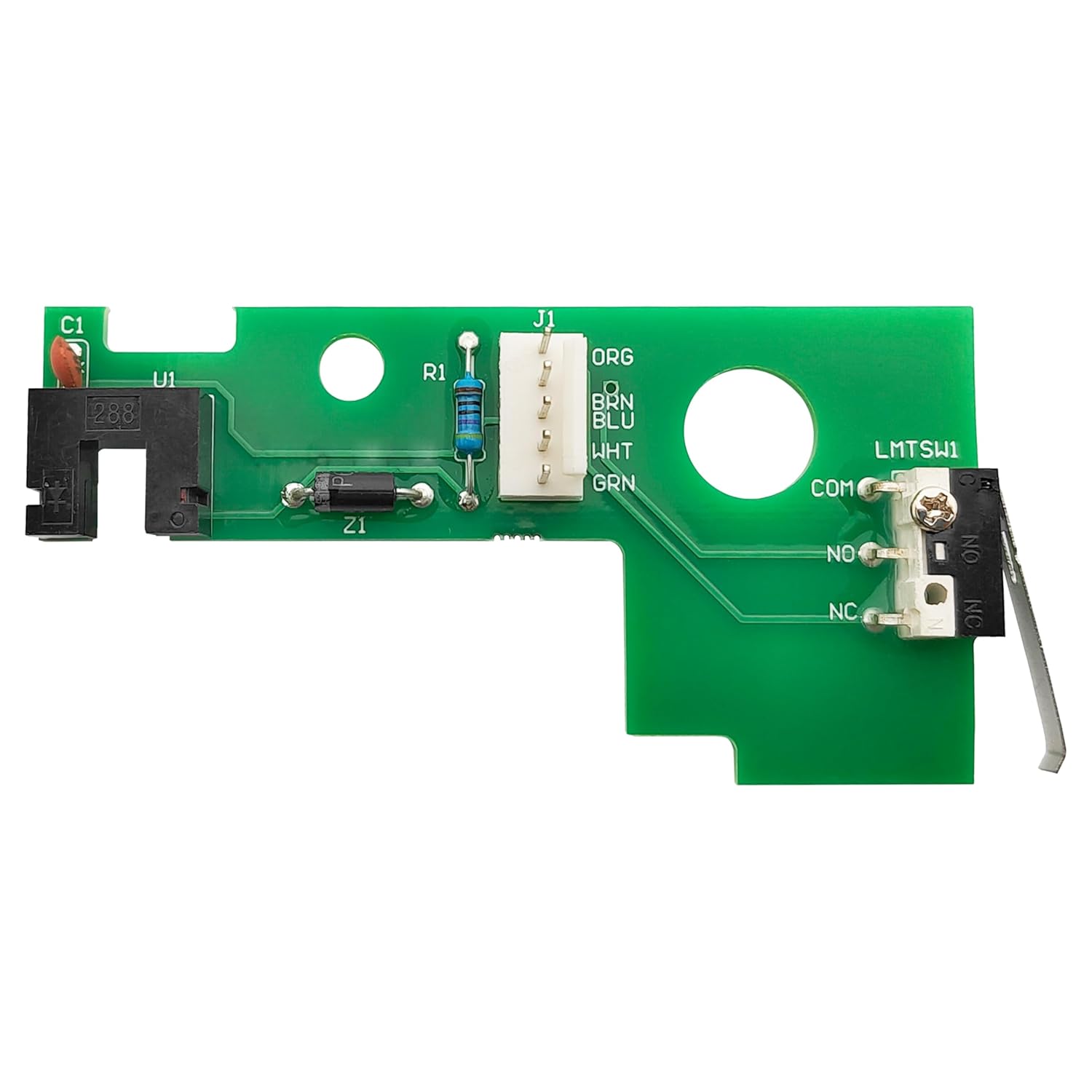
Image 1.1: The TycoonWon Rev Counter Board, a green circuit board with various electronic components.
The Rev Counter Board consists of a rev counter and a limit switch. It works by counting the number of motor turns, which allows the gate opener to accurately determine the gate's position and prevent it from over-extending or running away.

Image 1.2: Close-up view highlighting the Rev Counter sensor, the plug connection, and the limit switch on the board.
2. Compatibility
The TycoonWon Rev Counter Board (RVCTBD50) is compatible with a wide range of Mighty Mule and GTO automatic gate opener models. This board serves as a direct replacement for the original Rev Counter Board in the following series:
- Mighty Mule FM350, FM352, FM360, FM500, FM502, FM560, FM562, FM600, FM660 Series
- Mighty Mule 2000XL, 2500, 2502, 2550 Series
- GTO RVCTBD50
3. Safety Information
WARNING: Always disconnect power to the gate opener before performing any installation, maintenance, or troubleshooting. Failure to do so can result in serious injury or electrical shock.
- Ensure the gate opener's power supply is completely off and locked out, if possible, before beginning work.
- Protect the circuit board from moisture and water ingress during and after installation. Water can cause short circuits and damage the board.
- Handle the board by its edges to avoid damaging electronic components or introducing static electricity.
- If you are unsure about any step of the installation process, consult a qualified technician.
4. Setup and Installation
The TycoonWon Rev Counter Board is designed for a plug-and-play replacement, making installation straightforward. However, careful attention to detail is required to ensure proper function.
Pre-Installation Checklist:
- Confirm compatibility with your gate opener model.
- Gather necessary tools (screwdriver, pliers, cleaning supplies).
- Ensure the gate opener's power is OFF.
Installation Steps:
- Turn off the power switch on the lower left side of the control box of your gate opener.
- Remove the brake arm cotter pins at both ends. With all the wires in place, turn the arm upside down. Then use the appropriate tool to remove any screws securing the cover.
- Open the control box cover and carefully unplug the connector cable from the old Rev Counter Board.
- Remove the fixing screw that holds the old Rev Counter Board in place. Carefully remove the old board and replace it with the new TycoonWon Rev Counter Board. Plug the connector into the new board, ensuring the orange and green cables match the markings on the circuit board.
- Clean off any rust, dust, and cobwebs from the control box area to ensure optimal performance and prevent future issues.
- Reset all accessories and wires, ensuring all connections are secure and properly routed. Then, carefully close the control box cover and secure it. Turn on the power to the gate opener.

Image 4.1: Visual guide illustrating the steps for replacing and installing the Rev Counter Board within the gate opener's control unit.
It is crucial to ensure the sensor that detects the spinning wheel is correctly aligned. Improper alignment can prevent the board from functioning as intended.
5. Operation
Once installed, the Rev Counter Board operates automatically as part of your gate opener system. Its primary function is to precisely measure the gate's travel distance by counting the rotations of the motor. This ensures the gate opens and closes to the correct positions, preventing over-travel or incomplete cycles.

Image 5.1: Diagram showing a gate opening automatically, facilitated by the Rev Counter Board for precise movement.
The board's plug-and-play design means no additional settings are typically required after replacement. It seamlessly integrates with your existing gate opener system to restore proper functionality.
6. Troubleshooting
If your gate opener is not functioning correctly after installing the Rev Counter Board, refer to the following common issues and solutions:
Common Issues and Solutions:
- Issue: The gate does not open or close correctly, or does not open as far as it should. This often indicates a problem with the distance calculation.
Solution: This is the primary issue the Rev Counter Board addresses. If the old board was faulty, replacing it with this new board should resolve the problem. Ensure the new board is securely connected and the sensor is properly aligned. - Issue: The gate opener emits a specific buzzer sound.
Solution: The buzzer sounds can indicate specific faults:- 3 beeps: Indicates a fault with the main arm.
- 4 beeps: Indicates a fault with the sub-arm.
- Issue: The new board does not seem to be working after installation.
Solution:- Double-check all connections, ensuring they are firm and correctly matched (e.g., orange and green cables).
- Verify that the sensor (rev counter) is properly positioned and aligned to detect the spinning wheel.
- Inspect for any signs of water ingress or moisture within the control box, which can cause short circuits. Ensure proper sealing and drainage.
- Confirm that the power to the gate opener has been fully restored.

Image 6.1: Visual representation of a gate failing to open fully or correctly, indicating a potential issue with the Rev Counter Board.
7. Maintenance
To ensure the longevity and reliable performance of your Rev Counter Board and gate opener system, consider the following maintenance tips:
- Keep the Control Box Clean: Periodically open the control box (after disconnecting power) and clean out any dust, debris, or cobwebs. This prevents accumulation that could interfere with components or attract pests.
- Check for Moisture: Regularly inspect the inside of the control box for any signs of moisture or water. Ensure all seals are intact to prevent water ingress, especially since the gate opener operates outdoors.
- Inspect Connections: While the power is off, gently check that all wire connections to the board are secure and free from corrosion.
- Environmental Protection: If possible, ensure the gate opener's control box is adequately protected from extreme weather conditions.
8. Specifications
Key specifications for the TycoonWon Rev Counter Board:
| Specification | Value |
|---|---|
| Package Dimensions | 3.74 x 2.17 x 0.79 inches |
| Item Weight | 0.53 ounces (0.02 Kilograms) |
| Material | Plastic or Common Metal |
| UPC | 791390245316 |

Image 8.1: Diagram illustrating the physical dimensions of the Rev Counter Board.
9. Warranty and Support
For specific warranty information regarding your TycoonWon Rev Counter Board, please refer to the product packaging or contact TycoonWon customer support directly. If you encounter any issues not covered in this manual or require further assistance, please reach out to the manufacturer's support channels for expert guidance.