
zler Upright Rollator Walker
Zler Upright Rollator Walker Instruction Manual
Model: Upright Rollator Walker
Brand: Zler
Introduction
This instruction manual provides essential information for the safe and effective use of your Zler Upright Rollator Walker. Please read this manual thoroughly before assembly and operation to ensure proper function and user safety. This walker is designed to provide mobility assistance for elderly individuals and adults, promoting an upright posture for comfortable and stable walking.
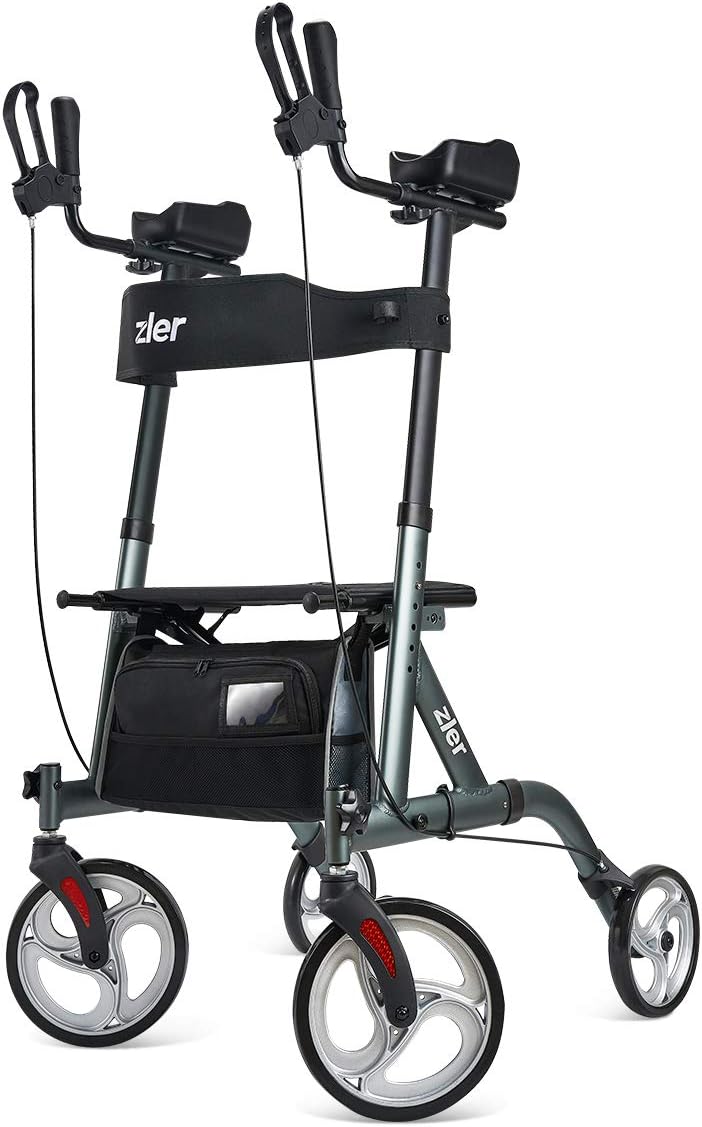
Image: The Zler Upright Rollator Walker, showcasing its design with padded armrests, seat, and storage bag.
Setup and Assembly
The Zler Upright Rollator Walker requires minimal assembly. Follow these steps to prepare your walker for use:
- Unpack Components: Carefully remove all parts from the packaging. Ensure all components are present and undamaged.
- Assemble the Walker Frame: Unfold the main frame of the walker. Ensure all locking mechanisms click into place securely.
- Adjust the Height: The armrest height is adjustable to fit users between 5' and 6' tall. Press the adjustment buttons on the upright tubes and slide the armrests to your desired height. Ensure both sides are adjusted to the same level and lock securely.

Image: Diagram illustrating the adjustable height feature, showing two figures of different heights using the walker.
- Folding for Storage: To fold the walker for compact storage or transport, pull the strap on the seat upwards. This will collapse the walker into a more compact form, suitable for car trunks.

Image: Illustration of the one-hand folding mechanism, showing the walker transitioning from upright to folded position.

Image: The Zler Upright Rollator Walker folded and stored in the trunk of a car, demonstrating its compact design.
- Attach Accessories: If applicable, attach the backrest and storage bag to the designated areas.
Operating Instructions
Proper operation ensures safety and comfort. Familiarize yourself with the walker's features before regular use.
Moving the Walker
- Grip the Handles: Place your hands firmly on the ergonomic handgrips. Your forearms should rest comfortably on the padded armrests, allowing you to maintain an upright posture.

Image: Close-up view of the padded armrests, designed for comfort and support.
- Unlock Brakes: Ensure the parking brakes are disengaged. Pull the brake levers towards you to release the brakes for movement.
- Walk with Support: Push the walker forward a short distance, then step forward. Maintain a steady pace, keeping your body centered within the walker for stability. The 10-inch front wheels offer 360-degree rotation for easy maneuverability across various terrains.

Image: Close-up of the 360-degree rotating front wheels, suitable for various terrains like asphalt, wood, tile, and grass.
Stopping and Sitting
- Engage Brakes: To stop, gently squeeze the brake levers. To engage the parking brakes, push the brake levers down until they lock into place. This will prevent the walker from moving.

Image: Close-up view of the brake mechanism, showing how to engage the parking brake by pushing the lever down.
- Using the Seat: Once the parking brakes are engaged, you can safely use the built-in seat. Turn around so your back is to the seat, then slowly lower yourself onto it. Ensure the walker is stable before sitting.
Maintenance
Regular maintenance helps prolong the life of your Zler Upright Rollator Walker.
- Cleaning: Wipe down the frame and components with a damp cloth and mild detergent. Avoid abrasive cleaners.
- Brake Check: Periodically check the brake cables and levers to ensure they are functioning correctly and provide adequate stopping power. Adjust if necessary.
- Wheel Inspection: Inspect the wheels for wear and tear. Ensure they rotate freely and are free of debris.
- Fastener Check: Regularly check all screws, bolts, and fasteners to ensure they are tight. Tighten any loose components.
Troubleshooting
If you encounter any issues with your walker, refer to the following common troubleshooting tips:
- Walker is unstable: Ensure all frame components are fully unfolded and locked into place. Verify that the height adjustments on both sides are even and securely locked.
- Brakes are not working effectively: Check if the brake levers are properly engaged. Inspect the brake cables for any damage or looseness. Adjust the cable tension if needed.
- Wheels are not rolling smoothly: Check for debris (hair, lint, etc.) wrapped around the wheel axles. Clean the wheels and ensure they are free to rotate.
Specifications
Detailed specifications for the Zler Upright Rollator Walker:
| Feature | Detail |
|---|---|
| Product Dimensions | 32"D x 24"W x 46"H (32 x 24 x 46 inches) |
| Item Weight | 20 Pounds |
| Material | Metal |
| Color | Black |
| Armrest Height Range | 39" to 44" |
| Seat Dimensions | 17.5" (L) x 9.5" (D) |
| Seat Height from Ground | 24" |
| Wheel Size | 10" Front / 8" Rear |
| Weight Capacity | 300 Pounds |

Image: Detailed diagram showing the dimensions of the Zler Upright Rollator Walker.
Safety Information
- Always ensure the walker is fully unfolded and all locking mechanisms are engaged before use.
- Engage the parking brakes before sitting on the seat or when the walker is stationary.
- Do not exceed the maximum weight capacity of 300 pounds.
- Use caution when navigating uneven surfaces or inclines.
- Regularly inspect the walker for any signs of wear, damage, or loose components. Do not use if damaged.
- This product is intended for mobility assistance. Statements regarding dietary supplements have not been evaluated by the FDA and are not intended to diagnose, treat, cure, or prevent any disease or health condition.
Warranty and Support
For warranty information, technical support, or replacement parts, please contact Zler customer service. You can also refer to the official user manual for more detailed information.
Related documentsUpright Rollator Walker

Ask a question about this manual
Ask about setup, troubleshooting, compatibility, parts, safety, or missing instructions. Manuals+ will review the question and use this page’s manual context to help answer it.