
1. Introduction
This manual provides detailed instructions for the setup, operation, and maintenance of your Crony ZXTL-13A Digital LED Table and Wall Clock. This device displays time, date, day, and temperature, and includes alarm and radio functions. Please read this manual thoroughly before using the product to ensure proper function and longevity.
2. Safety Information
- Do not expose the device to extreme temperatures, direct sunlight, or high humidity.
- Avoid dropping or subjecting the device to strong impacts.
- Do not attempt to disassemble or repair the device yourself. Refer all servicing to qualified personnel.
- Keep out of reach of children.
- Use only the specified power adapter and battery type (AAA).
3. Product Overview
The Crony ZXTL-13A is a versatile digital clock designed for both desk and wall mounting. It features a clear LED display and multiple functions.
3.1 Key Features
- Digital LED Display for Time, Date, Day, and Temperature
- Built-in Alarm Function
- Built-in Radio Function
- Desk & Shelf or Wall Mountable
- Durable Metal Material Construction
- Battery Powered (AAA) and AC Power Option
3.2 Clock Components

Figure 1: Front View of the Crony ZXTL-13A Clock. This image shows the main display area with segments for AM/PM, current time, alarm status, day of the week, month, temperature in Celsius, and week number.
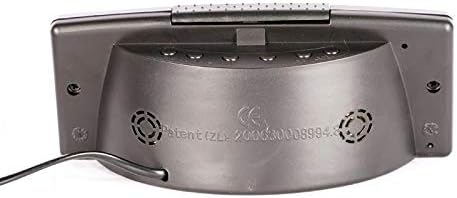
Figure 2: Back View of the Crony ZXTL-13A Clock. This image illustrates the rear panel, typically where control buttons for setting time, alarm, and mode selection are located, along with the power input port and possibly a battery compartment.
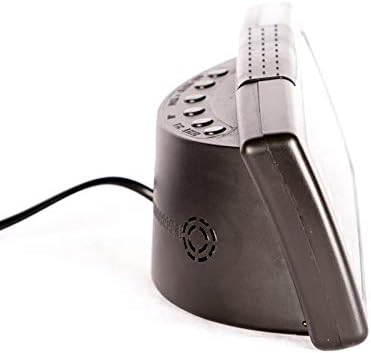
Figure 3: Side View of the Crony ZXTL-13A Clock. This image highlights the clock's profile, demonstrating its integrated stand for desk placement and the connection point for the power cable.
4. Setup
4.1 Powering the Clock
The Crony ZXTL-13A clock can be powered by either AAA batteries or an AC power adapter.
- Battery Installation: Locate the battery compartment on the back of the clock (refer to Figure 2). Insert the required number of AAA batteries, ensuring correct polarity (+/-).
- AC Power: Connect the provided power adapter to the DC input port on the back of the clock (refer to Figure 2 and 3). Plug the adapter into a standard wall outlet.
- For continuous operation and full functionality, it is recommended to use the AC power adapter. Batteries serve as a backup in case of power outage or for portability.
4.2 Mounting Options
- Desk/Shelf Placement: Utilize the integrated stand at the base of the clock for stable placement on any flat surface.
- Wall Mounting: The clock features mounting holes on the back for secure attachment to a wall. Use appropriate screws and wall anchors (not included) for installation.
5. Operating Instructions
The control buttons are typically located on the back of the clock (refer to Figure 2). Common buttons include MODE, UP/+, DOWN/-.
5.1 Setting Time
- Press and hold the MODE button until the hour digits begin to flash.
- Use the UP/+ or DOWN/- buttons to adjust the hour.
- Press MODE again to move to the minute digits, then adjust with UP/+ or DOWN/-.
- Continue pressing MODE to cycle through 12/24-hour format and AM/PM settings (if applicable), adjusting each with UP/+ or DOWN/-.
- Press MODE one last time or wait a few seconds for the settings to save automatically.
5.2 Setting Date and Day
- From normal time display, press the MODE button repeatedly until the date or year digits flash.
- Use UP/+ or DOWN/- to set the year, then press MODE.
- Adjust the month, then press MODE.
- Adjust the day, then press MODE. The day of the week should automatically update.
- Wait for the settings to save.
5.3 Setting Alarm
- Press the MODE button until the alarm time is displayed (often indicated by an alarm icon or "AL").
- Press and hold MODE until the alarm hour digits flash.
- Adjust the alarm hour with UP/+ or DOWN/-. Press MODE.
- Adjust the alarm minute with UP/+ or DOWN/-. Press MODE.
- To activate/deactivate the alarm, look for a dedicated alarm ON/OFF button or press UP/+ or DOWN/- while the alarm time is displayed (not flashing). An alarm icon will appear on the display when active.
5.4 Radio Function
The clock includes a built-in radio. Specific operation details may vary, but generally:
- Press a dedicated RADIO button or cycle through modes using the MODE button until the radio frequency is displayed.
- Use UP/+ or DOWN/- to tune to desired stations.
- Some models may have auto-scan or preset functions. Refer to on-screen prompts if available.
5.5 Temperature Display
The clock automatically displays the ambient temperature. Some models may allow switching between Celsius (°C) and Fahrenheit (°F). Look for a dedicated button or a setting within the MODE cycle to change the temperature unit.
6. Maintenance
6.1 Cleaning
To clean the clock, gently wipe the display and casing with a soft, dry, lint-free cloth. Do not use abrasive cleaners, solvents, or spray directly onto the clock.
6.2 Battery Replacement
If using batteries for backup, replace them when the display dims or functions become erratic. Ensure to use fresh AAA batteries and dispose of old batteries responsibly.
7. Troubleshooting
| Problem | Possible Cause | Solution |
|---|---|---|
| Display is blank or dim. | No power, low batteries, or power adapter issue. | Check AC power connection. Replace AAA batteries. Ensure power outlet is functional. |
| Clock not keeping accurate time. | Incorrect initial setting, power interruption. | Reset the time following Section 5.1. Ensure stable power supply. |
| Alarm does not sound. | Alarm not activated, incorrect alarm time, low volume. | Verify alarm is ON (alarm icon displayed). Check alarm time setting. Adjust volume if applicable. |
| Radio not working or poor reception. | Poor signal, antenna not extended (if applicable), incorrect frequency. | Adjust clock position. Extend any external antenna. Rescan for stations. |
8. Specifications
| Feature | Detail |
|---|---|
| Model | ZXTL-13A |
| Brand | Crony |
| Display Type | Digital LED |
| Functions | Time, Date, Day, Temperature, Alarm, Radio |
| Power Source | Battery Powered (AAA), AC Adapter |
| Material | Metal |
| Mounting Type | Wall Mount, Desk/Shelf |
| Package Dimensions | 20 x 9 x 8.6 cm |
| Weight | 420 g |
9. Warranty and Support
For warranty information or technical support, please refer to the documentation included with your purchase or contact Crony customer service directly. Keep your proof of purchase for warranty claims.
For further assistance, please visit the manufacturer's official website or contact their support channels.