
1. Product Overview
The Shure SLXD2 handheld transmitter, equipped with the legendary SM58 cardioid dynamic microphone capsule, is designed for use with SLX-D Digital Wireless receivers. It delivers transparent, 24-bit digital audio and rock-solid RF performance, suitable for a wide range of applications from day-long presentations to nighttime performances. Its rugged metal construction and OLED display ensure clear readability and durability.
Key features include:
- Digital Wireless Technology: Offers digital predictive switching diversity and a 44 MHz tuning bandwidth (region dependent).
- Audio Quality: Crystal clear 24-bit / 48 kHz digital audio with an extended 20 Hz to 20 kHz frequency response (microphone dependent) and 120 dB dynamic range.
- Battery Life: Up to 8 hours of operation from two AA batteries. Optional Shure SB903 Lithium-ion rechargeable battery provides enhanced battery monitoring.
- Operating Range: Reliable performance up to 330 feet (100 meters).
- Ease of Use: Features RF Scan and IR Sync for quick frequency finding and transmitter-receiver linking.

Figure 1: Shure SLXD2/SM58 Handheld Transmitter
Video 1: Shure SLX-D Digital Wireless Product Overview. This video provides a general overview of the SLX-D Digital Wireless Systems, highlighting key features and benefits.
2. What's in the Box
Your Shure SLXD2/SM58 package includes:
- (1) SLXD2 handheld transmitter with SM58 cardioid dynamic microphone capsule
- (1) Zippered bag
- (2) AA batteries
3. Setup
3.1 Frequency Band Selection
Before use, ensure that the wireless frequency band of your SLXD2/SM58 transmitter (J52 Band: 558-602/614-616 MHz) is compatible with your region and matches the frequency band of your SLX-D receiver. Refer to the Shure website for detailed frequency compatibility information.
3.2 Battery Installation
The SLXD2 transmitter operates on two AA batteries. To install or replace batteries:
- Unscrew the bottom cap of the transmitter.
- Open the battery compartment cover.
- Insert two AA batteries, observing the correct polarity (+/-) as indicated inside the compartment.
- Close the battery compartment cover and screw the bottom cap back on.
For extended use and advanced battery monitoring, consider upgrading to the optional Shure SB903 Lithium-ion rechargeable battery.
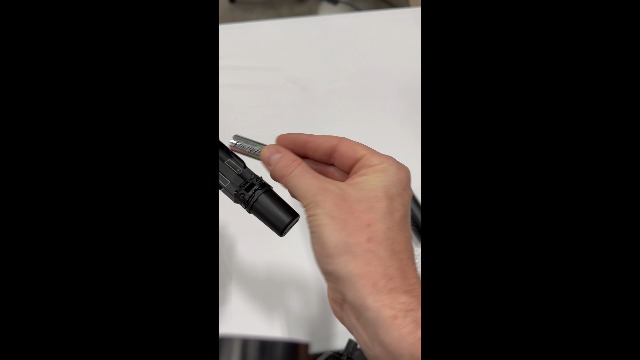
Figure 2: Battery installation in the SLXD2/SM58 transmitter.
3.3 Receiver Connection and Guided Frequency Setup
Ensure your SLX-D receiver is properly connected to its antennas, power supply, and your sound system. The SLX-D system features a guided frequency setup to help you find and assign clear frequencies.
Video 2: Shure SLX-D How To: Set Up and Use. This video guides you through the initial setup of your SLX-D system, including receiver connections and frequency scanning.
3.4 Syncing Transmitter and Receiver
After setting up the receiver, you need to sync the transmitter to it:
- Turn on the SLXD2/SM58 transmitter.
- On the SLX-D receiver, press the 'sync' button.
- Align the IR ports on the transmitter and receiver. The IR ports are small windows on both devices.
- Hold them aligned until the receiver confirms successful synchronization.
Video 3: Shure SLX-D How To: Add a Receiver. This video demonstrates how to add and sync additional receivers to your SLX-D system.
4. Operating the Transmitter
4.1 Power On/Off and Mute
The SLXD2/SM58 features an intuitive interface for power and mute functions:
- Power: Press and hold the power button to turn the transmitter on or off.
- Mute: Briefly press the mute button to toggle between active and muted audio. The OLED display will indicate the mute status.
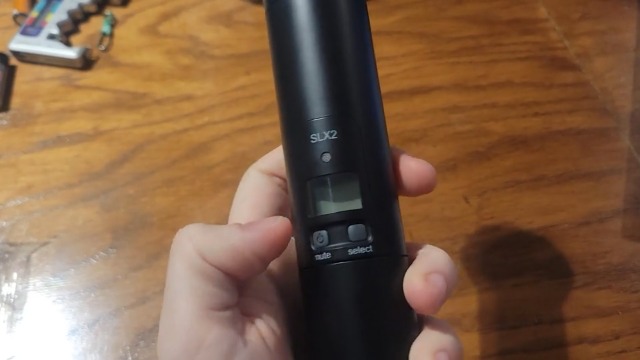
Figure 3: SLXD2/SM58 OLED display and control buttons.
4.2 Locking and Unlocking Controls
To prevent accidental changes during a performance or presentation, you can lock the transmitter's controls:
- Navigate to the 'Auto Lock' option in the transmitter's menu using the menu and enter buttons.
- Select 'On' to activate the auto-lock feature.
- To temporarily unlock, press 'Enter' then 'Menu'. Controls will re-lock after a short period of inactivity.
- To permanently disable auto-lock, navigate back to the 'Auto Lock' menu and select 'Off'.
Video 4: Shure SLX-D How To: Lock and Unlock. This video demonstrates how to lock and unlock the controls on your SLX-D transmitter and receiver.
5. Maintenance
5.1 Battery Care
Always use fresh, high-quality AA batteries. If using the optional Shure SB903 rechargeable battery, follow the charging instructions provided with the battery and charger. Remove batteries if the transmitter will not be used for an extended period to prevent leakage.
5.2 Cleaning
Wipe the transmitter body with a soft, dry cloth. For the microphone grille, use a mild disinfectant and a soft brush, ensuring no liquid enters the microphone capsule.
5.3 Storage
Store the transmitter in its zippered bag in a cool, dry place away from direct sunlight and extreme temperatures.
6. Troubleshooting
If you encounter issues with your SLXD2/SM58 transmitter, consider the following common troubleshooting steps:
- No Audio: Check battery levels, ensure the transmitter is powered on and not muted, and verify that the transmitter and receiver are properly synced. Confirm the receiver's output is connected to your sound system and its gain is set appropriately.
- Poor Signal/Interference: Perform a new frequency scan on the receiver to find a clear channel. Ensure the transmitter and receiver are within the specified operating range and that there are no obstructions. Check for other wireless devices operating on similar frequencies.
- Battery Indicator Low: Replace AA batteries or recharge the SB903 battery.
For more detailed troubleshooting guides and support, please visit the official Shure website.
7. Specifications
| Specification | Value |
|---|---|
| Model Name | SLXD2/SM58 |
| Connectivity Technology | Wireless |
| Polar Pattern | Unidirectional |
| Audio Sensitivity | 120 Decibels |
| Frequency Response | 20 Hz - 20 kHz (microphone dependent) |
| Operating Range | 330 feet (100 meters) |
| Battery Life | Up to 8 hours (with 2 AA batteries) |
| Power Source | Battery Powered (2 AA batteries included) |
| Enclosure Material | Metal, Plastic |
| Item Weight | 1.45 Pounds |
| Item Dimensions | 11.02 x 5.28 x 3.15 inches |
8. Warranty & Support
The Shure SLXD2/SM58 Handheld Transmitter comes with a 2 Year Manufacturer Warranty.
For technical support, product registration, or additional information, please visit the official Shure website or contact Shure customer service.