
1. Introduction
This manual provides comprehensive instructions for the safe and effective use of the Ace Instruments AI-2200 Hand Operated Pneumatic Pressure and Vacuum Calibrator. This device is designed for precise calibration of pressure and vacuum instruments in various industrial and laboratory settings. Please read this manual thoroughly before operating the calibrator.

Figure 1: Ace Instruments AI-2200 Hand Operated Pneumatic Pressure and Vacuum Calibrator with analog gauge connected.
2. Setup
Proper setup is crucial for accurate calibration. Follow these steps to prepare your AI-2200 calibrator:
- Connect the Master Gauge: Attach your high-precision master gauge to the designated port on the calibrator. Ensure a secure, leak-free connection.
- Connect the Unit Under Calibration (UUC): Connect the instrument you wish to calibrate (UUC) to the other port using the appropriate hose and reducers. The calibrator includes various reducers (1/8" BSP(F), 1/2" BSP(F), 3/8" BSP(F)) to accommodate different connection types.
- Select Medium (for Hydraulic models): If using a hydraulic model, ensure the reservoir is filled with the appropriate fluid (water or oil) as required for the pressure range. The AI-2200 is primarily pneumatic, but some variants may support hydraulic operation.
- Verify Connections: Double-check all connections to prevent pressure leaks during operation.

Figure 2: Calibrator with various accessories, including reducers and connection hose.
Video 1: This video demonstrates the setup and basic operation of the Ace Instruments AI-2200 Hand Operated Pneumatic Pressure and Vacuum Calibrator, including connecting gauges and generating pressure.
3. Operating Instructions
The AI-2200 calibrator is designed for both pressure and vacuum generation. Follow these steps for operation:
- Generating Pressure:
- Ensure all connections are tight.
- Close the release valve (if open).
- Operate the hand pump handles to generate the desired pressure. Observe both the master gauge and the UUC.
- Adjust pressure finely using the fine adjustment knob, if available.
- Generating Vacuum:
- Ensure all connections are tight.
- Switch the calibrator to vacuum mode (if applicable, typically by a selector switch or piston pin adjustment).
- Operate the hand pump handles to generate the desired vacuum. Observe both the master gauge and the UUC.
- Releasing Pressure/Vacuum: Slowly open the release valve to gradually decrease pressure or return to ambient conditions.

Figure 3: The calibrator shown with a digital master gauge for precise readings.
Video 2: An overview of the Ace Instruments AI-2200 Hand Operated Pneumatic Pressure and Vacuum Calibrator, highlighting its features and components.
4. Maintenance
Regular maintenance ensures the longevity and accuracy of your calibrator:
- Cleaning: Keep the calibrator clean and free from dust and debris. Use a soft, dry cloth for cleaning.
- Storage: Store the calibrator in a dry, cool place, away from direct sunlight and extreme temperatures.
- Seal Inspection: Periodically inspect O-rings and seals for wear and tear. Replace them if any damage is observed to maintain pressure integrity.
- Calibration: For continued accuracy, it is recommended to have the calibrator itself recalibrated by an authorized service center at regular intervals.
5. Troubleshooting
If you encounter issues with your AI-2200 calibrator, consider the following:
- Pressure/Vacuum Loss: Check all connections for tightness. Inspect hoses and seals for any visible damage or leaks.
- Inaccurate Readings: Ensure both the master gauge and the UUC are properly connected and functioning. Verify that the calibrator is set to the correct mode (pressure or vacuum).
- Difficulty Generating Pressure/Vacuum: Check for blockages in the system. Ensure the release valve is fully closed when generating pressure/vacuum.
For persistent issues, contact customer support.
6. Specifications
| Parameter | Value |
|---|---|
| Model | AI-2200 (AI-DP1-2200) |
| Measuring Parameters | Pressure and Vacuum |
| Vacuum Range | Ambient to -0.9 Kg/Cm² (-13 PSI) |
| Pressure Range | Ambient to 30 Kg/Cm² (30 Bar) 435 PSI |
| Material Of Construction | Aluminium and Stainless Steel |
| Weight | Approx. 1.5 Kgs (3.31 Pounds) |
| Master Gauge Range | -1 to 25 Bar / -14 to 362 PSI |
| Accuracy | ±0.5% |
| Case Size | 2.5" (63mm) |
| Case Material | ABS (IP64) |
| Rubber Boot | Silicone rubber (IP65) |
| Connection | 1/4" NPT 304SS |
| Sensor | 316L welded, Piezo |
| Operation Mode | Continuous pressure reading |
| Response Time | ±3 Hz display refresh rate |
| Proof / Burst Pressure | 200% / 300% FS |
| Operating Temperature | 14°F to 122°F / -10°C to 50°C |
| Storage Temperature | -4°F to 167°F / -20°C to 75°C |
| LCD Display | 2" x 3/4" (48mm x 16mm) |
| Operation Life | 1 million cycles |
| Power Supply | 2 x AAA battery (1.5V) (Not Included) |
| Battery Life | 2 years (auto shut-off mode) |
| Power Mode | Auto or manual shut-off |
| Display Digits | 4 digits to 5,000 psi |
| Pressure Unit Selection | psi, bar, kg/cm², MPa |
| Package Dimensions | 8 x 6 x 4 inches |
7. Included Accessories
The AI-2200 calibrator package includes the following items:
- 1 Unit of AI-DPI-2200 Pressure and Vacuum Calibrator
- 1 Unit of Master Gauge (Range: -1 to 25 bar)
- 3 Reducers: 1/8" BSP(F), 1/2" BSP(F), 3/8" BSP(F)
- Instruction Manual
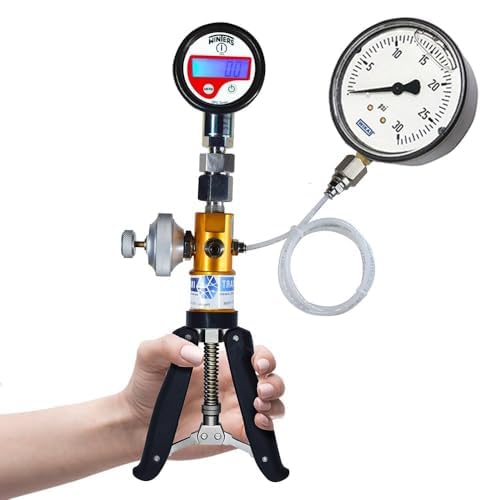
Figure 4: Close-up view of the various BSP reducers included with the calibrator.
8. Applications
The Ace Instruments AI-2200 is suitable for a wide range of applications, including:
- Calibration Laboratories
- Field Calibration
- Pressure Gauge Calibration
- Pressure Transmitter Calibration

Figure 5: Various applications of the AI-2200 calibrator in different environments.
9. Warranty and Support
The product comes with an instruction manual and a calibration certificate. For any technical assistance, warranty claims, or support, please contact Instrukart Holdings:
- Toll Free (India): 1800-121-0506
- Phone: +91(40)40262020
- Mobile: +91 7331116506
- Email: info@instrukart.com
- Website: www.instrukart.com
- Address: #18, Street 1A, Czech Colony, Sanath Nagar, Hyderabad-500018, INDIA
