
1. Introduction
This user manual provides comprehensive instructions for the safe and efficient operation, installation, and maintenance of your Cooler Depot CT530A-1 Countertop Bakery Display Cooler Case. Please read this manual thoroughly before using the appliance and retain it for future reference. This unit is designed for commercial use to display and refrigerate baked goods, pastries, and deli items.
2. Safety Information
Always follow basic safety precautions when using electrical appliances to reduce the risk of fire, electric shock, and injury. This appliance is certified to UL STD.NO.471, CSA STD. C22.2 NO.120, and conforms to NSF STD.7 standards.
- Ensure the unit is connected to a properly grounded 110V/60HZ power outlet.
- Do not operate the unit with a damaged power cord or plug.
- Keep ventilation openings clear of obstructions.
- Do not store explosive substances such as aerosol cans with a flammable propellant in this appliance.
- Unplug the unit before cleaning or performing any maintenance.
- This appliance is intended for commercial use only.
3. Product Overview
The Cooler Depot CT530A-1 is a countertop refrigerated display case featuring a semi-curved glass front for optimal product visibility. It includes bright LED lighting to enhance the presentation of your chilled items and two chrome-plated wire interior shelves for adjustable storage.

Figure 3.1: Front view of the Cooler Depot CT530A-1 display cooler.
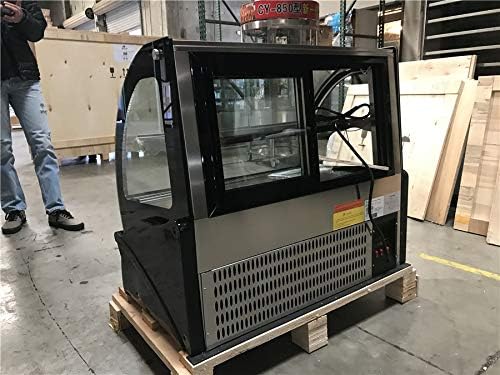
Figure 3.2: Rear view showing the sliding access doors and control panel.
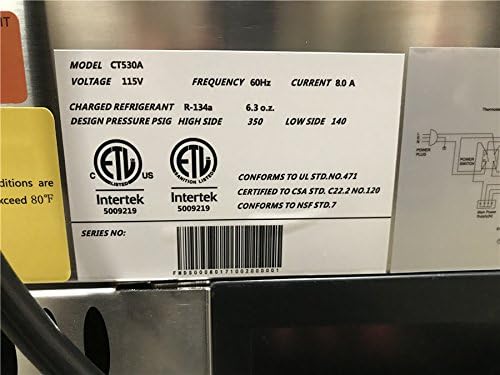
Figure 3.3: Product specification label with model number, voltage, and certifications.

Figure 3.4: Detailed specification chart for the CT530A model.
Key Features:
- Bright LED Lighting: Illuminates products for attractive display.
- Adjustable Shelves: Two chrome-plated wire shelves for flexible storage.
- Reduced Condensation: Specialized air outlet design minimizes condensation on the curved glass.
- Unobstructed View: Curved front glass and side/rear glass panels provide clear visibility.
- Digital Temperature Controller: For precise temperature management.
- Sliding Rear Access Doors: For easy loading and access.
4. Setup
- Unpacking: Carefully remove the unit from its packaging. Inspect for any shipping damage.
- Placement: Place the display cooler on a stable, level countertop. Ensure adequate ventilation around the unit, especially at the rear where the compressor is located. Avoid direct sunlight or heat sources.
- Initial Cleaning: Before first use, clean the interior and exterior surfaces with a mild detergent and soft cloth.
- Shelf Installation: Install the two chrome-plated wire shelves into the desired positions.
- Power Connection: Plug the unit into a dedicated 110V/60HZ grounded electrical outlet.
- Initial Cool-down: Allow the unit to cool down for at least 2-4 hours before loading products.
5. Operating Instructions
Power On/Off:
The unit features an on/off switch located at the rear control panel. Press the switch to turn the unit on or off.
Temperature Control:
The digital temperature controller allows you to set and monitor the internal temperature. The recommended operating temperature range is 36°F to 48°F (2°C to 9°C). Refer to the separate controller manual for detailed instructions on setting the temperature.
LED Lighting:
The internal LED lights can be controlled via a dedicated switch on the rear panel to illuminate your products.
Loading Products:
Load products through the rear sliding glass doors. Distribute items evenly on the shelves to ensure proper air circulation and consistent cooling.
6. Maintenance
- Daily Cleaning: Wipe down interior and exterior surfaces with a soft cloth and mild, non-abrasive cleaner. Ensure no water enters electrical components.
- Condenser Coil Cleaning: Regularly clean the condenser coils (located at the rear/bottom of the unit) to maintain cooling efficiency. Dust and debris can accumulate, reducing performance. Unplug the unit before cleaning.
- Gasket Inspection: Check door gaskets regularly for wear and tear. Damaged gaskets can lead to air leaks and reduced cooling efficiency.
- Defrosting: The unit features an automatic defrost system. If excessive ice buildup occurs, manually defrost the unit by turning it off and allowing the ice to melt naturally.
- Shelf Cleaning: Remove and clean the wire shelves as needed.
7. Troubleshooting
| Problem | Possible Cause | Solution |
|---|---|---|
| Unit does not power on. | No power supply; power switch off; circuit breaker tripped. | Check power cord connection; ensure power switch is on; reset circuit breaker. |
| Unit is not cooling properly. | Temperature setting too high; condenser coils dirty; door gasket damaged; unit overloaded. | Adjust temperature setting; clean condenser coils; inspect/replace door gasket; reduce product load. |
| Excessive condensation. | High humidity; frequent door openings; condensation reduction system issue. | Ensure proper ventilation; minimize door openings; contact support if issue persists. |
| Unusual noise. | Unit not level; loose components; fan obstruction. | Ensure unit is level; check for loose parts; clear any fan obstructions. |
If troubleshooting steps do not resolve the issue, please contact Cooler Depot customer support.
8. Specifications
| Model | CT530A-1 |
| Brand | Cooler Depot |
| Overall Dimensions (L x D x H) | 36" x 21.2" x 31" (91.4cm x 53.8cm x 78.7cm) |
| Capacity | 5.4 cu.ft (approx. 153 Liters) |
| Shelves | 2, Chrome-plated wire |
| Voltage | 110V/60HZ |
| Temperature Range | 36°F ~ 48°F (2°C ~ 9°C) |
| Refrigerant | R-134a |
| Certifications | NSF, ETL Certified (Conforms to UL STD.NO.471, Certified to CSA STD. C22.2 NO.120) |
| Installation Type | Countertop |
| Cooling Method | Compressor |
9. Warranty and Support
This Cooler Depot display cooler comes with a 2-year parts warranty and a 6-year compressor warranty. Labor is not covered under warranty.
For technical support, warranty claims, or to order replacement parts, please contact Cooler Depot customer service. Ensure you have your model number (CT530A-1) and purchase date available when contacting support.
10. Product Video Overview
This video provides a visual overview of the Cooler Depot countertop refrigerated display cases, demonstrating features such as dimensions, sliding doors, control panel, and internal lighting. It showcases the 36-inch, 48-inch, and 60-inch models, highlighting their design and functionality for commercial use.