
1. Introduction
This manual provides detailed instructions for the Valefod DC 12V 1-Channel Relay Module, Model 1CH-12V-10. This module is designed to control various AC/DC appliances and other high-current devices using low-voltage logic signals from microcontrollers. It features optocoupler isolation for enhanced safety and supports both high and low-level trigger inputs.
2. Product Features
- Control Devices: Utilizes a genuine high-quality DC12V relay and SMD opto-isolator, supporting high/low level triggers for controlling various AC/DC appliances and devices with significant current draw.
- Load Range: The Normally Open (NO) contact supports a maximum load of AC 250V/10A or DC 30V/10A. The opto-isolator trigger current is 5mA.
- Fault-tolerant Design: The relay remains inactive even if the control line is disconnected, preventing unintended operations.
- Universal Interface: Equipped with a screwed terminal plate and fixed bolt holes (3.1 mm diameter) on both sides for straightforward installation.
- High Compatibility: Directly controllable by 12V logic signals from various microcontrollers, including 8051, AVR, PIC, DSP, ARM, Raspberry Pi, MSP430, and TTL logic systems.
3. Specifications
| Parameter | Value |
|---|---|
| Relay Type | 12V 1-Channel |
| Quiescent Current | 5mA |
| Maximum Current | 80mA |
| Trigger Current | 3 - 5mA |
| Trigger Voltage (LOW) | 0 - 4V |
| Trigger Voltage (HIGH) | 4.5 - 12V |
| NO Maximum Load | AC 250V/10A or DC 30V/10A |
| Power Indicator | Green LED |
| Relay Status Indicator | Red LED |
| Dimensions (L x W x H) | 51 x 26 x 19 mm |
| Weight | 17g |
| Model Number | VA-0186-8 |
| Contact Material | Silver |
| Mounting Type | Screw Mount |
The module's compact design allows for easy integration into various projects.

Image: Dimensions of the Valefod DC 12V 1-Channel Relay Module, showing a length of 51mm, width of 26mm, and height of 19mm.
4. Setup and Wiring
4.1 High/Low Level Trigger Selection
The module supports both high and low-level triggering. This is selected using a jumper cap on the board:
- High Level Trigger: Connect the jumper wire to the 'High' pin. The relay will activate when the IN pin receives a high logic signal (4.5V to 12V).
- Low Level Trigger: Connect the jumper wire to the 'Low' pin. The relay will activate when the IN pin receives a low logic signal (0V to 4V).
4.2 Input Interface
The input terminals are used to power the module and provide the control signal:
- DC+: Connect to the positive pole of the 12V DC power supply (VCC).
- DC-: Connect to the negative pole of the power supply (GND).
- IN: This is the control signal input. Connect this to your microcontroller's output pin. The relay will activate based on the logic level (high or low) selected by the jumper.
4.3 Output Interface (Relay Contacts)
The output terminals provide the switching capability for your controlled device:
- NO (Normally Open): This contact is open (disconnected from COM) when the relay is de-energized. It connects to COM when the relay is activated.
- COM (Common): This is the common terminal for the relay switch. Connect one side of your load (e.g., AC live wire or DC positive pole) here.
- NC (Normally Closed): This contact is closed (connected to COM) when the relay is de-energized. It disconnects from COM when the relay is activated.

Image: Basic wiring diagram showing connections for the signal trigger, DC power, and a controlled device using the NO and COM terminals.
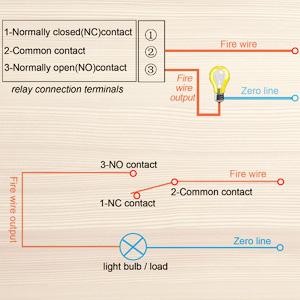
Image: Diagram illustrating the Normally Closed (NC), Common (COM), and Normally Open (NO) contacts of the relay, with an example of connecting a light bulb.

Image: Example connection diagram showing the Valefod 1-Channel Relay Module connected to an Arduino Uno microcontroller and an AC load (light bulb).
5. Operating Instructions
Once the module is correctly wired and powered, its operation is straightforward:
- Power On: Apply 12V DC power to the DC+ and DC- terminals. The green power indicator LED should illuminate.
- Control Signal: Send the appropriate logic signal (high or low, depending on your jumper setting) from your microcontroller to the 'IN' terminal.
- Relay Activation: When the 'IN' terminal receives the trigger signal, the relay will click, and the red status indicator LED will illuminate. This indicates that the relay contacts have switched.
- Load Control: The connected device will be powered on or off according to how it is wired to the NO, COM, or NC terminals and the relay's state.
- Deactivation: Remove the trigger signal from the 'IN' terminal. The relay will return to its default state, and the red LED will turn off.
6. Maintenance
The Valefod DC 12V 1-Channel Relay Module is designed for reliable operation with minimal maintenance. Follow these guidelines to ensure longevity:
- Keep Dry: Avoid exposing the module to moisture or high humidity, which can cause short circuits or corrosion.
- Cleanliness: Keep the module free from dust and debris. Use a soft, dry brush or compressed air for cleaning if necessary.
- Temperature: Operate the module within its specified temperature range to prevent damage to components.
- Secure Connections: Periodically check that all screw terminal connections are tight and secure to prevent intermittent operation or arcing.
- Physical Protection: If used in an environment where it might come into contact with conductive materials (e.g., metal enclosures), ensure proper insulation to prevent short circuits.
7. Troubleshooting
- Relay Not Activating:
- Verify that the 12V DC power supply is correctly connected to DC+ and DC- and is providing the correct voltage. The green power LED should be on.
- Check the jumper setting for high/low level trigger. Ensure your microcontroller's output signal matches the selected trigger type.
- Confirm that the control signal is being sent to the 'IN' pin. Use a multimeter to check the voltage at the 'IN' pin when the signal is active.
- Ensure the trigger current (3-5mA) is met by your control source.
- Controlled Device Not Responding:
- Confirm the relay is activating (red LED on, audible click).
- Check the wiring to the NO/COM/NC terminals. Ensure the load is correctly connected to the appropriate terminals for your desired operation (e.g., NO and COM for normally off, NC and COM for normally on).
- Verify the load's power supply and connections are secure and functional independently of the relay.
- Ensure the load's current and voltage requirements do not exceed the relay's maximum ratings (AC 250V/10A, DC 30V/10A).
- Loose Terminal Screws:
- If terminal screws are difficult to loosen or tighten, use an appropriately sized screwdriver and apply firm, steady pressure. Avoid excessive force to prevent stripping.
8. Warranty and Support
For warranty information or technical support regarding your Valefod DC 12V 1-Channel Relay Module, please refer to the seller's return policy or contact the manufacturer directly through their official channels. Keep your purchase receipt for any warranty claims.