
PowaKaddy FX3 EBS
PowaKaddy FX3 EBS Electric Trolley
User Manual
Model: FX3 EBS
1. Introduction
Welcome to the PowaKaddy FX3 EBS Electric Trolley user manual. This guide provides essential information for the safe and efficient operation, maintenance, and care of your new electric golf trolley. Please read this manual thoroughly before using your trolley to ensure optimal performance and longevity.
Safety Information
- Always ensure the trolley is stable before releasing the handle.
- Do not operate the trolley on excessively steep slopes or uneven terrain that could cause it to tip over.
- Keep hands and clothing clear of moving parts, especially wheels and folding mechanisms.
- Store the battery in a cool, dry place and follow all charging instructions carefully.
- Do not attempt to disassemble or repair the trolley or battery yourself. Contact authorized service personnel.
- The EBS (Electronic Braking System) is designed to assist with speed control on downhill slopes. It is not a parking brake. Always engage the parking brake (if available) or ensure the trolley is on level ground when stationary.
2. Setup and Assembly
2.1 Unpacking
Carefully remove all components from the packaging. Verify that all parts are present: the main trolley frame, wheels, and battery. Retain packaging for future storage or transport.
2.2 Unfolding the Trolley
The PowaKaddy FX3 EBS features a simple 1-click folding system.
- Place the trolley on a flat, stable surface.
- Locate the folding release mechanism (usually near the handle or main frame joint).
- Engage the release and gently lift the handle until the trolley fully extends and locks into its operating position. Ensure all locking mechanisms are securely engaged.
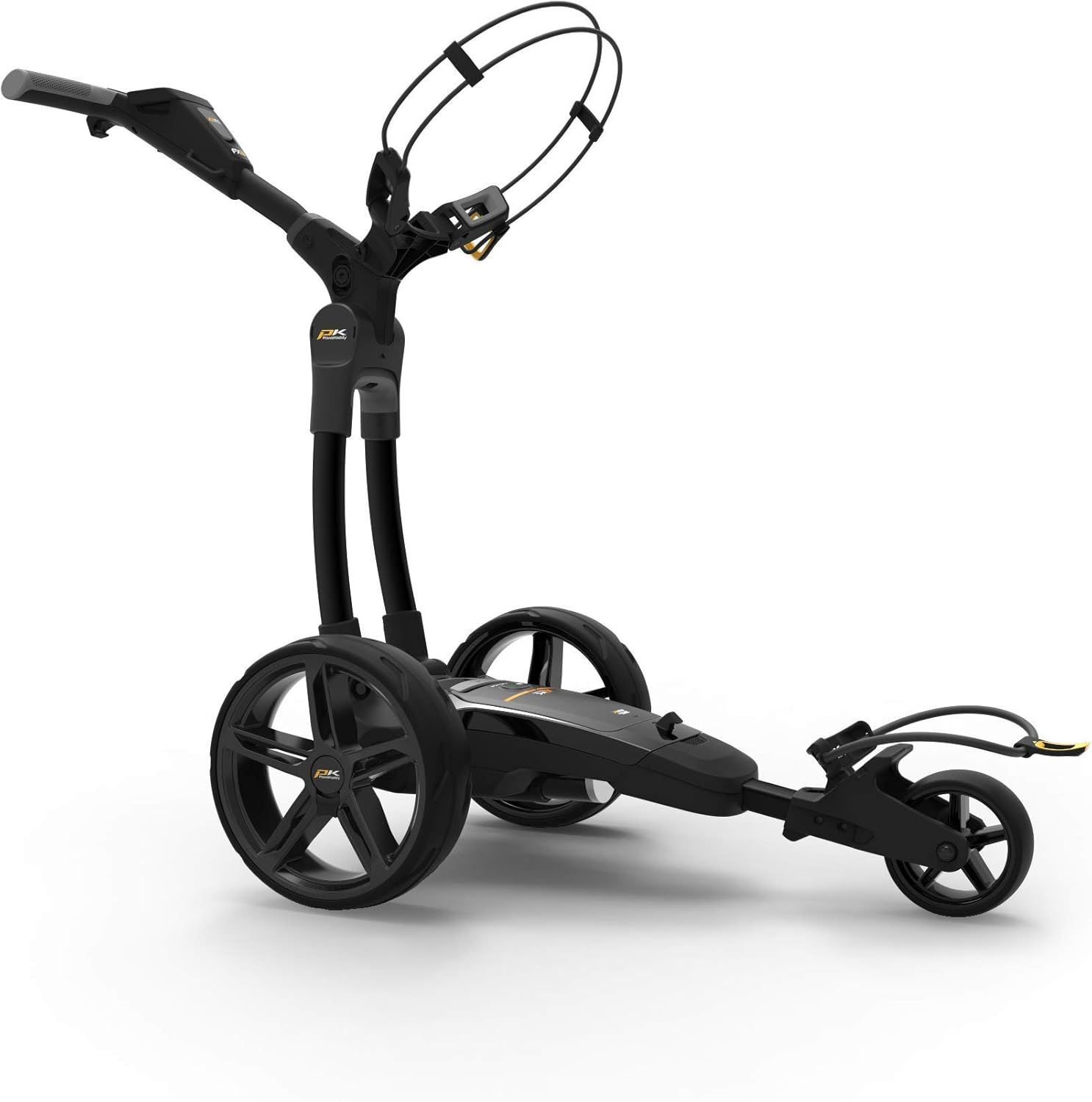
Image: The PowaKaddy FX3 EBS Electric Trolley in its fully unfolded, ready-to-use position, showcasing its robust frame and wheels.
2.3 Wheel Attachment
The low-profile metallic sports wheels are easily detachable for cleaning or transport.
- Align the wheel axle with the corresponding slot on the trolley frame.
- Push the wheel firmly onto the axle until it clicks into place. Ensure the wheel is securely fastened and spins freely.
- To remove, press the release button (if present) on the wheel hub and pull the wheel off.

Image: A detailed view of the low-profile metallic sports wheel of the PowaKaddy FX3 EBS, highlighting its design and attachment point.
2.4 Battery Installation and Charging
The FX3 EBS uses a 30V Plug'n'Play high-performance lithium battery.
- Ensure the trolley is switched off before installing or removing the battery.
- Locate the battery compartment, typically under the main frame.
- Slide the battery into the compartment until it clicks securely into place. Ensure the electrical contacts are properly aligned.
- To charge the battery, remove it from the trolley and connect it to the supplied PowaKaddy charger. Follow the charger's instructions for charging times and indicators. Always charge the battery fully before first use.

Image: A close-up view of the PowaKaddy FX3 EBS battery area, showing the "Plug'n'Play" label and the main power button.
2.5 Handle Adjustment
The handle is soft and height-adjustable to suit the user.
- Locate the handle adjustment mechanism (usually a quick-release lever or knob).
- Loosen the mechanism, adjust the handle to your desired height, and then securely tighten it.
3. Operating Instructions
3.1 Powering On/Off
To power on the trolley, press and hold the main power button on the battery or control panel until the display illuminates. To power off, press and hold the same button until the display turns off. The LED On/Off indicator will show the trolley's power status. The tamper control system prevents accidental power-on.
3.2 Display Functions
The FX3 EBS features an ultra-clear 2.3-inch widescreen color display.
- Battery Level Indicator: Quickly view the remaining battery capacity.
- Speed Setting: Displays the current speed level.
- Display Backlight System: With power-saving mode activated, the backlight will switch off after 20 minutes of inactivity.

Image: A detailed view of the PowaKaddy FX3 EBS control panel, showing the 2.3-inch widescreen color display and main control knob.
3.3 Speed Control System
The trolley is equipped with a powerful 30 Volt speed control system. Use the main control knob on the handle to adjust the trolley's speed. Rotate clockwise to increase speed and counter-clockwise to decrease speed.
3.4 Start, Pause, and Resume Function
To start the trolley, rotate the speed control knob to your desired speed and press the button. To pause, press the button once. To resume at the same speed, press the button again.
3.5 Electronic Braking System (EBS)
The EBS feature provides controlled braking on downhill slopes. When activated, the trolley will maintain a consistent speed, preventing it from running away. Consult your trolley's specific controls for EBS activation, typically integrated with the speed control or a dedicated button.
3.6 Front Wheel Adjustment
If the trolley does not track in a straight line, the front wheel alignment can be adjusted.
- Locate the front wheel adjustment mechanism (usually a knob or lever near the front wheel assembly).
- Make small adjustments and test the trolley's tracking until it moves in a straight line.
3.7 PowaKaddy Key-lock Bag System
This system prevents your golf bag from twisting on the trolley. Ensure your PowaKaddy golf bag is compatible and properly seated on the trolley's bag supports, utilizing the key-lock feature for stability. The elastic straps with integrated non-slip handles further secure the bag.
4. Maintenance
4.1 Cleaning
The Powaframe Chassis is designed for easy cleaning.
- Wipe down the trolley frame and wheels with a damp cloth after each use to remove dirt and debris.
- Avoid using abrasive cleaners or solvents that could damage the finish.
- Do not use high-pressure washers directly on the trolley, especially near electrical components.
4.2 Battery Care
Proper battery care is crucial for longevity.
- Always fully charge the battery after each use, even if only used for a short period.
- Do not leave the battery fully discharged for extended periods.
- Store the battery in a cool, dry place, away from direct sunlight and extreme temperatures.
- If storing for a long period, charge the battery to approximately 50% and recharge every 1-2 months.
4.3 Wheel Maintenance
Regularly check the wheels for any debris, such as grass or mud, that might impede their rotation. Clean them as needed. Ensure the wheels are securely attached before each use.
5. Troubleshooting
If you encounter issues with your PowaKaddy FX3 EBS, please refer to the following common problems and solutions.
| Problem | Possible Cause | Solution |
|---|---|---|
| Trolley does not power on. | Battery not connected, battery discharged, or tamper control engaged. | Ensure battery is fully inserted and charged. Press and hold power button firmly. |
| Trolley moves slowly or stops. | Low battery charge, heavy load, or obstruction. | Recharge battery. Reduce load. Check for obstructions around wheels/motor. |
| Trolley pulls to one side. | Front wheel misalignment. | Adjust the front wheel alignment as described in Section 3.6. |
| Display is dim or off. | Power-saving mode activated or low battery. | Press any button to reactivate backlight. Check battery charge. |
If the problem persists after attempting these solutions, please contact PowaKaddy customer support.
6. Specifications
Below are the technical specifications for the PowaKaddy FX3 EBS Electric Trolley:
- Model: PowaKaddy FX3 EBS
- Motor: 30 V, 230 W
- Battery: 30 V High-Performance Plug'n'Play Lithium (1 required, included)
- Display: Ultra-clear 2.3-inch Widescreen Color Display
- Weight (without battery): 9.6 kg (21.16 lbs)
- Folded Dimensions (L x W x H): 805 x 560 x 346 mm (31.7 x 22.0 x 13.6 inches)
- Chassis: Powaframe Chassis
- Wheels: Low-profile Metallic Sports Wheels
- Features: EBS (Electronic Braking System), 1-Click Folding System, Tamper Control, PowaKaddy Key-lock Bag System, Ambidextrous Control, Start/Pause/Resume Function, Battery Level Indicator, LED On/Off Indicator.
7. Warranty and Support
PowaKaddy products are manufactured to the highest standards. For information regarding your product's warranty, please refer to the warranty card included with your purchase or visit the official PowaKaddy website.
For technical support, spare parts, or service inquiries, please contact PowaKaddy customer service through their official website or authorized service centers. Always provide your product model (FX3 EBS) and serial number when seeking support.
Official Website: www.powakaddy.com