Introduction
This manual provides detailed instructions for the setup, operation, and maintenance of your Zelotes C-18 Wired Vertical Gaming Mouse. Designed for ergonomic comfort and high-performance gaming, this mouse features a vertical design to minimize wrist strain, adjustable DPI settings, and a multi-functional control bar.

Image: The Zelotes C-18 Wired Vertical Gaming Mouse, showcasing its ergonomic design and integrated control bar.
Product Features
- High Standard Gaming Configuration: Equipped with a PMW-3325 gaming chip for quick and agile response. Features 128KB onboard built-in storage for macro definitions, allowing settings to be saved directly on the mouse.
- Ergonomic Vertical Design: Provides enhanced support for your forearm, reducing wrist pain often associated with traditional mouse usage.
- Adjustable DPI Values: Five adjustable DPI settings (1500/2500/4000/7000/10000) for precise tracking on various surfaces. Easily switch DPI with a dedicated button.
- Multi-functional Control Bar: A single control bar functions as 5 keys (forward, backward, left, right, down), corresponding to W, S, A, D, and space keys by default. All buttons are programmable.
- Wide Compatibility: Compatible with Windows 2000/ME/XP(x64)/Vista/7/8/10 and Linux systems. Suitable for desktop, laptop, PC, and other devices.

Image: Diagram highlighting the mouse's performance features including 10000 DPI resolution, 100 IPS move speed, 20G acceleration, 5000 FPS frame rate, and laser engine.
Setup
- Unpack: Carefully remove the mouse and all accessories from the packaging.
- Connect: Plug the USB connector of the mouse into an available USB port on your computer.
- Driver Installation (Optional): For advanced customization and programming functions, insert the provided mini-disk into your computer's CD/DVD drive and follow the on-screen instructions to install the driver software. If your computer does not have a CD/DVD drive, drivers may be available for download from the manufacturer's website.
- Protective Film: Before use, please tear off the protective film from the mouse's mat (bottom glide pads).
Operating Instructions
Basic Usage
The Zelotes C-18 mouse is designed for a natural hand position. Place your hand over the mouse so your palm rests comfortably on its vertical body, and your fingers align with the primary buttons.
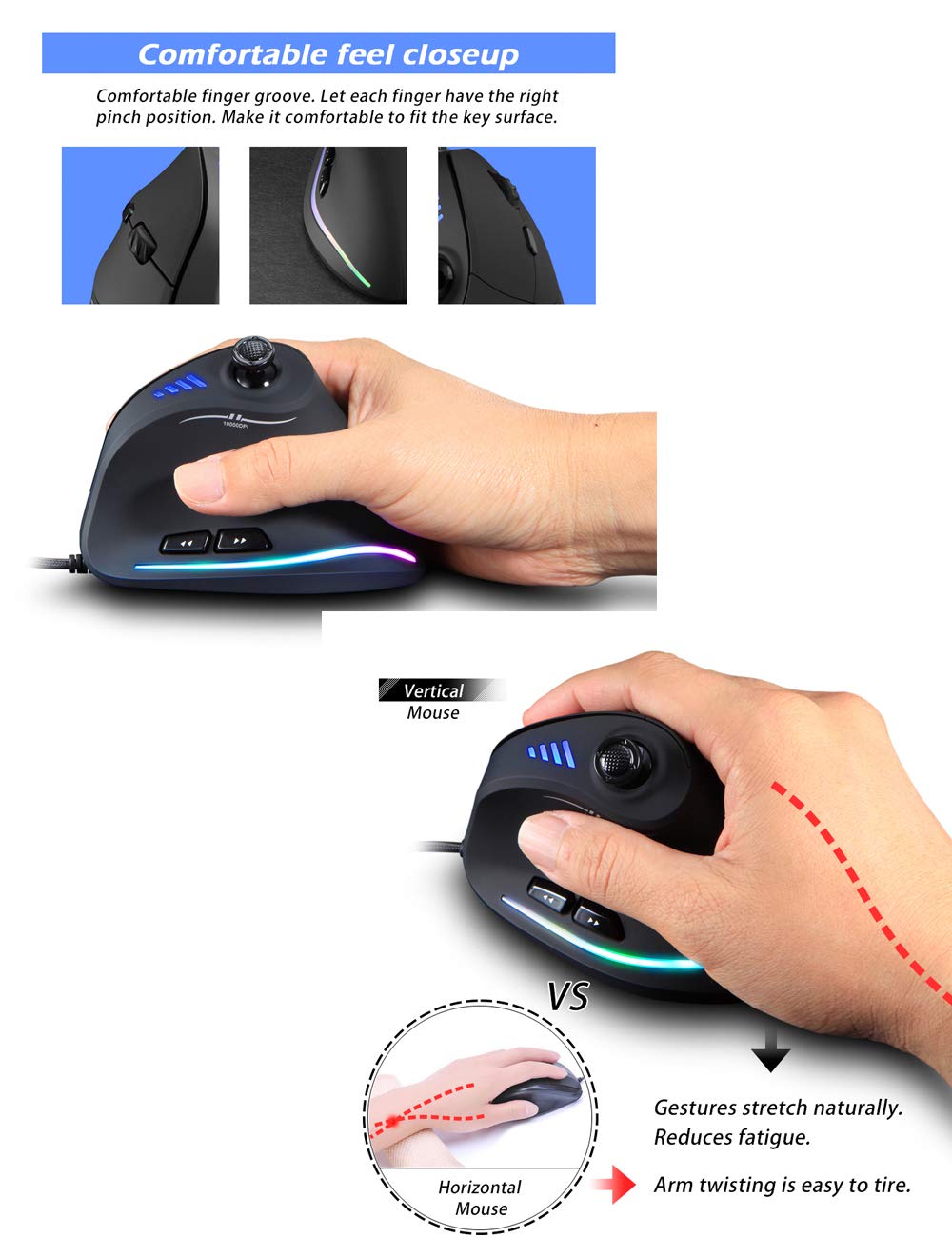
Image: A hand gripping the vertical mouse, illustrating the comfortable finger groove and comparing the natural wrist position to a traditional horizontal mouse.
DPI Adjustment
The mouse features 5 adjustable DPI levels. Press the dedicated DPI button (usually located near the scroll wheel or on the side) to cycle through the available sensitivities: 1500, 2500, 4000, 7000, and 10000 DPI. The indicator lights on the mouse will change to show the current DPI setting.
- 1 Light: 1500 DPI
- 2 Lights: 2500 DPI
- 3 Lights: 4000 DPI
- 4 Lights: 7000 DPI
- All 5 Lights: 10000 DPI

Image: Close-up of the mouse showing the DPI button and the four blue indicator lights, explaining how they correspond to DPI levels.
Control Bar Functionality
The integrated control bar, operated by your thumb, provides quick access to five directional inputs. By default, these correspond to keyboard keys W (forward), S (backward), A (left), D (right), and Space (downward press). These functions can be reprogrammed using the driver software.

Image: Illustration of the 5-direction rocker (control bar) and how it is operated by the thumb for integrated orientation control.
Left Function Keys
The mouse includes separate front and rear function keys located on the left side, designed to facilitate web page and file browsing (e.g., back and forward navigation).

Image: Top section shows a hand using the left function keys for navigation. The bottom section displays the underside of the mouse, labeling the sensor lens and glide pads.
Compatibility
The Zelotes C-18 mouse is compatible with the following operating systems:
- Windows 2000
- Windows ME
- Windows XP (x64)
- Windows Vista
- Windows 7
- Windows 8
- Windows 10
- Linux
For Mac OS X (versions V10.4 and above), the mouse is compatible for basic functions, but the programming features are not available.
Package Contents
Upon opening your Zelotes C-18 mouse package, you should find the following items:
- 1 x Ergonomic Wired Vertical Mouse
- 1 x Driver Mini-Disk
- 1 x Instruction Manual
Maintenance
- Cleaning: Use a soft, dry cloth to clean the surface of the mouse. For the optical sensor, use a cotton swab lightly dampened with isopropyl alcohol, ensuring no liquid enters the mouse body.
- Storage: Store the mouse in a cool, dry place away from direct sunlight and extreme temperatures.
- Cable Care: Avoid sharp bends or excessive pulling on the USB cable to prevent damage.
Troubleshooting
Mouse Not Responding
- Ensure the USB cable is securely plugged into a working USB port on your computer.
- Try plugging the mouse into a different USB port.
- Restart your computer.
- If using a USB hub, try connecting the mouse directly to the computer.
Cursor Movement is Erratic or Inaccurate
- Clean the optical sensor on the bottom of the mouse.
- Ensure you are using the mouse on a suitable surface (e.g., a mouse pad). Avoid highly reflective or transparent surfaces.
- Adjust the DPI settings to a lower sensitivity if the cursor is too fast.
Buttons or Control Bar Not Functioning
- Ensure the driver software is correctly installed, especially for programmable functions.
- Check for any software conflicts with other input devices.
- Test the mouse on another computer to determine if the issue is with the mouse or the computer's setup.
Specifications
| Brand | Zelotes electronic |
| Model Number | C-18 |
| Button Numbers | 11 |
| Traction Control | Optics |
| USB Cable Length | 1.8m |
| Working Voltage/Current | 5V 100mA |
| Button Life | 10 million times |
| Roller Life | 1.2 million rotations |
| Product Size | 110*72*76.5mm (4.3 x 2.8 x 3 inches) |
| Product Weight | 165±5g (8 ounces) |
| Resolution (DPI) | 1500-2500-4000-7000-10000 |
| Rate of Return (Polling Rate) | 125-1000Hz |

Image: Diagram illustrating the length, width, and thickness dimensions of the Zelotes C-18 mouse.
Important Notes
- If you are new to using a vertical mouse, it may take a few days to adjust to its ergonomic design.
- Always ensure the protective film on the mouse's glide pads is removed before use for optimal performance.
Warranty and Support
For warranty information and technical support, please refer to the documentation included in your product packaging or visit the official Zelotes electronic website. Specific warranty terms and conditions may vary by region and retailer.