
Introduction
Thank you for choosing the Xzeal 23.8-inch FHD 144Hz Gaming Monitor. This monitor is designed to enhance your gaming and viewing experience with its Full HD resolution (1920 x 1080), 144Hz refresh rate, and rapid 1ms response time. Featuring a VA panel with FreeSync synchronization, it offers smooth visuals and versatile connectivity options including DisplayPort and HDMI, along with an audio output.
Package Contents
Please check the box for the following items:
- Xzeal Starter 23.8" Monitor
- HDMI Cable
- Power Adapter
- Desk Stand Base
- Instruction Manual (this document)
- Warranty Policy
Setup
1. Assembling the Stand
Carefully place the monitor face down on a soft, clean surface to prevent scratches. Attach the stand base to the monitor arm, then secure the arm to the back of the monitor using the provided screws.

Image: Front view of the Xzeal monitor with its stand assembled, ready for use.
2. Connecting Cables
Connect the appropriate video cable (HDMI or DisplayPort) from your computer's graphics card to the corresponding input port on the monitor. Then, connect the power adapter to the monitor's power input and plug it into a power outlet.

Image: Rear view of the Xzeal monitor, highlighting the input ports for HDMI and DisplayPort, and the stand attachment point.
3. Initial Power-On
Press the power button, usually located on the back or bottom right of the monitor, to turn it on. The monitor should automatically detect the input signal. If not, you may need to manually select the input source using the On-Screen Display (OSD) menu.
Operating Instructions
Power On/Off
Press the power button to turn the monitor on or off. A power indicator light will typically illuminate when the monitor is active.
On-Screen Display (OSD) Menu
The OSD menu allows you to adjust various monitor settings. Use the buttons located on the back or bottom of the monitor to navigate the menu. Common settings include brightness, contrast, color temperature, input source, and gaming features.
Input Selection
If you have multiple devices connected, use the OSD menu to select the desired input source (HDMI or DisplayPort).
Refresh Rate and FreeSync
To utilize the 144Hz refresh rate, ensure your graphics card and operating system display settings are configured correctly. For AMD FreeSync, enable it in both the monitor's OSD menu and your graphics card's control panel for tear-free gaming.
Maintenance
Cleaning the Monitor
Always turn off and unplug the monitor before cleaning. Use a soft, lint-free cloth lightly dampened with water or a specialized screen cleaner. Do not use abrasive cleaners, alcohol, or ammonia-based solutions, as these can damage the screen or casing. Avoid spraying liquid directly onto the screen.
Storage
When storing the monitor for an extended period, ensure it is kept in a cool, dry place, away from direct sunlight and extreme temperatures. It is recommended to use the original packaging for protection.
Troubleshooting
If you encounter issues with your monitor, please refer to the following common problems and solutions:
- No Power: Ensure the power cable is securely connected to both the monitor and the power outlet. Check if the power adapter is functioning correctly.
- No Signal: Verify that the video cable (HDMI/DisplayPort) is firmly connected to both the monitor and your computer. Ensure the correct input source is selected in the monitor's OSD menu.
- Flickering or Distorted Image: Check the video cable for damage. Ensure your graphics card drivers are up to date. Adjust the refresh rate settings in your computer's display settings.
- Dead Pixels: While rare, a small number of dead or stuck pixels may be present. Refer to the warranty policy for details on acceptable pixel defects.
If the problem persists after trying these steps, please contact customer support.
Specifications
Detailed technical specifications for the Xzeal 23.8-inch FHD 144Hz Gaming Monitor:
| Model Name | XZMXZ30B (XZ3010-1) |
| Screen Size | 23.8 Inches |
| Resolution | 1920 x 1080 (FHD 1080p) |
| Refresh Rate | 144 Hz (Note: Some specifications list 75Hz, but product description and features highlight 144Hz for gaming. Please verify your settings.) |
| Response Time | 1 Millisecond |
| Panel Type | VA (implied by product description, not explicitly in specs table but mentioned in product description) |
| Aspect Ratio | 16:9 |
| Contrast Ratio | 2000:1 |
| Connectivity | HDMI, DisplayPort (DP), VGA (Note: Product description mentions HDMI/DP, specifications also list VGA. Please refer to physical ports on your unit.) |
| Adaptive Sync | AMD FreeSync |
| Special Features | Flicker-free technology, Curved (Note: Product description mentions "sin marco" (frameless), specifications mention "Curvada" (curved). Please verify the actual product design.) |
| VESA Mount Support | Yes (Wall Mount Type) |
| Dimensions (D x W x H) | 12.2 x 63 x 44 centimeters |
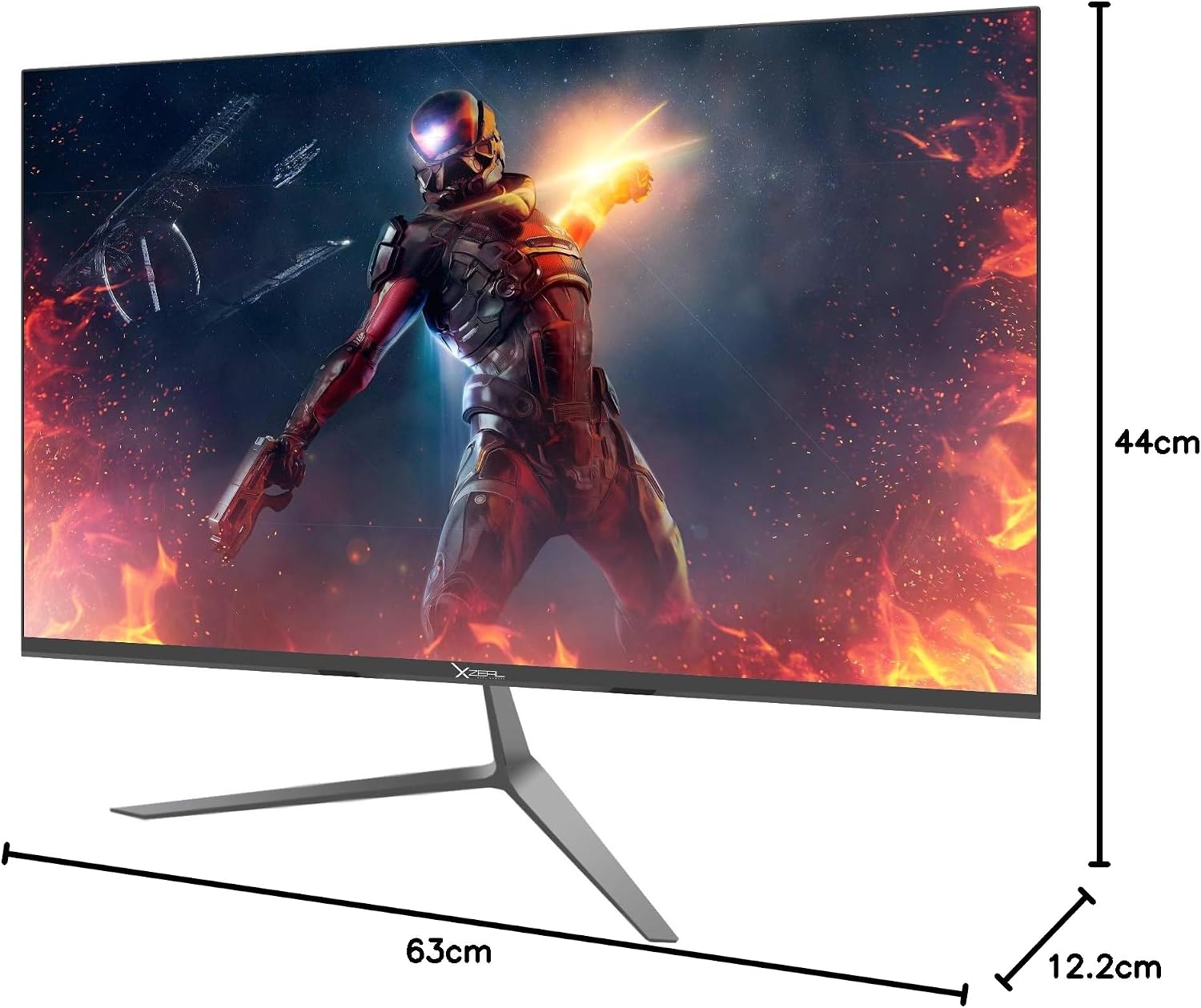
Image: Diagram illustrating the physical dimensions of the Xzeal monitor.
Warranty and Support
Warranty Information
This Xzeal monitor comes with a limited warranty. The product warranty is for one year, and the type of warranty is stated as 2 years limited warranty. Please refer to the included Warranty Policy document in your package for specific terms, conditions, and duration of coverage.
Customer Support
For technical assistance, warranty claims, or any other inquiries, please contact Xzeal customer support. Refer to the contact information provided in your warranty policy or on the official Xzeal website.


