
1. Introduction and Overview
This manual provides essential information for the safe and efficient operation of the Micro Power SSM2406 Power Supply. The SSM2406 is a robust 24VDC 06A power supply unit designed for various electronic applications. It features a wide input voltage range of 180-265VAC and operates at a frequency of 45-60Hz. This unit is equipped with essential overload and short circuit protection to ensure reliable and safe operation for your connected devices.
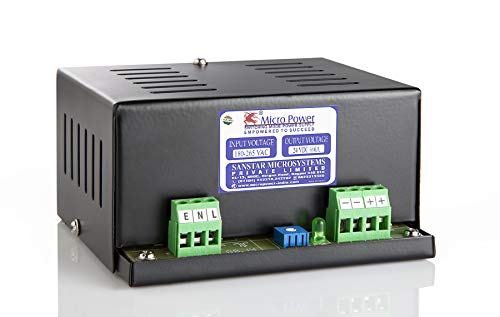
Figure 1: Micro Power SSM2406 Power Supply Unit showing input (E, N, L) and output (-, -, +, +) terminals.
2. Safety Information
Please read and understand all safety instructions before installing or operating this power supply. Failure to do so may result in injury or damage to the unit or connected equipment.
- Always disconnect the AC input power before performing any installation, wiring, or maintenance procedures.
- Ensure proper grounding of the unit. The 'E' terminal is for Earth connection.
- Do not expose the power supply to moisture, water, or extreme temperatures. Operate only in a dry, well-ventilated environment.
- Do not open the casing of the power supply. There are no user-serviceable parts inside. Refer all servicing to qualified personnel.
- Ensure that the total current draw of connected devices does not exceed the rated output current of 6A.
3. Product Features
- Input Voltage: 180-265VAC
- Output Voltage: 24VDC
- Output Current: 06A
- Operating Frequency: 45-60Hz
- Protection: Overload and Short Circuit Protection
- Compact and durable design
4. Setup
Follow these steps to properly set up your Micro Power SSM2406 Power Supply:
- Unpack: Carefully remove the power supply from its packaging and inspect it for any signs of damage.
- Mounting (Optional): The unit can be mounted using appropriate screws through the designated mounting holes. Ensure adequate ventilation space around the unit.
- Identify Terminals: Locate the input terminals labeled 'E' (Earth), 'N' (Neutral), and 'L' (Live), and the output terminals labeled '-', '-', '+', '+'. Refer to Figure 1 for visual identification.
- AC Input Wiring: Connect your AC power source (180-265VAC) to the input terminals. Connect the Earth wire to 'E', Neutral to 'N', and Live to 'L'. Ensure all connections are secure and tight.
- DC Output Wiring: Connect your 24VDC load to the output terminals. Connect the negative wire of your load to either of the '-' terminals and the positive wire to either of the '+' terminals. The dual terminals provide flexibility for wiring. Ensure correct polarity to prevent damage to your devices.
- Final Check: Double-check all wiring connections to ensure they are correct and secure before applying power.
5. Operating Instructions
Once the power supply is securely installed and wired:
- Apply Power: Connect the AC power source to the input of the power supply. The unit will automatically begin converting the AC input to a stable 24VDC output.
- Monitor Operation: Observe the connected devices for proper functionality. The power supply is designed to operate continuously within its specified limits.
- Power Off: To turn off the power supply, disconnect the AC input power.
6. Maintenance
The Micro Power SSM2406 Power Supply requires minimal maintenance. Adhering to these guidelines will help ensure its longevity and reliable performance:
- Regular Inspection: Periodically inspect the unit for any signs of physical damage, such as cracks, dents, or loose connections.
- Ventilation: Ensure that the ventilation slots on the power supply are not obstructed. Adequate airflow is crucial to prevent overheating.
- Cleaning: Clean the exterior of the unit with a dry, soft cloth. Do not use liquid cleaners, solvents, or abrasive materials.
- Connection Check: Occasionally check that all input and output wire connections remain tight and secure.
7. Troubleshooting
If you encounter issues with your power supply, refer to the following common troubleshooting steps:
- No Output Power:
- Verify that the AC input voltage (180-265VAC) is present and stable.
- Check all input and output wiring connections for looseness or incorrect polarity.
- Disconnect the load from the output terminals. If the power supply then provides output, the issue may be with an overloaded or short-circuited device connected to the output.
- Output Voltage Fluctuation or Low Voltage:
- Ensure that the total current draw of your connected devices does not exceed the rated 6A. Overloading can cause voltage drop.
- Check for stable input AC voltage.
- Overheating:
- Ensure adequate ventilation around the unit. Clear any obstructions from the ventilation slots.
- Verify that the ambient temperature is within the recommended operating range.
If the problem persists after following these steps, please contact customer support.
8. Specifications
| Parameter | Value |
|---|---|
| Brand | Micro Power |
| Manufacturer | Sanstar |
| Model Name | SSM2406 |
| Input Voltage | 180-265VAC |
| Output Voltage | 24VDC |
| Output Current | 06A |
| Frequency | 45-60Hz |
| Output Wattage | 300 Watts |
| Product Dimensions (LxWxH) | 10.2 x 7.6 x 5.2 cm |
| Item Weight | 350 g |
| Protection | Overload & Short Circuit Protection |
9. Warranty and Support
For warranty information, technical assistance, or further inquiries regarding your Micro Power SSM2406 Power Supply, please contact your point of purchase or the manufacturer, Sanstar Microsystems Pvt Ltd. Please have your product model number (SSM2406) and purchase details ready when contacting support.