
Bonvoisin 21
Bonvoisin Analytical Balance Model 21 User Manual
High Precision Lab Scale: 100g Capacity, 0.001g Readability
1. Introduction
This manual provides detailed instructions for the proper setup, operation, maintenance, and troubleshooting of your Bonvoisin Analytical Balance Model 21. This high-precision electronic scale is designed for accurate weighing in laboratory, scientific, and jewelry applications, offering a readability of 0.001g and a maximum capacity of 100g.
Please read this manual thoroughly before using the device to ensure optimal performance and longevity.
2. Safety Precautions
- Place the balance on a stable, level surface free from vibrations, drafts, and direct sunlight.
- Avoid placing the balance near strong electromagnetic fields or heat sources.
- Do not overload the balance beyond its maximum capacity of 100g.
- Keep the balance clean and dry. Avoid liquid spills on the display and buttons.
- Use only the provided power adapter or a compatible 9V battery. Note that the provided power cable is 110V only. For 220V regions, a compatible 220V cable or 9V battery is required.
- Do not attempt to disassemble or repair the balance yourself. Contact customer support for assistance.
3. Package Contents
Verify that all items are present in the package:
- Bonvoisin Analytical Balance Model 21
- Stainless Steel Weighing Pan
- Windshield (Clear Plastic Cover)
- 110V AC Power Adapter
- Calibration Weight (200g)
- User Manual
4. Product Overview
The Bonvoisin Analytical Balance Model 21 features a clear LCD display, intuitive control buttons, and a protective windshield for precise measurements.

Figure 4.1: Bonvoisin Analytical Balance Model 21. This image shows the complete balance unit with its clear plastic windshield and stainless steel weighing pan.
4.1 Components
- Weighing Pan: Stainless steel platform for placing items to be weighed.
- Windshield: Clear plastic cover to minimize external influences like air currents.
- LCD Display: Large, backlit screen showing weight readings, units, and status indicators.
- Control Panel: Buttons for ON/OFF, UNIT, PCS (counting), TARE/ZERO, and CAL (calibration).
- Adjustable Feet: Located at the bottom for leveling the balance.
- Level Bubble: Integrated bubble level for precise leveling.
5. Setup
5.1 Unpacking and Placement
- Carefully remove all components from the packaging.
- Place the balance on a firm, level, and vibration-free surface. Ensure the location is free from drafts, direct sunlight, and rapid temperature changes.
- Install the stainless steel weighing pan onto the central pillar.
- Place the clear plastic windshield over the weighing pan assembly.
5.2 Leveling the Balance
Accurate measurements require the balance to be perfectly level.
- Locate the level bubble, typically found near the display or on the base.
- Adjust the adjustable feet by turning them clockwise or counter-clockwise until the air bubble is centered within the circle of the level indicator.
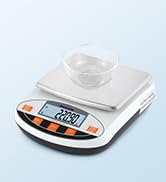
Figure 5.1: Adjustable feet and level bubble. This image illustrates how to use the adjustable feet to center the bubble in the level indicator, ensuring the balance is perfectly level for accurate readings.
5.3 Power Connection

Figure 5.2: Powering the balance. This image shows the two power options: a 110V AC adapter and a 9V DC battery (battery not included).
The balance can be powered by either an AC adapter or a 9V battery.
- AC Power: Connect the provided 110V AC adapter to the power input port on the balance and then to a suitable power outlet.
- DC Power (Battery): Open the battery compartment on the underside of the balance and insert a 9V battery (not included).
Important Note: The included AC power cable is designed for 110V regions only. If operating in a 220V region, you must provide a compatible 220V power cable or use a 9V battery.
6. Operating Instructions
6.1 Power On/Off
- Press the ON/OFF button to turn the balance on. The display will show "0.000g" after a self-test.
- Press and hold the ON/OFF button to turn the balance off.
6.2 Calibration
Calibration ensures the accuracy of your balance. It is recommended to calibrate the balance regularly or if it has been moved.
- Ensure the balance is on a stable surface and the windshield is closed.
- Press and hold the CAL button until "CAL" appears on the display.
- The display will then show the required calibration weight (e.g., "200.000g").
- Carefully place the provided 200g calibration weight onto the center of the weighing pan.
- The balance will automatically calibrate. Once complete, the display will show "PASS" or return to "0.000g".
- Remove the calibration weight. The balance is now calibrated and ready for use.
The balance supports both single-point calibration (using the included 200g weight) and multi-point calibration (requiring additional weights like 100g, 300g, 400g, 500g, not included).
6.3 Unit Conversion
The balance supports 13 different weighing units.

Figure 6.1: Unit conversion options. This image displays the balance with the 'UNIT' button highlighted and a list of 13 available weighing units.
- Press the UNIT button repeatedly to cycle through the available units: g (gram), ct (carat), oz (ounce), ozt (troy ounce), N (Newton), lb (pound), dr (dram), GN (grain), dwt (pennyweight), % (percentage), t/T (Taiwan Tael), T (Tola), T/A/R (Hong Kong Tael).
- The selected unit will be displayed on the LCD screen.
6.4 Tare Function
The tare function allows you to subtract the weight of a container, so only the net weight of the contents is measured.

Figure 6.2: Tare function in action. This image demonstrates the three steps: adding a container, pressing the tare button to zero the display, and then adding contents for net weight measurement.
- Place an empty container on the weighing pan.
- Press the TARE/ZERO button. The display will reset to "0.000g".
- Add the items to be weighed into the container. The display will show the net weight of the items.
6.5 Counting Function (PCS)
The counting function allows you to count a large number of identical items by weight.

Figure 6.3: Useful functions. This image highlights the counting function (PCS), along with one-press tare, low battery prompt, and overload prompt.
- Place a known quantity of items (e.g., 10, 20, 50, or 100 pieces) on the weighing pan.
- Press and hold the PCS button until "PCS" appears.
- Use the UNIT button to select the sample quantity (e.g., P10 for 10 pieces).
- Press PCS again to confirm. The display will now show the count of the sample.
- Remove the sample and add the items you wish to count. The display will show the total count.
6.6 General Weighing Procedure
- Turn on the balance and allow it to stabilize (display shows "0.000g").
- Ensure the correct unit is selected using the UNIT button.
- If using a container, perform the tare function as described in Section 6.4.
- Carefully place the item(s) to be weighed onto the center of the weighing pan.
- Wait for the reading to stabilize. The stable reading will be displayed.
- Remove the item(s) from the pan.
7. Maintenance
7.1 Cleaning

Figure 7.1: Removable weighing tray. This image shows the weighing pan detached from the balance, illustrating its ease of removal for cleaning.
- The stainless steel weighing pan is removable for easy cleaning.
- Wipe the balance exterior with a soft, damp cloth. Do not use abrasive cleaners or solvents.
- Ensure no liquids enter the internal components of the balance.
7.2 Protection

Figure 7.2: Protective film. This image highlights the protective film covering the display and buttons, designed to guard against liquid spills and extend the scale's lifespan.
- The display and buttons are covered with a protective film to guard against liquid spills and extend the lifespan of the device.
- Always use the windshield to protect the weighing area from drafts and dust.
8. Troubleshooting
| Problem | Possible Cause | Solution |
|---|---|---|
| Unstable readings / Drifting zero | Drafts, vibrations, uneven surface, temperature changes, electromagnetic interference. | Ensure balance is on a stable, level surface. Close windshield. Avoid drafts. Recalibrate. |
| Balance does not turn on | No power, low battery, faulty power adapter. | Check AC adapter connection. Replace 9V battery. Ensure correct voltage adapter is used. |
| Inaccurate measurements | Not calibrated, incorrect leveling, environmental factors. | Perform calibration. Level the balance. Ensure stable environment. |
| "EEEE" or "OUEr" on display | Overload. | Remove excess weight immediately. Do not exceed 100g capacity. |
| Low battery indicator | Battery power is low. | Replace the 9V battery or connect to AC power. |
9. Specifications
- Model: 21
- Capacity: 100g
- Readability: 0.001g (1mg)
- Accuracy: ±0.004g
- Minimum Weighing: 0.010g
- Units: g, ct, oz, ozt, N, lb, dr, GN, dwt, %, t/T, T, T/A/R (13 units)
- Display: Backlit LCD
- Power Supply: 110V AC Adapter (included), 9V DC Battery (not included)
- Features: Tare, Counting (PCS), Fault Visualization, Windshield, Non-slip mat, Removable Stainless Steel Pan, Adjustable Feet, Level Bubble.
- Weighing Pan Diameter: 90mm / 3.5 inches
- Product Dimensions: Approximately 20cm (7.88in) W x 26cm (10.24in) D x 14cm (5.5in) H (with windshield)
10. Warranty and Support
Bonvoisin products are manufactured to high-quality standards. For warranty information, technical support, or service inquiries, please contact Bonvoisin customer service through the retailer where the product was purchased or visit the official Bonvoisin website. Please have your model number (Model 21) and purchase details ready when contacting support.
Ask a question about this manual
Ask about setup, troubleshooting, compatibility, parts, safety, or missing instructions. Manuals+ will review the question and use this page’s manual context to help answer it.