
Introduction
This manual provides essential information for the safe and effective use of your XML Battery 7.2V 3600mAh Ni-MH battery pack. This rechargeable nickel-metal hydride (Ni-MH) battery is designed as a direct replacement for various wireless security systems, including DSC IMPASSA 9057, SCW-9057, and SCW-9055 models. Please read this manual thoroughly before installation and use.
Safety Information
Observe the following safety precautions to prevent injury or damage to the battery and connected devices:
- Do not disassemble, crush, puncture, or short-circuit the battery.
- Do not expose the battery to high temperatures (above 60°C / 140°F) or direct sunlight.
- Do not incinerate or dispose of the battery in fire.
- Keep the battery away from water and moisture.
- Use only the specified charger or charging system designed for Ni-MH batteries.
- If the battery leaks, avoid contact with the fluid. In case of contact, wash immediately with soap and water. Seek medical attention if irritation persists.
- Keep out of reach of children.
- Recycle or dispose of the battery properly according to local regulations.
Setup and Installation
This battery pack is designed for easy replacement in compatible wireless security systems. Refer to your security system's manual for specific battery compartment access and replacement procedures.
- Power Down System: Before beginning, ensure your wireless security system is completely powered off and disconnected from its main power source.
- Locate Battery Compartment: Identify the battery compartment on your security system panel. This is typically on the back or inside a removable cover.
- Remove Old Battery: Carefully disconnect the old battery pack from its connector. Note the orientation of the connector.
- Insert New Battery: Connect the new XML Battery pack to the system's battery connector, ensuring a secure fit. The connector is designed to fit only one way.
- Position Battery: Place the new battery pack securely within the battery compartment.
- Close Compartment: Replace the battery compartment cover and secure it.
- Restore Power: Reconnect your security system to its main power source and power it on. The system will begin charging the new battery.

Figure 1: Front view of the XML Battery 7.2V 3600mAh Ni-MH Battery Pack, showing the product label with voltage, capacity, and part number.
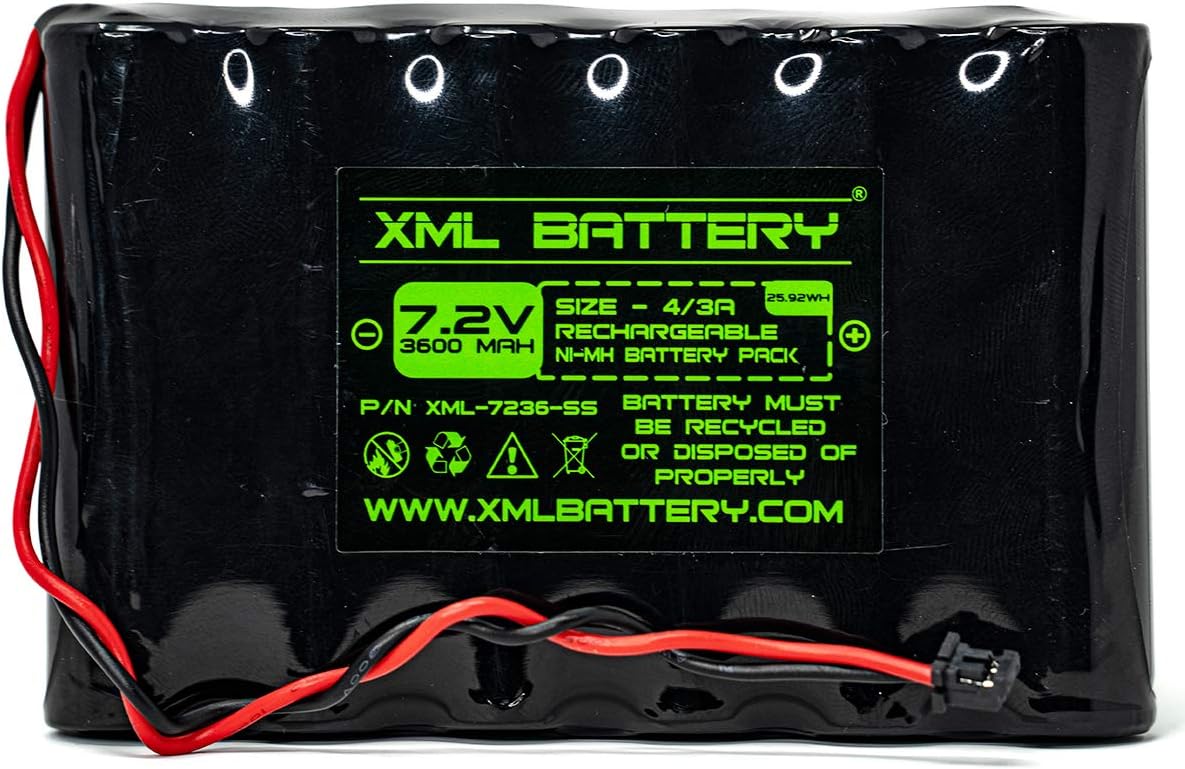
Figure 2: The XML Battery pack held by a gloved hand, illustrating its size and the side profile with the product label visible.
Operating Instructions
Once installed, the battery pack operates automatically as part of your wireless security system. It provides backup power in case of a main power outage and is continuously recharged by the security system when main power is available.
- Initial Charge: After installation, allow the battery to charge fully for at least 24-48 hours. Your security system will typically indicate when the battery is charging or fully charged.
- Backup Power: The battery will automatically engage to power your security system during a power interruption.
- Recharging: The battery will automatically recharge when the security system is connected to AC power.
Maintenance
Proper maintenance ensures the longevity and optimal performance of your Ni-MH battery pack.
- Regular Checks: Periodically check your security system's status for any low battery warnings.
- Temperature: Store and operate the battery within recommended temperature ranges (typically 0°C to 45°C / 32°F to 113°F) to maximize lifespan.
- Cleaning: Keep the battery and its connectors clean and free from dust or debris. Use a dry, soft cloth for cleaning.
- Replacement: Ni-MH batteries have a finite lifespan. If the battery no longer holds a charge or provides adequate backup power, it should be replaced. The typical lifespan for a security system battery is 3-5 years.
Troubleshooting
If you encounter issues with your battery pack, consider the following:
| Problem | Possible Cause | Solution |
|---|---|---|
| Security system displays "Low Battery" after installation. | Battery not fully charged. | Allow 24-48 hours for initial charging. Ensure the security system is connected to AC power. |
| Battery does not provide backup power during outage. | Battery is old or defective; improper connection. | Check battery connection. If battery is old, consider replacement. |
| Battery connector does not fit. | Incorrect battery model or incorrect orientation. | Verify the battery model matches your security system's requirements. Ensure the connector is oriented correctly. Do not force the connection. |
If issues persist, consult your security system's manual or contact a qualified technician.
Specifications
- Model: XML-7236-SS, 6PH-H-4/3A3600-S-D22
- Battery Type: Nickel-Metal Hydride (Ni-MH)
- Voltage: 7.2 Volts
- Capacity: 3600 mAh (Milliampere Hour)
- Dimensions: Approximately 4.5 x 0.5 x 3 inches
- Compatibility: DSC IMPASSA 9057, SCW-9057, SCW-9055 Wireless Security Systems, and other compatible models (OSA273, 17000145, 17000152)
- Reusability: Rechargeable
- UPC: 654152038345
Warranty and Support
For warranty information or technical support, please refer to the documentation provided with your purchase or contact XML Battery directly through their official website or customer service channels. Ensure you have your purchase details and product model number available when seeking support.
Manufacturer: XML Battery
Website: www.xmlbattery.com (as indicated on product label)