
NAVIFORCE NF9163-BK
NAVIFORCE NF-9163 Analogue - Digital Men's Watch Instruction Manual
Model: NF9163-BK | Brand: NAVIFORCE
1. Product Overview
The NAVIFORCE NF-9163 is a versatile men's watch featuring both analogue and digital displays. It combines classic watch design with modern digital functionalities, including a stopwatch, alarm, and LED display. Designed for durability, it is shock resistant and offers water resistance suitable for daily use.

Image 1.1: Front view of the NAVIFORCE NF-9163 watch, showcasing its black dial, black colored strap, and dual analogue-digital display.
Key Features:
- Digital Multifunction: Analog-digital Dual Display, 1/100-Second Stopwatch, LED Display, Week Display, Day and Date, Luminous Hands, Complete Calendar, Shock Resistant.
- Precise Timekeeping: Reliable Japanese Miyota Quartz Movement ensures accurate timekeeping.
- Water Resistance: Water resistant to 30 meters (99 feet/3 ATM). Suitable for rain and splashes of water, but not for swimming or submersion.
- Durable Construction: Stainless Steel case and strap, with a hardened mineral glass crystal.
2. Initial Setup
2.1 Unboxing and Inspection
Carefully remove the watch from its packaging. Inspect the watch for any visible damage or defects. Ensure all protective films are removed from the watch face and strap.
2.2 Setting Analog Time
- Pull out the crown (the knob on the right side of the watch case) to the first position.
- Rotate the crown clockwise or counter-clockwise to set the hour and minute hands to the desired time.
- Push the crown back in to its original position to start the analog timekeeping.
2.3 Setting Digital Time and Date
The digital display can be set using the push buttons on the watch. Refer to the 'Operating Instructions' section for detailed steps on setting the digital time, date, and other functions.
3. Operating Instructions
The NAVIFORCE NF-9163 watch features four primary buttons for digital functions:
- Button A (LIGHT): Activates the LED backlight.
- Button B (MODE): Cycles through different modes (Normal, Stopwatch, Alarm, Time Setting).
- Button C (RESET): Used for resetting functions or confirming settings.
- Button D (START/STOP): Used for starting/stopping functions or adjusting values.

Image 3.1: Diagram illustrating the functions of the watch's buttons and display elements, including Calendar, Week, Time, Light, Start, Mode, Reset, Countdown, Chronograph, Alarm, and Two Time.
3.1 Digital Functions Overview
- Timekeeping: 12-digit display showing hour, minute, second, day, month, and week.
- Alarm and SIG (Hourly Chime) Function.
- Stopwatch Function: 1/100-second accuracy.
- Time Display Format: Switch between 12-hour and 24-hour formats.
- Backlight: White LED backlight for visibility in low light conditions.
3.2 Navigating Modes
Press Button B (MODE) repeatedly to cycle through the following modes:
- Normal Time Display Mode
- Stopwatch Mode
- Alarm Mode
- Time Setting Mode

Image 3.2: Detailed diagram from the official movement instruction manual, showing button functions and mode navigation.
3.3 Stopwatch Function
In Stopwatch Mode, the watch can perform accumulative time recording, split time recording, and finish time recording.
3.3.1 Accumulative Time Recording
- Press Button D to START the stopwatch.
- Press Button D again to STOP the stopwatch.
- Press Button D again to RESTART the stopwatch from where it stopped.
- Press Button C to RESET the stopwatch to zero.
3.3.2 Split Time Recording
- Press Button D to START the stopwatch.
- Press Button C to record the SPLIT TIME. The display will show the split time while the stopwatch continues to run in the background.
- Press Button C again to return to the running stopwatch display.
- Press Button D to STOP the stopwatch.
- Press Button C to RESET the stopwatch to zero.
3.3.3 Finish Time Recording (for two participants)
- Press Button D to START the stopwatch.
- When the first participant finishes, press Button C to record their SPLIT TIME. The display will show the first participant's time.
- When the second participant finishes, press Button D to STOP the stopwatch.
- Press Button C to view the second participant's finish time.
- Press Button C again to RESET the stopwatch to zero.
Note: The stopwatch can measure up to 23 hours, 59 minutes, and 59.99 seconds. If not stopped, it will continue to run and reset to zero after reaching its upper limit.
3.4 Alarm Function
In Alarm Mode:
- Press Button D to toggle the alarm (ALM) and hourly chime (SIG) functions ON or OFF. The respective indicators will appear on the display when active.
- To Set Alarm Time: Press Button C until the 'Hour' digits flash. Press Button D to adjust the hour. Press Button C again, and the 'Minute' digits will flash. Press Button D to adjust the minute. Press Button C once more to confirm and exit alarm setting.
- When the alarm sounds (a 20-second beep), press Button D, Button C, Button A, or Button B to stop it.
- Snooze Function: If you press Button B during an alarm, the snooze function will activate, and the alarm will sound again after 5 minutes.
3.5 Time Setting Mode
In Time Setting Mode (indicated by flashing 'Second' digits):
- The 'Second' digits will flash. Press Button D to reset the seconds to zero.
- Press Button C to move to the next setting item. The sequence is: Second → Hour → Minute → Week → Day → Month.
- While an item is flashing, press Button D to adjust its value.
- Press Button A to exit the Time Setting Mode and return to the normal display.
- 12/24-Hour Format: When setting the 'Hour', if 'A' (AM) or 'P' (PM) is displayed, the watch is in 12-hour format. If 'H' is displayed, it is in 24-hour format.
4. Care and Maintenance
4.1 Water Resistance
This watch is water resistant to 30 meters (3 ATM / 99 feet). This means it is suitable for daily use and can withstand splashes of water or brief immersion in water, such as during hand washing or rain. It is not suitable for swimming, diving, or showering with hot water, as steam can penetrate the seals.
4.2 Cleaning Your Watch
To maintain the appearance of your watch:
- Wipe the watch case and strap regularly with a soft, dry cloth.
- For stubborn dirt, dampen the cloth slightly with water and mild soap, then wipe clean and dry thoroughly.
- Avoid using chemical cleaners, solvents, or abrasive materials, as these can damage the watch's finish.
4.3 Battery Replacement
The watch uses a Japanese Quartz movement with an estimated battery lifetime of 2 years. When the digital display fades or the analog hands stop moving, it indicates that the battery needs replacement. It is recommended to have the battery replaced by a qualified watch technician to ensure proper sealing and water resistance.
5. Troubleshooting
If you encounter any issues with your NAVIFORCE NF-9163 watch, please refer to the following common solutions:
- Analog Hands Not Moving: Check if the crown is pushed in completely. If it is, the battery may need replacement.
- Digital Display Blank/Faint: This usually indicates a low battery. Replace the battery.
- Incorrect Time/Date: Follow the instructions in Section 2.2 and 3.5 to reset the analog and digital time/date.
- Buttons Not Responding: Ensure the watch is not in a locked mode (though this model does not explicitly mention a lock). Try pressing Button B (MODE) to cycle through modes. If unresponsive, the battery may be too low.
- Water Inside Watch: If condensation or water appears inside the watch, stop using it immediately and take it to a professional watch repair service. This indicates a breach in the water resistance.
If the problem persists after trying these steps, please contact customer support.
6. Product Specifications
Detailed technical specifications for the NAVIFORCE NF-9163 watch:
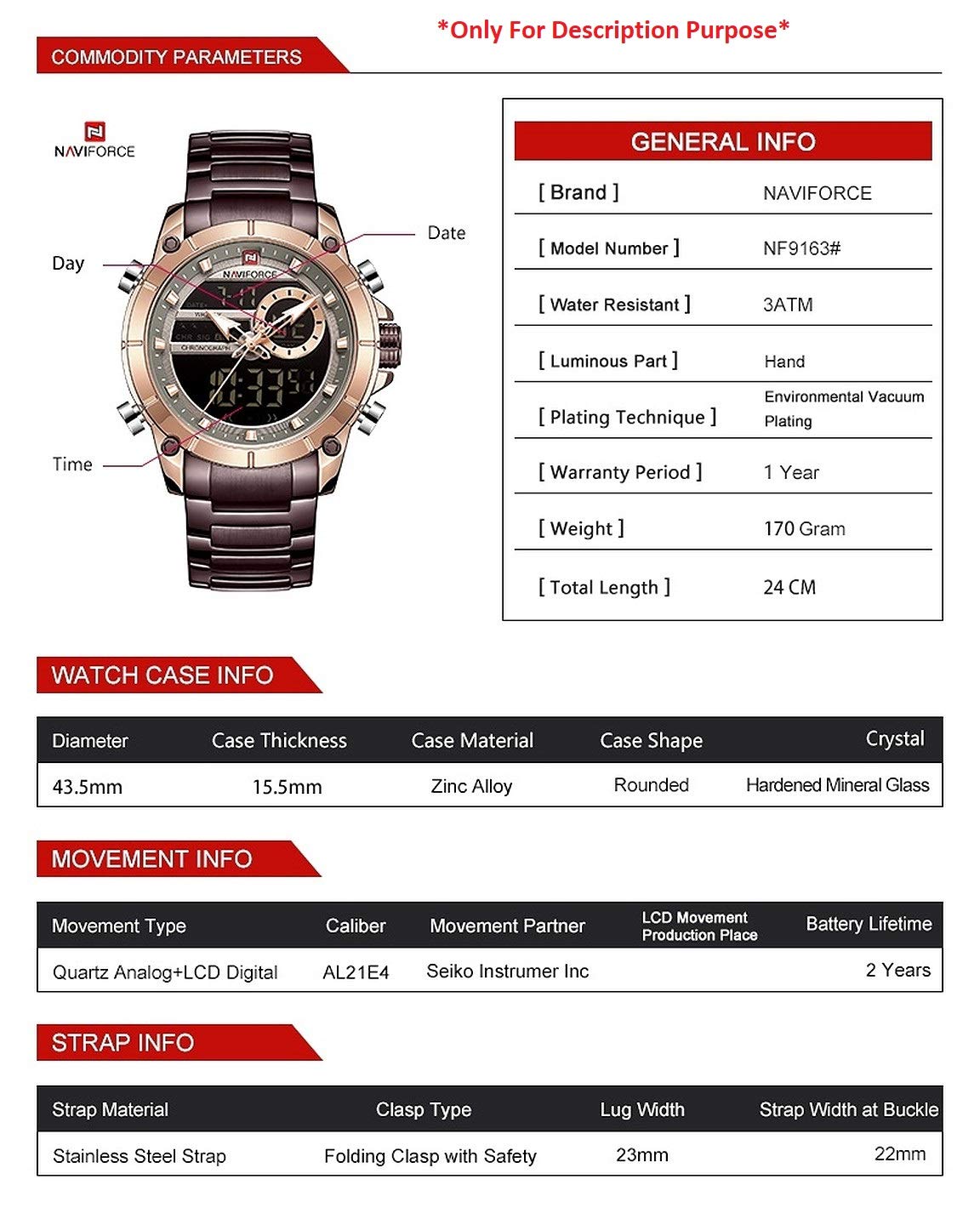
Image 6.1: Visual representation of the watch's commodity parameters and general information.
| Feature | Specification |
|---|---|
| Brand | NAVIFORCE |
| Model Number | NF9163-BK |
| Case Material | Stainless Steel |
| Band Material Type | Stainless Steel |
| Dial Diameter | 43.5 mm |
| Case Thickness | 15.5 mm |
| Band Length | 240 mm |
| Band Width | 22 mm |
| Watch Movement Type | Japanese Quartz (Miyota) |
| Water Resistance | 3 ATM (30 meters / 99 feet) |
| Item Weight | 322 g |
| Crystal Type | Hardened Mineral Glass |
| Battery Lifetime | Approx. 2 years |
| Clasp Type | Folding Clasp with Safety |
7. Warranty and Support
7.1 Warranty Information
The warranty type for this product is 'Contact Seller Of Record'. For specific warranty terms and conditions, please refer to the seller from whom you purchased the watch. Typically, this covers manufacturing defects for a specified period from the date of purchase.
7.2 Customer Support
For any questions, technical assistance, or warranty claims, please contact the seller 'RajNet Retail' through the Amazon platform. You can usually find their contact information on your order details page or by visiting the NAVIFORCE Store on Amazon.
When contacting support, please have your product model number (NF9163-BK) and purchase details readily available.
Related Documents - NF9163-BK
 |
NAVIFORCE NF8052 Men's Quartz Chronograph Watch User Manual Official user manual and guide for the NAVIFORCE NF8052 men's quartz multi-function chronograph watch. Learn about its features, operation, water resistance, warranty, and care. |
 |
NAVIFORCE NF9208 Watch: Instruction Manual and Features Comprehensive guide to the NAVIFORCE NF9208 watch, detailing its functions, modes, stopwatch, alarm, and time-setting procedures. Includes button operations and feature explanations. |
 |
Naviforce NF9138 Watch Movement Instruction Manual A concise guide to the Naviforce NF9138 watch movement, detailing button functions and operation for users. |
 |
NAVIFORCE Watch User Manual and Instructions Comprehensive user manual for NAVIFORCE watches, covering chronograph operations, date/day setting instructions, water resistance guidelines, and brand information. |
 |
Naviforce Watches Instruction Manual - User Guide Comprehensive instruction manual for Naviforce watches, covering brand story, usage advice, water resistance, and detailed guides for various watch patterns including chronographs. |
 |
Naviforce NF9197 Chronograph Watch User Manual and Specifications Comprehensive guide to operating and understanding the features of the Naviforce NF9197 chronograph watch, including time setting, alarm functions, and chronograph usage. |
Ask a question about this manual
Ask about setup, troubleshooting, compatibility, parts, safety, or missing instructions. Manuals+ will review the question and use this page’s manual context to help answer it.