
Introduction
This manual provides essential information for the setup, operation, maintenance, and troubleshooting of your Samsung UN55TU7000FXZA 55-inch 4K Ultra HD Smart LED TV. Please read these instructions carefully before using your television to ensure proper functionality and safety.
Important Safety Information
Always follow basic safety precautions when using this product to reduce the risk of fire, electric shock, and injury. Keep this manual for future reference.
- Do not expose the TV to rain or moisture.
- Do not block ventilation openings.
- Use only attachments/accessories specified by the manufacturer.
- Refer all servicing to qualified service personnel.
What's in the Box
Verify that all components are present:
- Samsung 55-inch 4K Ultra HD Smart LED TV
- Remote Control
- Power Cable
- TV Stand (2 pieces)
Setup
1. Unpacking and Placement
Carefully remove the TV from its packaging. The TV weighs approximately 30.9 pounds and measures 9.8 x 48.4 x 30.6 inches. Ensure the placement surface is stable and can support the TV's weight. For optimal viewing, position the TV away from direct sunlight or strong light sources.

Figure 1: Front view of the Samsung UN55TU7000FXZA 55-inch 4K UHD Smart LED TV.

Figure 2: Side view of the Samsung UN55TU7000FXZA 55-inch 4K UHD Smart LED TV, showing its slim profile.
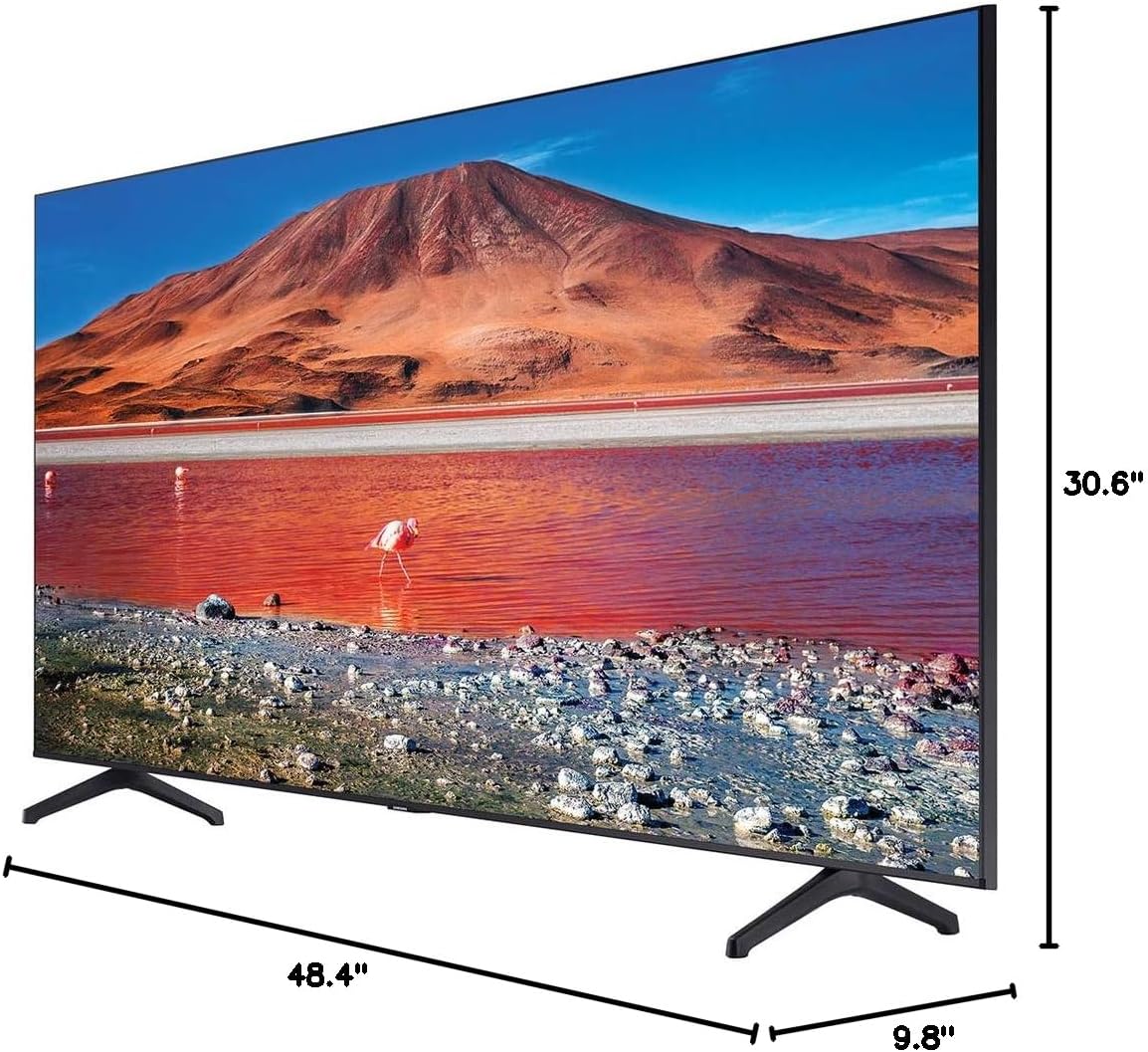
Figure 3: Diagram illustrating the dimensions of the Samsung UN55TU7000FXZA 55-inch 4K UHD Smart LED TV.
2. Attaching the Stand (Table Mount)
If using the included stand for table mounting, carefully attach the two stand pieces to the designated slots on the bottom of the TV. Ensure they are securely fastened according to the diagrams in the quick setup guide (not included in this document). The TV is designed for table mount placement.
3. Connecting Peripherals
Your TV supports various connectivity options:
- HDMI: Connect external devices such as Blu-ray players, game consoles, or cable boxes using HDMI cables.
- USB: Plug in USB drives for media playback.
- Ethernet: For a stable wired internet connection.
- Wi-Fi: Connect wirelessly to your home network.
- Bluetooth: Pair compatible audio devices or accessories.
4. Power Connection
Connect the power cable to the TV's power input and then to a wall outlet. The TV requires 20 watts of power.
Operating Your TV
1. Power On/Off
Press the Power button on the remote control to turn the TV on or off. The TV features a fast boot-up time, allowing quick access to content.
2. Smart TV Features (Powered by Tizen)
Your Samsung Smart LED TV is powered by the Tizen operating system, providing a seamless and intuitive user experience. Access a wide range of applications and streaming services directly from your TV.
- Supported Internet Services: Enjoy popular streaming platforms such as Hulu and Netflix.
- Samsung TV Plus: Access a variety of free live TV channels and on-demand content without additional subscriptions, provided you have an internet connection.
Video 1: An official product video demonstrating the features of the Samsung 4K Ultra HD Smart LED TV, including its display technology and smart capabilities.
3. Picture Settings
The Crystal UHD Display and Crystal Processor 4K work together to deliver stunning visuals. The ultra-fast processor transforms everything you watch into stunning 4K resolution.
- Crystal Display: Experience millions of colors with PurColor technology, fine-tuned for a natural-looking picture.
- HDR (High Dynamic Range): Enhances the range of light levels on your TV, so you can enjoy an immense spectrum of colors and all the visual details, even in the darkest scenes.
- 4K Upscaling: Content from HD/FHD sources is intelligently upscaled to near 4K quality.
4. Sound Settings
Adjust the sound output to your preference through the TV's audio settings menu. You can connect external sound systems via HDMI (ARC) or Bluetooth for an enhanced audio experience.
Maintenance
1. Cleaning Your TV
To clean the screen, gently wipe it with a soft, lint-free cloth. For stubborn marks, lightly dampen the cloth with water or a screen-cleaning solution. Avoid using harsh chemicals or abrasive materials. Clean the TV's exterior with a soft, dry cloth.
2. Software Updates
Ensure your TV's software is up-to-date for optimal performance and access to the latest features. You can usually check for and install updates through the TV's settings menu under 'Support' or 'Software Update'.
Troubleshooting
If you encounter issues with your TV, refer to the following common problems and solutions:
- No Power: Check if the power cable is securely connected to both the TV and the wall outlet. Ensure the outlet is functioning.
- No Picture/Sound: Verify that the correct input source is selected. Check all cable connections (HDMI, etc.) for looseness.
- Remote Control Not Working: Replace the batteries in the remote. Ensure there are no obstructions between the remote and the TV's sensor.
- Poor Picture Quality: Adjust picture settings (brightness, contrast, sharpness). Ensure the input source is providing a high-quality signal.
- Smart Features Not Working: Check your internet connection (Wi-Fi or Ethernet). Restart your router and the TV.
For more complex issues or persistent problems, please contact Samsung Customer Support.
Specifications
| Feature | Detail |
|---|---|
| Brand | Samsung |
| Model Number | UN55TU7000FXZA |
| Screen Size | 55 Inches |
| Display Technology | LED |
| Resolution | 4K Ultra HD |
| Aspect Ratio | 16:9 |
| Image Contrast Ratio | High (around 5000:1 to 6000:1, approximately) |
| Connectivity Technology | Bluetooth, Ethernet, HDMI, USB, Wi-Fi |
| Supported Internet Services | Hulu, Netflix |
| Included Components | Power Cable, Remote, Stand, TV |
| Item Weight | 30.9 pounds |
| Product Dimensions | 9.8 x 48.4 x 30.6 inches |
| Wattage | 20 watts |
| Color | Black |
| Mounting Type | Table Mount |
Warranty and Support
Your Samsung TV may come with a manufacturer's warranty. Please refer to the warranty card included with your product for specific terms and conditions. For additional protection, this product may be bundled with a CPS Enhanced Protection Pack; consult its documentation for details.
For technical assistance, service, or further inquiries, please visit the official Samsung support website or contact their customer service directly. Contact information can typically be found on the Samsung website or in your product's packaging.


