
Introduction
The Snooper Ventura S5100 Plus is a dedicated satellite navigation system engineered for caravan and motorhome drivers. It provides tailored routes by considering your vehicle's specific dimensions and weight, ensuring a safer and more efficient journey. This manual will guide you through the setup, operation, and maintenance of your device, helping you to fully utilize its advanced features.
What's in the Box
- S5100 Satellite Navigation Unit
- 5-inch Touchscreen Display
- In-vehicle Power Supply (12V-24V) with TMC antenna
- Windshield Mount
- Unit Holder
- USB Cable
Setup
Initial Device Setup
Before first use, ensure your device is fully charged. Connect the provided power supply to the unit and your vehicle's 12V-24V socket. Upon powering on, you will be prompted to configure your vehicle profile. This is crucial for the Ventura S5100 Plus to calculate safe and appropriate routes for your caravan or motorhome.

Image: Configure your vehicle's dimensions and weight for optimized routing.
Enter the precise width, length, height, and weight of your vehicle. The device supports up to 10 different vehicle profiles, allowing you to switch between configurations easily, for example, when driving with or without a trailer.
Mounting the Device
Attach the windshield mount to a clean, smooth surface on your vehicle's windshield, ensuring it does not obstruct your view. Secure the S5100 unit into the holder until it clicks into place. Adjust the viewing angle for optimal visibility.

Image: The device securely mounted on the windshield for clear viewing.
Operating Instructions
Navigation Basics
From the main menu, select "Navigate" to begin. You can search for destinations by city, postcode, or by selecting from your saved favorites. The intuitive touchscreen interface allows for easy input.

Image: The main navigation screen with options to search for destinations.
Multi-Route Technology
The Ventura S5100 Plus supports multi-stop routing, allowing you to plan journeys with up to 16 different destinations. This feature is ideal for extended trips, enabling you to include various points of interest or overnight stops along your route.

Image: Plan complex journeys with multiple stops using the multi-route feature.
Junction View and Lane Guidance
As you approach major highway junctions, the device will display a full-screen image of the intersection, clearly indicating which lane you need to be in. This feature significantly enhances safety and reduces stress when navigating complex road networks, especially with a large vehicle.

Image: Clear visual guidance for navigating complex road junctions.
Speed Limit Information (My-Speed)
The My-Speed software preloaded on the device displays the correct speed limit for the type of vehicle you are driving. This visual information helps you adhere to local regulations and maintain a safe speed.
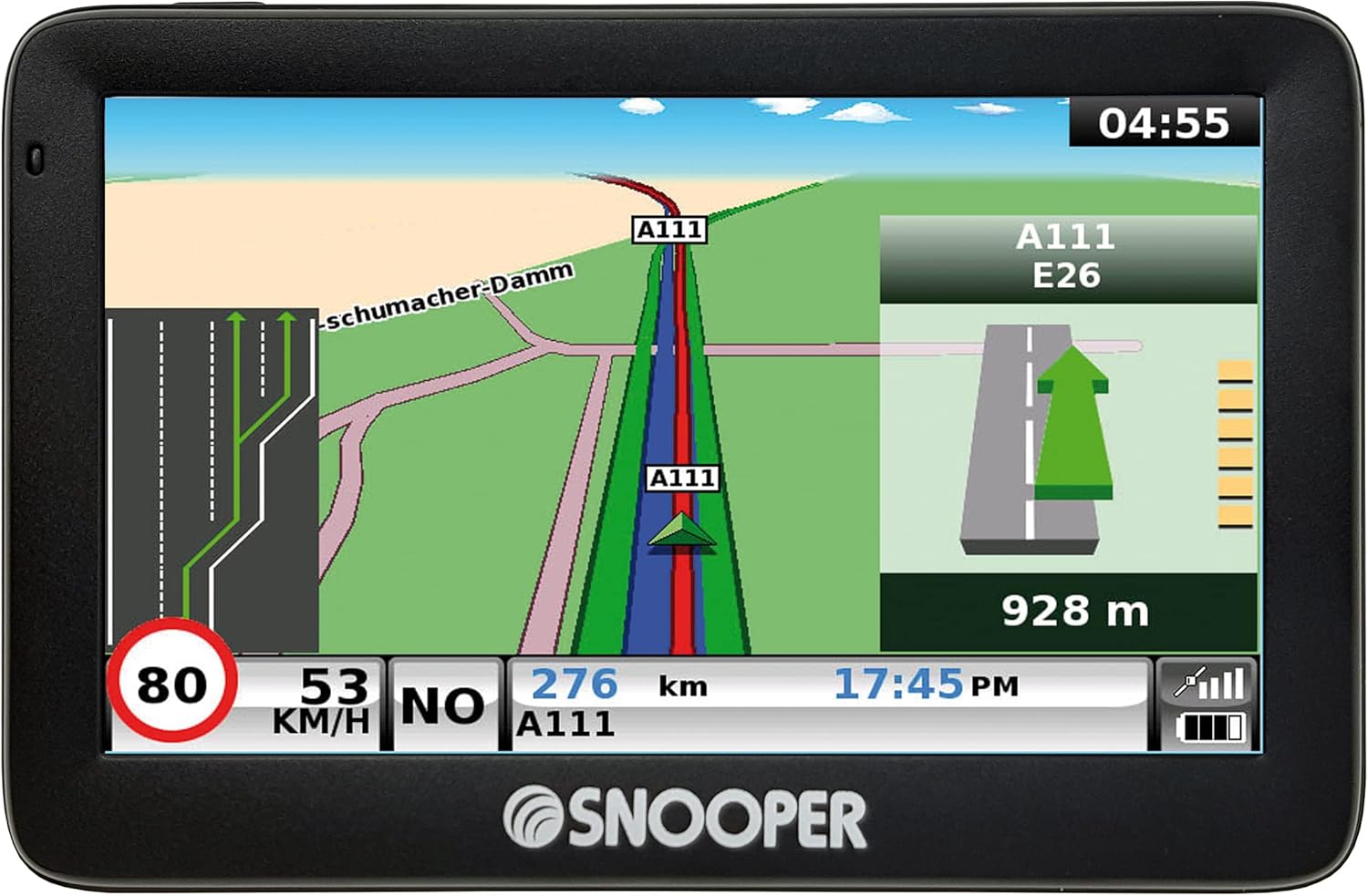
Image: Real-time display of current speed and applicable speed limits.
Points of Interest (POIs)
The Ventura S5100 Plus includes an extensive database of over 24,000 campsites and motorhome stopovers across 31 European countries. You can easily search for and navigate to these POIs, making trip planning more convenient.

Image: Search for various points of interest, including campsites and motorhome stopovers.
Maintenance
Map Updates
Your Snooper Ventura S5100 Plus comes with free lifetime map updates for UK and European maps. These updates are provided on the included 8GB Micro SD card. Regularly check for and download the latest map data to ensure your navigation system is always up-to-date with the most current road information.

Image: The device supports comprehensive UK and EU mapping with lifetime updates.
Cleaning the Device
To maintain the clarity of the 5-inch LCD touchscreen, gently wipe it with a soft, lint-free cloth. Avoid using abrasive cleaners or solvents, as these can damage the screen and casing.
Troubleshooting
This section addresses common issues you might encounter with your Snooper Ventura S5100 Plus.
- No Power/Device Not Turning On: Ensure the power cable is securely connected to both the device and the vehicle's 12V-24V socket. Check the vehicle's power outlet for functionality. If the device has an internal battery, ensure it is charged.
- GPS Signal Loss: Ensure the device has a clear, unobstructed view of the sky. Avoid placing it near large metal objects or tinted windows that might interfere with the GPS signal. Move to an open area if indoors or in a covered parking space.
- Touchscreen Unresponsive: Gently clean the screen to remove any dirt or smudges. If the issue persists, try a soft reset by holding down the power button for approximately 10-15 seconds until the device restarts.
- Incorrect Route Calculation: Verify that your vehicle profile settings (height, weight, length, width) are correctly entered and selected for your current journey. Ensure your map data is up to date by performing a map update.
- Audio Issues: Check the volume settings on the device. Ensure the speaker is not obstructed.
Specifications
| Feature | Detail |
|---|---|
| Brand | Snooper |
| Model Name | VENTURA S5100 |
| Screen Size | 5 Inches LCD Touchscreen |
| Connectivity Technology | USB |
| Special Features | Touchscreen, Multi-route Technology, Vehicle Profiles, Junction View, Lane Guidance, Truck-specific POIs (relevant for large vehicles) |
| Product Dimensions (L x W x H) | 13.2 x 8.6 x 1.9 cm |
| Weight | 509 grams |
| Included Components | S5100 Satellite Navigation Unit, In-vehicle Power Supply (12V-24V), Windshield Mount, Unit Holder, USB Cable |
| Map Type | Europe (UK & EU) |
Warranty Information
The Snooper Ventura S5100 Plus comes with a manufacturer's warranty of 1 year. Please retain your proof of purchase for any warranty claims. For detailed terms and conditions, refer to the warranty card included with your product or visit the official Snooper website.
Support
For further assistance, technical support, or inquiries regarding your Snooper Ventura S5100 Plus, please visit the official Snooper support website or contact their customer service department. Contact details can typically be found on the manufacturer's website or in the product packaging.