1. Introduction
The HP P500 Portable SSD is a compact and high-performance external solid state drive designed for reliable data storage and transfer. Utilizing high-quality NAND Flash and a USB 3.2 Gen 1 Type-C interface, it offers fast read and write speeds, making it suitable for various applications including storing documents, photos, videos, and games. Its robust design ensures durability, and its broad compatibility allows use with PCs, Macs, Android devices, and gaming consoles.
This manual provides essential information for setting up, operating, maintaining, and troubleshooting your HP P500 Portable SSD.
2. Package Contents
- HP P500 Portable SSD (500GB)
- USB Type-C to Type-A cable
- USB Type-A to Type-C adapter
3. Setup and Connection
The HP P500 Portable SSD is designed for easy plug-and-play functionality. Follow these steps to connect your device:
- Identify the correct cable: The package includes a USB Type-C to Type-A cable and a Type-A to Type-C adapter.
- Connect to your device:
- If your computer or device has a USB Type-C port, use the USB Type-C to Type-A cable with the Type-A to Type-C adapter. Connect the Type-C end of the adapter to your device and the Type-C end of the cable to the SSD.
- If your computer or device has a standard USB Type-A port, use the USB Type-C to Type-A cable directly. Connect the Type-A end to your device and the Type-C end to the SSD.
- Verify connection: Once connected, your operating system should automatically detect the HP P500 SSD. It may appear as a new drive letter (e.g., "D:", "E:") in "My Computer" or "This PC" on Windows, or on the desktop/Finder sidebar on macOS.

Figure 1: HP P500 Portable SSD with USB Type-C connection.
This image shows the sleek, black HP P500 Portable SSD from an angled perspective, highlighting its compact size and the USB Type-C port. The device has a metallic finish with the HP logo and "Portable SSD P500" printed on its surface. The image illustrates the physical appearance of the drive when ready for connection.
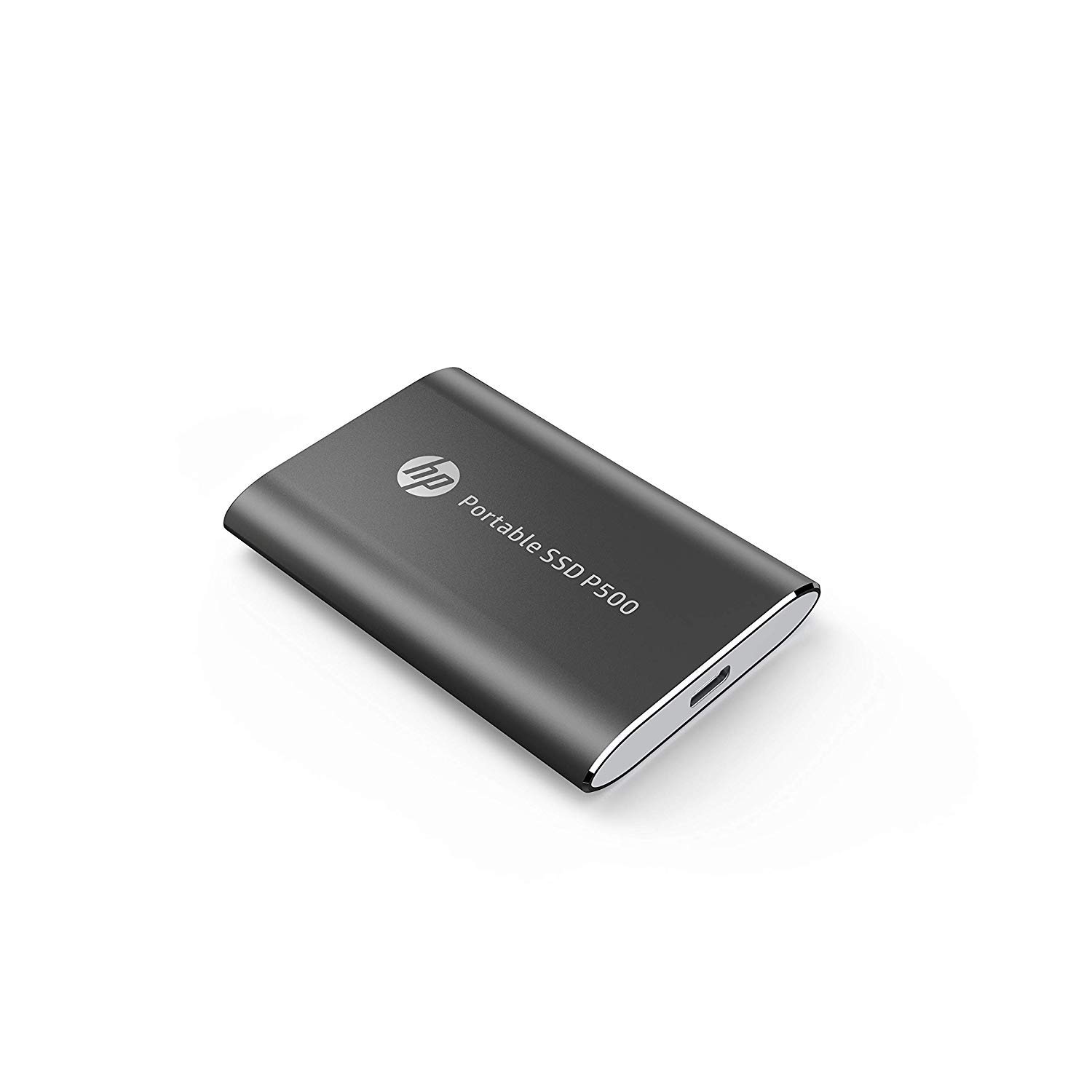
Figure 2: HP P500 Portable SSD compact design.
This image presents the HP P500 Portable SSD from a slightly different angle, emphasizing its slim and portable form factor. The device is black with a metallic sheen, featuring the HP logo and product name. This view helps users understand the physical dimensions and overall design of the SSD.
The HP P500 is compatible with a wide range of devices, including:
- Personal Computers (PC)
- Macintosh computers (Mac)
- Android devices
- Gaming consoles
4. Operating Instructions
4.1. Data Transfer
To transfer files to or from your HP P500 SSD, simply drag and drop files between your computer's storage and the SSD's drive folder. The USB 3.2 Gen 1 interface enables high-speed data transfers, with read and write speeds of up to 420 MB/s. This allows for quick movement of large files such as videos, photos, and games.
4.2. Capacity and Usage
The 500GB capacity of the HP P500 provides ample space for extensive photo libraries, documents, games, and movie collections. Its compact size and light weight (less than 50 grams) make it an ideal portable storage solution for users on the go.
4.3. Acronis Cloning Software
The HP P500 includes a customized version of Acronis True Image software for seamless data transfer and backup. This software can assist in restoring system functions and protecting against ransomware. Refer to the Acronis documentation for detailed instructions on using this feature.
5. Maintenance and Care
To ensure the longevity and optimal performance of your HP P500 Portable SSD, follow these maintenance guidelines:
- Safe Removal: Always safely eject the SSD from your operating system before physically disconnecting it. This prevents data corruption.
- Physical Protection: While rugged, avoid dropping the device or exposing it to extreme temperatures, moisture, or strong magnetic fields.
- Cleaning: Use a soft, dry cloth to clean the exterior of the SSD. Do not use liquid cleaners or solvents.
- Firmware Updates: Periodically check the official HP support website for any available firmware updates for your P500 SSD. Firmware updates can improve performance and stability.
6. Troubleshooting
If you encounter issues with your HP P500 Portable SSD, consider the following troubleshooting steps:
- Device Not Detected:
- Ensure the USB cable is securely connected to both the SSD and your computer.
- Try connecting to a different USB port on your computer.
- Test with a different USB cable if available.
- Restart your computer and try connecting again.
- Check your computer's Disk Management (Windows) or Disk Utility (macOS) to see if the drive is recognized but not assigned a drive letter or mounted.
- Slow Transfer Speeds:
- Ensure you are connected to a USB 3.0 (or higher) port on your computer. USB 2.0 ports will result in significantly slower speeds.
- Verify that your computer's drivers for USB ports are up to date.
- Avoid transferring many small files simultaneously, as this can reduce overall transfer speed compared to a single large file.
- Data Corruption:
- Always safely eject the drive before disconnecting.
- Run a disk check utility on the SSD (e.g., Error Checking on Windows, First Aid on macOS Disk Utility).
- If issues persist, consider reformatting the drive (Note: This will erase all data on the drive. Back up important data first.).
If these steps do not resolve the issue, please refer to the support section for further assistance.
7. Specifications
| Brand | HP |
| Model Number | CPSD81GS1E40-500-Blk |
| Series | HP P500 |
| Digital Storage Capacity | 500 GB |
| Hard Disk Type | Solid State Drive (SSD) |
| Hard Disk Interface | Solid State |
| Connectivity Technology | USB 3.2 Gen 1 (Type-C) |
| Read Speed | Up to 420 MB/s |
| Write Speed | Up to 420 MB/s |
| Compatible Devices | PC, Mac, Android devices, Gaming Consoles |
| Color | Black |
| Dimensions (LxWxH) | 7.91 x 5.39 x 1 cm |
| Item Weight | 59.9 g |
| Included Components | USB Type C-to-A cable, Type A-to-C adaptor |
8. Warranty Information
The HP P500 Portable SSD typically comes with a 1-year limited warranty from the date of purchase. This warranty covers manufacturing defects and ensures the product functions as specified under normal use. For specific terms and conditions, including how to make a warranty claim, please refer to the warranty card included with your product or visit the official HP support website.
Proof of purchase is generally required for warranty service.
9. Support and Contact
For further assistance, technical support, or to access updated drivers and firmware, please visit the official HP support website:
You may also find helpful resources and frequently asked questions (FAQs) on the product support page for the HP P500 Portable SSD.