
Educational Insights 8808
Educational Insights GeoSafari® Jr. Talking Wildlife Camera™
Model: 8808
Brand: Educational Insights
Introduction
The GeoSafari® Jr. Talking Wildlife Camera™ is an interactive educational toy designed to spark curiosity about wildlife and nature. Featuring the voice and photography of Wildlife Warrior Robert Irwin, this camera provides an immersive learning experience with high-resolution images, fun facts, and engaging quiz questions. It is suitable for children aged 4 to 8 years.

The GeoSafari® Jr. Talking Wildlife Camera™ and its packaging.
Safety Information
Please read and understand all safety information before using this product. Keep these instructions for future reference.
- Battery Safety: This product requires 3 AAA batteries (not included). Ensure batteries are inserted with correct polarity (+ and -). Do not mix old and new batteries, or different types of batteries. Remove exhausted batteries promptly. Do not dispose of batteries in fire.
- Choking Hazard: Small parts may be generated. Not for children under 3 years due to potential choking hazards.
- Adult Supervision: Adult supervision is recommended during play, especially during initial setup and battery installation.
- Product Care: Do not submerge the camera in water. Clean with a soft, dry cloth.
What's in the Box
Your GeoSafari® Jr. Talking Wildlife Camera™ package should contain the following items:
- GeoSafari® Jr. Talking Wildlife Camera™ unit
- Removable Tripod
- Instruction Manual (this document)

Key components of the GeoSafari® Jr. Talking Wildlife Camera™.
Setup
1. Battery Installation
- Locate the battery compartment on the underside of the camera unit.
- Using a small Phillips head screwdriver (not included), unscrew the battery compartment cover.
- Insert 3 new AAA batteries, ensuring correct polarity as indicated inside the compartment.
- Replace the battery compartment cover and secure it with the screw.
2. Attaching the Tripod
The camera is designed to be used with the included tripod for stable viewing and optimal functionality. The tripod also houses the speaker for audio playback.
- Align the camera unit with the tripod base.
- Gently slide the camera onto the tripod until it clicks securely into place. Ensure a firm connection for proper audio and image display.

Attaching the camera to its tripod.
Operating Instructions
The GeoSafari® Jr. Talking Wildlife Camera™ offers two primary modes of play: Fact Mode and Quiz Mode, along with a Pretend Play Mode.
General Operation
- Look through the dual eyepiece viewer to see the high-resolution images.
- Use the interactive buttons on the camera to navigate through content and answer questions.

A child engaging with the Talking Wildlife Camera.

Detailed view of the camera's interactive buttons.
Fact Mode
In Fact Mode, Robert Irwin will guide you through 130 of his own wildlife photos, providing over 120 fun facts about the animals and their habitats. To activate Fact Mode, press the Fact Button (often indicated by a magnifying glass icon or similar). Use the arrow buttons to browse through different images and facts.

Learn about animals and their habitats with Robert Irwin.

Explore diverse environments and wildlife from around the world.
Quiz Mode
Test your knowledge with over 120 quiz questions. To enter Quiz Mode, press the Quiz Button (often indicated by a question mark icon or similar). Robert Irwin will ask questions based on the facts you've learned. Select your answer using the numbered buttons (1, 2, 3) or arrow buttons, then confirm your choice.
Pretend Play Mode
For on-the-go adventures, the camera can be removed from its tripod. While detached, the camera functions as a pretend play toy, allowing children to mimic taking photos and explore their imagination. Note that the audio features and image viewing require the camera to be securely attached to the tripod.
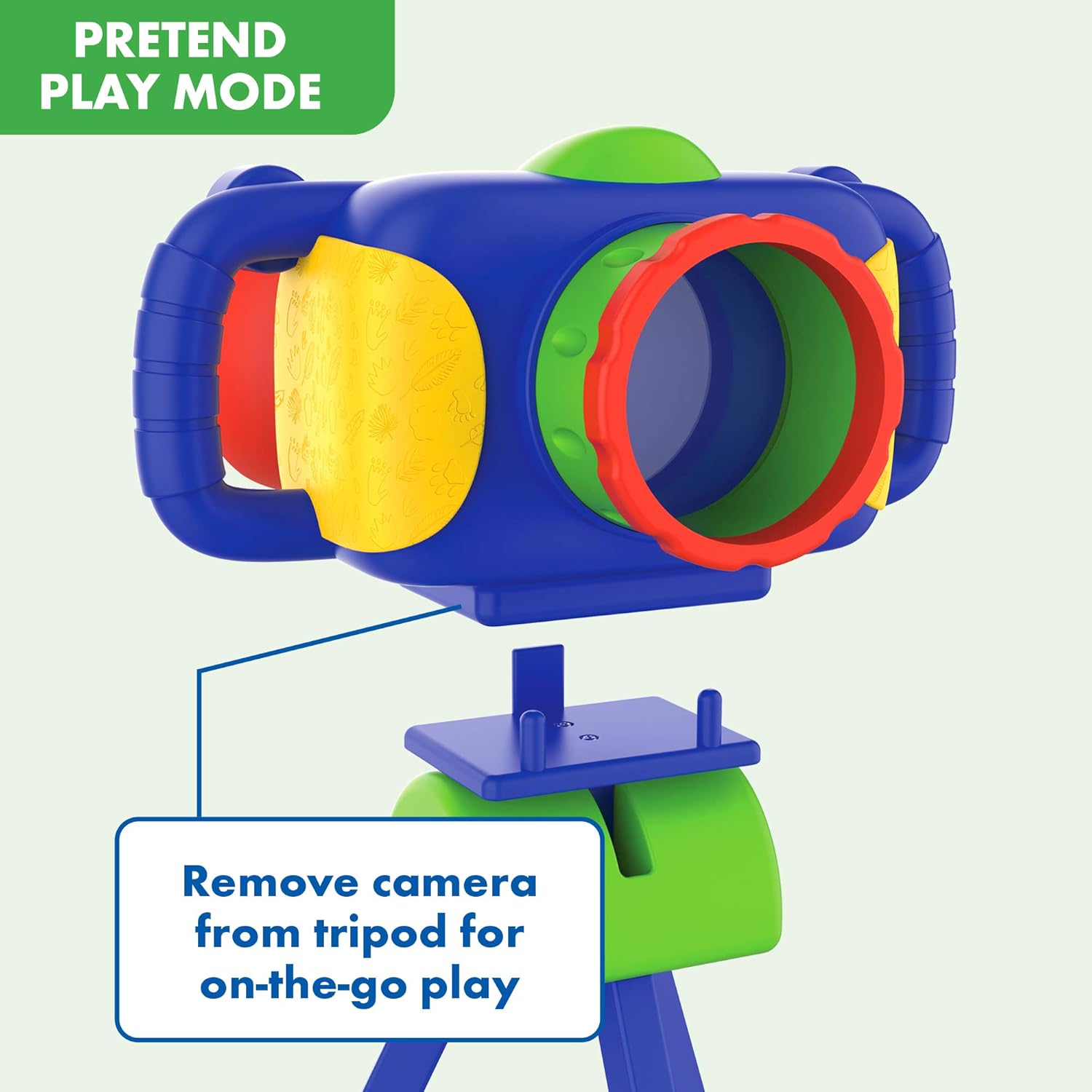
The camera can be detached for imaginative play.
Official Product Video
This video provides an overview of the GeoSafari® Jr. Talking Wildlife Camera™ features and how it engages children in learning about wildlife with Robert Irwin.
Maintenance
- Cleaning: Wipe the camera and tripod with a soft, slightly damp cloth. Do not use harsh chemicals or abrasive cleaners.
- Storage: Store the camera in a cool, dry place away from direct sunlight when not in use.
- Battery Replacement: Replace batteries when audio becomes distorted or images appear dim. Always use fresh, high-quality AAA batteries.
Troubleshooting
| Problem | Possible Cause | Solution |
|---|---|---|
| Camera does not turn on or has no sound/images. |
|
|
| Images appear blurry. |
|
|
| Tripod attachment feels loose or breaks easily. |
|
|
Specifications
- Model Number: 8808
- Manufacturer: Educational Insights
- Recommended Age: 4 - 8 years
- Power Source: 3 x AAA batteries (not included)
- Image Count: 130 built-in HD images
- Facts & Quizzes: Over 120 fun facts and 120 quiz questions
- Item Weight: 1.89 pounds
- Release Date: January 1, 2020
Warranty and Support
Educational Insights stands behind the quality of its products. For specific warranty information, product support, or to inquire about replacement parts, please visit the official Educational Insights website or contact their customer service department. Keep your purchase receipt as proof of purchase.
You can find more information and contact details on the Educational Insights Amazon Store.
Ask a question about this manual
Ask about setup, troubleshooting, compatibility, parts, safety, or missing instructions. Manuals+ will review the question and use this page’s manual context to help answer it.