
AYR int_LOCK RF 504 - 144
int_LOCK RF Invisible Electronic Security Lock
Model: int_LOCK RF 504 - 144
Introduction
The int_LOCK RF is an advanced invisible electronic security lock designed to significantly enhance the security of your main doors. This system integrates an alarm function and intelligent configurable features, providing robust protection against unauthorized entry. Its unique design makes it undetectable from the exterior, adding an extra layer of deterrence.

Figure 1: Front view of the int_LOCK RF Invisible Electronic Security Lock in matte brass finish.
Safety Information
- Battery Safety: Use only the specified battery types (9V for the main unit, CR2032 for remotes). Do not mix old and new batteries. Dispose of batteries responsibly according to local regulations.
- Installation: Professional installation is recommended to ensure proper function and security. Ensure all screws are tightened securely.
- Indoor Use Only: This product is designed for indoor use on main doors. Do not expose to water, extreme temperatures, or direct sunlight.
- Alarm Volume: The alarm can exceed 90 dB. Avoid prolonged exposure to the alarm sound at close range.
- Children and Pets: Keep remote controls out of reach of children and pets to prevent accidental activation or tampering.
Package Contents
Verify that all components listed below are included in your package:
- 1 x int_LOCK RF Electronic Lock
- 4 x int_Key RF Remote Controls
- 1 x 9V Battery (CP9V)
- 1 x CR2032 3V Battery (for remote)
- 1 x Bridge
- 1 x Coupling Aid
- 4 x Wood Screws (6 x 50 mm)
- 4 x Wood Screws (6 x 40 mm)
- 8 x Sheet Metal Screws (6.3 x 32 mm)
- 2 x Installation Templates
- 8 x Extra Shims
- 1 x User Manual
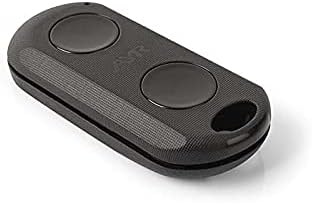
Figure 2: An int_Key RF Remote Control, used to operate the lock.
Setup and Installation
Follow these steps carefully for proper installation. It is recommended to have the installation performed by a qualified professional.
- Prepare the Door and Frame: Use the provided installation templates to mark the drilling points on both the door and the door frame. Ensure precise alignment for optimal performance.
- Mount the int_LOCK RF Unit: Secure the main int_LOCK RF unit to the inside of your door using the appropriate wood screws (6x50mm or 6x40mm) or sheet metal screws (6.3x32mm) depending on your door material. Ensure the unit is level and firmly attached.
- Install the Bridge/Strike Plate: Attach the bridge (strike plate) to the door frame, aligning it perfectly with the int_LOCK RF unit on the door. Use the remaining screws to secure it. The coupling aid can be used to ensure correct positioning.
- Insert Batteries: Open the battery compartment on the int_LOCK RF unit and insert the 9V battery. Ensure correct polarity. For the remote controls, insert the CR2032 3V battery into each remote.
- Synchronize Remote Controls: Follow the instructions in the separate remote control synchronization guide (if provided) or the main manual to pair the int_Key RF remote controls with the int_LOCK RF unit. The lock can support up to 20 remote controls.

Figure 3: Visual guide for the installation process, showing marking, mounting, and securing the lock.

Figure 4: The int_LOCK RF unit installed on the interior side of a door, demonstrating its discreet placement.
Operating Instructions
The int_LOCK RF is operated primarily using the int_Key RF remote controls.
- Locking the Door: Press the designated lock button on your int_Key RF remote control. The lock will engage, securing the door. A confirmation sound or light indicator may be present.
- Unlocking the Door: Press the designated unlock button on your int_Key RF remote control. The lock will disengage, allowing the door to be opened.
- Activating the Alarm: The int_LOCK RF features a loud alarm (over 90 dB) that can be activated via the remote control. Refer to your remote's specific button layout for alarm activation. This alarm deters tampering attempts.
- Adding/Removing Remotes: To add new remote controls or remove existing ones, follow the specific pairing/unpairing procedure outlined in the synchronization section of the full manual.


Figure 5: Icons illustrating key functions: remote operation, alarm activation, and enhanced security.
Maintenance
- Battery Replacement:
- Main Unit (int_LOCK RF): When the battery level is low, the unit may emit a warning signal. Replace the 9V battery promptly to ensure continuous operation. Open the battery compartment, remove the old battery, and insert a new 9V battery, observing polarity.
- Remote Controls (int_Key RF): If a remote control becomes unresponsive, replace its CR2032 3V battery. Refer to the remote's specific design for battery access.
- Cleaning: Clean the exterior of the int_LOCK RF unit and remote controls with a soft, dry cloth. Do not use abrasive cleaners, solvents, or excessive moisture, as these can damage the finish or internal components.
- Regular Checks: Periodically check the mounting screws for tightness and ensure the lock mechanism operates smoothly without obstruction.
Troubleshooting
| Problem | Possible Cause | Solution |
|---|---|---|
| Lock does not respond to remote control. |
|
|
| Alarm triggers unexpectedly. |
|
|
| Lock mechanism does not engage/disengage smoothly. |
|
|
Specifications
| Manufacturer | AYR |
| Model Number | int_LOCK RF 504 - 144 |
| Product Dimensions | 10.5 x 3.3 x 12.1 cm (L x W x H) |
| Weight | 700 g |
| Color | Matte Brass |
| Material | Carbon Steel, Plastic, Zinc |
| Lock Type | Electronic Door Lock |
| Power Source (Main Unit) | 1 x 9V Battery (included) |
| Power Source (Remote) | 1 x CR2032 3V Battery (included per remote) |
| Special Features | Invisible electronic security lock with alarm, configurable functions. |
| Recommended Use | Indoor; Home, Professional |
Warranty and Support
For warranty information and technical support, please refer to the documentation provided with your purchase or contact AYR customer service directly. Keep your proof of purchase for warranty claims.
Manufacturer: AYR
Contact Information: Please visit the official AYR website or refer to the contact details provided in your product packaging for support.
Ask a question about this manual
Ask about setup, troubleshooting, compatibility, parts, safety, or missing instructions. Manuals+ will review the question and use this page’s manual context to help answer it.