1. Introduction
Thank you for choosing the Core RC CR194 5008- Servo. This high-performance digital servo is engineered for precision and durability, making it an excellent choice for 1/12th scale remote-controlled vehicles. This manual provides essential information for proper installation, operation, and maintenance to ensure optimal performance and longevity of your servo.
Please read this manual thoroughly before using the product.
2. Features
- Coreless Motor: Provides smooth operation and quick response.
- Metal Geared: Enhances durability and resistance to wear.
- Twin Ball Bearing: Reduces friction and improves efficiency and lifespan.
- Digital Performance: Offers precise control and consistent torque.
- Heat Sink: Integrated for effective cooling during demanding use.
- Wide Range of Accessories: Includes various servo horns and mounting hardware.
3. Setup and Installation
Proper installation is crucial for the performance and reliability of your servo. Follow these general guidelines:
- Mounting: Securely mount the servo in the designated location within your vehicle chassis using the provided screws and rubber grommets. Ensure the servo is firmly attached to prevent movement during operation, which can affect steering precision.
- Servo Horn Attachment: Select the appropriate servo horn for your application. Attach it to the servo output shaft, ensuring it is centered before tightening the screw. Avoid overtightening.
- Linkage Connection: Connect the servo horn to the steering or throttle linkage of your vehicle. Ensure there is no binding or excessive play in the linkage system. Adjust the linkage length as necessary to achieve the desired range of motion without straining the servo.
- Receiver Connection: Plug the servo's connector cable into the appropriate channel on your RC receiver. Refer to your receiver's manual for correct channel assignments (e.g., Channel 1 for steering, Channel 2 for throttle). Ensure the polarity is correct.
- Power On: With the servo connected, power on your transmitter first, then your receiver/vehicle. This sequence helps prevent unexpected servo movements.
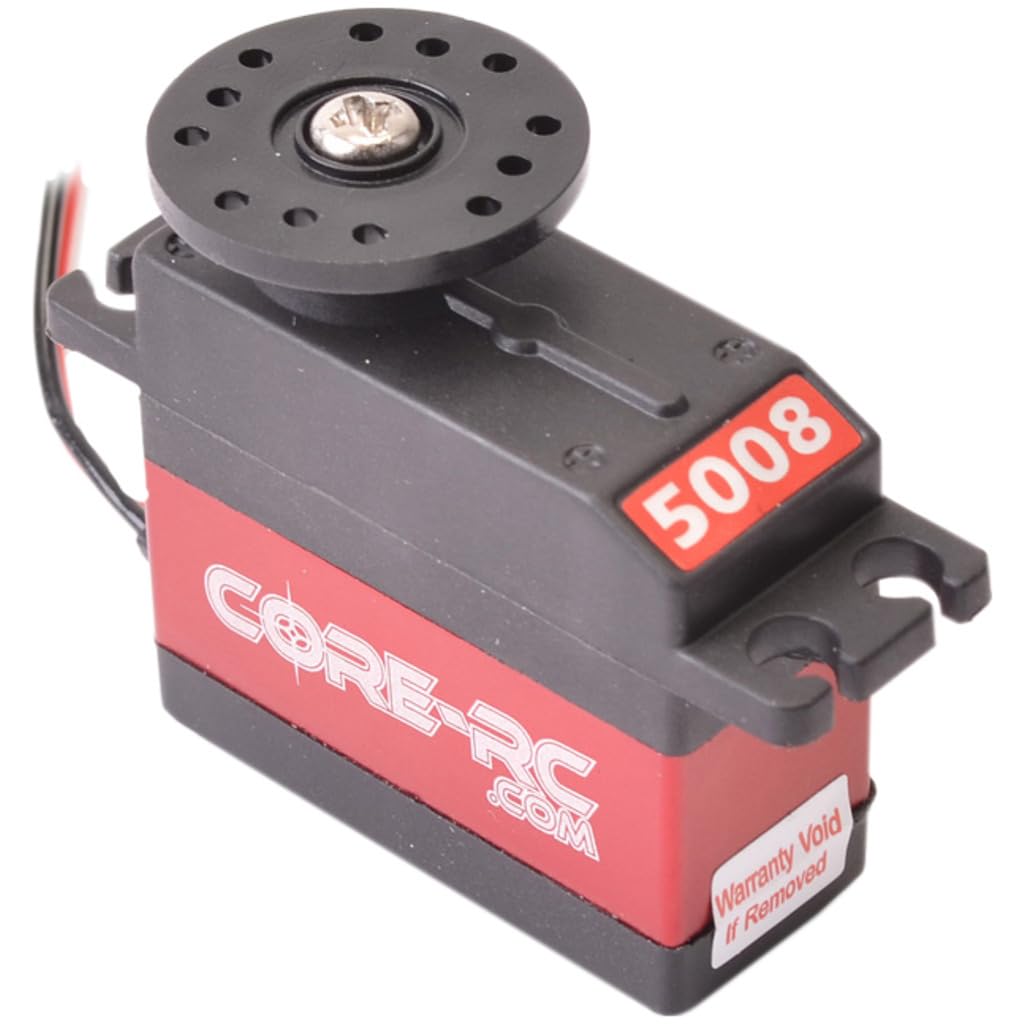
Image: Core RC CR194 5008- Servo, showcasing its compact design and wiring for connection to an RC receiver.
4. Operating Instructions
Once installed, the Core RC 5008- Servo operates in conjunction with your RC transmitter and receiver to control the desired function (e.g., steering, throttle). The digital nature of this servo provides precise and responsive control.
- Centering: Ensure your transmitter's trim settings are neutral (centered) before operation. The servo should return to its neutral position when the control stick is released.
- Range of Motion: Verify that the servo provides the full required range of motion for your application without binding or over-extending the mechanical limits of the vehicle's components. Adjust end-points on your transmitter if necessary.
- Power Supply: Ensure your receiver and servo are supplied with adequate voltage (typically 4.8V to 6.0V). Operating at incorrect voltages can damage the servo or lead to inconsistent performance.
5. Maintenance
Regular maintenance will help prolong the life and performance of your servo:
- Cleaning: Keep the servo free from dirt, dust, and moisture. Use a soft, dry brush or compressed air to clean the exterior. Avoid using solvents or harsh chemicals.
- Gear Inspection: Periodically inspect the metal gears for any signs of wear, damage, or foreign debris. While metal gears are durable, extreme impacts can cause damage.
- Wiring Check: Ensure all wiring connections are secure and free from cuts or fraying. Loose connections can lead to intermittent operation.
- Mounting Security: Regularly check that the servo is securely mounted and that mounting screws are tight.
6. Troubleshooting
If you encounter issues with your Core RC 5008- Servo, consider the following:
- Servo Not Responding:
- Check all wiring connections between the servo, receiver, and power source.
- Ensure the receiver and transmitter are powered on and properly bound.
- Verify the servo is plugged into the correct channel on the receiver.
- Test with a different servo or receiver if available to isolate the problem.
- Erratic or Jittery Movement:
- Check for radio interference.
- Ensure the power supply to the receiver and servo is stable and sufficient.
- Inspect servo gears for damage or debris.
- Check for binding in the mechanical linkage.
- Lack of Torque or Speed:
- Verify the power supply voltage is within the recommended range (6V for optimal performance).
- Ensure there is no excessive friction or binding in the mechanical linkage.
- Check for signs of internal damage or wear.
7. Specifications
| Specification | Value |
|---|---|
| Weight | 33g |
| Speed (6V) | 0.08 sec/60 degrees |
| Torque (6V) | 5.0 kg/cm |
| Size (L x W x H) | 35.5mm x 15.3mm x 42.2mm |
| Spline | 25T |
| Motor Type | Coreless |
| Gear Type | Metal |
| Bearings | Twin Ball Bearing |
8. Warranty and Support
For warranty information or technical support regarding your Core RC CR194 5008- Servo, please contact your retailer or the manufacturer directly. Keep your proof of purchase for any warranty claims.
Contact details can typically be found on the product packaging or the official Core RC website.


