
Optoma UHD50X
Optoma UHD50X True 4K UHD Projector User Manual
Model: UHD50X | Brand: Optoma
1. Introduction
This manual provides essential information for the setup, operation, and maintenance of your Optoma UHD50X True 4K UHD Projector. The Optoma UHD50X is engineered for movies and gaming, delivering incredible details and vibrant colors with 4K UHD resolution and a 240Hz refresh rate for enhanced gaming performance.
2. What's in the Box
Upon unboxing, please ensure all the following items are present:
- UHD50X Projector
- AC power cord
- Remote control
- Batteries for remote
- Quick start guide card
3. Key Features
- TRUE 4K ULTRA HD: Experience high-quality home cinema feel with 8.3 million distinct addressable on-screen pixels.
- LAG-FREE GAMING: World's first ultra-fast 240Hz gaming projector enabling blur-free visuals and unparalleled smoothness, combined with Enhanced Gaming Mode to produce a 16ms response time, or 26ms at 4K UHD for the lowest input lag on a 4K projector.
- HDR & HLG COMPATIBLE: Enjoy brighter whites and deeper black levels for an enhanced viewing experience of images and videos, enabled by HDR10 & HLG technologies.
- DYNAMIC BLACK: Dynamic Black technology provides more depth to the image by smoothing lamp output to create a high contrast ratio (500,000:1); bright scenes appear clear while dark scenes remain detailed.
- FLEXIBLE INSTALLATION: Whether ceiling mounted or placed on a table, get the picture just right with 1.3X zoom, 5-15% vertical lens shift and ±40° keystone correction.
- CRISP, COLORFUL PICTURE: UltraDetail technology ensures enhanced image sharpness with a higher frame rate to deliver a crystal clear picture; RGBWRGBW 8 segment color wheel increases the color ratio for richer, vivid and cinematic image.
- ULTRA-BRIGHT: Enjoy 3,400 lumens of brightness in your home theater room, family room, gaming room – or even outdoors for backyard movie nights.
- VARIETY OF INPUTS: Connect with most media players, gaming consoles, PCs, Macs, and mobile devices with input options such as HDMI 2.0 inputs with HDCP 2.2 support, HDMI 4K, USB, VGA, and more.
- LONG LAMP LIFE: Enjoy up to 15,000 hours of lamp life, enabling an average of two 2-hour movies every day for 10 plus years.
- STANDARD THROW PROJECTION: Project a 100" image from approximately 9–11 feet away; project a 120" image from approximately 11–13 feet away; UHD50X projects up to a 302" image.
4. Setup Guide
4.1 Physical Placement
The Optoma UHD50X projector measures 4.6 x 12.4 x 10.6 inches and weighs 8.6 pounds. It can be placed on a table or ceiling-mounted. Ensure adequate ventilation around the projector.

Figure 4.1: Front view of the Optoma UHD50X Projector.
4.2 Connectivity
The projector offers a variety of input and output ports for connecting to different devices. Refer to the diagram below for port identification.

Figure 4.2: Dimensions and Connectivity ports of the Optoma UHD50X. Includes USB Service Only, RS-232, VGA In, HDMI 1.4a, HDMI 2.0/MHL 2.1, USB Power Out (5V/1.5A), S/PDIF, 12V Out, Audio In (stereo, 3.5mm jack), and Audio Out (stereo, 3.5mm jack).
For optimal 4K UHD performance, use HDMI 2.0 inputs with HDCP 2.2 support. The projector also supports VGA and USB connections.
4.3 Initial Power On and Adjustment
Connect the AC power cord to the projector and a power outlet. Press the power button on the projector or remote control to turn it on. Use the lens shift and zoom controls located on the top of the projector to adjust the image size and position. Keystone correction (±40°) can be used to square the image if the projector is not perfectly perpendicular to the screen.
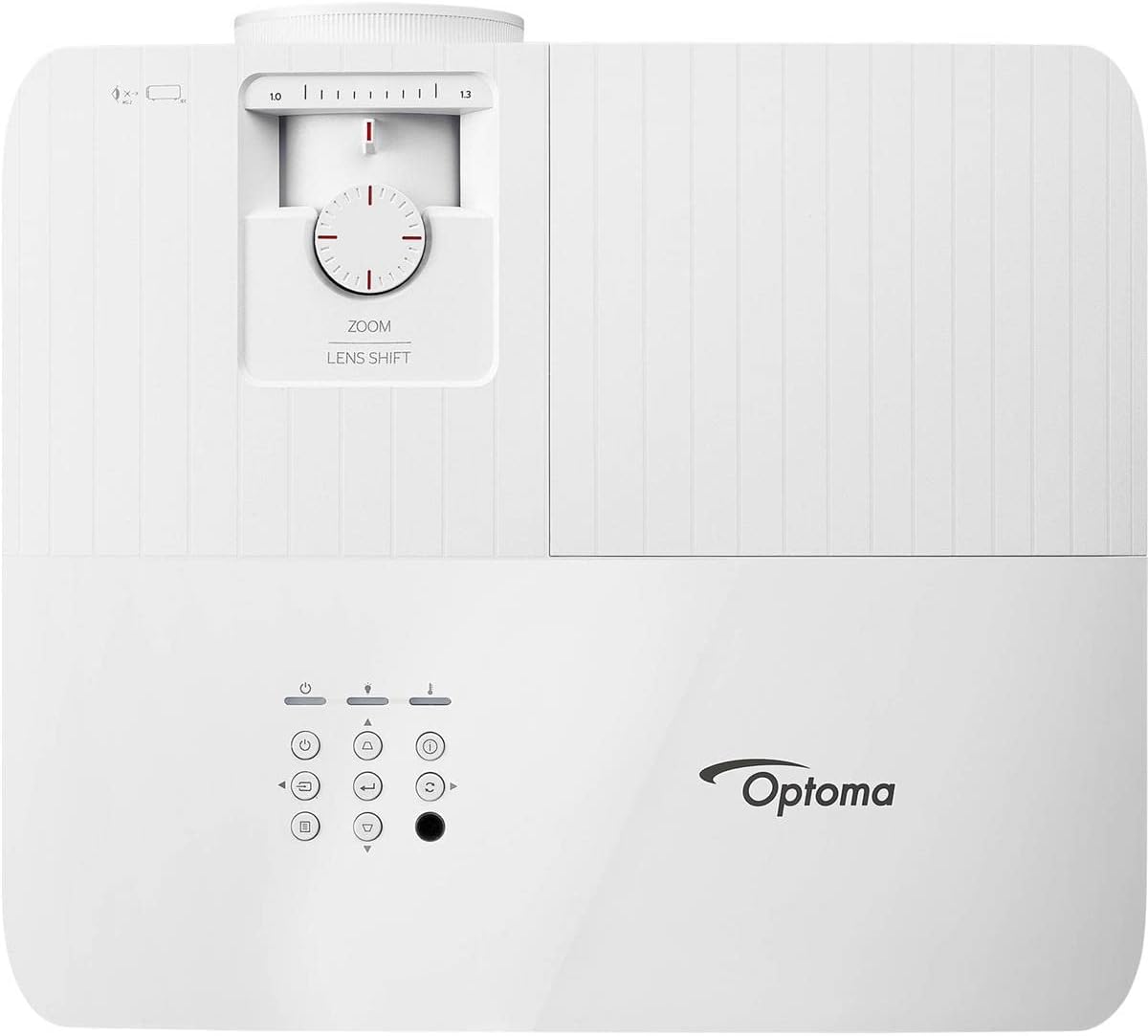
Figure 4.3: Top view of the Optoma UHD50X Projector showing zoom and lens shift controls.
4.4 Setup Video
Watch this official video for a visual guide on setting up and understanding the features of your Optoma UHD50X projector.
Video 4.4: Official Optoma UHD50X 4K UHD Projector overview. This video highlights the projector's capabilities and provides a visual demonstration of its features.
5. Operating Instructions
5.1 Powering On/Off
To power on the projector, press the power button on the remote control or the projector's control panel. To power off, press the power button twice. Allow the projector to cool down properly after use before unplugging it.
5.2 Source Selection
Use the "Source" button on the remote or control panel to cycle through available input sources (HDMI 1, HDMI 2, VGA, etc.).
5.3 Image Quality and Modes
The UHD50X delivers true 4K UHD resolution with 8.3 million pixels. It supports HDR10 and HLG content for enhanced contrast and color. The projector features a high brightness of 3,400 lumens, allowing for clear viewing even in well-lit rooms.
Video 5.3.1: Explanation of True 4K UHD technology and its benefits for image clarity and detail.
5.4 Gaming Features
For gamers, the UHD50X offers an ultra-fast 240Hz refresh rate and an Enhanced Gaming Mode that reduces input lag to 16ms at 1080p, or 26ms at 4K UHD. This ensures smooth, blur-free visuals and highly responsive gameplay.
Video 5.4.1: Overview of Optoma's award-winning projectors, highlighting features beneficial for gaming and home entertainment.
5.5 Audio
The projector includes integrated speakers. For a more immersive audio experience, connect external audio systems via the Audio Out (3.5mm jack) or S/PDIF ports.
6. Maintenance
6.1 Lamp Life
The lamp in your UHD50X projector has a life of up to 15,000 hours in Dynamic mode. This provides many years of use with minimal maintenance. When the lamp reaches the end of its life, a warning message will appear on the screen, and the lamp indicator light will illuminate.
6.2 Cleaning
Regularly clean the projector's lens with a soft, lint-free cloth specifically designed for optical surfaces. Do not use abrasive cleaners or solvents. Keep the air vents clear of dust and obstructions to ensure proper airflow and prevent overheating.
7. Troubleshooting
If you encounter issues with your Optoma UHD50X projector, refer to the common problems and solutions below:
| Problem | Possible Cause | Solution |
|---|---|---|
| No image on screen |
|
|
| Blurry or distorted image |
|
|
| Overheating warning |
|
|
If the issue persists, please contact Optoma customer support for further assistance.
8. Technical Specifications
| Specification | Detail |
|---|---|
| Product Dimensions | 4.6 x 12.4 x 10.6 inches |
| Item Weight | 8.6 pounds |
| Item Model Number | UHD50X |
| Brand | Optoma |
| Recommended Uses For Product | Gaming |
| Special Feature | 240Hz Gaming Mode, Speakers |
| Connectivity Technology | VGA, USB, HDMI |
| Display Resolution | 3840 x 2160 (4K UHD) |
| Brightness | 3400 lumens |
| Lamp Life | Up to 15,000 hours (Dynamic mode) |
| Input Lag | 16ms (1080p 240Hz), 25ms (4K UHD) |
| Contrast Ratio | 500,000:1 (Dynamic Black) |
9. Warranty and Support
Your Optoma UHD50X projector comes with a manufacturer's warranty. Please refer to the warranty card included in your product packaging or visit the official Optoma website for detailed warranty terms and conditions.
Optional protection plans are available for purchase to extend coverage:
- 2-Year Protection Plan
- 3-Year Protection Plan
- Complete Protect (monthly plan)
For technical support, service, or to inquire about replacement parts, please contact Optoma customer service through their official channels. Keep your purchase receipt and product serial number handy when contacting support.
Ask a question about this manual
Ask about setup, troubleshooting, compatibility, parts, safety, or missing instructions. Manuals+ will review the question and use this page’s manual context to help answer it.