
JAINSONS PET PRODUCTS SF-1000F Aquarium Filter
Jainsons Pet Products Sobo Aquarium Pump External Filter SF-1000F
User Manual
Introduction
Thank you for choosing the Jainsons Pet Products Sobo Aquarium Pump External Filter SF-1000F. This external canister filter is designed to provide efficient mechanical, chemical, and biological filtration for your aquarium, ensuring crystal clear water and a healthy aquatic environment. With a flow rate of 1000 L/H and a power consumption of 10W, this filter is suitable for various applications including biofloc systems, fish farming ponds, fish tanks, and hydroponics setups. Please read this manual thoroughly before installation and operation to ensure proper use and longevity of your filter.
Safety Instructions
- Always disconnect the power supply before performing any maintenance, cleaning, or assembly.
- Ensure that the filter is placed on a stable, level surface below the aquarium water level to allow for proper siphoning and operation.
- Do not operate the filter if the power cord or plug is damaged.
- This appliance is for indoor use only and should not be exposed to water splashes or rain.
- Keep out of reach of children.
- Do not use the filter for purposes other than those specified in this manual.
- Ensure all connections are secure and leak-free before powering on.
Product Overview
Components
The SF-1000F external filter system includes the main filter unit, inlet and outlet hose connections, various tubes, and suction cups for secure placement. Refer to the images below for a visual guide to the filter's parts and included accessories.
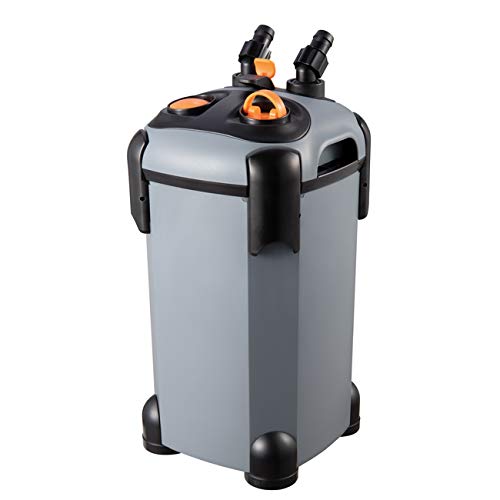
Figure 1: Main unit of the Sobo Aquarium Pump External Filter SF-1000F.

Figure 2: Detailed view highlighting key features and connection points of the SF-1000F filter.

Figure 3: Included accessories and tubing for the SF-1000F external filter.
Features
- Effective Filtration: Ensures efficient mechanical, chemical, and biological filtration, keeping water crystal clear and free from harmful impurities.
- Versatile Use: Suitable for various applications including biofloc systems, fish farming ponds, fish tanks, and hydroponics setups.
- Reliable Performance: Powered by a robust motor, it delivers consistent water flow and optimal filtration without compromising on efficiency.
- Easy Installation: Designed for user convenience, the filter is easy to install and maintain.
- Durable Build: Crafted from high-quality materials for durability and longevity.
Setup and Installation
Follow these steps for proper setup and installation of your SF-1000F external filter:
- Prepare the Filter Media:
Open the filter unit by releasing the locking clips. Remove the filter baskets. Rinse all filter media (sponges, ceramic rings, bio balls, activated carbon - if included or purchased separately) thoroughly under clean water. Arrange the media in the baskets according to your filtration needs (e.g., mechanical media at the bottom, biological in the middle, chemical at the top). Ensure there is space for water flow.
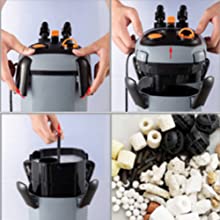
Figure 4: Opening the filter head and arranging filtration media.
- Assemble the Filter Head:
Place the filter head back onto the main unit, ensuring it is properly aligned. Secure all locking clips firmly to prevent leaks.
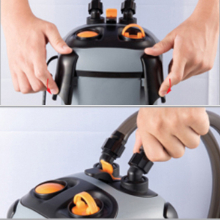
Figure 5: Securing the filter head using the locking clips.
- Connect Hoses:
Attach the inlet and outlet hoses to the corresponding ports on the filter head. Ensure the connections are tight. The "IN" port is for water entering the filter, and the "OUT" port is for filtered water returning to the aquarium.

Figure 6: Top view of the filter head indicating IN and OUT connections.
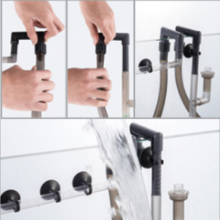
Figure 7: Proper connection of the inlet and outlet hoses.
- Position Inlet and Outlet Tubes:
Place the inlet tube (with strainer) inside the aquarium, ensuring it is submerged and positioned to draw water effectively. Position the outlet tube (spray bar or return nozzle) to create good water circulation in the aquarium.
- Prime the Filter:
Before plugging in, fill the filter unit with water. This can be done by pouring water directly into the filter or by using the priming button/lever if available on your model. Ensure the filter is completely filled with water to avoid dry running.
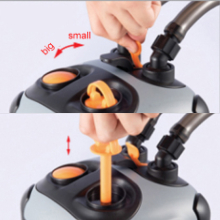
Figure 8: Priming the filter to remove air and fill with water.
- Check for Leaks:
Once primed, double-check all connections for any leaks before plugging the unit into a power outlet.
Operating Instructions
- Power On:
After ensuring the filter is fully primed and all connections are secure, plug the power cord into a suitable electrical outlet. The filter should start operating immediately, drawing water from the aquarium, filtering it, and returning clean water.
- Flow Rate:
The SF-1000F has a maximum flow rate of 1000 Liters Per Hour. This flow rate is generally fixed and optimized for efficient filtration. Ensure the inlet and outlet tubes are not obstructed to maintain optimal flow.
- Continuous Operation:
For best results and to maintain stable water parameters, the filter should operate continuously 24/7. Only turn off the filter for maintenance or feeding, and restart it promptly.

Figure 9: The SF-1000F external filter in operation with an aquarium setup.
Maintenance
Regular maintenance is crucial for the optimal performance and longevity of your SF-1000F filter. Perform maintenance at least once a month, or more frequently depending on your aquarium's bioload.
- Disconnect Power:
Always unplug the filter from the power outlet before beginning any maintenance.
- Disconnect Hoses:
Close the inlet and outlet valves (if present) and disconnect the hoses from the filter head. This will prevent water from spilling.
- Remove Filter Head:
Release the locking clips and carefully lift the filter head from the canister body.
- Clean Filter Media:
Remove the filter baskets. Rinse mechanical filter media (sponges, filter floss) thoroughly in old aquarium water (from a water change) to preserve beneficial bacteria. Chemical media (like activated carbon) should be replaced every 2-4 weeks. Biological media (ceramic rings, bio balls) should only be gently rinsed if heavily clogged, again using old aquarium water.
- Clean Impeller and Housing:
Carefully remove the impeller from the filter head and clean it and its housing with a small brush to remove any debris or algae buildup. This ensures smooth operation and prevents noise.
- Clean Canister and Hoses:
Rinse the inside of the filter canister. Clean the inlet and outlet hoses using a hose brush to remove any buildup that might restrict flow.
- Reassemble:
Reassemble the filter in reverse order, ensuring all media is correctly placed, the impeller is secure, and the filter head is firmly locked. Reconnect hoses and prime the filter before plugging it back in.
Troubleshooting
| Problem | Possible Cause | Solution |
|---|---|---|
| Filter not starting/no flow | Not plugged in; power outage; air in filter; clogged impeller; damaged impeller. | Check power connection; check circuit breaker; re-prime the filter; clean impeller; replace impeller if damaged. |
| Reduced flow rate | Clogged filter media; clogged hoses/tubes; dirty impeller; air in filter. | Clean or replace filter media; clean hoses; clean impeller; re-prime the filter. |
| Loud noise/vibration | Air in filter; impeller not seated correctly; foreign object in impeller; worn impeller. | Re-prime the filter; check impeller seating; remove foreign objects; replace impeller. |
| Leaking | Loose connections; damaged O-ring/gasket; cracked housing. | Tighten all connections; inspect and replace O-rings/gaskets; contact support if housing is cracked. |
Specifications
- Model: SF-1000F Aquarium Filter
- Brand: JAINSONS PET PRODUCTS
- Power: 10W
- Maximum Flow Rate: 1000 Liters Per Hour
- Voltage: 2.2E+2 Volts (AC)
- Material: Copper (Note: This might refer to internal components, main housing is typically plastic)
- Item Weight: 1 kg
- Dimensions: Approximately 26 x 24.49 x 21 cm (Package Dimensions)
- Specific Uses: Aquarium Filter
Warranty and Support
Jainsons Pet Products is committed to providing high-quality products. While specific warranty details are not provided in this manual, please retain your proof of purchase for any warranty claims. For technical support, troubleshooting assistance, or inquiries regarding parts and service, please contact Jainsons Pet Products directly through their official channels or visit their store page:
Visit Jainsons Pet Products Store
You may also refer to the FAQs section on their brand story page for common questions:
- How we get our start? Launched in 2016. Our Brand was set up with a motive to address the Lack of variety available for pet products in India.
- What makes our products unique? Unique because they offer a solution to the most common ailments in Pets that is so simple, natural, and effective.
- Why we love what we do? Testimonials of how our products provided relief and solved a problem for a pet when nothing else would work, makes us smile and very proud.
Ask a question about this manual
Ask about setup, troubleshooting, compatibility, parts, safety, or missing instructions. Manuals+ will review the question and use this page’s manual context to help answer it.