
BLACK+DECKER BXAC7E
BLACK+DECKER BXAC7E Evaporative Air Cooler User Manual
Model: BXAC7E
Introduction
Thank you for choosing the BLACK+DECKER BXAC7E Evaporative Air Cooler. This manual provides important information regarding the safe operation, installation, maintenance, and troubleshooting of your new appliance. Please read this manual thoroughly before use and retain it for future reference.

Image: The BLACK+DECKER BXAC7E Evaporative Air Cooler, shown with its remote control and two included ice packs, highlighting the complete package contents.
Safety Information
Always follow basic safety precautions when using electrical appliances to reduce the risk of fire, electric shock, and injury to persons.
- Read all instructions before using this appliance.
- Do not operate any fan with a damaged cord or plug. Discard fan or return to an authorized service facility for examination and/or repair.
- Do not run cord under carpeting. Do not cover cord with throw rugs, runners, or similar coverings. Arrange cord away from traffic area and where it will not be tripped over.
- To disconnect the appliance, turn controls to the OFF position, then remove plug from outlet.
- Use the appliance only for its intended household use as described in this manual.
- Do not use outdoors.
- Do not immerse the appliance in water or other liquids.
- Unplug from outlet when not in use, when moving the appliance from one location to another, and before cleaning.
- Do not allow children to operate this appliance.
- Ensure the appliance is placed on a stable, level surface.
- Do not block air inlets or outlets.
Package Contents
Verify that all items are present in the package:
- BLACK+DECKER BXAC7E Evaporative Air Cooler Unit
- Remote Control
- Ice Packs (2)
- User Manual (this document)
Product Overview
Familiarize yourself with the components of your evaporative air cooler.
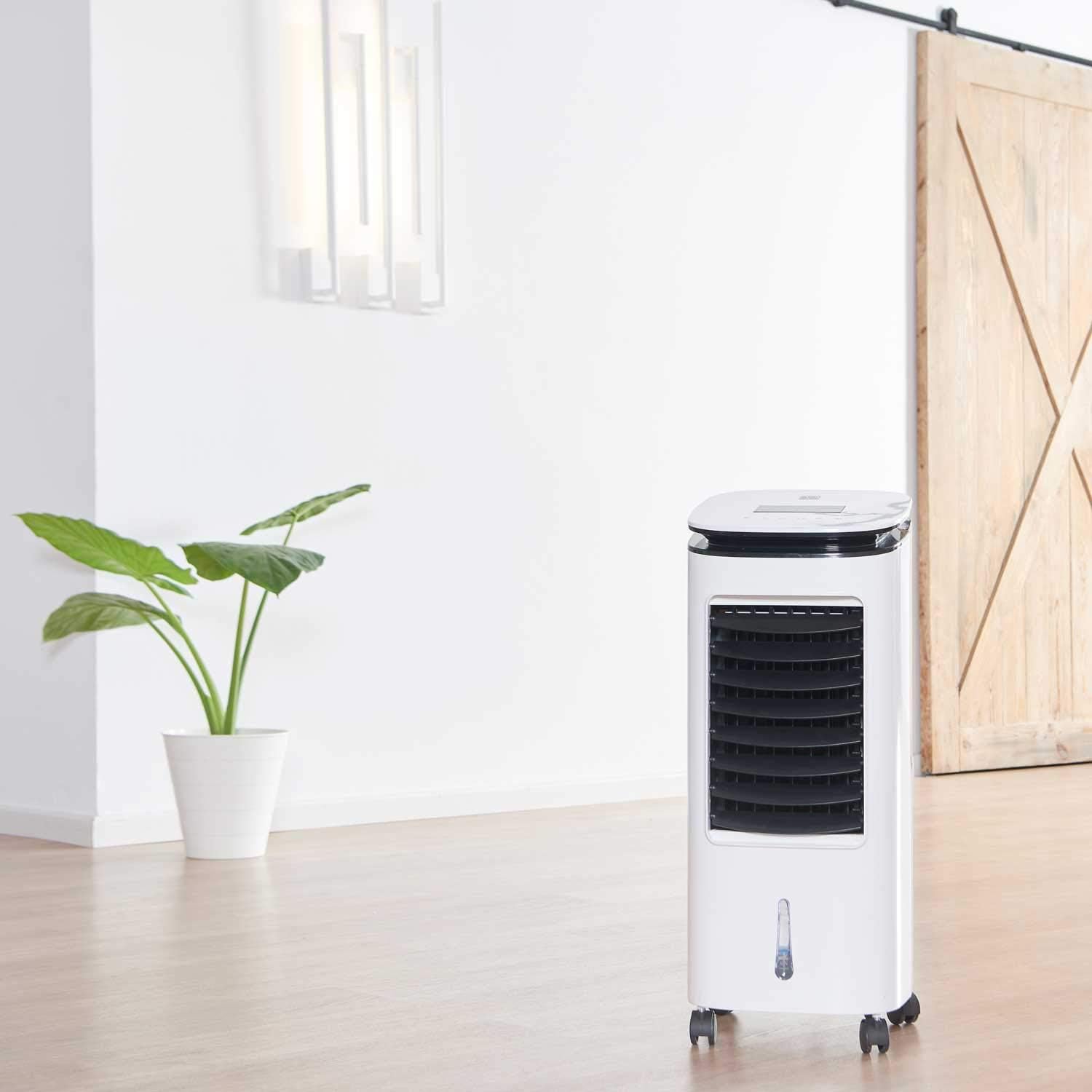
Image: The evaporative air cooler positioned in a room, demonstrating its compact size and freestanding design.
Main Components:
- Control Panel: Located on the top of the unit for manual operation.
- Air Outlet: Front grille where cooled air is discharged.
- Water Tank: Removable tank at the bottom for water and ice packs.
- Casters: Wheels at the base for easy mobility.
- Air Filter: Located at the rear, accessible for cleaning.
- Remote Control: For convenient operation from a distance.
Setup
Follow these steps to set up your evaporative air cooler for first use.
- Unpacking: Carefully remove the unit from its packaging. Retain packaging for future storage or transport.
- Positioning: Place the air cooler on a firm, level surface. Ensure there is adequate space around the unit for proper airflow (at least 20 cm from walls or furniture).
- Caster Installation (if not pre-installed): If the casters are not already attached, insert them firmly into the designated holes at the bottom of the unit. Ensure they click into place.
- Filling the Water Tank:
- Pull out the water tank from the bottom rear of the unit.
- Fill the tank with clean, cool water. Do not exceed the "MAX" fill line.
- For enhanced cooling, place the provided ice packs (after freezing them) into the water tank.
- Carefully push the water tank back into the unit until it is securely in place.
- Power Connection: Plug the power cord into a standard electrical outlet (240V AC).

Image: A person demonstrating the ease of moving the evaporative air cooler, highlighting its portability.

Image: A close-up view of the locking casters at the base of the unit, emphasizing stability and mobility.

Image: A hand demonstrating the removal of the water tank from the evaporative air cooler for filling or cleaning.
Operation
Learn how to operate your evaporative air cooler using the control panel or remote control.
Control Panel:
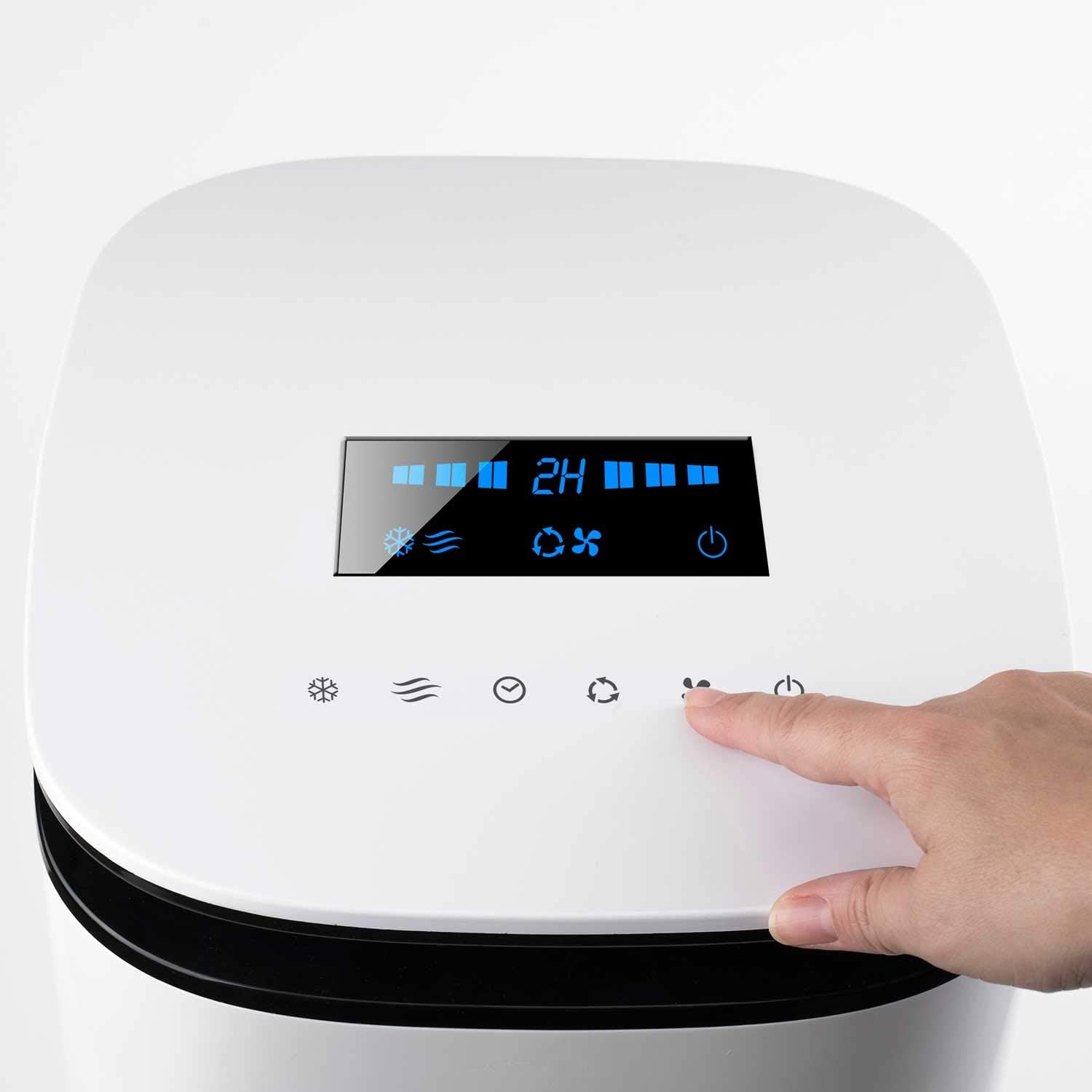
Image: A close-up of the top control panel with illuminated display and touch buttons, showing a hand interacting with it.
- Power Button (⏻): Press to turn the unit ON or OFF.
- Speed Button (☰): Cycles through 3 fan speeds: Low, Medium, High.
- Mode Button (☁): Selects operating modes (e.g., Normal, Natural, Sleep).
- Timer Button (⏱): Sets the auto-off timer (up to 7 hours).
- Swing Button (↻): Activates or deactivates the oscillation function for wider air distribution.
- Cooling/Humidifying Button (❄): Activates or deactivates the evaporative cooling/humidifying function.
Remote Control:
The remote control duplicates the functions of the main control panel for convenient operation.
- Ensure the remote control has working batteries (not included).
- Point the remote control directly at the unit's receiver.
Maintenance
Regular maintenance ensures optimal performance and extends the lifespan of your air cooler.
Cleaning the Water Tank:
- Unplug the unit from the power outlet.
- Pull out the water tank.
- Empty any remaining water and clean the tank with a soft cloth and mild detergent. Rinse thoroughly.
- Allow the tank to air dry completely before reinserting.
Cleaning the Air Filter:
- Unplug the unit.
- Locate the air filter panel at the rear of the unit.
- Remove the filter.
- Clean the filter with a soft brush or vacuum cleaner. For deeper cleaning, rinse with water and mild detergent.
- Ensure the filter is completely dry before reinserting it into the unit.

Image: A hand demonstrating how to access the rear filter panel for cleaning or maintenance.
General Cleaning:
- Wipe the exterior of the unit with a soft, damp cloth. Do not use abrasive cleaners or solvents.
- Ensure no water enters the control panel or other electrical components.
Storage:
When not in use for extended periods, empty and clean the water tank and filter. Store the unit in a cool, dry place, preferably in its original packaging.
Troubleshooting
Refer to this section for common issues and their solutions.
| Problem | Possible Cause | Solution |
|---|---|---|
| Unit does not turn on. | No power supply. Power button not pressed. | Check if the power cord is securely plugged into a working outlet. Press the Power button on the control panel or remote. |
| No cool air. | Water tank is empty. Cooling function not activated. Ambient humidity is too high. | Fill the water tank with water. Press the Cooling/Humidifying button. Evaporative coolers are less effective in high humidity environments. Consider using a dehumidifier or opening windows for ventilation. |
| Weak airflow. | Air filter is dirty. Air inlets/outlets are blocked. | Clean the air filter as described in the Maintenance section. Ensure nothing is obstructing the air intake or output grilles. |
| Remote control not working. | Batteries are dead or incorrectly inserted. Obstruction between remote and unit. | Replace batteries and ensure correct polarity. Remove any objects blocking the signal path. |
Specifications
Technical details of the BLACK+DECKER BXAC7E Evaporative Air Cooler.
- Model: BXAC7E
- Brand: BLACK+DECKER
- Type: Evaporative Air Cooler
- Mounting Type: Freestanding
- Color: White
- Air Flow Capacity: 234 CMPH
- Controls Type: Button
- Reservoir Capacity: 7 Liters
- Noise Level: 61 dB
- Number of Speeds: 3
- Voltage: 240 Volts (AC)
- Item Weight: 16.19 pounds (approx. 7.34 kg)
- Product Dimensions (L x W x H): 10.24 x 11.81 x 29.92 inches (approx. 26 x 30 x 76 cm)

Image: A technical diagram illustrating the dimensions of the product packaging, providing a visual reference for the unit's size.
Warranty and Support
For warranty information or technical support, please contact BLACK+DECKER customer service. Refer to the product packaging or the official BLACK+DECKER website for the most up-to-date contact details and warranty terms specific to your region.
Online Support: www.blackanddecker.com/support
Please have your model number (BXAC7E) and purchase date ready when contacting support.
Related documentsBXAC7E


Ask a question about this manual
Ask about setup, troubleshooting, compatibility, parts, safety, or missing instructions. Manuals+ will review the question and use this page’s manual context to help answer it.