
1. Product Overview
The YFYIQI DM300S is a high-frequency moisture meter designed for precise and rapid measurement of moisture content in various powdered materials, including coal powder, coal slag, and chemical powders. Utilizing advanced high-frequency technology, this device offers accurate readings essential for quality control and process optimization in industrial applications. Its portable and compact design, combined with a clear backlit digital display, ensures ease of use in diverse environments.
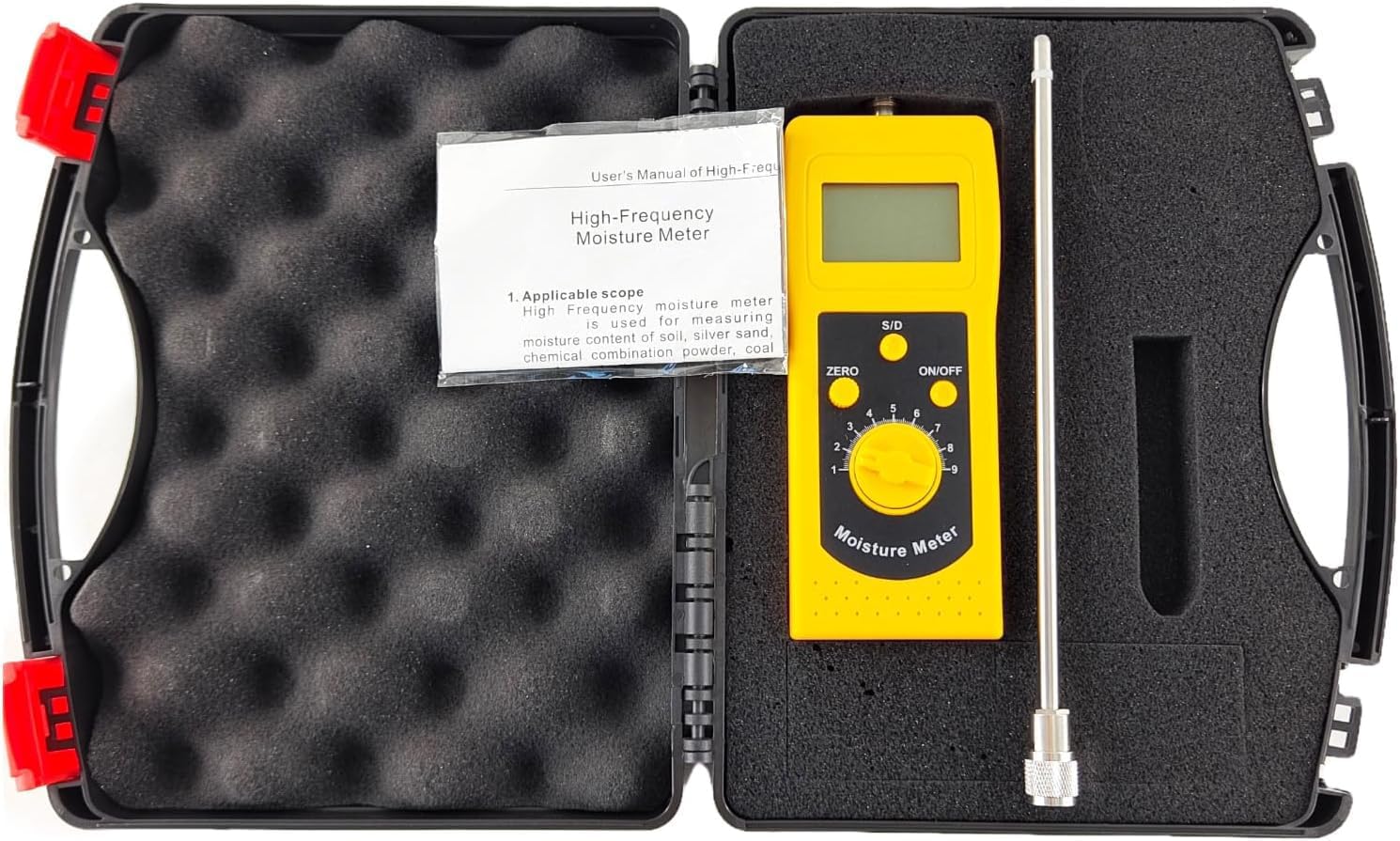
Image 1: The YFYIQI DM300S High-Frequency Coal Powder Moisture Meter with its probe attached, ready for use. The device features a digital display and control buttons.
Key Features:
- High-Frequency Measurement: Employs advanced high-frequency principles for accurate data collection.
- Portable and Compact: Easy to carry and operate in various field conditions.
- Instant Readings: Provides immediate moisture content display.
- Backlit Digital Display: Ensures clear readability even in low-light environments.
- Low Battery Warning: Alerts the user when battery replacement is needed.
2. Setup and Assembly
2.1 Battery Installation
The DM300S requires a 9V battery for operation. Ensure the device is powered off before installing or replacing the battery.
- Locate the battery compartment cover on the back of the device.
- Gently slide or unclip the cover to open the compartment.
- Insert a new 9V battery, ensuring correct polarity (+/-).
- Replace the battery compartment cover securely.

Image 2: The open battery compartment of the DM300S, showing where to insert the 9V battery.
2.2 Probe Attachment
The measurement probe needs to be securely attached to the main unit.
- Identify the probe connector port on the top of the main unit.
- Align the probe's connector with the port.
- Gently push and twist the probe connector clockwise until it is firmly secured. Do not overtighten.

Image 3: A close-up view of the probe connector being attached to the main unit of the DM300S.

Image 4: A close-up view of the probe detached from the main unit, showing the connector port.
3. Operating Instructions
3.1 Powering On/Off
- To power on the device, press the ON/OFF button. The digital display will illuminate.
- To power off the device, press the ON/OFF button again.
3.2 Zero Calibration
Before taking measurements, it is recommended to perform a zero calibration to ensure accuracy.
- Ensure the probe is clean and dry, and not in contact with any material.
- Power on the device.
- Press the ZERO button. The display should show '0.0' or a value very close to zero. If not, repeat the process.
3.3 Taking Measurements
Follow these steps to measure the moisture content of your material:
- Perform zero calibration as described in Section 3.2.
- Carefully insert the probe into the material you wish to measure. Ensure the probe is fully immersed and stable within the material for consistent readings.
- The moisture content will be displayed instantly on the LCD screen.
- For best results, take multiple readings from different points within the material and average them.
- After measurement, remove the probe and clean it thoroughly.
3.4 Understanding the Display
The 4-digit LCD displays the moisture content as a percentage. The device may show readings in two ranges: 0.00-2.00% (d) for dry basis or 0.0-90.0% (s) for wet basis, depending on the material and internal settings. Refer to the specific material calibration settings if applicable (not detailed in general specifications).
4. Maintenance
4.1 Cleaning
- Always clean the probe after each use to prevent material buildup, which can affect accuracy. Use a dry, soft cloth.
- Wipe the main unit with a dry, soft cloth. Do not use abrasive cleaners or immerse the device in water.
4.2 Battery Replacement
When the low battery warning appears on the display, replace the 9V battery as described in Section 2.1.
4.3 Storage
- Store the device and probe in a cool, dry place, away from direct sunlight and extreme temperatures.
- If storing for an extended period, remove the battery to prevent leakage.
- Keep the device in its protective carrying case (if provided) to prevent damage.

Image 5: The DM300S moisture meter and its probe neatly stored within the protective carrying case.
5. Troubleshooting
| Problem | Possible Cause | Solution |
|---|---|---|
| Device does not power on. | Dead or incorrectly installed battery. | Check battery polarity; replace with a new 9V battery. |
| Inaccurate or inconsistent readings. | Probe not clean; improper insertion; no zero calibration. | Clean the probe; ensure full and stable insertion; perform zero calibration before use. |
| Low battery warning displayed. | Battery power is low. | Replace the 9V battery immediately. |
| Display is dim or flickering. | Low battery; environmental conditions. | Replace battery. Ensure operating within specified temperature/humidity ranges. |
6. Technical Specifications
| Parameter | Value |
|---|---|
| Display | 4-digit LCD |
| Measuring Range | 0.00-2.00% (dry basis); 0.0-90.0% (wet basis) |
| Operating Conditions | Temperature: 0-60°C; Humidity: 5%-90% RH |
| Resolution | 0.1 or 0.01 |
| Accuracy | ± 0.5%n |
| Power Supply | 9V battery |
| Dimensions | 172 x 66 x 28 mm |
| Probe Length | 235 mm (400mm, 600mm options may be available) |
| Weight | 210g (excluding battery) |
| Material | ABS |
7. Warranty and Support
7.1 Product Warranty
This YFYIQI DM300S moisture meter comes with a 1-year warranty from the date of purchase. The warranty covers manufacturing defects and malfunctions under normal use. It does not cover damage caused by misuse, accidents, unauthorized modifications, or improper maintenance.
7.2 Customer Support
For technical assistance, warranty claims, or any questions regarding the operation of your DM300S moisture meter, please contact your retailer or the manufacturer's customer support. Please have your purchase receipt and product model number (DM300S) available when contacting support.