
Antarion B084HKYXV5
Antarion 19-inch HD LED TV User Manual
Model: B084HKYXV5 | Brand: Antarion
1. Introduction
This user manual provides comprehensive instructions for the Antarion 19-inch (48cm) HD LED TV, Model B084HKYXV5. This smart television is designed for versatile use, including motorhomes and RVs, offering Android 9.0, integrated Wi-Fi and CAST functions, and multi-voltage compatibility (12V/24V/220V). Please read this manual carefully before operating your TV to ensure proper use and to maximize its features.
2. Package Contents
Verify that all items listed below are included in your package:
- Antarion 19-inch HD LED TV
- Remote Control
- 12V Cigarette Lighter Power Cable
- 220V AC Power Adapter
- User Manual (this document)

Figure 2.1: Antarion 19-inch HD LED TV and its accessories.
3. Setup Guide
3.1 Power Connection
The Antarion TV supports multiple power inputs for various environments:
- For 12V/24V DC Power (Motorhome/RV Use): Connect the supplied 12V cigarette lighter power cable to the TV's DC input port and then to your vehicle's 12V or 24V power outlet.
- For 220V AC Power (Home Use): Connect the supplied 220V AC power adapter to the TV's DC input port, then plug the adapter into a standard 220V AC wall outlet.
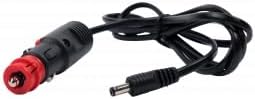
Figure 3.1: 12V Cigarette Lighter Power Cable.

Figure 3.2: 220V AC Power Adapter.
Note: Ensure the integrated ON/OFF switch on the TV is in the OFF position before connecting power. After connecting, switch it to ON.
3.2 Initial Setup and Network Connection
Upon first power-on, the TV will guide you through the initial Android setup process. This includes selecting your language, region, and connecting to a Wi-Fi network.
- Follow the on-screen prompts to complete the basic setup.
- When prompted, select your Wi-Fi network and enter the password to connect to the internet.
- Once connected, the TV will be ready for smart features and app usage.
4. Operating Instructions
4.1 Remote Control Functions
Familiarize yourself with the remote control for easy navigation and operation of your Antarion TV.

Figure 4.1: Remote Control Layout.
- Power Button: Turns the TV on or off.
- Navigation Buttons (Arrow Keys & OK): Navigate menus and select options.
- Volume +/-: Adjusts the volume level.
- CH +/-: Changes TV channels.
- Home Button: Returns to the Android TV home screen.
- Input Button: Selects input sources (HDMI, AV, USB, Tuner).
- Dedicated App Buttons: Quick access to pre-installed apps like Netflix (if available on remote).
4.2 Android 9.0 Smart Features
Your Antarion TV runs on Android 9.0, providing access to a wide range of smart features and applications.

Figure 4.2: Android TV Interface.
- App Access: Download and install various applications from the Google Play Store, including streaming services like Netflix.
- Wi-Fi Connectivity: Connect to your home or mobile hotspot Wi-Fi network for internet access.
- CAST Function: Wirelessly mirror content from your compatible smartphone or tablet to the TV screen.
- Bluetooth: Connect Bluetooth-enabled devices such as headphones or speakers for enhanced audio experience.
4.3 Media Playback via USB
The TV features a USB port for playing audio and video files directly from a USB storage device.
- Insert your USB drive into the TV's USB port.
- Navigate to the media player application or select the USB input source.
- Browse and select your desired audio or video files for playback.
4.4 DVB-T2 Tuner
The integrated ULTRA HD DVB-T2 compatible tuner allows you to receive digital terrestrial television broadcasts. Connect an appropriate antenna to the TV's antenna input and perform a channel scan through the TV's settings menu.
5. Maintenance and Care
To ensure the longevity and optimal performance of your Antarion TV, follow these maintenance guidelines:
- Cleaning the Screen: Gently wipe the screen with a soft, lint-free cloth. For stubborn marks, slightly dampen the cloth with water or a screen-cleaning solution specifically designed for electronics. Do not spray liquid directly onto the screen.
- Cleaning the Casing: Use a soft, dry cloth to clean the TV's casing. Avoid using abrasive cleaners or solvents.
- Ventilation: Ensure proper ventilation around the TV. Do not block the ventilation openings.
- Power Off: Always turn off the TV using the integrated ON/OFF switch when not in use for extended periods, especially in a motorhome/RV to conserve battery power.
6. Troubleshooting
If you encounter issues with your TV, refer to the following common problems and solutions:
| Problem | Possible Cause | Solution |
|---|---|---|
| No Power | Power cable not connected; Integrated ON/OFF switch is OFF. | Ensure power cable is securely connected. Turn the integrated ON/OFF switch to ON. |
| No Signal / Blank Screen | Incorrect input source selected; Antenna/HDMI cable loose. | Press the "Input" button on the remote to select the correct source. Check antenna or HDMI cable connections. Perform a channel scan for DVB-T2. |
| Wi-Fi Connection Issues | Incorrect password; Router too far; Network interference. | Re-enter Wi-Fi password. Move TV closer to router or reduce interference. Restart router. |
| Remote Control Not Working | Dead batteries; Obstruction between remote and TV. | Replace batteries. Remove any obstructions. Ensure remote is pointed at the TV's IR receiver. |
7. Specifications
Key technical specifications for the Antarion 19-inch HD LED TV:
| Feature | Detail |
|---|---|
| Brand | Antarion |
| Model | B084HKYXV5 |
| Screen Size | 19 Inches (48 cm) |
| Display Technology | LCD |
| Resolution | HD 1366 x 768 pixels |
| Operating System | Android 9.0 |
| Connectivity Technology | Bluetooth, Wi-Fi, USB |
| Special Features | Smart / Internet, Integrated ON/OFF switch, CAST function |
| Supported Internet Services | Netflix (and others via Google Play Store) |
| Tuner | ULTRA HD DVB-T2 compatible |
| Power Compatibility | 12V / 24V DC, 220V AC |
| Power Consumption | Class A / 19W (very low consumption) |
| Color | Glossy Black |
| Product Dimensions (D x W x H) | 5.4 x 44 x 5.4 cm (approx. 2.1 x 17.3 x 2.1 inches) |
| Weight | 2 kg (approx. 4.4 lbs) |
| Included Components | 12V cigarette lighter cable, 220V power adapter |

Figure 7.1: Energy Efficiency Label. For more details, visit the EPREL database.
8. Warranty and Support
Your Antarion TV comes with a 2-year warranty from the date of purchase. This warranty covers manufacturing defects and ensures the product meets its specified performance standards.
For technical support, warranty claims, or any questions not covered in this manual, please contact your retailer or the Antarion customer service. Please have your product model number (B084HKYXV5) and proof of purchase ready when contacting support.
Ask a question about this manual
Ask about setup, troubleshooting, compatibility, parts, safety, or missing instructions. Manuals+ will review the question and use this page’s manual context to help answer it.