
Ricoh WG-70
Ricoh WG-70 Black Waterproof Digital Camera
Model: WG-70
Introduction
The Ricoh WG-70 is engineered for adventure, offering exceptional durability and image quality in challenging environments. This digital camera is built to withstand water, shocks, dust, freezing temperatures, and crushing forces, making it an ideal companion for outdoor enthusiasts and professionals alike. With its 16-megapixel sensor and advanced imaging capabilities, the WG-70 captures stunning photos and Full HD videos, even in specialized conditions like underwater or extreme close-ups.
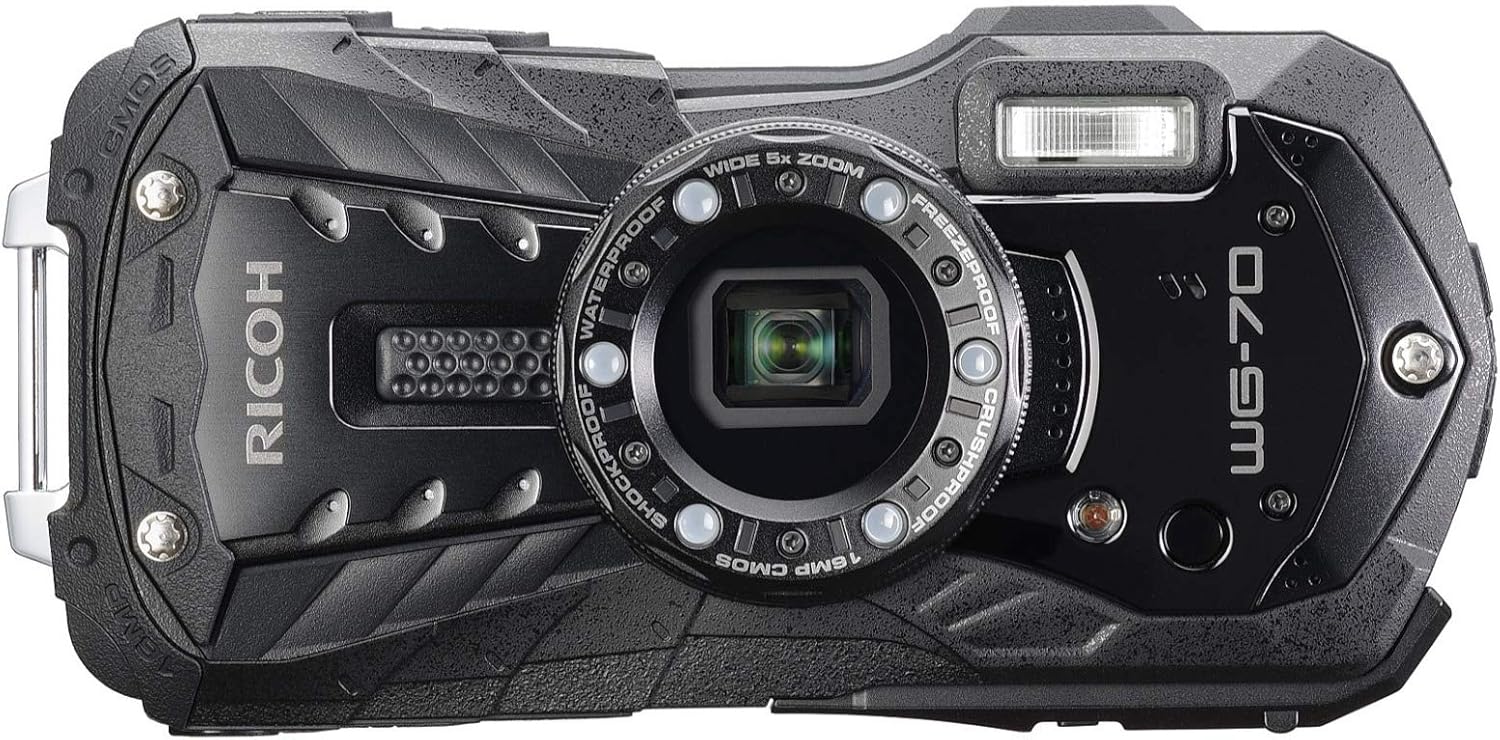
Front view of the Ricoh WG-70 camera, showcasing its rugged design and lens with surrounding macro lights.
Package Contents
Verify that all the following items are included in your Ricoh WG-70 package:
- Ricoh WG-70 Digital Camera
- Rechargeable Lithium-Ion Battery D-LI92
- Power Adapter
- USB Cable
- Strap
- Macro Stand O-MS1
Camera Overview
Familiarize yourself with the physical components and controls of your Ricoh WG-70 camera.
Rear View and Controls

The rear of the WG-70 features the 2.7-inch LCD monitor, navigation buttons, playback button, and menu access.
The rear panel includes the LCD monitor, directional pad with OK button, playback button, and menu button for navigating camera settings and reviewing images.
Side Views and Ports

The side of the WG-70 reveals the sealed compartment for HDMI and USB connectivity.
The side of the camera houses the sealed compartments for the micro-HDMI and micro-USB ports, ensuring waterproof integrity when closed. The opposite side features a sturdy strap lug.
Setup
1. Battery Installation and Charging
- Open the battery/memory card compartment cover located on the bottom of the camera. Ensure the lock is fully disengaged.
- Insert the D-LI92 rechargeable lithium-ion battery into the battery slot, ensuring the correct orientation as indicated by the diagram inside the compartment.
- Close the compartment cover securely until it clicks into place and engage the lock to maintain waterproof sealing.
- Connect the camera to the power adapter using the supplied USB cable. Plug the power adapter into a wall outlet. The charging indicator will illuminate.
- Charging is complete when the indicator light turns off. A full charge typically takes approximately 2.5 hours.
2. Memory Card Insertion
- With the battery compartment open, locate the SD card slot.
- Insert a compatible SD, SDHC, or SDXC memory card (Class 10 recommended) into the slot until it clicks. Ensure the card is inserted with the label facing the correct direction.
- Close the compartment cover securely.
3. Initial Power On
Press the power button located on the top of the camera to turn it on. Follow any on-screen prompts for initial setup, such as setting the date and time.
Basic Operation
Turning On/Off
Press the ON/OFF button on the top of the camera to power it on or off.
Taking Photos (Auto Picture Mode)
The camera features an Auto Picture mode which automatically selects the most appropriate shooting mode from 16 different scene modes. To take a photo:
- Point the camera at your subject.
- Press the shutter button halfway down to focus.
- Press the shutter button fully to capture the image.
Zoom Operation
Use the zoom lever (W/T buttons) to adjust the focal length. The WG-70 features a 5x optical zoom lens (equivalent to 28mm to 140mm in 35mm format) and an Intelligent Zoom function that extends the range up to approximately 36 times without compromising image quality.
Using the LCD Monitor (Outdoor View Setting)
The 2.7-inch LCD monitor has an AR (Anti-Reflection) coating to minimize glare. For optimal viewing in bright outdoor conditions, use the Outdoor View Setting mode, which allows you to easily adjust the monitor brightness level.
Advanced Shooting Modes
Underwater Mode
Designed specifically for underwater photography, this mode optimizes color, contrast, and white balance to compensate for the loss of red tones and contrast in water, delivering sharp and true-to-life images. An option to capture two consecutive images (one with flash, one without) is available.
Digital Microscope Mode
This mode allows for greatly enlarged close-up photography, capturing details invisible to the naked eye. The six LED Macro Lights positioned around the lens provide bright, uniform illumination for subjects at close distances. The Instant Illumination Enhance function automatically raises the light discharge level at shutter release to minimize blur.

The Ricoh WG-70 with its six LED Macro Lights activated, ideal for illuminating subjects in Digital Microscope mode.
The Macro Lights also function as a Self-Portrait Assist mode (using LED blink to confirm face detection) and a general LED Lighting mode for dark environments.
Handheld Night Snap Mode
Automatically captures multiple images of a nighttime scene and composites them into a single, blur-free image, enhancing clarity in low-light conditions.
Cross Processing
Apply a unique color-changed finish to your images, mimicking the effect of cross-processed film. This mode is available within the Image Tone settings.
Video Recording
The WG-70 supports various video recording options:
- Full HD Movie Recording: Capture high-quality video clips (1920 x 1080 pixels, 16:9) at 30 frames per second using the H.264 format.
- High-Speed Camera Function: Record for slow-motion playback of captured movie clips.
- Interval Movie Function: Useful for time-lapse sequences.
- Micro-HDMI Terminal: Connect the camera to external audio-visual devices for simultaneous output of Full HD movie clips and sound.
Image Stabilization
The WG-70 incorporates triple anti-shake protection to minimize blurred images:
- Pixel Track SR mechanism: Digitally processes still images to compensate for camera shake.
- Digital SR mode: Automatically raises sensitivity (up to ISO 6400) in low-lighting conditions for still images, allowing for higher shutter speeds to reduce camera and subject shake.
- Movie SR mode: Compensates for image misalignment caused by camera shake during movie recording, producing blur-free video clips.
Maintenance and Care
Waterproof Care
- Before and after underwater use, ensure all compartment covers (battery/memory card, HDMI/USB) are clean and free of debris.
- Always close covers firmly until they click and engage all locks.
- After use in saltwater, rinse the camera thoroughly with fresh water and dry it with a soft cloth. Do not use detergents or abrasive cleaners.
Cleaning the Camera
- Use a soft, lint-free cloth to clean the camera body. For stubborn dirt, dampen the cloth slightly with water.
- For the lens and LCD screen, use a specialized lens cleaning cloth and solution. Avoid touching the lens surface directly.
Storage
Store the camera in a cool, dry place away from direct sunlight and extreme temperatures. Remove the battery if the camera will not be used for an extended period.
Troubleshooting
| Problem | Possible Cause / Solution |
|---|---|
| Camera does not power on. | Battery may be depleted. Charge the battery fully. Ensure battery is inserted correctly. |
| Poor picture quality / Pixelated images. | Check shooting mode (e.g., ensure not in a low-resolution setting for Digital Microscope if printing). Ensure lens is clean. Use appropriate lighting. Consider using a tripod for stability in low light. |
| Flash not firing or inconsistent. | Check flash settings (Auto, On, Off). Ensure subject is within flash range. Battery level may be low. |
| Battery life is short. | Frequent use of flash, video recording, or continuous shooting can drain the battery faster. Reduce LCD brightness. Consider carrying a spare battery. |
| Camera not recognized by computer. | Ensure USB cable is securely connected. Try a different USB port or cable. Check camera's USB connection settings. |
| Water inside camera. | Immediately power off the camera and remove the battery. Do not attempt to use it. Contact customer support. Ensure all compartment covers were properly sealed before water exposure. |
Specifications
| Feature | Detail |
|---|---|
| Model Name | WG-70 |
| Effective Still Resolution | 16 MP |
| Photo Sensor Technology | CMOS (1/2.3-inch) |
| Optical Zoom | 5x |
| Focal Length | 5 to 25mm (35mm Equivalent: 28 to 140mm) |
| Digital Zoom | 7.2x |
| Maximum Aperture | 3.5 Millimeters |
| Image Stabilization | Digital |
| Expanded ISO Range | 100 - 6400 |
| Video Resolution | Full HD 1080p (1920 x 1080) at 30 FPS |
| Supported File Format | JPEG (Still), MP4 (Video) |
| Screen Size | 2.7 Inches LCD |
| Water Resistance Level | Waterproof (up to 14 meters) |
| Shockproof | Up to 1.6 meters |
| Crushproof | Up to 100kgf |
| Freeze-proof | Down to -10°C |
| Connectivity Technology | HDMI D (Micro), USB Micro-B (USB 2.0) |
| Battery Type | 1 x D-LI92 Rechargeable Lithium-Ion, 3.7 VDC, 770 mAh |
| Item Dimensions (D x W x H) | 1.2"D x 4.8"W x 2.4"H |
| Item Weight | 1.1 Pounds |
Warranty and Support
Warranty Information
The Ricoh WG-70 Digital Camera comes with a 1 Year Manufacturer's Warranty. Please retain your proof of purchase for warranty claims.
Customer Support
For technical assistance, service, or inquiries regarding your Ricoh WG-70, please contact Ricoh customer support. Refer to the official Ricoh website for the most current contact information and support resources.
Ask a question about this manual
Ask about setup, troubleshooting, compatibility, parts, safety, or missing instructions. Manuals+ will review the question and use this page’s manual context to help answer it.