
1. Introduction
This manual provides essential information for the safe and effective installation, operation, and maintenance of the Zing Ear ZE-215 Illuminated Rocker Switch. This switch is designed as a replacement component for various electrical appliances, commonly found in electric space heaters and fireplaces. It features a snap-in design for easy integration and illuminates red when activated.
Please read this manual thoroughly before proceeding with installation or use.
2. Safety Information
WARNING: Risk of Electric Shock. Always disconnect power before installing or servicing this switch.
- Ensure the power supply to the appliance is completely disconnected at the circuit breaker or fuse box before beginning any installation or replacement procedures.
- Verify that the voltage and current ratings of the switch (125VAC 15A / 250VAC 10A) are compatible with your appliance's requirements.
- Do not exceed the specified electrical ratings.
- If you are unsure about electrical wiring or installation, consult a qualified electrician.
- Keep children and pets away from the work area during installation.
- Inspect the switch for any physical damage before installation. Do not install a damaged switch.
3. Installation (Setup)
The Zing Ear ZE-215 switch is designed for snap-in mounting. Follow these steps for proper installation:
- Disconnect Power: Ensure the appliance is unplugged or the circuit breaker is off.
- Access Switch Area: Carefully open the appliance housing to access the existing switch.
- Note Wiring: Before disconnecting, carefully note or photograph the wiring connections to the old switch. The ZE-215 has three quick-connect spade terminals.
- Remove Old Switch: Gently pry out the old switch from its mounting hole.
- Connect New Switch: Connect the wires to the corresponding terminals on the new Zing Ear ZE-215 switch. The terminals are typically numbered 1, 2, and 3. Refer to the wiring diagram below for common configurations.
- Mount New Switch: Align the new switch with the mounting hole and press firmly until it snaps securely into place.
- Secure Housing: Close and secure the appliance housing.
- Restore Power: Reconnect the power supply to the appliance.
3.1. Terminal Identification and Dimensions
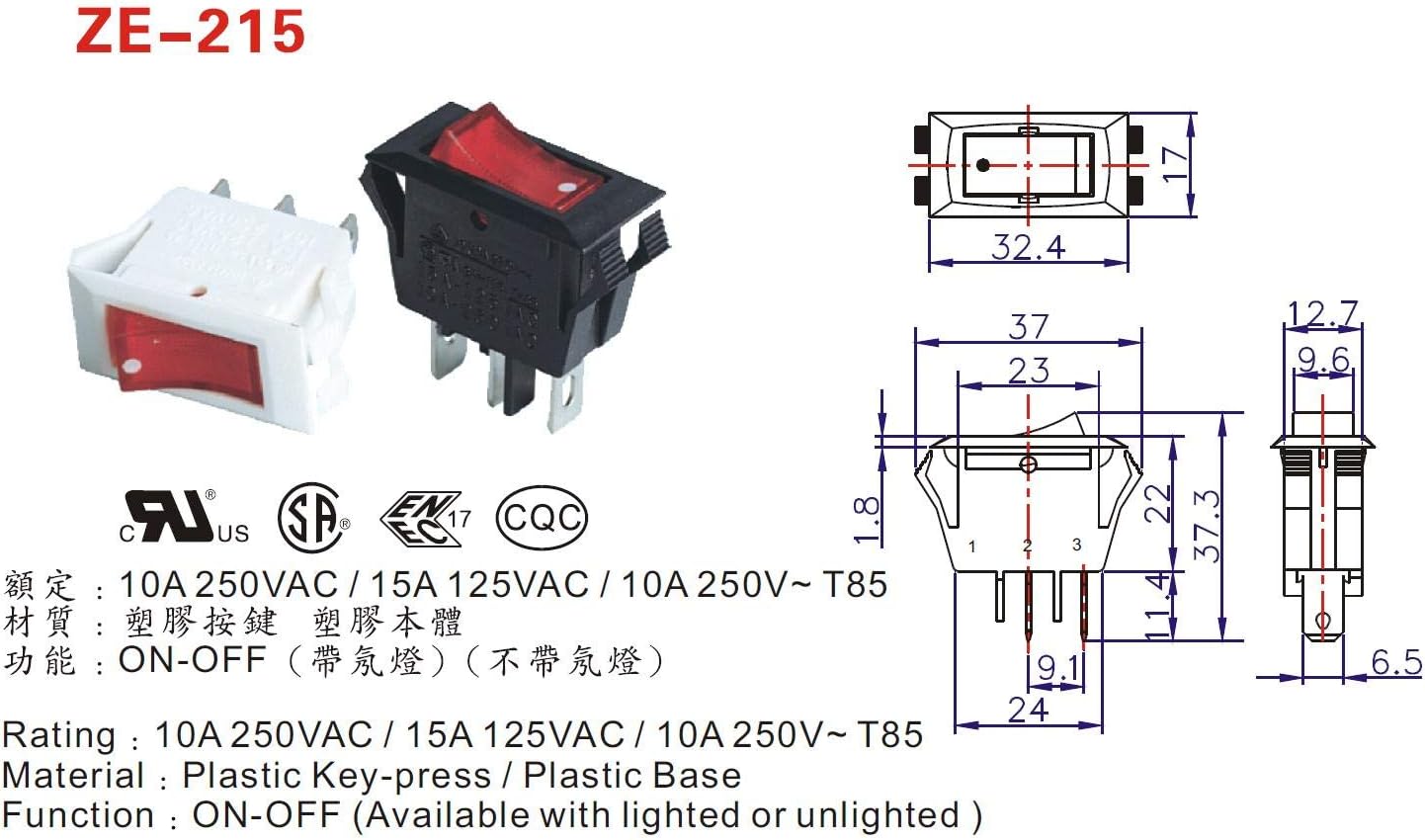
Image: Technical diagram showing the dimensions and terminal layout (1, 2, 3) of the Zing Ear ZE-215 rocker switch. This diagram is crucial for correct wiring and ensuring proper fit.
The diagram above illustrates the physical dimensions and the typical numbering of the three quick-connect spade terminals. Ensure your appliance's wiring matches these terminal positions for correct functionality. Terminal 1 is often the input, Terminal 2 the output, and Terminal 3 for the illumination circuit, but this can vary by appliance. Always refer to your appliance's specific wiring diagram if available.

Image: A close-up view of the Zing Ear ZE-215 illuminated red rocker switch, showing its red actuator and black housing.
This image provides a visual reference of the switch's appearance, including its red illuminated rocker and the quick-connect spade terminals at the rear.
4. Operating Instructions
The Zing Ear ZE-215 is an ON-OFF rocker switch. Its operation is straightforward:
- To turn the connected appliance ON, press the rocker switch to the 'ON' position. The switch will illuminate red when power is flowing through it and the appliance is active.
- To turn the connected appliance OFF, press the rocker switch to the 'OFF' position. The illumination will turn off, and power to the appliance will be disconnected.
5. Maintenance
The Zing Ear ZE-215 rocker switch is designed for durability and typically requires minimal maintenance.
- Cleaning: If necessary, gently wipe the exterior of the switch with a dry, soft cloth. Do not use abrasive cleaners or solvents. Ensure the appliance is disconnected from power before cleaning.
- Inspection: Periodically inspect the switch for any signs of physical damage, such as cracks, loose connections, or discoloration. If any damage is observed, disconnect power immediately and replace the switch.
6. Troubleshooting
If you encounter issues with your Zing Ear ZE-215 switch, consider the following troubleshooting steps:
- Switch Does Not Illuminate:
- Check if the appliance is receiving power from the main supply.
- Verify that the switch is in the 'ON' position.
- Ensure all three terminals are correctly wired and making good contact. A loose connection can prevent illumination.
- The internal lamp may be faulty. If all connections are correct and power is present, the switch may need replacement.
- Appliance Does Not Turn On/Off:
- Confirm the switch is correctly installed and wired according to the appliance's diagram.
- Check for continuity across the switch terminals when in the 'ON' position (with power disconnected).
- Inspect the appliance's internal wiring for any disconnections or damage.
- If the switch feels loose or unresponsive, it may be mechanically faulty and require replacement.
- Switch Feels Loose in Mounting Hole:
- Ensure the mounting hole dimensions match the switch specifications (refer to Section 3.1).
- Verify that the snap-in tabs are fully engaged.
If troubleshooting steps do not resolve the issue, it is recommended to replace the switch or consult a qualified technician.
7. Specifications
| Feature | Specification |
|---|---|
| Model Number | ZE-215 |
| Operation Mode | ON-OFF |
| Current Rating | 15 Amps (125VAC) / 10 Amps (250VAC) |
| Operating Voltage | 120 Volts / 250 Volts |
| Connector Type | Quick Connect |
| Switch Type | Rocker |
| Terminal Type | Spade (3 terminals) |
| Mounting Type | Snap-In Mount |
| Actuator Type | Rocker |
| Certifications | UL, ENEC17, CQC |
| Brand | Zing Ear |
8. Warranty and Support
Specific warranty details for the Zing Ear ZE-215 switch are typically provided by the point of purchase or the manufacturer. Please retain your purchase receipt for warranty claims.
For technical support or further inquiries, please contact the seller or the manufacturer directly. Contact information can usually be found on the product packaging or the seller's website.