
Introduction
This instruction manual provides comprehensive guidance for the Case Logic Notion 15.6-inch Laptop Bag. Designed for professionals, this premium bag offers dual-density impact foam protection, extensive organization, and a sophisticated design. Please read this manual thoroughly to ensure proper use and care of your product.
Key Features:
- Padded organization panel with multiple storage options for small electronics, cords, accessories, business cards, and keys.
- Padded, easy-grab handles designed for comfortable carrying.
- Adjustable, removable shoulder strap with padding for alternative carrying.
- Folded PU zipper pulls for quiet operation.
- Durable 1680 denier polyester, modern twill accent material, and PU trim for a stylish and robust construction.
Setup
Your Case Logic Notion Laptop Bag is designed for immediate use. Follow these steps to prepare your bag:
- Attach the Shoulder Strap: Locate the adjustable, removable shoulder strap included with your bag. Attach the swivel hooks on each end of the strap to the D-rings located on the sides of the bag. Adjust the strap length to your preference for comfortable carrying.

Image: The laptop bag with its adjustable shoulder strap attached, ready for use.
- Initial Inspection: Before placing items inside, inspect all zippers and compartments to ensure they operate smoothly.
- Organize Main Compartments: Familiarize yourself with the various pockets and compartments. The bag features a dedicated padded laptop pocket and additional compartments for documents or a second device.
Operating
This section details how to effectively use the features of your Case Logic Notion Laptop Bag.
Laptop and Device Storage
- Main Laptop Compartment: Place your laptop (up to 15.6 inches) into the dedicated padded compartment. This compartment is designed to provide dual-density impact foam protection.

Image: Demonstrates placing a laptop into the protective main compartment.
- Additional Compartments: Utilize the secondary compartment for tablets, documents, or other larger items.

Image: The bag's interior, showing ample space for documents and a tablet.
Organization Panel
The front organization panel is designed for small electronics, cords, accessories, business cards, and keys.
- Utilize the various pockets and elastic loops to secure items.
- The key clip provides a secure attachment point for your keys.
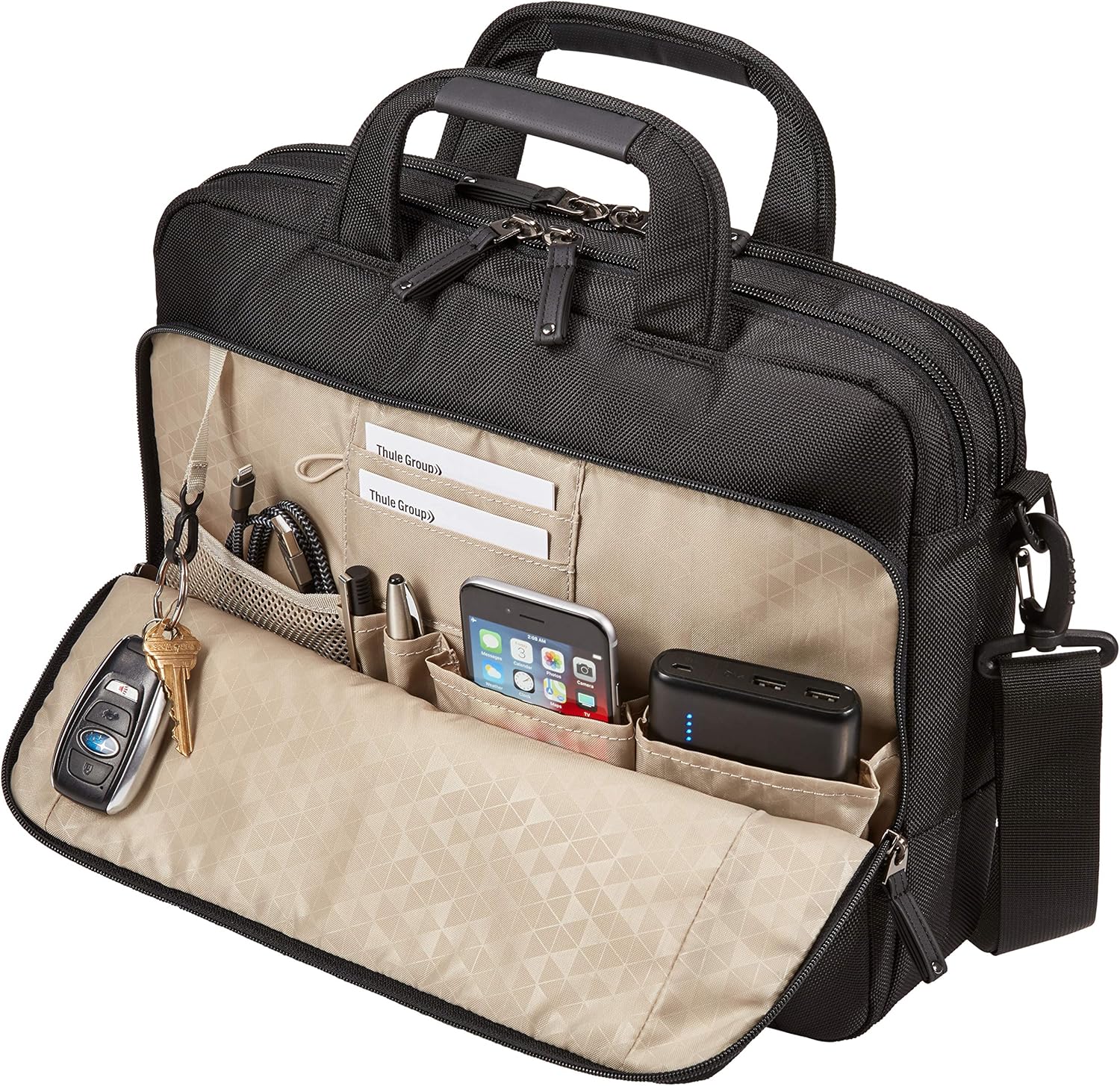
Image: The open front panel revealing organized storage for accessories.
Carrying Options
- Top Handles: Use the padded, easy-grab handles for hand carrying. They are shaped to fold and fit comfortably.
- Shoulder Strap: For hands-free carrying, use the adjustable and removable padded shoulder strap.
- Luggage Pass-Through: The bag features a pass-through panel on the back, allowing it to securely slide over the handle of rolling luggage for convenient travel.

Image: The bag attached to a rolling suitcase handle for easy transport.
Maintenance
Proper care will extend the life and appearance of your Case Logic Notion Laptop Bag.
- Cleaning: The bag is made from durable polyester and nylon. For cleaning, hand wash only. Use a mild soap and cold water. Do not machine wash, bleach, tumble dry, or iron.
- Drying: Air dry the bag completely before storing or reusing to prevent mildew.
- Zipper Care: Keep zippers free from dirt and debris. If a zipper becomes stiff, a small amount of zipper lubricant can be applied.
- Storage: Store the bag in a cool, dry place away from direct sunlight when not in use.
Troubleshooting
This section addresses common issues you might encounter with your laptop bag.
- Stiff Zippers: If zippers become difficult to open or close, ensure no fabric is caught. Apply a small amount of silicone-based zipper lubricant to the zipper teeth.
- Damaged Key Clip: The internal key clip is designed for convenience. If it becomes damaged, a universal key clip can be sourced as a replacement.
- Bag Appears Small: Ensure you are utilizing all available compartments and pockets efficiently. The bag is designed for laptops up to 15.6 inches and associated accessories. Overstuffing can strain materials and zippers.
Specifications
| Feature | Detail |
|---|---|
| Model Name | Notion |
| Model Number | 3204198 |
| Compatible Device Size (Maximum) | 15.6 Inches |
| Color | Black |
| Material Type | Nylon, Polyester |
| Item Weight | 700 Grams |
| Number of Compartments | 4 |
| Number of Pockets | 7 |
| Closure Type | Zipper |
| Included Components | Shoulder Strap |
| Product Care Instructions | Hand Wash Only |
Warranty Information
This Case Logic Notion Laptop Bag is covered by a manufacturer's warranty. For specific details regarding warranty coverage, terms, and conditions, please refer to the warranty documentation included with your purchase or visit the official Case Logic website.
Please retain your proof of purchase for any warranty claims.
Support
For further assistance, product inquiries, or to report any issues not covered in this manual, please contact Case Logic customer support.
- Online Support: Visit the official Case Logic website for FAQs, support resources, and contact information.
- Manufacturer: Case Logic (a brand of Thule Group)


