
Global Industrial 183150
Global Industrial Adjustable Height Workbench User Manual
Model: 183150 | Brand: Global Industrial
Introduction
This user manual provides comprehensive instructions for the assembly, operation, and maintenance of your Global Industrial Adjustable Height Workbench. Designed for durability and versatility, this workbench features a robust steel construction and an adjustable height mechanism to suit various tasks and user preferences. Please read this manual thoroughly before assembly and use to ensure safe and efficient operation.
Safety Information
Always prioritize safety when assembling and using the workbench. Failure to follow these guidelines may result in injury or damage to the product.
- Ensure all components are present and undamaged before beginning assembly.
- Wear appropriate personal protective equipment (PPE), such as gloves, during assembly to prevent cuts or pinches.
- Assemble the workbench on a flat, stable surface to prevent tipping.
- Do not exceed the maximum weight capacity of 2000 lbs.
- Ensure all fasteners are securely tightened before placing items on the workbench.
- When adjusting the height, ensure the workbench is clear of obstructions and that the adjustment pins are fully engaged in the desired height holes.
- Keep children and pets away from the assembly area and the workbench during use.
Package Contents
Verify that all the following components are included in your package:
- Workbench Top (1)
- Adjustable C-Channel Legs (4)
- Horizontal Support Beams (2)
- Assembly Hardware (Bolts, Nuts, Washers, Adjustment Pins)
If any parts are missing or damaged, please contact Global Industrial customer support.
Setup and Assembly
Assembly of the Global Industrial Adjustable Height Workbench requires basic tools (not included), such as a wrench or socket set. It is recommended to have two people for assembly due to the weight and size of the components.
Step-by-Step Assembly
- Unpack Components: Carefully remove all parts from the packaging and lay them out on a clean, flat surface. Identify each component using the "Package Contents" list.

Figure 1: Overview of the assembled workbench. Use this as a reference during assembly.
- Assemble Leg Frames: Attach the horizontal support beams between two C-channel legs to form two complete leg frames. Ensure all bolts are finger-tightened initially.
- Attach Workbench Top: Carefully place the workbench top upside down on a protected surface. Align the pre-drilled holes on the leg frames with the corresponding holes on the underside of the workbench top. Secure the leg frames to the top using the provided hardware.

Figure 2: The 12-gauge steel workbench top, ready for leg attachment.
- Tighten All Fasteners: Once all components are in place, systematically tighten all bolts and nuts using a wrench or socket set. Ensure all connections are secure but do not overtighten.
- Adjust Height (Optional): The workbench legs feature an adjustable height mechanism. To adjust, remove the plastic adjustment pins from each leg. Slide the inner leg section to the desired height, ensuring the holes align. Reinsert the adjustment pins firmly into the aligned holes on all four legs. The height adjusts in 1-1/2 inch increments.

Figure 3: Detail of the adjustable leg mechanism, showing the white adjustment pin.
- Electrical Outlet Knockouts: The C-channel legs include removable duplex knockouts on the front and rear for the installation of a hard-wired electrical outlet (outlet sold separately). Consult a qualified electrician for proper installation of electrical components.

Figure 4: View of the removable duplex knockouts for electrical outlet installation.
Operating Instructions
Your Global Industrial Adjustable Height Workbench is designed for heavy-duty use in various environments. Follow these guidelines for optimal performance.
- Weight Capacity: The workbench has a maximum weight capacity of 2000 lbs. Distribute weight evenly across the surface to maintain stability.
- Height Adjustment: To change the workbench height, refer to Step 5 in the "Setup and Assembly" section. Always ensure all four adjustment pins are securely engaged at the same height setting before use.
- Work Surface: The 1-3/4" steel top with a square edge provides a durable work surface. While the powder coat finish resists rust and cracks, it is advisable to use protective mats for delicate tasks or to prevent scratches from sharp objects.
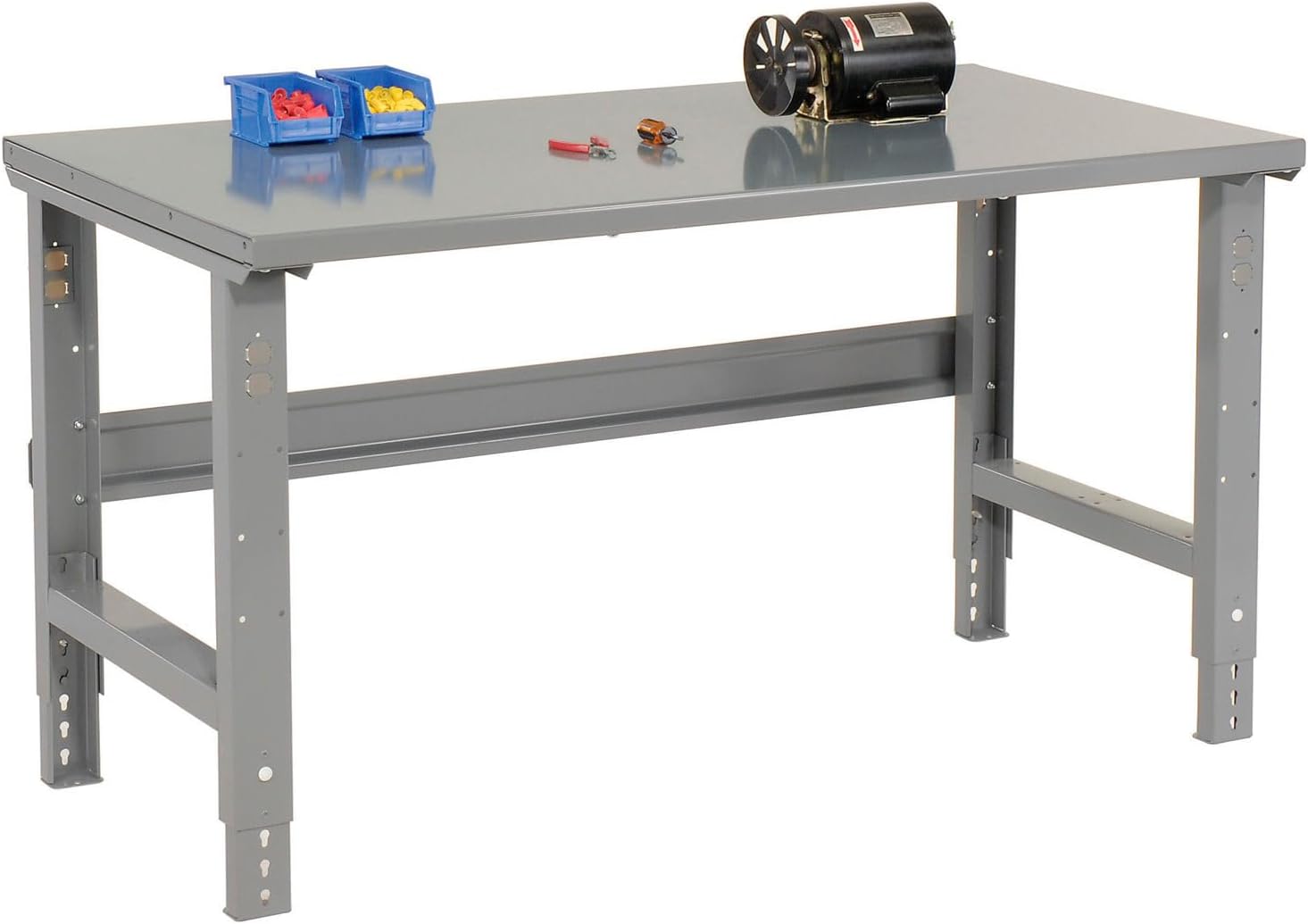
Figure 5: The workbench provides a sturdy platform for various tools and equipment.

Figure 6: The adjustable height feature allows for comfortable use with different seating arrangements or for standing work.
Maintenance
Regular maintenance will extend the life and performance of your workbench.
- Cleaning: Wipe down the steel top and legs with a damp cloth to remove dust, dirt, and debris. For stubborn grime, use a mild detergent and water, then dry thoroughly. Avoid abrasive cleaners that could damage the powder coat finish.
- Fastener Check: Periodically inspect all bolts, nuts, and adjustment pins to ensure they remain tight and secure. Retighten as necessary.
- Surface Protection: While durable, the steel top can be scratched by sharp tools. Consider using a workbench mat or protective covering for specific tasks.
Troubleshooting
If you encounter issues with your workbench, refer to the following common problems and solutions:
| Problem | Possible Cause | Solution |
|---|---|---|
| Workbench is wobbly or unstable. | Loose fasteners; uneven floor; legs not adjusted to the same height. | Ensure all bolts are securely tightened. Move the workbench to a level surface. Verify all four legs are set to the exact same height using the adjustment pins. |
| Difficulty adjusting leg height. | Adjustment pins are stuck; inner leg section is binding. | Ensure the workbench is unloaded. Wiggle the inner leg section slightly while pulling the pin. Clean any debris from the adjustment holes. |
| Scratches or damage to the finish. | Heavy use; sharp objects; abrasive cleaning. | Use protective mats for tasks involving sharp tools. Avoid dragging heavy objects. Clean with mild, non-abrasive cleaners. Minor scratches can be touched up with matching gray paint. |
Specifications
| Feature | Detail |
|---|---|
| Model Number | 183150 |
| Brand | Global Industrial |
| Material | Steel (Top), Alloy Steel (Frame) |
| Overall Dimensions (W x D x H) | 48" W x 30" D x 29-1/8" to 35-1/8" H (Adjustable) |
| Workbench Top Thickness | 1-3/4" (12 gauge steel) |
| Weight Capacity | 2000 Lbs. (Evenly Distributed) |
| Finish Type | Gray Powder Coated |
| Item Weight | 101.5 Pounds |
| Assembly Required | Yes |
| UPC | 707022002516 |
Warranty and Support
Global Industrial products are manufactured to high-quality standards. For specific warranty information, please refer to the warranty card included with your purchase or visit the official Global Industrial website. For technical support, replacement parts, or any inquiries, please contact Global Industrial customer service.
Global Industrial Customer Service: www.globalindustrial.com/contactUs
Ask a question about this manual
Ask about setup, troubleshooting, compatibility, parts, safety, or missing instructions. Manuals+ will review the question and use this page’s manual context to help answer it.