
KYHOPE LB06
LB06 Hart Current Voltage Signal Generator Process Calibrator Tester User Manual
Model: LB06 | Brand: KYHOPE
1. Introduction
The KYHOPE LB06 Process Calibrator is a high-precision, multi-functional instrument designed for signal simulation and measurement in industrial applications. It supports various signal types including current, voltage, mV, resistance, frequency, and common thermocouple and RTD types. With its high accuracy and reliability, the LB06 is an essential tool for calibration, testing, and maintenance of process control systems.
2. Safety Information
Please read and understand all safety instructions before operating the LB06 calibrator. Failure to follow these instructions may result in injury or damage to the instrument.
- Always use the provided test leads and accessories.
- Do not operate the calibrator in wet or damp conditions.
- Ensure the instrument is powered off before connecting or disconnecting test leads.
- Avoid applying voltages or currents exceeding the specified maximum input ratings.
- The instrument is protected by 4 units of PPTC and a quick-break fuse to prevent damage from high voltage. However, always exercise caution.
- Refer to the specifications section for detailed input/output ranges.
3. Package Contents
Verify that all items listed below are included in your package:
- 1 Unit x Original BRT LB06 Portable Precision Process Calibrator
- 1 Set x High safety standards testing Pen Probe
- 1 Unit x High quality 2A USB Cable for Battery Re-charge
- 1 Unit x High quality meter bag
- 1 Set x Professional Brightwin Easy-to-understand User Manual (this document)
4. Product Overview
The LB06 calibrator features a compact design with a clear LCD display and intuitive button layout for easy operation.

Figure 4.1: Front view of the LB06 Process Calibrator. The device has a central LCD screen displaying "Source 12.000 mA" and a keypad below it with buttons for various functions like V, mA, mV, TC, RTD, Hz, 24V, Hart, Modbus, F-Fn, and navigation keys.
Key Components:
- LCD Display: High-resolution screen with backlight for clear readings in various lighting conditions.
- Keypad: Dedicated buttons for different signal types (V, mA, mV, TC, RTD, Hz), 24V output, and communication functions (Hart, Modbus). Navigation and Enter keys are also present.
- Input/Output Terminals: Located on the sides/top/bottom (not visible in image, but implied by function) for connecting test leads.
- Power Button: For turning the device on and off.
5. Features
The LB06 Process Calibrator offers a comprehensive set of features for precise measurement and simulation:
- High Precision: Achieves 0.025%+1/2 digits accuracy, ensuring high reliability and stability in signal simulation and measurement.
- Output Simulation: Capable of sourcing/passive 0/4-20mA, 0-11V, 0-110mV, 20-400Ω, R, E, S, K, J, B, T, N type thermocouples, PT1000, PT100, CU50, 24V outputs, and frequency signals.
- Measurement Capabilities: Measures 0-30V, 0-150mV, 0-999.9Ω, R, E, S, K, J, B, T, N type thermocouples, PT100, Pt1000, CU50, 24V, 0-24mA, Ohm, and frequency.
- Communication Functions: Includes standard MODBUS Master, MODBUS Slave, and Hart communicator/operator functions.
- User-Friendly Display: High resolution LCD display with backlight for clear visibility in various lighting conditions.
- Fast Response: No delay in signal source simulation and signal testing or measurement.
- Battery Indicator: Features a battery capacity bar for easy monitoring of battery status.
- Robust Protection: Equipped with 4 units of PPTC and a quick-break fuse to protect the instrument from high voltage damage.
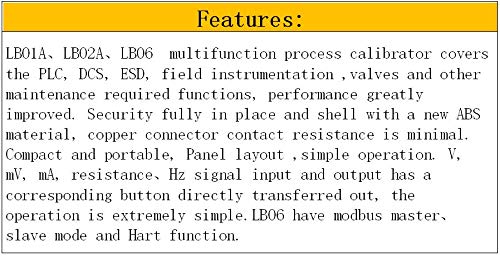
Figure 5.1: Features overview. The LB06 is a multifunction process calibrator covering PLC, DCS, ESD, field instrumentation, and valve maintenance. It features improved performance, robust ABS material shell, minimal copper connector contact resistance, compact and portable design, simple panel layout, and direct button transfer for V, mV, mA, resistance, and Hz signals. It also includes Modbus master, slave, and Hart functions.
6. Setup
6.1 Initial Charging
Before first use, ensure the LB06 calibrator is fully charged. Connect the provided 2A USB cable to the calibrator's charging port and a suitable USB power adapter (not included). The battery capacity bar on the display will indicate charging status.
6.2 Powering On/Off
- To power on: Press and hold the Power button (red button with power symbol) until the display illuminates.
- To power off: Press and hold the Power button until the display turns off.
6.3 Connecting Test Leads
Use the high safety standards testing pen probes provided. Connect them to the appropriate input/output terminals on the calibrator based on the measurement or simulation task. Always ensure secure connections to prevent inaccurate readings or potential hazards.
7. Operating Instructions
The LB06 offers both signal sourcing (output) and measurement capabilities. The intuitive keypad allows for quick selection of desired functions.

Figure 7.1: Overview of LB06 functions. This image highlights the Modbus master/slave and Hart universal capabilities. It also lists the output ranges (0~24mA, 0~11V, 0~110mV, TC, 20~2200Ω, RTD, 24V) and measure ranges (0~±30mA, 0~±30V, 0~±150mV, TC, 0~2500Ω, RTD).
7.1 General Operation
- Select Mode: Press the desired function button (e.g., V for Voltage, mA for Current) to switch between measurement and source modes. The display will indicate the current mode (e.g., "Source" or "Measure").
- Adjust Value: Use the arrow keys (↑, ↓, ←, →) to adjust the output value or navigate through settings.
- Confirm: Press the Enter button to confirm a setting or value.
- Function Key (F-Fn): This button provides access to additional functions or sub-menus depending on the selected mode.
7.2 Specific Function Operations
The LB06 supports a wide range of signal types for both measurement and output. Refer to the "Function List of Measure" and "Function List of Output" tables below for detailed capabilities.

Figure 7.2: Function List for Measure and Output. This table details which functions (DC.V, DC.mV, Ohm, DC.mA, TC types R, S, B, K, E, J, T, N, RTD types Pt100, Cu50, Pt1000, frequency, 24V, Modbus master/slave, Hart, update) are supported for measurement and output across LB01A, LB02A, and LB06 models. A black circle indicates support for a given function.
7.2.1 Current (mA) Source/Measure
- Press the mA button.
- Select "Source" or "Measure" using the navigation keys and Enter.
- Adjust the mA value using the arrow keys.
- For source, choose between 0-20mA or 4-20mA, and active/passive modes if applicable.
7.2.2 Voltage (V/mV) Source/Measure
- Press the V or mV button.
- Select "Source" or "Measure".
- Adjust the V/mV value using the arrow keys.
7.2.3 Thermocouple (TC) Source/Measure
- Press the TC button.
- Select the desired thermocouple type (E, S, K, J, B, T, N, R) using the navigation keys.
- Adjust the temperature value.
7.2.4 RTD (Resistance Temperature Detector) Source/Measure
- Press the RTD button.
- Select the desired RTD type (PT100, PT1000, CU50).
- Adjust the temperature value.
7.2.5 Ohm (Ω) Measure
- Press the Ω button (often combined with other functions or accessed via F-Fn).
- The calibrator will display the measured resistance.
7.2.6 Frequency (Hz) Source/Measure
- Press the Hz button.
- Select "Source" or "Measure".
- Adjust the frequency value.
7.2.7 Hart and Modbus Communication
- Press the Hart or Modbus button to enter the respective communication mode.
- Follow the on-screen prompts for configuring and communicating with Hart or Modbus devices. Detailed operation for these advanced functions may require consulting the dedicated communication protocol manuals.
8. Specifications
Detailed technical specifications for the LB06 Process Calibrator are provided below:
8.1 Measurement Performance Index

Figure 8.1: Performance Index of Measure. This table provides detailed specifications for measurement functions including range, resolution, and accuracy for DC Voltage, DC Current, DC Millivolt, Ohm, Frequency, and various Thermocouple (R, S, B, K, E, J, T, N) and RTD (Pt1000, Pt100, Cu50) types. Notes on lead resistance error and cold junction error are also included.
| Function | Unit | Range | Resolution | Accuracy (RD: read number) | Note |
|---|---|---|---|---|---|
| DC. V | V | -30 ~ 30 | 0.001 | ±0.025%RD ± 0.004V | |
| DC. mA | mA | -30 ~ 30 | 0.001 | ±0.025%RD ± 0.004mA | |
| DC. mV | mV | -150 ~ 150 | 0.01 | ±0.025%RD ± 0.02mV | |
| Ohm | Ω | 0 ~ 999.9 | 0.1 | ±0.025%RD ± 0.2Ω | Lead resistance error is not included in accuracy |
| 1000 ~ 2500 | 1 | ±0.025%RD ± 1Ω | |||
| frequency | KHz | 0 ~ 10 | 0.001 | ±0.05%SP ± 2Hz | |
| TC | R | 0 ~ 1700°C | 0.1 | ±0.1%RD ± 3°C | cold junction error is not included in accuracy |
| S | 0 ~ 1600°C | 0.1 | ±0.1%RD ± 3°C | ||
| B | 500 ~ 1800°C | 0.1 | ±0.1%RD ± 3°C | ||
| K | -200 ~ 1370°C | 0.1 | ±0.05%RD ± 0.2°C | ||
| E | -200 ~ 1000°C | 0.1 | ±0.05%RD ± 0.2°C | ||
| J | -200 ~ 1200°C | 0.1 | ±0.05%RD ± 0.2°C | ||
| T | -200 ~ 400°C | 0.1 | ±0.05%RD ± 0.2°C | ||
| N | -200 ~ 1300°C | 0.1 | ±0.05%RD ± 0.2°C | ||
| RTD | Pt1000 | -50 ~ 300°C | 0.1 | ±0.1%RD ± 0.5°C | Lead resistance error is not included in accuracy |
| Pt100 | -200 ~ 850°C | 0.1 | ±0.1%RD ± 0.5°C | ||
| Cu50 | -50 ~ 150°C | 0.1 | ±0.1%RD ± 1.5°C |
8.2 Output Performance Index
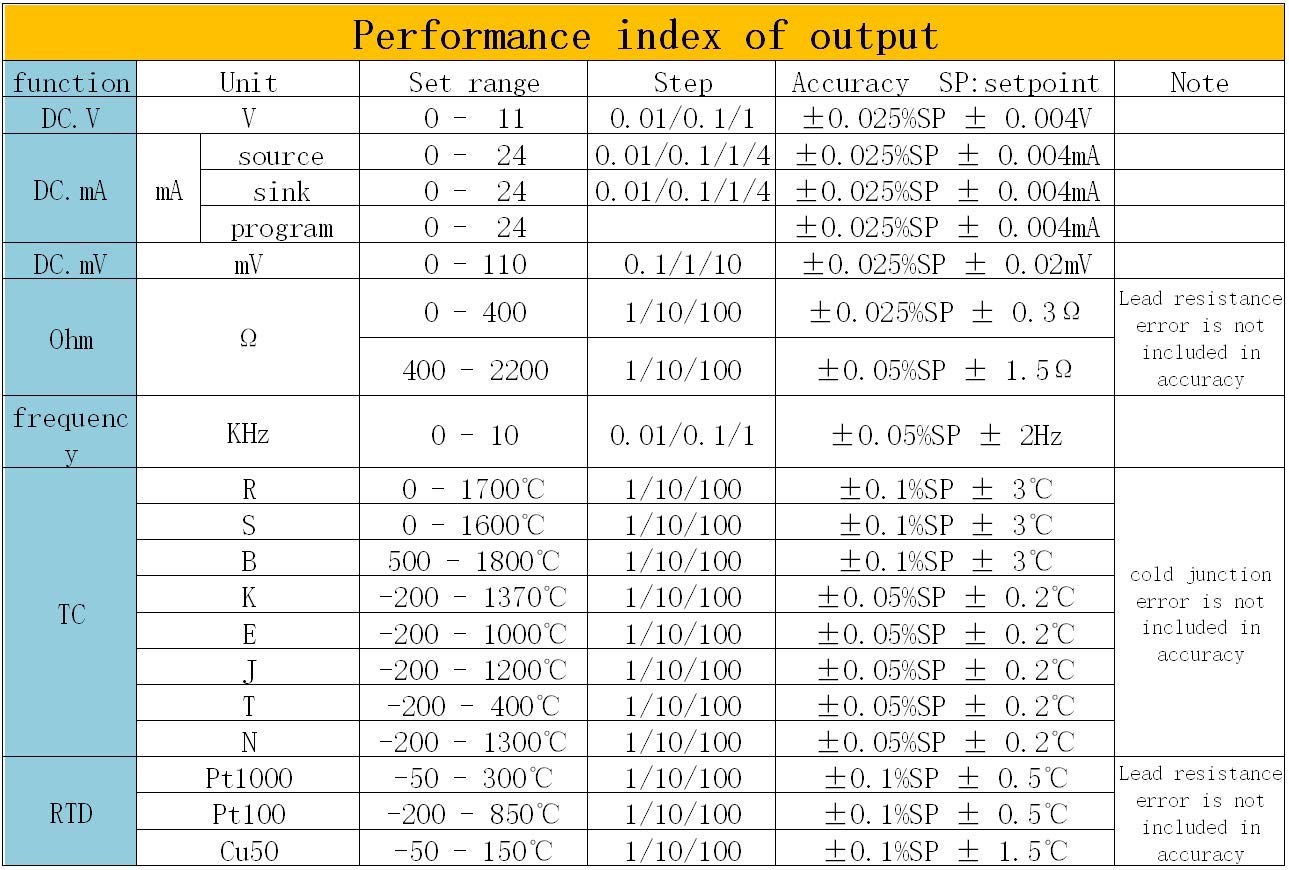
Figure 8.2: Performance Index of Output. This table provides detailed specifications for output functions including set range, step, and accuracy for DC Voltage, DC Current (source, sink, program), DC Millivolt, Ohm, Frequency, and various Thermocouple (R, S, B, K, E, J, T, N) and RTD (Pt1000, Pt100, Cu50) types. Notes on lead resistance error and cold junction error are also included.
| Function | Unit | Set range | Step | Accuracy (SP: setpoint) | Note |
|---|---|---|---|---|---|
| DC. V | V | 0 ~ 11 | 0.01/0.1/1/4 | ±0.025%SP ± 0.004V | |
| DC. mA | mA | source 0 ~ 24 | 0.01/0.1/1/4 | ±0.025%SP ± 0.004mA | |
| sink 0 ~ 24 | 0.01/0.1/1/4 | ±0.025%SP ± 0.004mA | |||
| program 0 ~ 24 | ±0.025%SP ± 0.004mA | ||||
| DC. mV | mV | 0 ~ 110 | 0.1/1/10 | ±0.025%SP ± 0.02mV | |
| Ohm | Ω | 0 ~ 400 | 1/10/100 | ±0.05%SP ± 0.3Ω | Lead resistance error is not included in accuracy |
| 400 ~ 2200 | 1/10/100 | ±0.05%SP ± 1.5Ω | |||
| frequency | KHz | 0 ~ 10 | 0.01/0.1/1 | ±0.05%SP ± 2Hz | |
| TC | R | 0 ~ 1700°C | 1/10/100 | ±0.1%SP ± 3°C | cold junction error is not included in accuracy |
| S | 0 ~ 1600°C | 1/10/100 | ±0.1%SP ± 3°C | ||
| B | 500 ~ 1800°C | 1/10/100 | ±0.1%SP ± 3°C | ||
| K | -200 ~ 1370°C | 1/10/100 | ±0.05%SP ± 0.2°C | ||
| E | -200 ~ 1000°C | 1/10/100 | ±0.05%SP ± 0.2°C | ||
| J | -200 ~ 1200°C | 1/10/100 | ±0.05%SP ± 0.2°C | ||
| T | -200 ~ 400°C | 1/10/100 | ±0.05%SP ± 0.2°C | ||
| N | -200 ~ 1300°C | 1/10/100 | ±0.05%SP ± 0.2°C | ||
| RTD | Pt1000 | -50 ~ 300°C | 1/10/100 | ±0.1%SP ± 0.5°C | Lead resistance error is not included in accuracy |
| Pt100 | -200 ~ 850°C | 1/10/100 | ±0.1%SP ± 0.5°C | ||
| Cu50 | -50 ~ 150°C | 1/10/100 | ±0.1%SP ± 1.5°C |
8.3 General Specifications
- Model: LB06
- Brand: KYHOPE
- Power Source: Battery Powered (Rechargeable via USB)
- Display: High resolution LCD with backlight
- Protection: 4 units of PPTC and a quick-break fuse
- Dimensions: (Not specified in input, placeholder if needed)
- Weight: (Not specified in input, placeholder if needed)
- Operating Temperature: (Not specified in input, placeholder if needed)
- Storage Temperature: (Not specified in input, placeholder if needed)
9. Maintenance
9.1 Cleaning
Wipe the calibrator's exterior with a soft, damp cloth. Do not use abrasive cleaners or solvents. Ensure no moisture enters the device.
9.2 Battery Care
To prolong battery life, avoid fully discharging the battery frequently. Recharge the battery using the provided USB cable when the battery indicator shows low capacity. If storing the device for an extended period, charge it to approximately 50% and recharge every few months.
9.3 Storage
Store the calibrator in a cool, dry place, away from direct sunlight and extreme temperatures. Use the provided meter bag for protection during storage and transport.
10. Troubleshooting
This section provides solutions to common issues you might encounter with the LB06 Process Calibrator.
| Problem | Possible Cause | Solution |
|---|---|---|
| Device does not power on. | Low battery or completely discharged. | Connect the calibrator to a USB power source using the provided cable and allow it to charge for at least 30 minutes before attempting to power on again. |
| Inaccurate readings/output. | Loose or incorrect test lead connections. Incorrect function/range selected. Environmental interference. Device needs calibration. | Ensure all test leads are securely connected to the correct terminals. Verify that the correct measurement or source function and range are selected for your application. Move the device away from strong electromagnetic fields. If issues persist, contact customer support for professional calibration. |
| Display is dim or unreadable. | Backlight off or low battery. Extreme ambient lighting. | Check battery level and recharge if necessary. Adjust backlight settings if available (refer to F-Fn button functions). Operate in a suitably lit environment. |
| Buttons are unresponsive. | Temporary software glitch. Physical damage. | Try powering the device off and then on again. If physical damage is suspected, contact customer support. |
11. Warranty and Support
11.1 Warranty Information
Specific warranty details for the KYHOPE LB06 Process Calibrator are typically provided with your purchase documentation or can be obtained from the point of sale. Please retain your proof of purchase for warranty claims.
11.2 Customer Support
For technical assistance, troubleshooting beyond this manual, or service inquiries, please contact KYHOPE customer support through the vendor from whom you purchased the product or refer to the contact information provided in your product packaging.
When contacting support, please have your product model (LB06) and purchase details ready.
Ask a question about this manual
Ask about setup, troubleshooting, compatibility, parts, safety, or missing instructions. Manuals+ will review the question and use this page’s manual context to help answer it.