
1. Important Safety Instructions
Read all instructions carefully before beginning installation. Failure to follow these instructions could result in electric shock, fire, or personal injury.
- Always disconnect power at the main circuit breaker before installation or servicing.
- All electrical connections must be in accordance with local codes, ordinances, and the National Electric Code. If you are unfamiliar with wiring, consult a qualified electrician.
- Ensure the installation site can support the weight of the fan (approximately 10.9 kg).
- Do not operate the fan with damaged blades or housing.
- Keep hands, clothing, and other objects clear of the fan blades when the fan is operating.
- This fan is designed for indoor use only.
2. Package Contents
Verify that all components listed below are present before beginning installation. If any parts are missing or damaged, contact customer support.
- Motor Housing Assembly
- Fan Blades (5)
- Blade Brackets
- Light Kit Assembly with Caged Drum Shade
- Remote Control with Wall Mount
- Downrod and Canopy
- Mounting Bracket
- Hardware Pack (screws, washers, wire nuts)
- Instruction Manual

Figure 2.1: Overview of the Warehouse of Tiffany Bobet Rustic Bronze 52-Inch Ceiling Fan.
3. Specifications
Detailed specifications for the CFL-8435REMO/MB ceiling fan.
| Attribute | Value |
|---|---|
| Brand | Warehouse of Tiffany |
| Model Number | CFL-8435REMO/MB |
| Color | Brown (Rustic Bronze Finish) |
| Product Dimensions | 132.08 x 132.08 x 50.8 cm (52-inch diameter) |
| Item Weight | 10.9 Kilograms |
| Power / Wattage | 60 watts (fan motor) |
| Voltage | 120 Volts |
| Material | Glass, Metal, Wood |
| Style | Contemporary Formal / Rustic |
| Light Fixture Form | Chandelier (Caged Drum Shade) |
| Light Source | Incandescent (bulbs not included) |
| Control Type | Remote Control |

Figure 3.1: Energy Guide for the CFL-8435REMO/MB Ceiling Fan, showing estimated yearly energy cost and airflow.

Figure 3.2: Energy Information at High Speed, detailing airflow, electricity use, and airflow efficiency.
4. Setup & Installation
Professional installation is recommended for safety and optimal performance. Ensure power is OFF at the circuit breaker before proceeding.
4.1 Mounting the Fan
- Secure the mounting bracket to the ceiling junction box. Ensure the junction box is securely fastened to the building structure and can support the fan's weight.
- Assemble the downrod to the motor housing, feeding the electrical wires through the downrod.
- Carefully lift the fan assembly and hang it on the mounting bracket.
4.2 Wiring
- Connect the fan's electrical wires to the household wiring according to the wiring diagram provided in the full manual (typically black to black, white to white, and green/bare copper to ground).
- Ensure all wire connections are secure using wire nuts.
- Tuck the wires neatly into the junction box.
4.3 Attaching Blades and Light Kit
- Attach each fan blade to its respective blade bracket using the provided screws.
- Secure the blade assemblies to the motor housing.
- Connect the light kit wiring to the fan motor wiring.
- Attach the light kit assembly, including the caged drum shade, to the bottom of the fan motor housing.
- Install appropriate incandescent bulbs (not included) into the light kit sockets.

Figure 4.1: The Bobet Ceiling Fan seamlessly integrated into a living room setting.
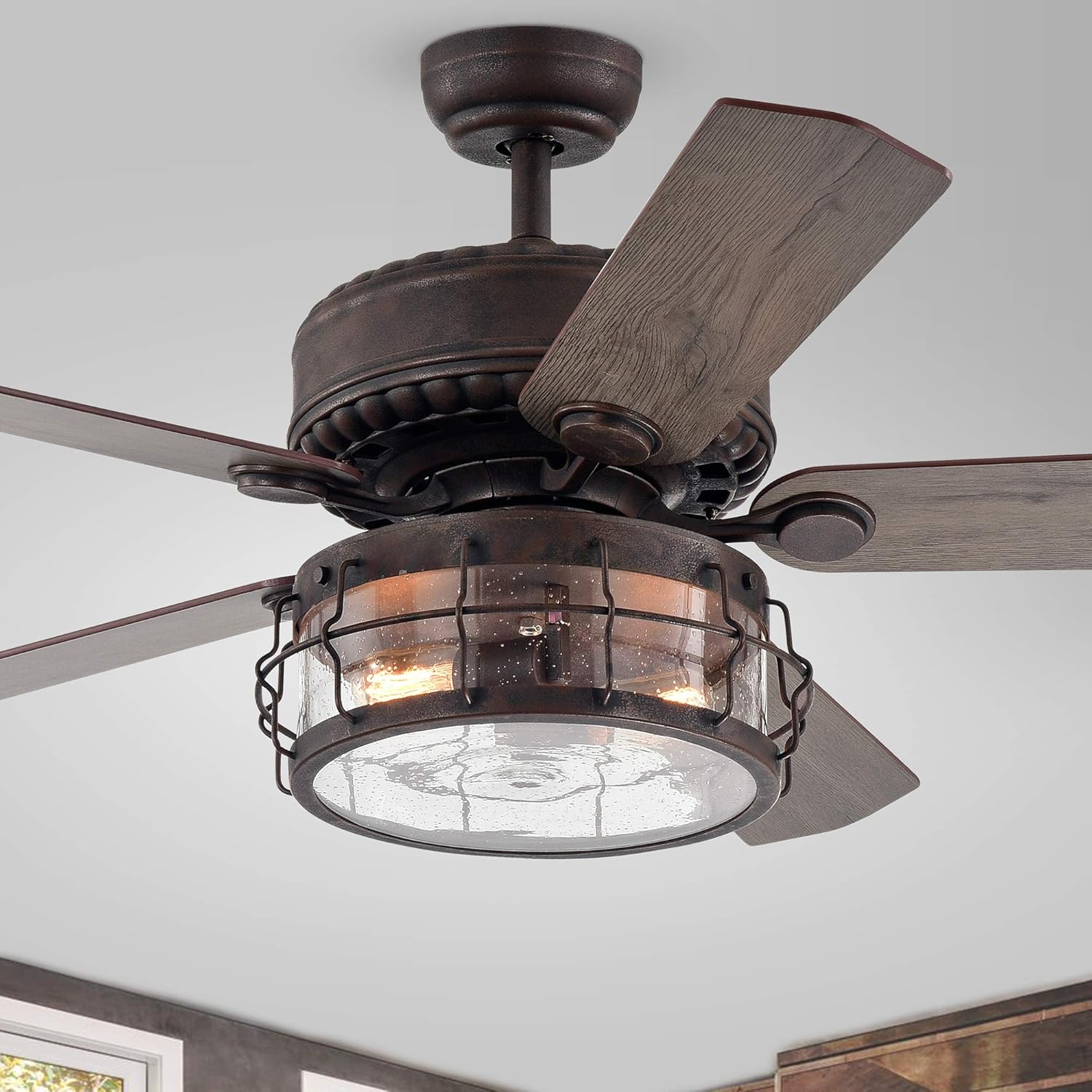
Figure 4.2: Detailed view of the fan's light kit with its distinctive caged drum shade and seeded glass.
5. Operating Instructions
This ceiling fan is operated using the included remote control.
5.1 Using the Remote Control
- Power Button: Press to turn the fan and light ON or OFF.
- Fan Speed Buttons: Typically labeled 1, 2, 3 (or Low, Medium, High) to adjust fan speed.
- Light Control Button: Press to turn the light ON or OFF. Some remotes may also have a dimmer function (press and hold).
- Reverse Function (if applicable): A button to change the direction of blade rotation for summer (downward airflow) or winter (upward airflow).
- Ensure the remote control has fresh batteries installed.
6. Maintenance
Regular maintenance ensures the longevity and optimal performance of your ceiling fan.
- Cleaning: Use a soft, damp cloth to clean the fan blades and motor housing. Do not use abrasive cleaners or solvents. Ensure power is OFF before cleaning.
- Blade Inspection: Periodically check that all blade screws are tight. Loose blades can cause wobbling and noise.
- Light Kit: Replace incandescent bulbs as needed. Ensure the power is OFF and bulbs have cooled before replacement.
- Electrical Connections: Annually, with power OFF, check all electrical connections for tightness.
7. Troubleshooting
Refer to the following table for common issues and their solutions.
| Problem | Possible Cause | Solution |
|---|---|---|
| Fan does not start | No power to the fan; Loose wire connections; Remote control battery dead. | Check circuit breaker; Verify all wire connections are secure; Replace remote control batteries. |
| Light does not work | Bulb faulty; Loose wire connection in light kit; Light switch/remote issue. | Replace bulb; Check light kit wiring; Ensure remote is functioning. |
| Fan wobbles | Loose blade screws; Unbalanced blades; Loose mounting bracket. | Tighten all blade screws; Use a balancing kit (not included); Ensure mounting bracket is secure. |
| Noisy operation | Loose screws; Motor hum; Blades hitting an obstruction. | Check all screws on fan and light kit; Ensure no wires are rubbing; Verify blades are clear of obstructions. |
8. Warranty and Support
Warehouse of Tiffany products are manufactured to high-quality standards. For specific warranty information, please refer to the warranty card included with your purchase or contact Warehouse of Tiffany customer support directly.
For technical assistance or replacement parts, please visit the official Warehouse of Tiffany website or contact their customer service department. Have your model number (CFL-8435REMO/MB) and purchase date ready when contacting support.