
1. Important Safety Instructions
Please read all instructions carefully before using this electric radiator. Retain this manual for future reference.
- Electrical Safety: Ensure the voltage indicated on the rating label matches your mains supply. Do not operate the radiator with a damaged cord or plug.
- Placement: Position the radiator on a stable, level surface or securely mount it to a wall. Maintain a safe distance from flammable materials, curtains, and furniture. Do not cover the radiator.
- Water Resistance (IP24): This appliance has an IP24 rating, making it suitable for use in bathrooms. However, it must not be immersed in water. Ensure it is installed in a location where switches and other controls cannot be touched by a person in a bath or shower.
- Children and Vulnerable Persons: This appliance can be used by children aged 8 years and above and persons with reduced physical, sensory or mental capabilities or lack of experience and knowledge if they have been given supervision or instruction concerning use of the appliance in a safe way and understand the hazards involved. Children shall not play with the appliance. Cleaning and user maintenance shall not be made by children without supervision.
- Overheating Protection: The radiator is equipped with an automatic safety shut-off system to prevent overheating. If it shuts off, unplug it, allow it to cool, and check for any obstructions before restarting.
- Cleaning: Always unplug the radiator before cleaning. Use a soft, damp cloth. Do not use abrasive cleaners or solvents.
2. Product Overview
The Gridinlux Homely WiFi Warm 2000W is a silent, programmable electric radiator designed for efficient heating. It features a high-quality glass panel, two power settings, and smart control via a mobile application and Wi-Fi connectivity.

Image 1: The Gridinlux Homely WiFi Warm 2000W electric radiator, showcasing its sleek design and a smartphone displaying the control app interface.
Key Features:
- Power Settings: Two thermal power settings: 1000W (Power I) and 2000W (Power II).
- Temperature Control: Automatic temperature management between 5°C and 40°C.
- Smart Control: Wi-Fi connectivity for control via the "Tuya Smart" mobile application (available on Google Play and App Store). Compatible with Google Home and Amazon Alexa.
- Touch Screen: Intuitive iTouch screen and control panel.
- Installation Options: Can be used freestanding with included feet or wall-mounted.
- Safety: Automatic shut-off for overheating protection and IP24 splash/humidity resistance.
- Programmable: 24/7 programming for efficient heat emission.
3. Setup and Installation
The radiator offers flexible installation options: freestanding or wall-mounted.
3.1 Freestanding Installation
- Unpack the radiator and identify the two feet.
- Attach the feet to the base of the radiator using the provided screws. Ensure they are securely fastened.
- Place the radiator on a stable, level surface, ensuring adequate clearance from walls and other objects.

Image 2: The Gridinlux radiator positioned freestanding on its feet in a room setting.
3.2 Wall-Mounted Installation
- Select a suitable wall location, ensuring it is away from water sources (unless specifically designed for bathroom zones and installed by a qualified electrician) and flammable materials.
- Use the provided mounting kit (brackets, screws, wall plugs).
- Mark the drilling points on the wall according to the bracket dimensions.
- Drill holes, insert wall plugs, and secure the mounting brackets to the wall.
- Carefully lift the radiator and hook it onto the wall brackets, ensuring it is securely seated.
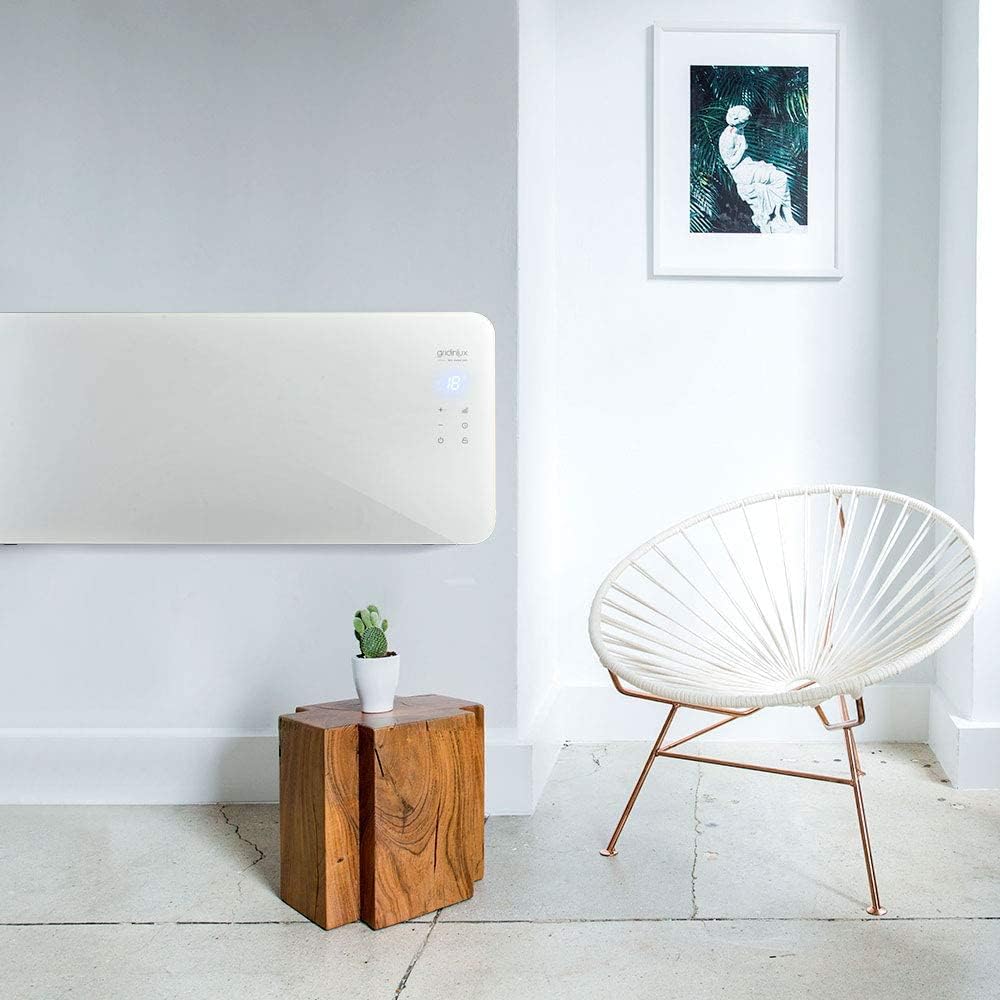
Image 3: The Gridinlux radiator mounted on a wall, demonstrating its space-saving installation option.
3.3 Initial Power-On and Wi-Fi Connection
- Plug the radiator into a suitable electrical outlet.
- Download the "Tuya Smart" application from Google Play or the App Store on your mobile device.
- Register or log in to your Tuya Smart account.
- Follow the in-app instructions to add a new device. Select "Heater" or "Radiator" and follow the pairing process, which typically involves putting the radiator into pairing mode (refer to the radiator's display for indicators) and connecting to your home Wi-Fi network (2.4GHz only).
- Once connected, you can control the radiator via the app and integrate it with Google Home or Amazon Alexa.

Image 4: A smartphone screen showing the Tuya Smart application controlling the radiator, with logos for Amazon Alexa and Google Home integration.
4. Operating Instructions
The radiator can be operated via its integrated touch panel or the mobile application.
4.1 Touch Panel Controls
The iTouch panel on the radiator allows for direct control:
- Power Button: Turns the radiator On/Off.
- Temperature Adjustment (+/-): Increases or decreases the target temperature.
- Mode Button: Cycles through power settings (1000W, 2000W) or other available modes.
- Timer Button: Sets the operating timer.
- Wi-Fi Indicator: Shows the status of the Wi-Fi connection.

Image 5: A detailed view of the radiator's touch control panel, showing the digital temperature display and various function buttons.
4.2 Mobile App Control (Tuya Smart)
Once connected to the Tuya Smart app, you can:
- Turn the radiator On/Off remotely.
- Adjust the target temperature.
- Select power modes (1000W/2000W).
- Set daily or weekly schedules for operation.
- Monitor the current room temperature.
- Integrate with voice assistants like Amazon Alexa and Google Home for voice commands.
5. Maintenance and Care
Regular maintenance ensures optimal performance and longevity of your radiator.
- Cleaning: Before cleaning, always unplug the radiator and allow it to cool completely. Wipe the exterior surfaces with a soft, damp cloth. Do not use abrasive cleaners, solvents, or harsh chemicals, as these can damage the finish.
- Storage: If storing the radiator for an extended period, ensure it is clean and dry. Store it in a cool, dry place, preferably in its original packaging.
- Inspection: Periodically check the power cord and plug for any signs of damage. If damage is found, discontinue use and contact qualified personnel for repair.
6. Troubleshooting
Refer to the following table for common issues and their solutions.
| Problem | Possible Cause | Solution |
|---|---|---|
| Radiator does not turn on. | Not plugged in; power outlet fault; safety shut-off activated. | Ensure plug is fully inserted. Test outlet with another device. Unplug, allow to cool, check for obstructions, then restart. |
| No heat output. | Low power setting; target temperature not set correctly; room temperature already reached. | Increase power setting. Adjust target temperature higher than current room temperature. |
| Wi-Fi connection fails. | Incorrect Wi-Fi password; 5GHz network used; radiator too far from router; router issues. | Verify Wi-Fi password. Ensure you are connecting to a 2.4GHz network. Move radiator closer to router or improve Wi-Fi signal. Restart router. |
| App control not responding. | No internet connection on phone; radiator offline; app glitch. | Check phone's internet connection. Verify radiator's Wi-Fi indicator. Restart app or phone. |
If the problem persists after attempting these solutions, please contact customer support.
7. Specifications
Detailed technical specifications for the Gridinlux Homely WiFi Warm 2000W electric radiator.
- Brand: Gridinlux
- Model Number: 50074 (Wifi Warm 2000)
- Color: White
- Dimensions (L x W x H): 92 x 24 x 43 cm (product); 94P x 13l x 45H cm (packaging/alternative product dimensions)
- Weight: 7.4 Kilograms
- Power: 2000 Watts (Two settings: 1000W, 2000W)
- Voltage: 240 Volts
- Material: Glass
- IP Rating: IP24 (Splash-proof)
- Special Features: Wi-Fi Compatible, Google Home and Alexa Integration, Mounting Kit, Programmable, Electric
- Form Factor: Compact, Wall-mountable
- Usage: Indoor
- Power Source: Corded Electric
- Heating Method: Radiant

Image 6: Dimensional diagram of the Gridinlux radiator, indicating its length (92cm), height (47cm), and depth (5cm from the wall when mounted, or 24cm with feet).
8. Warranty and Support
Information regarding warranty and customer support is not available in the provided product data. Please refer to the product packaging or the manufacturer's official website for details on warranty coverage and how to contact customer support for assistance.


