
1. Introduction
The KYHOPE HT-9829 is a high-sensitivity digital portable thermal anemometer designed for precise measurement of air velocity and temperature. Utilizing a combination of hot wire and standard thermistor technology, this instrument provides rapid and accurate readings, making it suitable for various applications including environmental testing, air conveyors, clean rooms, and HVAC system balancing.
Its slim probe design is ideal for accessing grilles and diffusers, while the large LCD display with backlight ensures clear readability of both air velocity and temperature simultaneously. The microprocessor circuit guarantees maximum accuracy and offers special functions such as data hold and recording of maximum/minimum readings.
2. Safety Information
- Read this manual thoroughly before operating the device.
- Do not expose the device to extreme temperatures, humidity, or direct sunlight.
- Avoid dropping or subjecting the device to strong impacts.
- Keep the hot wire probe clean and free from dust or debris to ensure accurate measurements.
- Do not attempt to disassemble or modify the device, as this will void the warranty and may cause damage.
- Remove batteries if the device will not be used for an extended period to prevent leakage.
3. Package Contents
Please check the package contents upon receipt. If any items are missing or damaged, contact your supplier immediately.
- KYHOPE HT-9829 Digital Portable Thermal Anemometer Unit
- Hot Wire Probe
- User Manual
- Carrying Case (if included with your model)
4. Product Overview
The HT-9829 features a robust design with an intuitive button layout and a clear LCD display.

Figure 1: KYHOPE HT-9829 Anemometer with connected hot wire probe.
4.1 Device Components
- LCD Display: Large screen with backlight for displaying air velocity, temperature, units, and other indicators.
- Hot Wire Probe Input: Port for connecting the external hot wire probe.
- Battery Compartment: Located on the rear of the device.
4.2 Control Buttons
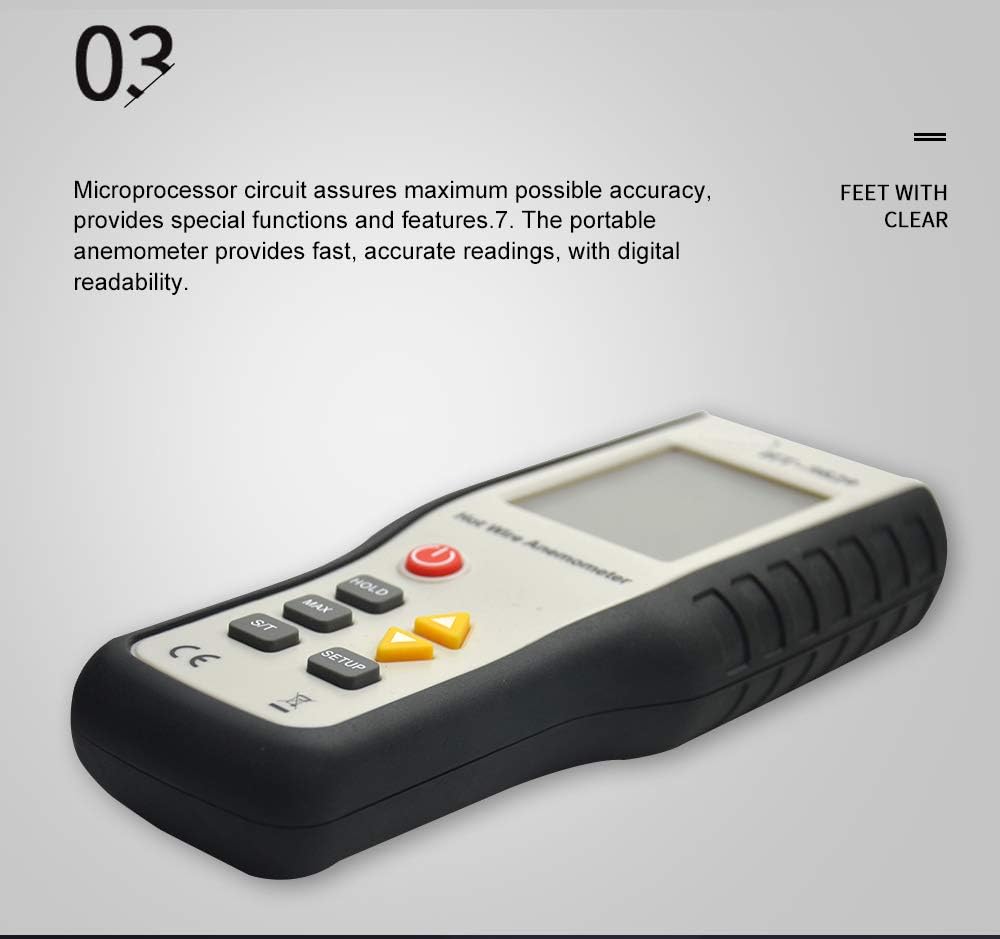
Figure 2: Control panel of the HT-9829 Anemometer.
- Power Button (): Press to turn the device ON or OFF.
- HOLD Button: Freezes the current reading on the display. Press again to release.
- MAX Button: Displays the maximum recorded air velocity or temperature. Press again to cycle through MIN and current readings.
- S/T Button: Switches between air velocity and temperature display.
- SETUP Button: Enters the setup menu for unit selection and other settings.
- Up/Down Arrow Buttons ( / ): Used to navigate menus and adjust settings.
5. Setup
5.1 Battery Installation
- Locate the battery compartment cover on the rear of the device.
- Slide or unscrew the cover to open.
- Insert the required batteries (e.g., 9V battery or AA batteries, refer to compartment markings) ensuring correct polarity.
- Replace the battery compartment cover securely.
5.2 Probe Connection
- Locate the probe input port on the top or side of the anemometer unit.
- Carefully align the connector of the hot wire probe with the input port.
- Gently push the connector into the port until it is firmly seated. Do not force the connection.
6. Operating Instructions
6.1 Power On/Off
- To turn ON: Press the Power Button once. The LCD will illuminate and display readings.
- To turn OFF: Press and hold the Power Button for approximately 2-3 seconds until the display turns off.
6.2 Taking Measurements
- Ensure the hot wire probe is securely connected to the main unit.
- Turn on the device.
- Position the slim probe in the airflow you wish to measure. Ensure the sensor head is fully exposed to the airflow.
- The display will show real-time air velocity and temperature readings.
6.3 Unit Selection
The HT-9829 supports multiple units for air velocity and temperature.
- Press the SETUP button to enter the unit selection menu.
- Use the Up/Down Arrow Buttons to cycle through available air velocity units: m/s, km/h, ft/min, MPH, Knots.
- Press SETUP again to select temperature units: °C or °F.
- Press HOLD or wait for a few seconds for the device to exit the setup menu and apply the selected units.
6.4 Data Hold Function
To freeze the current reading on the display:
- Press the HOLD button once. The 'HOLD' indicator will appear on the LCD.
- To resume live readings, press the HOLD button again.
6.5 Maximum/Minimum Readings
To view the maximum or minimum recorded values:
- Press the MAX button once to display the maximum air velocity and temperature recorded since power-on. The 'MAX' indicator will appear.
- Press the MAX button again to display the minimum air velocity and temperature. The 'MIN' indicator will appear.
- Press the MAX button a third time to return to live readings.
6.6 Backlight
The LCD display features a backlight for improved visibility in low-light conditions. The backlight typically activates automatically when the device is powered on and may have an auto-off feature to conserve battery life.
7. Maintenance
7.1 Cleaning
- Wipe the device casing with a soft, damp cloth. Do not use abrasive cleaners or solvents.
- For the hot wire probe, use a soft brush or compressed air to gently remove dust or lint. Avoid touching the delicate hot wire sensor directly.
7.2 Storage
- Store the anemometer in a cool, dry place, away from direct sunlight and extreme temperatures.
- If storing for an extended period, remove the batteries to prevent leakage and potential damage to the device.
- Keep the probe protected, ideally in its original packaging or a dedicated case, to prevent damage to the sensor.
8. Troubleshooting
| Problem | Possible Cause | Solution |
|---|---|---|
| Device does not power on | Low or dead batteries; Incorrect battery installation | Replace batteries; Check battery polarity |
| Inaccurate readings | Dirty or damaged probe; Incorrect unit selection; Obstruction in airflow | Clean probe gently; Verify unit settings; Ensure clear airflow to sensor |
| Probe not detected | Loose or faulty probe connection | Ensure probe is securely connected; Check for damage to probe cable/connector |
| Display is dim or blank | Low batteries; Backlight off | Replace batteries; Check backlight settings (if applicable) |
9. Specifications
| Parameter | Value |
|---|---|
| Model | HT-9829 |
| Measurement Type | Heat-Sensitive Thermal Anemometer (Hot Wire) |
| Air Velocity Units | m/s, km/h, ft/min, MPH, Knots |
| Temperature Units | °C, °F |
| Display | Large LCD with Backlight |
| Functions | Data Hold, MAX/MIN Record |
| Probe Type | Slim, ideal for grilles & diffusers |
| Material | Plastic |
| Power Source | Battery (type not specified, typically 9V or AA) |
| Manufacturer | KYHOPE |
10. Warranty and Support
This KYHOPE HT-9829 Digital Portable Thermal Anemometer is covered by a standard manufacturer's warranty against defects in materials and workmanship. The duration and terms of the warranty may vary by region and retailer. Please retain your proof of purchase for warranty claims.
For technical support, service, or warranty inquiries, please contact your original point of purchase or refer to the contact information provided by KYHOPE on their official website or product packaging.