Product Overview
The AULCMEET AKB75675304 is a direct replacement remote control designed for a wide range of LG Smart TV models. It offers immediate functionality without the need for programming, providing a convenient solution for lost or damaged original remotes. This remote features an ergonomic design for comfortable handling and includes dedicated buttons for popular streaming services.
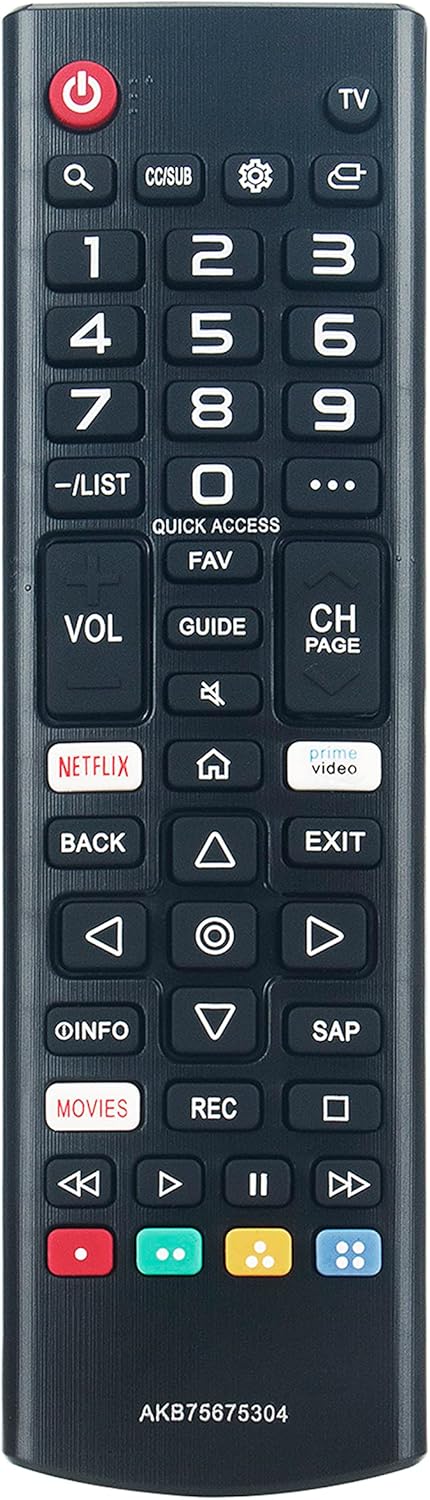
Image: Front view of the AULCMEET AKB75675304 replacement remote control, showcasing its button layout including power, number keys, volume, channel, navigation, and dedicated streaming service buttons.
Setup and Installation
Battery Installation
To begin using your remote control, you must first install the batteries.
- Step 1: Locate and open the battery cover on the back of the remote control.
- Step 2: Insert two new AAA 1.5V Alkaline batteries into the compartment. Ensure that the positive (+) and negative (-) terminals of the batteries align correctly with the markings inside the compartment.
- Step 3: Close the battery cover securely until it clicks into place.

Image: Rear view of the AULCMEET AKB75675304 remote control with the battery cover removed, showing the two AAA battery slots and correct polarity indicators.
Operating Instructions
Basic Operation
The AULCMEET AKB75675304 remote control is designed for immediate use with compatible LG TV models without requiring any programming. Simply point the remote control towards the TV's infrared (IR) sensor, ensuring there are no obstructions in the line of sight.
- Power Button: Press the red power button to turn your LG TV on or off.
- Number Buttons (0-9): Use these buttons to directly input channel numbers or other numerical selections.
- Volume Up/Down (VOL): Adjust the TV's audio volume.
- Channel Up/Down (CH PAGE): Change TV channels sequentially.
- Navigation Buttons (Up, Down, Left, Right, OK): Use the directional arrows to navigate through on-screen menus and the 'OK' button to confirm selections.
- Back Button: Return to the previous screen or menu.
- Exit Button: Exit the current menu or application.
- Netflix/Prime Video Buttons: Press these dedicated buttons for direct access to the respective streaming services.

Image: Angled view of the AULCMEET AKB75675304 remote control, highlighting its ergonomic shape and accessible button layout.

Image: A person holding the AULCMEET AKB75675304 remote control while watching television, demonstrating typical usage.
Maintenance
Proper care and maintenance will extend the life of your remote control.
- Cleaning: Wipe the remote control with a soft, dry cloth. Avoid using liquid cleaners, solvents, or abrasive materials, as these can damage the surface or internal components.
- Battery Replacement: Replace batteries when the remote's response becomes sluggish or stops working. Always replace both batteries at the same time with new ones of the same type (AAA 1.5V Alkaline). Do not mix old and new batteries or different types of batteries.
- Storage: Store the remote in a cool, dry place away from direct sunlight, high humidity, and extreme temperatures. Remove batteries if the remote will not be used for an extended period to prevent leakage.
Troubleshooting
If you encounter issues with your remote control, refer to the following common problems and solutions:
- Remote is not responding:
- Ensure the batteries are correctly installed with the proper polarity.
- Replace old batteries with new AAA 1.5V Alkaline batteries.
- Make sure there are no obstructions between the remote control and the TV's IR sensor.
- Confirm the remote is compatible with your specific LG TV model (refer to the compatibility list).
- Buttons require hard pressing:
- This may indicate low battery power. Replace the batteries.
- If the issue persists with new batteries, the remote control may be faulty.
- TV resets unexpectedly (e.g., every 60 minutes):
- If your TV resets periodically when using this remote, it may indicate an incompatibility or a faulty remote.
- Try using the original TV remote or another known compatible remote to isolate the issue. If the problem stops with a different remote, the AULCMEET remote may be the cause.
Specifications
| Feature | Detail |
|---|---|
| Model Number | AKB75675304 |
| Brand | AULCMEET |
| Compatible Devices | LG Televisions |
| Power Source | 2 x AAA 1.5V Alkaline Batteries (not included) |
| Dimensions | 7.8 x 2 x 0.68 inches (19.8 x 5.1 x 1.7 cm) |
| Item Weight | 2.08 ounces (59 grams) |
| Special Feature | Ergonomic design |
| Color | Black |
Compatibility List
This remote control is compatible with a wide range of LG TV models, including but not limited to the following:
- 43UM6900PUA
- 49UM6900PUA
- 55UM6900PUA
- 43UM7100PUA
- 49UM7100PUA
- 60UM7100DUA
- 70UM7170DUA
- 65UM7650PUB
- 75UM8070PUA
- 55UM7300AUE
- 55UM7300PUA
- 65UM7300AUE
- 65UM7300PUA
- 70UM7350PUA
- 70UM7370AUB
- 70UM7370PUA
- 50UM7400PUA
- 55UM7400PUA
- 65UM7400PUA
- 75UM7570AUE
- 75UM7570PUB
- 75UM7570PUD
- 82UM7570PUB
- 86UM7570PUB
- 82UM8070AUB
- 82UM8070PUA
- 86UM8070AUB
- 86UM8070PUA
- 55UM7200PUA
- 60UM7200PUA
- 43UM7300AUE
- 43UM7300PUA
- 43UM7310PUA
- 49UM7300AUE
- 49UM7300PUA
- 50UM7300AUE
- 50UM7300PUA
- 50UM7310PUA
- 50UM7600PUB
- 55UM7650PUB
- 43UN7300PUC
- 43UN7300AUD
- 43UN7300PUD
- 43UN7100PUA
- 43UN7000PUB
- 43UN6950ZUA
- 43UN6951ZUA
- 43UN6955ZUF
- 49UN7300PUC
- 49UN7300PUF
- 49UN7300AUD
- 49UN7300PUB
- 49UN7100PUA
- 49UN7000PUB
- 50UN8050PUD
- 50UN8000PUB
- 50UN7300PUF
- 50UN7300PUC
- 50UN7300AUD
- 50UN7300PUB
- 50UN7000PUC
- 50UN6950ZUF
- 50UN6951ZUF
- 50UN6955ZUF
- 55UN8050PUD
- 55UN8000PUB
- 55UN7300PUF
- 55UN7300PUC
- 55UN7300AUD
- 55UN7300PUB
- 55UN7310PUC
- 55UN7100PUA
- 55UN7000PUB
- 55UN6950ZUA
- 55UN6951ZUA
- 55UN6955ZUF
- 60UN7300PUA
- 60UN7310PUA
- 60UN7000PUB
- 60UN6950ZUA
- 60UN6951ZUA
- 65UN8500pui
- 65UN8500AUJ
- 65UN8050PUD
- 65UN8000PUB
- 65UN7300PUF
- 65UN7300PUC
- 65UN7300AUD
- 65UN7300PUB
- 65UN7310PUC
- 65UN7100PUA
- 65UN6950ZUA
- 65UN6951ZUA
- 65UN6955ZUF
- 65UN9000AUJ
- 70UN6950ZUA
- 70UN6955ZUC
- 70UN7370PUC
- 70UN7370AUD
- 70UN7370PUB
- 70UN7100PUA
- 70UN7070PUA
- 75UN8570PUC
- 75UN7370PUE
- 75UN8000PUB
- 75UN8570AUD
- 75UN7370AHU
- 75UN7370PUB
- 75UN7100PUD
- 75UN7070PUC
- 75UN6950ZUD
- 75UN6951ZUD
- 75UN6955ZUD
- 75UN6970PUD
- 75UN9070AUD
- 82UN8570PUC
- 82UN8570PUB
- 82UN8570AUD
- 82UN8070PUD
- 86UN8570PUC
- 86UN8570PUB
- 86UN8570AUD
- 86UN9070AUD
This list is not exhaustive. If your LG TV model is not listed, please compare your original remote with the images provided or contact the seller for compatibility confirmation.
Warranty and Support
For any questions, technical assistance, or warranty inquiries regarding your AULCMEET AKB75675304 replacement remote control, please contact the seller directly through your purchase platform. Specific warranty terms and conditions may vary and are typically provided by the seller at the time of purchase.
Note: This manual provides general instructions. Specific features and functions may vary slightly depending on your LG TV model and its firmware version.