
Introduction
This manual provides detailed instructions for the setup, operation, and maintenance of your Pyle PDWM2958B.5 Compact UHF Wireless Microphone System. Please read this manual thoroughly before using the product to ensure proper function and to prevent damage.
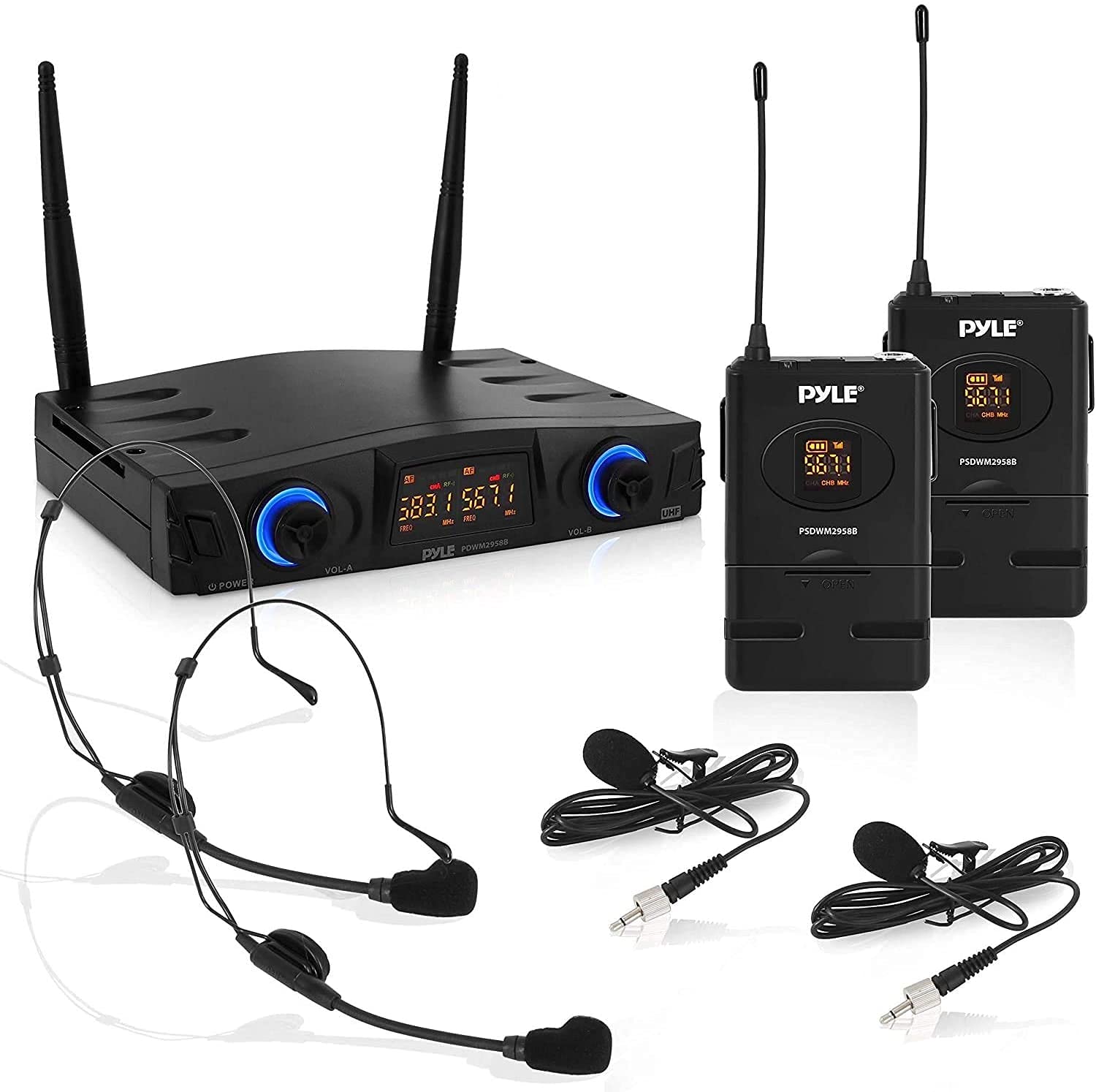
Figure 1: Pyle PDWM2958B.5 System Overview
What's in the Box
Verify that all components are present in the package:
- Microphone Receiver Base
- (2) Belt-Pack Transmitters
- (2) Headset Microphones
- (2) Lavalier Microphones
- (4) 'AA' Batteries
- USB Cable

Figure 2: Package Contents
Product Features
- Wireless Belt-Pack Microphone System
- 2-Channel, UHF Selectable Frequency Design
- Lab Tested Distortion-Free Pro Audio Performance
- USB Powered Microphone Receiver Base
- Compact Tabletop Receiver Design
- Independent Channel Adjustable Volume Settings
- Receiver with Digital LCD Display for AF/RF Audio Signal Indicators & Frequency Readout
- Dual Antenna for Extended Wireless Range
- Integrated Low Noise Circuitry
- 1/4'' Unbalanced Audio Output Jack
- (2) XLR (3-Pin) Balanced Audio Input Connectors

Figure 3: Receiver Front Panel with LCD Display

Figure 4: Headset and Lavalier Microphones
Setup
- Powering the Receiver: Connect the supplied USB cable to the receiver's Micro USB port and to a DC 5V USB power source (e.g., USB wall adapter, computer USB port).
- Connecting Audio Output:
- For unbalanced audio, connect a 1/4'' audio cable from the receiver's 1/4'' Unbalanced Audio Output Jack to your mixer or amplifier.
- For balanced audio, connect XLR (3-Pin) cables from the receiver's Balanced Audio Input Connectors (A and B) to your mixer or amplifier.

Figure 5: Receiver Connections
- Installing Batteries in Belt-Pack Transmitters:
- Open the battery compartment on each belt-pack transmitter.
- Insert two 'AA' batteries into each transmitter, observing correct polarity.
- Close the battery compartment securely.

Figure 6: Belt-Pack Battery Installation
- Connecting Microphones to Belt-Pack Transmitters: Plug the headset or lavalier microphone into the input jack on the belt-pack transmitter.
- Positioning Antennas: Extend the dual antennas on the receiver for optimal signal reception.
Operating Instructions
- Power On:
- Press the Power ON/OFF button on the receiver. The LCD display will illuminate.
- Slide the Power ON/OFF switch on each belt-pack transmitter to the 'ON' position.
- Frequency Selection: The system features selectable UHF frequencies. Refer to the receiver's LCD display for current frequency readout. If interference occurs, consult the full product manual for instructions on changing frequencies (not detailed in provided data).
- Adjusting Volume: Use the independent channel adjustable volume settings on the receiver to control the output level of each microphone.
- Monitoring Signal: The receiver's digital LCD display shows AF (Audio Frequency) and RF (Radio Frequency) signal indicators, allowing you to monitor the connection status.
- Wireless Operation: Ensure the belt-pack transmitters are within the wireless operation range of up to 165 feet from the receiver for optimal performance.
Media Resources
No official product videos were found in the provided data. For additional visual guides or demonstrations, please check the manufacturer's official website or support channels.
Maintenance
- Cleaning: Use a soft, dry cloth to clean the receiver and transmitters. Do not use liquid cleaners or solvents.
- Battery Replacement: Replace 'AA' batteries in the belt-pack transmitters when the low battery indicator appears or performance degrades. Always use fresh batteries of the same type.
- Storage: When not in use for extended periods, remove batteries from the transmitters and store the system in a cool, dry place.
Troubleshooting
| Problem | Possible Cause | Solution |
|---|---|---|
| No sound from microphone |
|
|
| Interference or poor sound quality |
|
|
| Receiver LCD not displaying |
|
|
Specifications
| Feature | Detail |
|---|---|
| Wireless Mic System Type | UHF (Ultra High Frequency) Band |
| Selectable Channel Frequency | (2x) 16 Channels |
| Wireless Operation Range | Up to 165 ft. |
| Audio Frequency Response | 30-20kHz |
| Image & Spurious Rejection | >70 dB |
| Audio Output Level | +/- 300 mV |
| Output Impedance | 600 Ohm |
| Frequency Stability | +/- 0.005% |
| Maximum Deviation | +/- 15 kHz |
| T.H.D | 0.03% |
| Sensitivity | -96dBm |
| Construction Material | Engineered ABS Housing |
| Power Consumption | <85mA |
| USB Interface | Micro USB |
| Belt-Pack Power | (2) x 'AA' Batteries (Each) |
| Receiver Power Supply | USB, DC 5V |
| Belt-Pack Dimensions (L x W x H) | 3.94'' x 2.46'' x 0.87'' -inches (Each) |
| Receiver Base Dimensions (L x W x H) | 8.08'' x 6.97'' x 1.72'' -inches |
Warranty and Support
For warranty information and technical support, please refer to the documentation included with your purchase or visit the official Pyle website. You can also visit the Pyle Store on Amazon for additional product details and support resources.


