
IKOHS Petcare HD
IKOHS Petcare HD Automatic Pet Feeder User Manual
Model: Petcare HD
Brand: IKOHS
Introduction
The IKOHS Petcare HD is an advanced automatic pet feeder designed for small and medium-sized pets, including dogs and cats. This device integrates a high-definition 1080P camera with night vision, a voice recorder, and a speaker, allowing you to monitor and interact with your pet remotely via a smartphone application and Wi-Fi connectivity. It ensures your pet is fed on schedule, providing peace of mind and convenience.
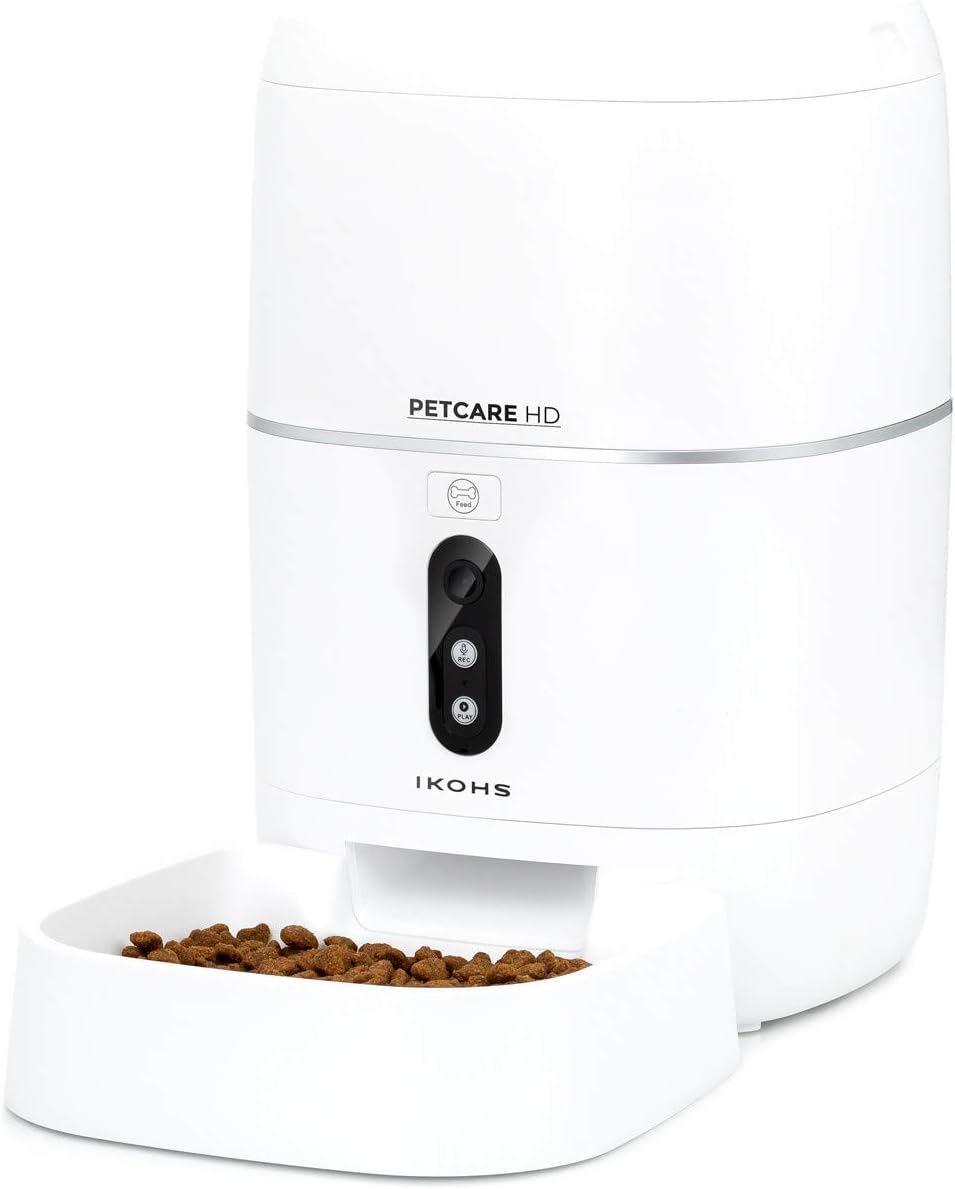
Image: The IKOHS Petcare HD automatic pet feeder, showing its sleek white design and the food dispensing tray.
Setup Guide
1. Unpacking and Placement
- Carefully remove all components from the packaging: the main feeder unit, food bowl, power adapter, and user manual.
- Place the feeder on a stable, flat surface in an area accessible to your pet and within range of your Wi-Fi network.
- Attach the food bowl securely to the base of the feeder.
2. Power Connection
- Connect the power adapter to the feeder's power input port.
- Plug the adapter into a standard electrical outlet. The device will power on, and indicator lights may illuminate.
3. App Installation and Wi-Fi Connection
- Download the official IKOHS Petcare app from your smartphone's app store (iOS or Android).
- Open the app and follow the on-screen instructions to create an account or log in.
- Initiate the device pairing process within the app. This typically involves selecting your device model and entering your Wi-Fi network credentials. Ensure your Wi-Fi network is 2.4GHz, as 5GHz networks may not be supported.
- Follow the app's prompts to connect the feeder to your Wi-Fi network. This may involve pressing a reset or pairing button on the feeder.

Image: A smartphone screen showing the live camera feed from the Petcare HD feeder, demonstrating remote monitoring capabilities.
4. Filling the Feeder
- Open the lid of the food container.
- Pour dry pet food into the container. The feeder has a capacity of 6 liters (approximately 3 kg of food).
- Close the lid securely to maintain freshness and prevent moisture and odors.
Operating Instructions
1. Programming Feeding Schedules
- Access the feeding schedule settings within the IKOHS Petcare app.
- Set desired feeding times and days of the week.
- Specify the number of portions for each feeding. Portions can be up to 100g.
- Save your programmed schedule. The feeder will automatically dispense food at the set times.

Image: A cat enjoying a meal dispensed by the automatic feeder, demonstrating its practical use.
2. Using the HD Camera and Night Vision
- From the app, select the live view option to access the integrated 1080P HD camera feed.
- The camera features night vision, allowing you to monitor your pet even in low-light conditions.
- The camera system uses encrypted signals for enhanced security.
3. Voice Recording and Two-Way Audio
- The feeder allows you to record short voice messages that will play when food is dispensed, providing a familiar sound for your pet.
- Utilize the two-way audio feature to speak to your pet directly through the feeder's speaker and listen to their responses via the built-in microphone.

Image: A cat and a dog observing the Petcare HD feeder, highlighting its appeal to various pet types.
4. Motion Alerts
- Enable motion detection in the app settings to receive alerts on your smartphone when movement is detected near the feeder. This can also serve as a home monitoring feature.
5. Manual Feeding
- In addition to scheduled feedings, you can manually dispense food at any time through the app.

Image: A dog resting beside the Petcare HD feeder, illustrating the product's integration into a pet's environment.
Maintenance
Cleaning Instructions
- Food Bowl: The food bowl can be detached and washed with mild soap and water. Ensure it is completely dry before reattaching.
- Food Container: Periodically wipe the inside of the food container with a dry or slightly damp cloth to remove any food residue. Do not submerge the main unit in water.
- Exterior: Clean the exterior of the feeder with a soft, dry cloth. Avoid abrasive cleaners or solvents.
- Ensure the feeder is unplugged before performing any cleaning.
Troubleshooting
Common Issues and Solutions
- Connectivity Problems:
- Ensure your Wi-Fi network is 2.4GHz. The feeder may not connect to 5GHz networks.
- Check that the feeder is within range of your Wi-Fi router.
- Restart your Wi-Fi router and the feeder.
- If pairing issues persist, try resetting the feeder (refer to app instructions for specific reset procedures).
- Feeder Beeping Continuously:
- A continuous beeping sound often indicates a loss of Wi-Fi connection. Re-establish the Wi-Fi connection through the app.
- Ensure the feeder is powered on and connected to a stable power source.
- Food Not Dispensing:
- Check if the food container has enough dry food.
- Ensure there are no obstructions in the dispensing mechanism.
- Verify that the feeding schedule is correctly set in the app.
- Perform a manual dispense via the app to test the mechanism.
- Camera Not Working / Poor Quality:
- Ensure the feeder has a stable Wi-Fi connection.
- Check for any physical obstructions on the camera lens.
- Restart the app and the feeder.
If you encounter persistent issues not covered here, please refer to the manufacturer's official support channels or the in-app help section.
Specifications
| Feature | Detail |
|---|---|
| Brand | IKOHS |
| Model | Petcare HD |
| Capacity | 6 Liters (approx. 3 kg dry food) |
| Material | PET |
| Color | White |
| Dimensions (Package) | 43.5 x 26.2 x 24.9 cm |
| Item Weight | 3.07 kg |
| Connectivity | Wi-Fi (2.4GHz) |
| Camera | 1080P HD with Night Vision |
| Audio Features | Voice Recorder, Speaker, Two-way Audio |
| Special Features | Motion Alerts, Programmable Feeding, Airtight Container |
| Target Species | Dog, Cat |
| Included Components | Power Adapter, User Manual |
Warranty and Support
For detailed information regarding the product warranty, please refer to the warranty card included in your product packaging or visit the official IKOHS website. Warranty terms and conditions may vary by region.
For technical support, troubleshooting assistance beyond this manual, or customer service inquiries, please contact IKOHS customer support through their official website or the contact information provided in the product documentation.
Important Notes
- This feeder is designed for dry pet food only. Do not use wet food, canned food, or treats that may clog the dispenser.
- Keep the feeder away from direct sunlight and heat sources.
- Ensure the power cord is not chewed by pets.
- Regularly check the food level to ensure continuous feeding.
Official Product Videos
There are no official product videos provided by the seller for this item at this time.
Ask a question about this manual
Ask about setup, troubleshooting, compatibility, parts, safety, or missing instructions. Manuals+ will review the question and use this page’s manual context to help answer it.