
Introduction
This manual provides detailed instructions for the installation, operation, and maintenance of your Pyle PLMRB38B.5 Bluetooth Marine Receiver Stereo. Please read this manual thoroughly before using the product to ensure proper function and to prevent damage. Keep this manual for future reference.
Safety Information
- Ensure proper wiring connections to prevent short circuits and electrical damage.
- Do not attempt to disassemble or modify the unit. This may void the warranty and cause damage.
- Avoid exposing the unit to extreme temperatures, direct sunlight for prolonged periods, or excessive moisture.
- Always operate your vessel safely. Adjust audio settings only when it is safe to do so.
- Use only the specified power supply (12V DC).
Package Contents
Verify that all items are present in the package:
- Pyle PLMRB38B.5 Marine Stereo Receiver
- Remote Control
Product Overview
Familiarize yourself with the front panel controls and rear connections of your marine receiver.
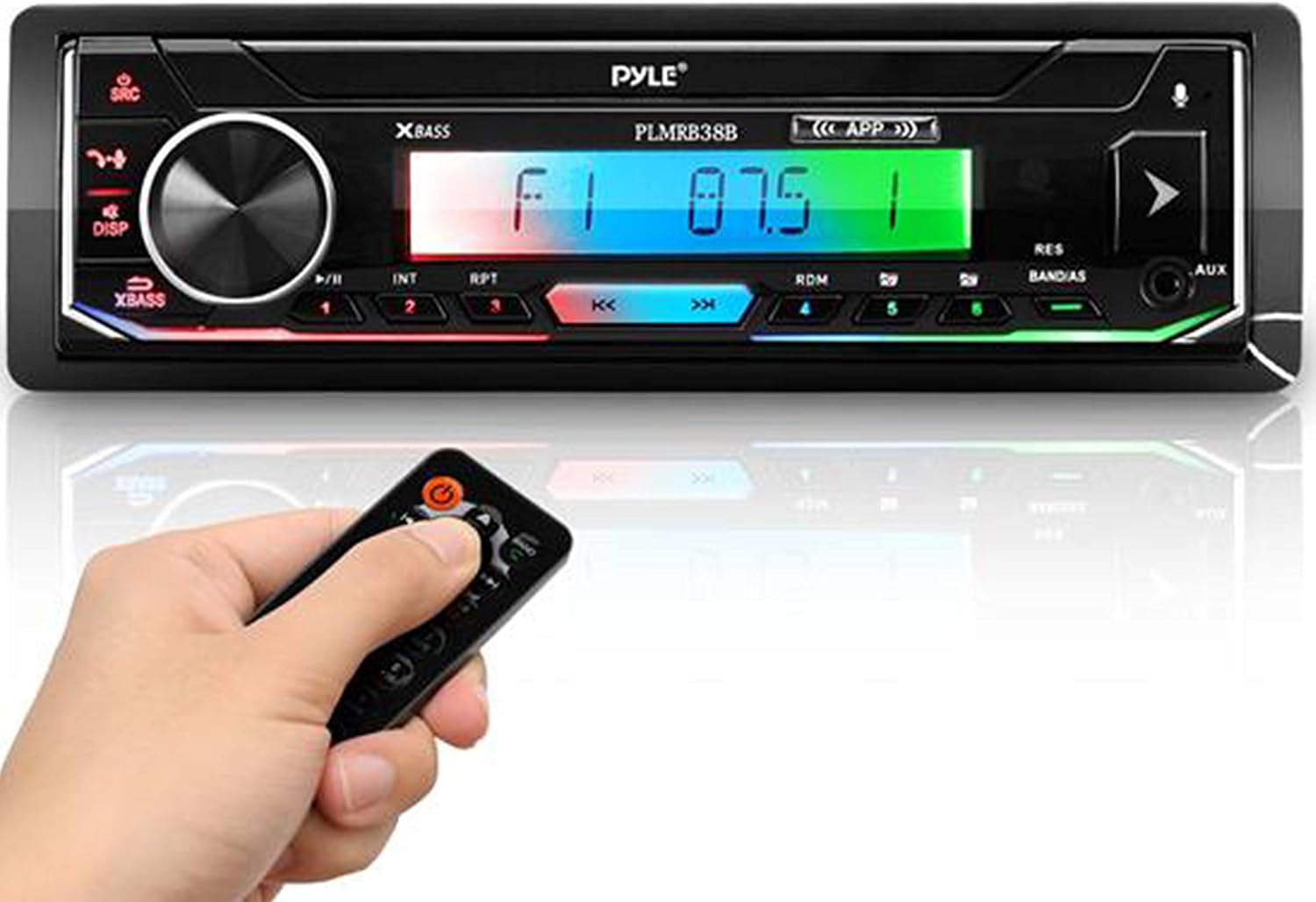
Image: Front view of the Pyle PLMRB38B.5 marine receiver, showcasing the digital LCD display, control buttons, and a remote control for convenient operation.

Image: Front and rear views of the Pyle PLMRB38B.5 marine receiver. The front panel displays the LCD and controls, while the rear panel shows the wiring harness and RCA output connections.
Front Panel Controls:
- Power/Mode Button: Turns the unit on/off and switches between input modes (AM/FM, Bluetooth, USB, SD, AUX).
- Volume Knob: Adjusts the audio output level. Press to access audio settings (EQ, Balance, Fader).
- Display (DISP) Button: Toggles display information.
- XBass Button: Activates or deactivates the XBass feature for enhanced low frequencies.
- Play/Pause/Preset Buttons: Control media playback and select radio presets.
- Skip/Tune Buttons: Navigate tracks or tune radio frequencies.
- AUX Input: 3.5mm jack for connecting external audio devices.
- USB/SD Slot: For media playback from USB flash drives and SD memory cards.
- Microphone: Built-in for hands-free calling.
Rear Panel Connections:
- Wiring Harness: For power, ground, and speaker connections.
- RCA Output: 1 pair RCA output + 2x Subwoofer for connecting external amplifiers.
Setup
Installation

Image: The Pyle PLMRB38B.5 marine receiver seamlessly integrated into a boat's dashboard, demonstrating its universal Single DIN installation compatibility.
The PLMRB38B.5 features a universal Single DIN size design for easy installation into most marine vehicle dashboards. Consult a professional installer if you are unsure about the installation process.
Wiring Diagram
Refer to the wiring diagram provided with your unit for specific connections. General connections include:
- Yellow Wire: Constant 12V (Battery)
- Red Wire: Accessory 12V (Ignition)
- Black Wire: Ground
- Speaker Wires: Connect to your boat's speakers (typically 4 pairs for front/rear, left/right).
- Antenna: Connect your marine antenna.
Ensure all connections are secure and insulated to prevent electrical issues.
Operating Instructions
Basic Operation
- Power On/Off: Press the Power/Mode button to turn the unit on. Press and hold to turn off.
- Mode Selection: Press the Power/Mode button repeatedly to cycle through available modes: AM/FM Radio, Bluetooth, USB, SD, AUX.
- Volume Control: Rotate the volume knob to increase or decrease the audio level.
AM/FM Radio
- Tuning: In AM/FM mode, press the Skip/Tune buttons to manually tune frequencies. Press and hold for automatic seek tuning.
- Preset Stations: The unit supports 30 station memory. To save a station, tune to the desired frequency, then press and hold one of the numbered preset buttons (1-6). To recall a saved station, press the corresponding preset button.
- Store/Scan Mode: Use the Band/AS button to automatically scan and store strong stations.
Bluetooth Connectivity

Image: The receiver's display showing ID3 tag information ('UNKOWN ARTIST', 'Unknown Artist - Track 01') during Bluetooth wireless streaming, with a smartphone in the foreground.
The PLMRB38B.5 features Bluetooth Wireless Audio Ability (BT Version 4.2) for streaming music from compatible devices.
- Ensure Bluetooth is enabled on your mobile device (e.g., iPhone, Android smartphone, tablet).
- Select Bluetooth mode on the receiver. The unit will enter pairing mode.
- On your device, search for available Bluetooth devices and select 'Pyle Audio' or similar.
- Once paired, you can stream audio from your device to the receiver. The LCD panel will display ID3 Tag Song Readout for artist name and song title.
Hands-Free Calling

Image: The Pyle PLMRB38B.5 receiver highlighting its hands-free calling feature with a microphone icon and sound wave graphics, indicating compatibility with XBass, Siri Dialing, and Android/iOS apps.
With the built-in microphone, you can make and receive calls hands-free when connected via Bluetooth.
- Answering Calls: When a call comes in, the telephone number will be displayed on the LCD panel. Press the call answer button (usually the green phone icon) to accept the call.
- Ending Calls: Press the call end button (usually the red phone icon) to terminate a call.
- Redial: Some units support redialing the last dialed number. Refer to the specific button layout.
USB/SD Card Playback
- Insert a USB flash drive or SD memory card into the respective slot. The unit will automatically switch to USB/SD mode and begin playing MP3 digital audio files.
- Use the Skip/Tune buttons to navigate between tracks.
- Use the Play/Pause button to control playback.
- Features include Memory/Repeat/Random/Intro Play functions.
AUX Input
- Connect an external audio device (e.g., MP3 player, smartphone) to the 3.5mm AUX input connector jack on the front panel.
- Select AUX mode using the Power/Mode button. Audio from the connected device will play through the receiver.
Audio Settings
- Press the volume knob to access audio settings. Rotate the knob to adjust:
- Equalizer (EQ): Select from preset EQ curves or customize.
- Balance: Adjust audio distribution between left and right speakers.
- Fader: Adjust audio distribution between front and rear speakers.
- XBass: Enhance bass frequencies.
Maintenance
- Cleaning: Use a soft, dry cloth to clean the unit's surface. Do not use abrasive cleaners or solvents.
- Connections: Periodically check all wiring connections to ensure they are secure and free from corrosion, especially in a marine environment.
- Storage: If storing the vessel for an extended period, ensure the unit is powered off and protected from extreme conditions.
Troubleshooting
| Problem | Possible Cause | Solution |
|---|---|---|
| No power | Incorrect wiring; Blown fuse; Vehicle battery low | Check power and ground connections; Replace fuse; Charge/check vehicle battery |
| No sound | Volume too low; Mute activated; Speaker wires disconnected; Incorrect input mode | Increase volume; Deactivate mute; Check speaker connections; Select correct input mode |
| Bluetooth not connecting | Bluetooth not enabled on device; Unit not in pairing mode; Device already paired to another unit | Enable Bluetooth on device; Ensure receiver is in Bluetooth mode; Disconnect from other devices and retry pairing |
| USB/SD not playing | Unsupported file format; Corrupted media; Incorrect mode selected | Ensure files are MP3; Try different USB/SD card; Select USB/SD mode |
| Remote control not working | Battery depleted; Obstruction between remote and unit; Remote sensor blocked | Replace remote battery; Remove obstructions; Ensure clear line of sight to sensor |
Specifications

Image: Diagram illustrating the dimensions of the Pyle PLMRB38B.5 marine receiver, measuring 7.1 inches in width, 1.97 inches in height, and 4.5 inches in depth, with a weight of 1.44 lbs.
| Feature | Specification |
|---|---|
| Model Number | PLMRB38B.5 |
| Power Output | 100 Watt (25W x 4) Peak, 75 Watts RMS |
| Bluetooth Version | 4.2 (A2DP) |
| Connectivity | Bluetooth, USB, SD Card, AUX (3.5mm), RCA |
| Display | Digital LCD |
| Radio Tuner | AM/FM Stereo, 30 Station Memory |
| Audio File Playback | MP3 |
| Equalizer | 10EQ, Balance, Fader, XBass |
| Hands-Free Calling | Built-in Microphone |
| Output Mode | Stereo |
| Product Dimensions | 8.5 x 3.25 x 6.75 inches (Overall), 7.1" (W) x 1.97" (H) x 4.5" (D) (Chassis) |
| Item Weight | 1.34 pounds |
| Power Supply | 12V DC |
Warranty and Support
Pyle products are designed for reliability and performance. For warranty information or technical support, please refer to the documentation included with your purchase or visit the official Pyle website. Keep your proof of purchase for warranty claims.


