
Bonvoisin 10kg, 0.1g
Bonvoisin Lab Scale 10kgx0.1g Instruction Manual
Model: 10kg, 0.1g
1. Introduction
Thank you for choosing the Bonvoisin Lab Scale. This digital analytical balance is designed for accurate and precise weighing in various applications, including laboratory, school, business, and jewelry. With a 0.1g resolution and a maximum capacity of 10kg, it offers versatile functionality including tare and counting features. This manual provides detailed instructions for setup, operation, and maintenance to ensure optimal performance and longevity of your scale.
2. Package Contents
Please verify that all items listed below are included in your package:
- Bonvoisin Lab Scale (1 unit)
- Stainless Steel Weighing Pan (1 unit)
- Power Adapter (1 unit)
- Instruction Manual (1 unit)
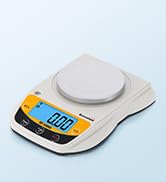
Image: Contents of the Bonvoisin Lab Scale package, showing the scale unit, the square weighing pan, the power adapter, and the instruction manual.
3. Product Features
- High Precision: 0.1g resolution with a minimum weighing capacity of 0.5g and maximum of 10kg.
- Multiple Units: Supports g, kg, ct, tl, oz, dwt, lb, dr, gn, ozt, MM, tl.J, tl.T, tl.H, t.
- Multifunctional: Includes Tare function for container weight subtraction and Counting function for multiple items.
- Durable Material: Features a 7.09 x 7.09 inch stainless steel weighing pan and an ABS shell.
- Stable Design: Equipped with non-slip mat, adjustable front and rear legs, and a level indicator for stable operation.
- Dual Power Sources: Can be powered by the included 100-240V adapter or 4 AA batteries (not included).
- CE Certification: Ensures compliance with European safety standards.

Image: A visual representation of the Bonvoisin Lab Scale with callouts pointing to its key features such as CE Certification, Units Conversion, LCD Display, Stainless Steel Weighing Platter, Counting Function, and Tare Function.
4. Components Overview
Familiarize yourself with the main components of your Bonvoisin Lab Scale:
- Weighing Pan: Stainless steel platform for placing items to be weighed.
- LCD Display: Digital screen showing weight, units, and function indicators.
- Control Panel: Contains buttons for operation (ON/OFF, MODE, PCS, TARE).
- Adjustable Screws/Feet: Located at the bottom corners for leveling the scale.
- Level Bubble: A small bubble indicator to ensure the scale is perfectly level for accurate readings.
- Power Input: Port for connecting the AC adapter.
- Battery Compartment: Located on the underside for AA batteries.

Image: An exploded view diagram of the Bonvoisin Lab Scale, labeling its key components including the adjustable screws, stainless steel weighing pan, LCD display, level bubble, ABS shell, and buttons for tare, counting, mode, and power.
5. Setup
5.1 Unpacking and Placement
- Carefully remove the scale and all accessories from the packaging.
- Place the scale on a stable, flat, and vibration-free surface. Avoid direct sunlight, drafts, or extreme temperature changes.
- Ensure the surface is clean and dry.
5.2 Leveling the Scale
For accurate measurements, the scale must be perfectly level.
- Locate the level bubble indicator on the front left side of the scale.
- Adjust the four adjustable feet (screws) at the bottom corners of the scale by twisting them until the bubble is centered within the circle of the level indicator.

Image: Detailed view of the Bonvoisin Lab Scale's LCD display, level bubble, adjustable screws, and weighing pan, illustrating how to level the device for accurate measurements.
5.3 Power Connection
The scale can be powered by the included AC adapter or 4 AA batteries (not included).
- AC Power: Insert the power adapter into the DC input port on the back of the scale, then plug the adapter into a standard electrical outlet (100-240V).
- Battery Power: Open the battery compartment on the underside of the scale and insert 4 AA batteries, ensuring correct polarity.

Image: The Bonvoisin Lab Scale demonstrating its dual power options: connection via the included power cable and the use of 4 AA batteries (not included).
6. Operating Instructions
6.1 Power On/Off
- Press the ON/OFF button to turn the scale on.
- Press and hold the ON/OFF button to turn the scale off.
6.2 Unit Conversion
The scale supports multiple weighing units. To switch between units:
- Press the MODE button repeatedly to cycle through the available units (g, kg, ct, tl, oz, dwt, lb, dr, gn, ozt, MM, tl.J, tl.T, tl.H, t).
- The selected unit will be displayed on the LCD screen.
6.3 Tare Function
The Tare function allows you to subtract the weight of a container, so only the weight of the contents is measured.
- Place the empty container on the weighing pan.
- Wait for the reading to stabilize.
- Press the TARE button. The display will reset to 0.0g.
- You can now add items to the container, and the scale will display only the net weight of the items.

Image: A step-by-step guide demonstrating the Tare function. First, an empty bowl is placed on the scale, showing its weight. Then, the TARE button is pressed, and the display resets to zero, allowing for measurement of contents only.
6.4 Counting Function (PCS)
The counting function is useful for counting multiple small items of uniform weight.
- Place a sample quantity of items (e.g., 10, 20, 50, 100 pieces) on the weighing pan.
- Press the PCS button. The display will show "PCS" and a number (e.g., "10 PCS").
- Use the MODE button to select the sample quantity that matches the number of items you placed on the pan.
- Press the ON/OFF button to confirm the sample quantity.
- Remove the sample items.
- Now, place any quantity of the same items on the pan, and the scale will display the count of the items.

Image: A four-step visual guide on how to use the counting function. It shows placing a sample of items, pressing the PCS key, confirming the sample quantity, and then counting a larger batch of items.
6.5 Setting Auto-Off Time
You can adjust the auto-off time to conserve battery life or disable it for continuous operation.
- With the scale turned off, press and hold both the TARE and ON/OFF keys simultaneously.
- Continue holding the ON/OFF key until the display shows "F05".
- Press the MODE key to cycle through the auto-off time options (e.g., 0, 2, 5, 8 minutes). A setting of "0" means the auto-off function is disabled.
- Once your desired auto-off time is displayed, keep pressing the ON/OFF key until the display shows "LOAD".
- When "LOAD" is displayed, unplug the power adapter (if using AC power) or remove batteries to save the setting.
Video: A demonstration on how to set the auto-off time for the Bonvoisin Lab Scale. It shows the sequence of button presses and display changes to configure this setting.
7. Maintenance
- Cleaning: Wipe the scale with a soft, damp cloth. Do not use abrasive cleaners or immerse the scale in water. The stainless steel pan can be removed for separate cleaning.
- Storage: Store the scale in a clean, dry, and stable environment when not in use. Avoid extreme temperatures and humidity.
- Calibration: While the scale is factory calibrated, periodic calibration with known weights may be necessary for optimal accuracy, especially after prolonged use or significant environmental changes. Refer to the calibration section if available in the full manual.
- Battery Replacement: If using batteries, replace all four AA batteries when the low battery indicator appears on the display.
8. Troubleshooting
| Problem | Possible Cause | Solution |
|---|---|---|
| Scale does not turn on. | No power, dead batteries, or faulty adapter. | Check power adapter connection. Replace batteries if using battery power. |
| Inaccurate readings. | Scale not level, unstable surface, drafts, or need for calibration. | Ensure scale is level and on a stable surface. Avoid drafts. Perform calibration if necessary. |
| Display shows "LoAd" or "O-Ld". | Overload. | Remove excess weight from the weighing pan immediately. Do not exceed maximum capacity. |
| Display shows "UnSt". | Unstable reading. | Ensure the scale is on a stable surface and there are no vibrations or air currents affecting it. |
9. Specifications
- Brand: Bonvoisin
- Model: 10kg, 0.1g
- Capacity: 10 kg (22 lb)
- Readability/Resolution: 0.1 g
- Minimum Weighing: 0.5 g
- Linearity Error Range: ±0.4 gram
- Weighing Pan Material: Stainless Steel
- Weighing Pan Dimensions: 7.09 x 7.09 inches (17.8 x 17.8 cm)
- Display Type: LCD with Green Backlit
- Power Source: 100-240V AC Adapter (included) or 4 x AA Batteries (not included)
- Product Dimensions: 10.24 x 7.09 x 2.52 inches (25.6 x 17.8 x 6.4 cm)
- Item Weight: 5.17 pounds
- Material: Acrylonitrile Butadiene Styrene (ABS)
- Special Feature: Smart, Counting Function, Tare Function

Image: A diagram illustrating the dimensions of the Bonvoisin Lab Scale, showing its length, width, and height measurements in both centimeters and inches.
10. Warranty and Support
For warranty information, technical support, or service inquiries, please refer to the contact details provided on the product packaging or visit the official Bonvoisin website. Keep your purchase receipt as proof of purchase for warranty claims.
Manufacturer: Bonvoisin
Model Number: XXX-16
UPC: 795787256312, 795787256329
Ask a question about this manual
Ask about setup, troubleshooting, compatibility, parts, safety, or missing instructions. Manuals+ will review the question and use this page’s manual context to help answer it.