
Hilitand B083VTKLTT
Hilitand Multifunction Digital Display Voltage Tester Instruction Manual
Model: B083VTKLTT
Introduction
This manual provides comprehensive instructions for the safe and effective use of your Hilitand Multifunction Digital Display Voltage Tester. This pen-sized device is designed for quick and easy testing of AC/DC voltage, featuring a digital display and an LED lighting function for enhanced convenience.
Important Safety Information
Always read and understand all safety warnings and instructions before using this product. Failure to follow these instructions may result in electric shock, fire, or serious injury.
- Do not use if the tester appears damaged.
- Ensure proper insulation and avoid contact with live circuits when not testing.
- Always verify the tester's functionality before and after each use.
- Keep out of reach of children.
- This device is intended for voltage testing only. Do not use for other purposes.
Product Overview and Features
The Hilitand Voltage Tester is a versatile tool designed for electrical professionals and DIY enthusiasts. Its compact design and intuitive functions make it an essential tool for various electrical testing needs.
Key Features:
- LED Lighting Function: Provides illumination for working in dimly lit areas.
- AC/DC Voltage Detection: Capable of testing both alternating current and direct current voltages.
- Digital Display: Shows voltage values for precise readings.
- Durable Construction: Made from high-quality ABS plastic for resistance to falling and aging, ensuring safety insulation.
- Easy to Use: Simple operation for quick and efficient testing.
Components and Controls
Familiarize yourself with the different parts of your voltage tester:
- Test Pen Head: The metal tip used for direct contact testing.
- Digital Display Screen: Shows voltage readings and other indicators.
- DIRECT Button: Used for direct contact voltage detection.
- INDUCTION Button: Used for non-contact inductive testing.
- LED Light: Illuminates the testing area.
- ABS Plastic Handle: Provides a secure and insulated grip.
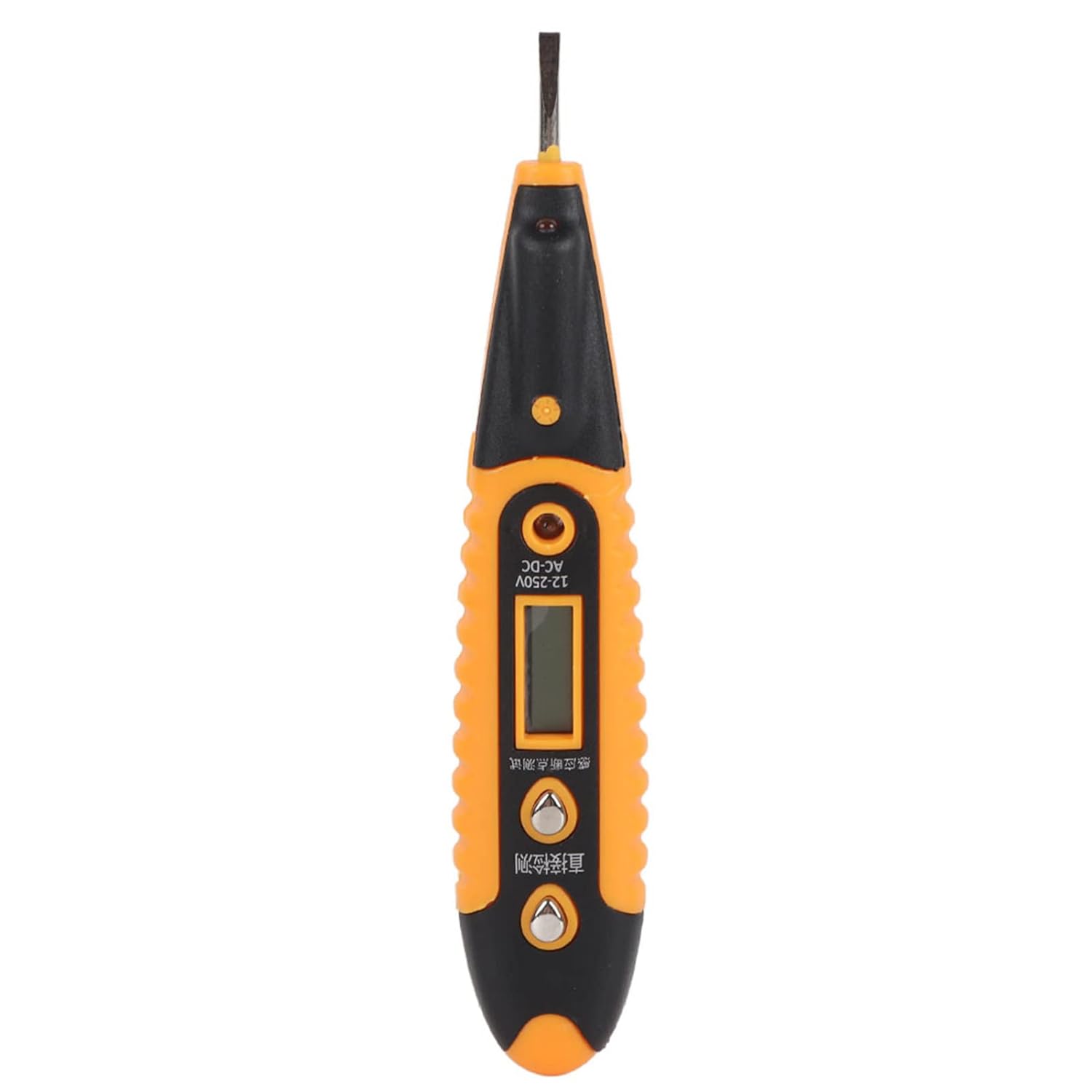
Image: Front view of the Hilitand Multifunction Digital Display Voltage Tester, showing the digital screen and the 'DIRECT' and 'INDUCTION' buttons.

Image: Close-up view of the tester's tip, highlighting the LED light and the flat-head screwdriver tip.
Setup and Initial Use
Battery Installation (if applicable):
The voltage tester requires batteries for operation. Please ensure batteries are correctly installed before first use. The battery compartment is typically located at the rear or base of the handle.

Image: View of the battery compartment located at the end of the tester's handle.
Self-Test Before Use:
- Hold the metal test pen head in one hand.
- Press the DIRECT detection button with your other hand.
- Phenomenon: The LED light should illuminate. If the light does not turn on, the tester's battery may be insufficient and needs replacement.
Operating Instructions
1. FireWire Detection Function:
- Press the DIRECT test button on the tester with one hand.
- Insert the test pen head into the live (fire) line.
- Phenomenon: The blue light indicator will illuminate, and the digital screen will display voltage values such as 12V, 36V, 55V, 110V, or 220V, indicating the detected voltage level.

Image: A person using the Hilitand Voltage Tester to check an electrical connection, demonstrating its practical application.
2. Zero Line Detection Function:
- Press the DIRECT test button on the tester with one hand.
- Insert the test pen head into the neutral (zero) line.
- Phenomenon: The blue screen light will illuminate, and the screen may display 12V (the value might or might not be displayed if there is an external electric field, but the light will be on).
3. Breakpoint Detection Function:
- Press the INDUCTION (breakpoint detection) button.
- Hold the test pen head close to the wire. A lightning bolt symbol should appear on the screen.
- Slowly move the test pen along the wire.
- Phenomenon: If the lightning symbol disappears, this indicates the breaking point of the wire.
4. Non-Contact Inductive Test (INDUCTION):
This mode allows you to detect whether an object is energized without direct contact, useful for identifying live wires or high-voltage split lines in vehicles.
- Press the INDUCTION button.
- Bring the tip of the tester near the object or wire to be tested.
- Phenomenon: The tester will indicate the presence of voltage through an audible or visual signal (e.g., lightning symbol or light illumination) without physical contact.
Maintenance
- Cleaning: Wipe the tester with a dry, soft cloth. Do not use abrasive cleaners or solvents.
- Storage: Store the tester in a cool, dry place away from direct sunlight and extreme temperatures.
- Battery Replacement: Replace batteries promptly when the self-test indicates low power to ensure accurate readings.
- Inspection: Periodically inspect the tester for any signs of damage, such as cracks in the casing or frayed wires. Do not use if damaged.
Troubleshooting
| Problem | Possible Cause | Solution |
|---|---|---|
| Tester does not turn on during self-test. | Low or dead battery. | Replace the battery. |
| Inaccurate voltage readings. | Low battery; improper contact; external interference. | Replace battery; ensure firm contact; re-test in a clear environment. |
| Breakpoint detection not working. | Not pressing INDUCTION button; wire too thick/shielded. | Ensure INDUCTION button is pressed; try direct contact if possible. |
Specifications
| Attribute | Detail |
|---|---|
| Product Dimensions | 5.71 x 1.18 x 0.39 inches |
| Weight | 0.71 ounces |
| Brand | Hilitand |
| Power Source | Powersource (Battery operated) |
| Style | Digital |
| Color | Black (with orange accents) |
| Manufacturer | Hilitand |
Warranty and Support
For warranty information or technical support, please refer to the product packaging or contact Hilitand customer service directly. Keep your purchase receipt for warranty claims.
Hilitand Customer Service: Please visit the official Hilitand brand store on Amazon or their official website for contact details and further assistance. Visit Hilitand Store
Ask a question about this manual
Ask about setup, troubleshooting, compatibility, parts, safety, or missing instructions. Manuals+ will review the question and use this page’s manual context to help answer it.