
Introduction
This manual provides comprehensive instructions for the VINABTY RC911R RC-911R Replacement Remote Control. This remote is designed as a direct replacement for various Onkyo AV Receiver and Speaker models, ensuring seamless compatibility without the need for complex programming.
Compatible Onkyo AV Receiver and Speaker models include:
- HT-R695, HT-S7800
- TX-NR555, TX-NR575, TX-NR585, TX-NR656, TX-NR686, TX-NR676, TX-NR757, TX-NR777, TX-NR787
- TX-RZ610, TX-RZ710, TX-RZ720, TX-RZ810, TX-RZ820
- And other models requiring RC911R or RT24140911.
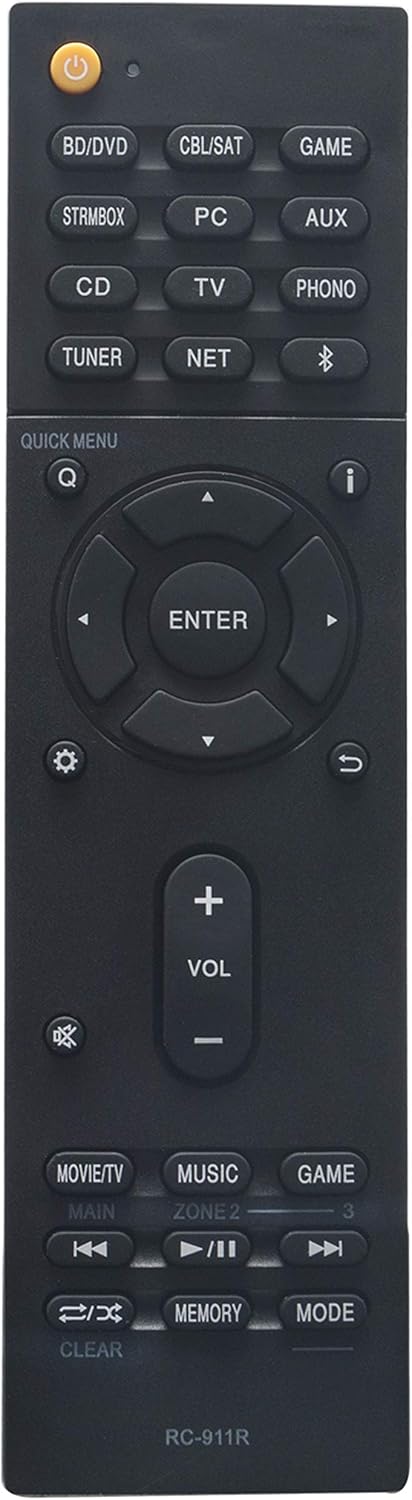
Figure 1: Front view of the VINABTY RC911R replacement remote control, showing all buttons and layout.
Setup
Battery Installation
The VINABTY RC911R remote control requires two (2) AAA batteries for operation. Batteries are not included with the remote control.
- Locate the battery compartment on the back of the remote control.
- Slide the battery compartment cover downwards to open it.
- Insert two AAA batteries, ensuring the positive (+) and negative (-) terminals align correctly with the markings inside the compartment.
- Slide the battery compartment cover back into place until it clicks securely.
Important Note:
- Do not mix old and new batteries.
- Do not mix alkaline, standard (carbon-zinc), or rechargeable (nickel-cadmium) batteries.
- Remove batteries if the remote control will not be used for an extended period to prevent leakage.

Figure 2: Rear view of the remote control with the battery cover removed, illustrating battery placement.
Initial Use
This replacement remote control is designed to work immediately with compatible Onkyo AV Receiver and Speaker models without any programming required. Once batteries are installed, point the remote control towards your Onkyo device and begin operation.
Operating Instructions
The VINABTY RC911R remote control provides full functionality for your Onkyo AV Receiver. Below is a general overview of common button functions:
- Power Button (●): Turns the AV Receiver On or Off.
- Input Selectors (BD/DVD, CBL/SAT, GAME, STRMBOX, PC, AUX, CD, TV, PHONO, TUNER, NET, Bluetooth): Selects the desired audio/video input source.
- Navigation Pad (Up, Down, Left, Right, ENTER): Used to navigate menus and confirm selections.
- VOL +/-: Adjusts the master volume level.
- Mute Button (🔇): Mutes or unmutes the audio output.
- Quick Menu (Q): Accesses quick settings or on-screen menus.
- Return/Exit (↶): Returns to the previous screen or exits a menu.
- Movie/TV, Music, Game: Dedicated buttons for selecting sound modes optimized for different content types.
- Playback Controls (Rewind, Play/Pause, Fast Forward, Stop): Controls media playback for compatible devices.
- Memory, Mode, Clear: Advanced functions for specific receiver settings. Refer to your Onkyo AV Receiver's original manual for detailed use of these buttons.
For specific functions and advanced settings, please consult the original user manual of your Onkyo AV Receiver model.
Maintenance
To ensure the longevity and optimal performance of your VINABTY RC911R remote control, follow these maintenance guidelines:
- Cleaning: Wipe the remote control regularly with a soft, dry cloth. For stubborn dirt, slightly dampen the cloth with water or a mild, non-abrasive cleaner. Avoid using harsh chemicals, solvents, or abrasive materials, as these can damage the remote's surface and buttons.
- Storage: Store the remote control in a cool, dry place away from direct sunlight, extreme temperatures, and high humidity.
- Battery Care: If the remote control will not be used for an extended period (e.g., more than a month), remove the batteries to prevent potential leakage and corrosion, which can damage the remote's internal components.
- Avoid Drops: Protect the remote from physical impact. Dropping the remote can cause internal damage or break external components.
Troubleshooting
If you encounter issues with your VINABTY RC911R remote control, please refer to the following common solutions:
| Problem | Possible Cause / Solution |
|---|---|
| Remote control is not responding. |
|
| Remote control works intermittently. |
|
| Remote control does not require programming. | This is not a problem. The VINABTY RC911R is a direct replacement remote and does not require any programming. Simply insert batteries and it should function with compatible Onkyo models. |
If the issue persists after trying these steps, please refer to the "Warranty and Support" section for further assistance.
Specifications
| Feature | Detail |
|---|---|
| Model Number | RC911R RC-911R |
| Brand | VINABTY |
| Product Dimensions | 5 x 1.9 x 0.5 inches |
| Item Weight | 2.39 ounces |
| Batteries Required | 2 AAA batteries (not included) |
| Connectivity Technology | Infrared (IR) |
| Compatible Devices | Onkyo Home Theater AV Receivers |
| Special Feature | Ergonomic design |
| Max Number of Supported Devices | 1 (Direct replacement for specific Onkyo models) |
| Date First Available | January 14, 2020 |
Warranty and Support
VINABTY strives to provide high-quality replacement products. If you have any questions or encounter any issues with your RC911R remote control, please do not hesitate to contact us.
We are committed to providing a response within 24 hours to assist you with your concerns.
Please refer to your purchase documentation or the seller's contact information for specific warranty details and support channels.