
1. Introduction and Overview
The Senasys K-Kontrol KPORT-EXT8 is a portable, pre-wired temperature controller designed for direct control of various equipment such as heaters, fans, air conditioners, and ventilation systems. This robust unit is suitable for both heating and cooling applications, offering reliable temperature management in diverse environments. Its construction ensures durability and resistance to weather and corrosion.
Key features include:
- Construction: Durable plastic enclosure.
- Switch Type: Single Stage operation.
- Temperature Range: 30°F to 110°F with ±2° accuracy and a 3° differential.
- Rating: NEMA 4X, N.E.C. 457 compliant for environmental protection.
- Features: Made in USA, includes a 96-inch remote capillary sensor and a 120-Volt, 8ft piggyback plug for easy installation.
2. Safety Information
Please read and understand all safety instructions before installing or operating this device. Failure to follow these instructions may result in property damage, injury, or death.
- Electrical Safety: This device operates on 120-Volt AC. Ensure the power source is disconnected before any installation or maintenance. Do not operate with damaged cords or plugs.
- Environmental Protection: The NEMA 4X rating indicates protection against dust, rain, splashing water, and hose-directed water. However, avoid submerging the unit.
- Sensor Placement: Ensure the capillary sensor is placed in a location where it can accurately measure the desired temperature without being exposed to direct sunlight, drafts, or extreme heat sources that could skew readings.
- Intended Use: Use this thermostat only for its intended purpose of controlling temperature for compatible electrical equipment.
3. Setup
The KPORT-EXT8 thermostat is designed for straightforward setup due to its pre-wired configuration.
- Unpack the Unit: Carefully remove the thermostat and its components from the packaging. Inspect for any visible damage.
- Identify Components: The package includes the thermostat unit with a clear cover, an attached 8ft piggyback plug, and a 96-inch remote capillary sensor.
- Mounting (Optional): While portable, the unit can be surface mounted if desired. Use appropriate fasteners (not included) through the designated mounting points on the enclosure. Ensure the mounting surface is stable and secure.
- Sensor Placement: Position the 96-inch remote capillary sensor in the area where temperature control is required. Ensure the sensor is not kinked or damaged. Avoid placing it near heat-generating appliances or in direct airflow from vents, which could lead to inaccurate readings.
- Connect Equipment: Plug the equipment you wish to control (e.g., heater, fan) into the piggyback receptacle on the thermostat's power cord.
- Connect to Power: Plug the thermostat's piggyback plug into a standard 120-Volt AC electrical outlet.
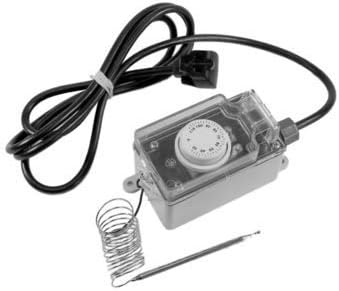
Figure 1: Senasys K-Kontrol KPORT-EXT8 Portable Thermostat. This image shows the main thermostat unit, the attached power cord with a piggyback plug, and the coiled remote capillary sensor.
4. Operating Instructions
The KPORT-EXT8 thermostat features a simple mechanical knob for temperature adjustment.
- Power On: Once the thermostat is plugged into a power outlet and your equipment is connected to the piggyback plug, the unit is powered on.
- Adjusting Temperature: The clear cover protects the temperature adjustment knob. Gently open the cover to access the knob. Rotate the knob to set your desired temperature. The dial is marked in both Fahrenheit and Centigrade.
- Temperature Differential: The thermostat has a 3° differential. This means if you set the temperature to 70°F for heating, the unit will activate when the temperature drops to 68.5°F and deactivate when it reaches 71.5°F (or similar range depending on calibration). For cooling, it would activate at 71.5°F and deactivate at 68.5°F.
- Monitoring: The thermostat will automatically switch the connected equipment on or off to maintain the set temperature within its differential range.

Figure 2: Close-up view of the KPORT-EXT8 thermostat's mechanical temperature dial. The dial shows temperature markings in both Fahrenheit and Centigrade, allowing for precise setting.
5. Maintenance
The KPORT-EXT8 thermostat requires minimal maintenance to ensure optimal performance.
- Cleaning: Periodically wipe the exterior of the thermostat and the clear cover with a soft, damp cloth. Do not use abrasive cleaners or solvents. Ensure the unit is unplugged before cleaning.
- Sensor Inspection: Regularly check the capillary sensor for any physical damage, kinks, or corrosion. Ensure it remains securely positioned in the desired temperature sensing area.
- Environmental Check: Verify that the NEMA 4X enclosure remains sealed and free from cracks or damage, especially if used in harsh environments.
6. Troubleshooting
If you encounter issues with your KPORT-EXT8 thermostat, refer to the following common troubleshooting steps:
- Thermostat Not Activating Equipment:
- Check if the thermostat is securely plugged into a live 120-Volt outlet.
- Ensure the controlled equipment is properly plugged into the thermostat's piggyback receptacle and is functional independently.
- Verify the temperature setting on the knob. Adjust it to a point that should trigger the equipment based on the current ambient temperature and the 3° differential.
- Inspect the capillary sensor for damage or improper placement.
- Inaccurate Temperature Readings:
- Relocate the capillary sensor away from direct sunlight, drafts, or heat sources that could interfere with accurate ambient temperature measurement.
- Ensure the sensor is fully extended and not coiled tightly, which can affect its responsiveness.
- Unit Not Responding:
- Unplug the thermostat from the power source for a few minutes, then plug it back in.
- Check the circuit breaker for the outlet.
If problems persist after attempting these steps, contact Senasys customer support for further assistance.
7. Specifications
| Brand | Senasys |
| Model Number | KPORT-EXT8 |
| Controller Type | Mechanical knob |
| Temperature Range | 30°F to 110°F |
| Accuracy | ±2° |
| Differential | 3° |
| Voltage | 120 Volts AC |
| Power Source | AC |
| Remote Sensor Length | 96 inches (8 feet) |
| Plug Type | 8ft Piggyback Plug |
| Construction Material | Plastic enclosure, Copper capillary |
| Environmental Rating | NEMA 4X, N.E.C. 457 |
| UPC | 651307980948 |
8. Warranty and Support
For warranty information and customer support, please contact Senasys directly. Details regarding specific warranty periods and terms are typically provided with your purchase documentation or can be found on the official Senasys website.
Manufacturer: Senasys
For technical assistance or inquiries, please refer to the contact information provided by Senasys.