
allen + roth 70755
User Manual
allen + roth Blackout Cordless Cellular Shade
Model: 70755
Introduction
Thank you for choosing the allen + roth Blackout Cordless Cellular Shade. This manual provides important information regarding the installation, operation, maintenance, and troubleshooting of your new cellular shade. Please read this manual thoroughly before installation and retain it for future reference.
This cordless cellular shade is designed to block out light and provide enhanced privacy, making it ideal for bedrooms, media rooms, or any space where light control is desired. Its cordless design ensures child and pet safety while adding a warm, finished look to your home decor.

Image: The allen + roth Blackout Cordless Cellular Shade in a window, showcasing its blackout capabilities and clean appearance.
Safety Information
Please observe the following safety precautions to ensure safe operation and prevent damage to the product or injury to yourself.
- Cordless Design: This product features a cordless design for enhanced child and pet safety. No cords are present that could pose a strangulation hazard.
- Installation: Ensure the shade is securely mounted according to the installation instructions. Improper installation can lead to the shade falling, causing injury or damage.
- Handling: Handle the shade with care during installation and operation to avoid damaging the fabric or internal mechanisms.
- Cleaning: Use only recommended cleaning methods. Harsh chemicals or abrasive materials can damage the fabric and finish.
Package Contents
Before beginning installation, ensure all parts are present and accounted for. If any parts are missing or damaged, do not proceed with installation and contact customer support.
- 1 x allen + roth Blackout Cordless Cellular Shade
- Mounting Brackets (quantity may vary based on shade width)
- Mounting Hardware (screws, anchors)
- Installation Instructions (this manual)
Setup and Installation
This section provides step-by-step instructions for installing your cellular shade. The shade can be mounted inside or outside the window frame.
Tools Required (Not Included):
- Measuring Tape
- Pencil
- Drill with appropriate drill bits
- Screwdriver (Phillips head recommended)
- Level
Step-by-Step Installation:
- Measure and Mark:
Determine whether you will mount the shade inside or outside the window frame. Measure and mark the desired locations for the mounting brackets. Ensure the marks are level and spaced appropriately to support the shade's width.
- Drill Pilot Holes:
Using a drill, create pilot holes at the marked locations. If drilling into drywall, use appropriate wall anchors (included). For wood, pilot holes should be slightly smaller than the screw diameter.
- Attach Mounting Brackets:
Secure the mounting brackets to the wall or window frame using the provided screws. Ensure the brackets are firmly attached and aligned.
- Install the Shade:
Align the headrail of the cellular shade with the installed mounting brackets. Gently push the shade upwards until it clicks securely into place within the brackets. The hidden hanging brackets provide a clean, finished look.
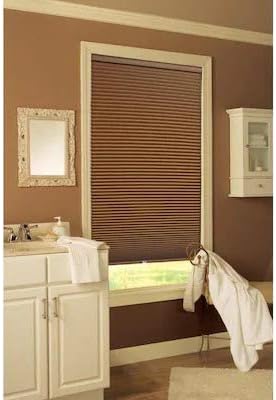
Image: The cellular shade installed in a bathroom setting, demonstrating its integration into home decor.
- Test Operation:
Once installed, gently raise and lower the shade to ensure it operates smoothly and stays in the desired position. Refer to the "Operating Instructions" section for proper usage.
Operating Instructions
Your allen + roth Blackout Cordless Cellular Shade is designed for simple and safe operation.
- To Lower the Shade:
Grasp the bottom rail of the shade firmly with both hands. Gently pull the shade downwards to the desired position. The shade will stay in place once you release the bottom rail.
- To Raise the Shade:
Grasp the bottom rail of the shade firmly with both hands. Gently push the shade upwards to the desired position. The shade will stay in place once you release the bottom rail.
- Adjusting Position:
For minor adjustments, gently push or pull the bottom rail until the shade reaches the exact height you desire. The cordless mechanism allows for precise positioning.
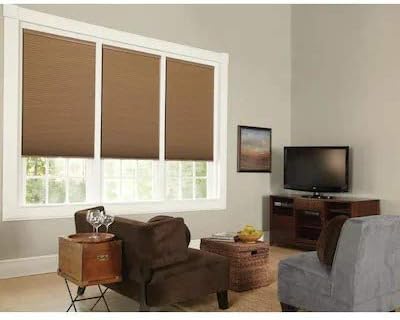
Image: Multiple cellular shades installed in a living room, demonstrating their aesthetic appeal and functionality in a larger setting.
Maintenance and Care
Proper care will extend the life and appearance of your cellular shade.
- Cleaning:
The shade fabric is made of high-quality, non-woven polyester. For general cleaning, use a soft brush or a vacuum cleaner with a brush attachment to gently remove dust and debris.
- Spot Cleaning:
For spot cleaning, use a damp cloth with mild soap and water. Gently blot the stained area. Do not rub vigorously, as this may damage the fabric. Allow the shade to air dry completely before raising it.
- Avoid Harsh Chemicals:
Do not use harsh detergents, solvents, or abrasive cleaners, as these can discolor or damage the fabric and components.
- Regular Inspection:
Periodically inspect the shade for any signs of wear or damage to the fabric or operating mechanism. If any issues are found, contact customer support.
Troubleshooting
If you encounter any issues with your cellular shade, refer to the following common problems and solutions.
| Problem | Possible Cause | Solution |
|---|---|---|
| Shade does not stay up/down | Mechanism not properly engaged or damaged. | Ensure the shade is fully extended and then gently push it up. If it still doesn't hold, try lowering it completely and then raising it again. If the issue persists, the internal mechanism may be faulty; contact customer support. |
| Shade is crooked | Improper installation or uneven tension. | Check if the mounting brackets are level and securely installed. If the shade is slightly off, try gently adjusting the bottom rail to even it out. Re-installation may be necessary if the brackets are not level. |
| Difficulty raising/lowering | Obstruction or mechanism issue. | Check for any obstructions in the window frame or along the shade's path. Ensure you are grasping the bottom rail firmly and applying even pressure. If the movement is still stiff, the internal mechanism might require inspection by a professional. |
If you are unable to resolve the issue using these troubleshooting steps, please contact allen + roth customer support for further assistance.
Specifications
Detailed specifications for your allen + roth Blackout Cordless Cellular Shade.
- Brand: allen + roth
- Model Number: 70755
- Product Dimensions: 64"L x 23"W (Actual: 23-in x 64-in)
- Material: High quality, non-woven Polyester
- Color: Linen
- Opacity: Blackout
- Operation Mode: Manual, Cordless
- Mounting Type: Inside or Outside Mount
- Included Components: Hanging Brackets, Mounting Hardware
- Product Care: Spot Clean
Warranty and Support
For warranty information or technical support, please contact allen + roth customer service. Keep your purchase receipt as proof of purchase.
Customer Service: Refer to the contact information provided with your product packaging or visit the official allen + roth website for support details.
Website: www.allenandroth.com (This is a placeholder URL, please refer to actual product documentation for correct website)