
JStoon NV-3186
JStoon Digital Night Vision Monocular User Manual
Brand: JStoon | Model: NV-3186
1. Introduction
Thank you for choosing the JStoon Digital Night Vision Monocular. This device is engineered to provide clear visibility in low-light conditions and complete darkness, making it an essential tool for outdoor enthusiasts, hunters, and security personnel. Please read this manual thoroughly to understand the features, operation, and maintenance of your new monocular.

Image: The JStoon Digital Night Vision Monocular, showcasing its compact design and included accessories like the 32GB SD card and packaging.
2. Key Features
- Enhanced Night Vision: Equipped with an advanced no-glow 850nm infrared illuminator for clear viewing up to 984ft (300m) in 100% darkness. Features 7 adjustable IR brightness levels.
- Integrated Display & Recording: 1.5-inch viewing screen supports real-time photographing and 1080P video recording (without sound).
- Powerful Magnification: Offers 3X optical zoom and 4X digital zoom for precise observation of distant objects.
- Storage & Connectivity: Includes a 32GB memory card for storing photos and videos. Content can be easily transferred to a computer via the provided data cable.
- Portable & Versatile: Compact and lightweight design for easy one-handed operation. Supports tripod installation for stable viewing.

Image: An infographic highlighting the monocular's core capabilities, such as 984ft night vision, 1080P HD recording, 3X optical zoom, 4X digital zoom, 32GB SD card inclusion, and 5-10 hours of battery life.
3. Package Contents
Please check the box for the following items:
- JStoon Digital Night Vision Monocular
- 32GB Micro SD Card
- USB Data Cable
- Carrying Bag
- Cleaning Cloth
- User Manual
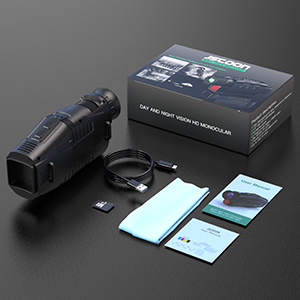
Image: A visual representation of all items included in the product package.
4. Setup
4.1 Battery Installation
The monocular requires 5 AA batteries (not included). To install:
- Locate the battery compartment on the underside of the device.
- Open the battery cover.
- Insert 5 AA batteries, ensuring correct polarity (+/-).
- Close the battery cover securely.

Image: The monocular with its battery compartment open, illustrating where to insert the 5 AA batteries.
4.2 SD Card Installation
The device comes with a 32GB Micro SD card. To install:
- Locate the SD card slot, usually near the USB port.
- Insert the Micro SD card until it clicks into place.
4.3 Powering On/Off
Press and hold the power button (usually marked with a power symbol) for a few seconds to turn the device on or off.
Video: An official JStoon video demonstrating the power-on sequence and initial view through the monocular, highlighting its ability to see in complete darkness with infrared.
5. Operating Instructions
5.1 Day and Night Use
The monocular can be used in both daylight and complete darkness. In daylight, it functions as a regular monocular. For night vision, activate the infrared illuminator.

Image: A split image showing the clear view of a leopard in daylight and its infrared night vision counterpart, demonstrating the device's versatility.
5.2 Adjusting Infrared (IR) Brightness
The IR illuminator has 7 adjustable levels. Higher levels provide brighter and clearer images in darker conditions.
- Press the IR button (usually marked with an IR symbol) to cycle through IR levels.
- Select the appropriate level for your viewing environment.

Image: A series of images demonstrating the effect of different IR levels on visibility in complete darkness, from level 1 to level 7.
5.3 Zoom Functionality
The monocular features 3X optical zoom and 4X digital zoom.
- Use the optical zoom for initial magnification.
- Activate digital zoom for further enlargement of the image. Note that digital zoom may reduce image clarity.

Image: A visual comparison of 3X optical zoom and 4X digital zoom, illustrating the magnification levels.
5.4 Photo and Video Recording
Capture moments with the built-in photo and video recording functions.
- Press the Mode button to switch between photo and video modes.
- Press the Capture/Record button to take a photo or start/stop video recording.
- Videos are recorded without sound.
Video: An official JStoon video demonstrating how to save photos and videos using the monocular, including playback on the device.
5.5 Data Transfer
To transfer recorded media to your computer:
- Connect the monocular to your computer using the provided USB data cable.
- Alternatively, remove the Micro SD card and insert it into a card reader connected to your computer.
- Access the device or SD card as a removable storage device on your computer to view and transfer files.
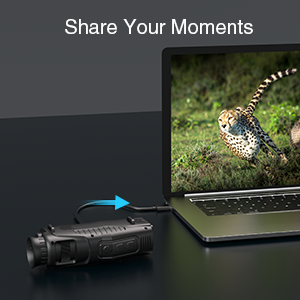
Image: The monocular connected to a laptop, illustrating the process of sharing captured moments.
6. Maintenance
- Cleaning: Use the provided cleaning cloth to gently wipe the lens and body of the monocular. Do not use abrasive materials or harsh chemicals.
- Storage: Store the device in its carrying bag in a cool, dry place when not in use. Remove batteries if storing for extended periods to prevent leakage.
- Avoid Direct Sunlight: Do not expose the lens to direct sunlight, as this can damage internal components.
7. Troubleshooting
| Problem | Possible Cause | Solution |
|---|---|---|
| Device does not power on. | Low or dead batteries; incorrect battery installation. | Replace batteries; ensure correct polarity. |
| Image is blurry. | Focus not adjusted; dirty lens. | Adjust the manual focus wheel; clean the lens with the provided cloth. |
| Poor night vision performance. | IR illuminator off or set too low. | Activate IR or increase IR brightness level. |
| Cannot record photos/videos. | SD card full or not inserted correctly. | Check SD card insertion; delete old files or use a new card. |
8. Specifications
- Optical Zoom: 3X
- Digital Zoom: 4X
- Objective Lens Diameter: 25mm
- Infrared Illuminator: 850nm, 7 levels adjustable
- Viewing Distance in Darkness: Up to 984ft (300m)
- Display Screen: 1.5-inch LCD
- Video Resolution: 1080P (no sound recording)
- Power Source: 5 AA batteries (not included)
- Storage: Supports Micro SD card (32GB included)
- Dimensions: 7.09 x 3.35 x 3.27 inches
- Item Weight: 10.1 ounces (0.63 pounds)
9. Warranty and Support
JStoon products are manufactured to the highest quality standards. This product is covered by a manufacturer's warranty against defects in materials and workmanship. For detailed warranty information, technical support, or service inquiries, please refer to the contact information provided in your product packaging or visit the official JStoon website.
We recommend registering your product online to receive updates and support.
Ask a question about this manual
Ask about setup, troubleshooting, compatibility, parts, safety, or missing instructions. Manuals+ will review the question and use this page’s manual context to help answer it.