
1. Product Overview
The BN44-00808E is a combined Power Supply and LED Driver Board designed for specific television models. This board is responsible for converting AC power into the various DC voltages required by the television's components, including the main board, T-con board, and LED backlight strips. Proper functioning of this board is critical for the television to power on and display an image.

Figure 1: Top view of the BN44-00808E Power Supply/LED Board. This image displays the component side of the board, showing various capacitors, transformers, and integrated circuits responsible for power regulation and LED driving. Key connectors for AC input and DC outputs are visible.
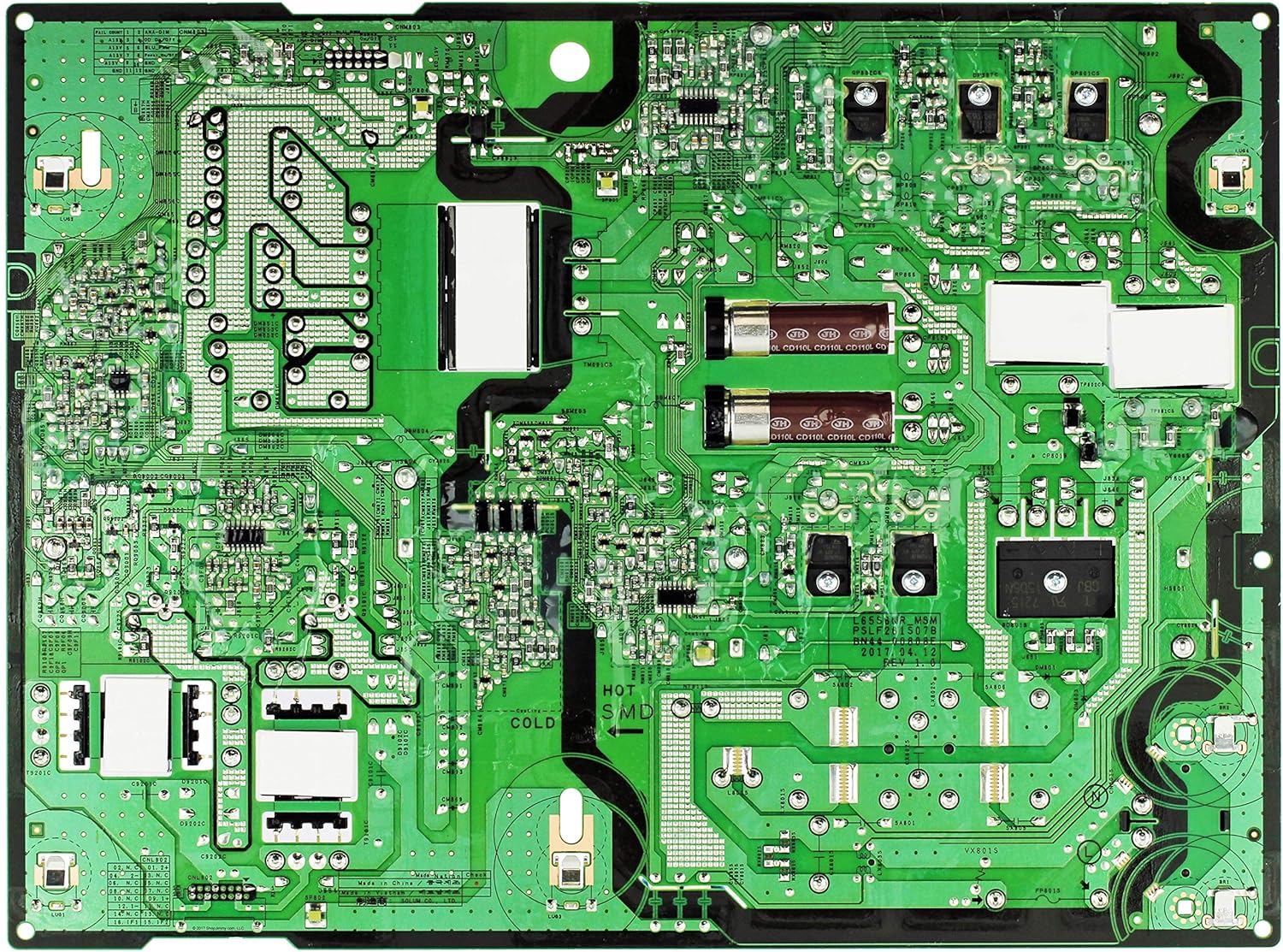
Figure 2: Bottom view of the BN44-00808E Power Supply/LED Board. This image shows the solder side of the printed circuit board, revealing the traces and solder points that connect the components on the top side. Thermal pads and mounting holes are also visible.
2. Safety Precautions
Working with electronic components, especially power supply units, carries inherent risks. Adhere to the following safety guidelines:
- Disconnect Power: Always ensure the television is unplugged from the AC power outlet before beginning any installation or repair work.
- Discharge Capacitors: Power supply boards contain large capacitors that can store high voltage even after power is disconnected. Exercise extreme caution and allow sufficient time for capacitors to discharge, or safely discharge them using appropriate tools.
- Professional Installation Recommended: Installation of this component should ideally be performed by a qualified technician. Incorrect installation can lead to damage to the television or personal injury.
- Handle with Care: Avoid touching components unnecessarily. Static electricity can damage sensitive electronic parts. Use an anti-static wrist strap if available.
- Inspect for Damage: Before installation, visually inspect the new board for any signs of physical damage during shipping.
3. Compatibility
The BN44-00808E Power Supply/LED Board is compatible with various television models. It is crucial to verify that this part number matches the original board in your television to ensure proper function and avoid damage. Refer to the part number printed on your existing board.
Known compatible models include, but are not limited to:
- UA58NU7103KXXS
- UA58NU7103WXXY
- UA65MU6100KPXD
- UA65MU6100KXXM
- UA65MU6100KXXS
- UA65MU6100KXXT
- UA65MU6100KXXV
- UA65MU6100RLSG
- UA65MU6100SXNZ
- UA65MU6100WXXY
- UA65MU6103KXXT
- UA65MU6103KXXV
- UA65MU6103WXXY
- UA65MU6300KXXM
- UA65MU6300KXXS
- UA65MU6300KXXT
- UA65MU6300KXXV
- UA65MU6300SXNZ
- UA65MU6300WXXY
- UA65MU7000KXGH
- UA65MU7000KXKE
- UA65MU7000KXXA
- UA65MU7000KXZN
- UA65MU7000RSMM
- UA65MU7000RXMM
- UA65MU7000RXTW
- UA65MU7000RXUM
- UA65MU7000SXEG
- UA65MU7000SXMV
- UA65MU7350KXKE
- UA65MU7350KXRQ
- UA65MU7350KXXA
- UA65MU7350KXZN
- UA65MU7350RXMM
- UA65MU7350RXUM
- UA65MU7350SXEG
- UA65MU7350SXMV
- UA65MU7351KXXA
- UE58MU6120KXXU
- UE58MU6120WXXN
- UE58MU6122KXXH
- UE58MU6125KXXC
- UE58MU6190UXZG
- UE58MU6192UXXH
- UE58MU6199UXZG
- UE65MU6100KXXU
- UE65MU6100KXZT
- UE65MU6100UXCE
- UE65MU6100UXRU
- UE65MU6100UXUA
- UE65MU6100WXXN
- UE65MU6102KXXH
- UE65MU6105KXXC
- UE65MU6120KXXU
- UE65MU6120KXZT
- UE65MU6120WXXN
- UE65MU6122KXXH
- UE65MU6125KXXC
- UE65MU6125KXZT
- UE65MU6170UXZG
- UE65MU6172UXXH
- UE65MU6175UXXC
- UE65MU6179UXZG
- UE65MU6190UXZG
- UE65MU6192UXXH
- UE65MU6195UXXC
- UE65MU6199UXZG
- UE65MU6200KXXU
- UE65MU6200KXZT
- UE65MU6200WXXN
- UE65MU6202KXXH
- UE65MU6205KXXC
- UE65MU6220KXXU
- UE65MU6220KXZT
- UE65MU6220WXXN
- UE65MU6222KXXH
- UE65MU6225KXXC
- UE65MU6270UXZG
4. Installation Guide
This section provides general steps for replacing a power supply board. Due to the complexity and safety risks involved, professional installation is strongly recommended.
- Prepare the Work Area: Ensure a clean, well-lit, and static-free environment. Lay the television screen-down on a soft, protective surface to prevent damage.
- Disconnect Power: Crucially, unplug the television from the wall outlet. Wait several minutes for any residual power to dissipate.
- Remove Back Cover: Carefully remove the screws securing the television's back cover. Set the screws aside in an organized manner.
- Locate the Old Board: Identify the existing power supply/LED board. It is typically the largest board connected directly to the AC power input.
- Disconnect Cables: Gently disconnect all cables connected to the old board. This includes AC input, main board connections, and LED backlight connections. Note the orientation and position of each cable for correct re-connection. Taking photos can be helpful.
- Remove Old Board: Unscrew the mounting screws holding the old board in place. Carefully lift the board out of the television chassis.
- Install New Board: Position the new BN44-00808E board into the chassis, aligning it with the mounting holes. Secure it with the screws removed earlier.
- Reconnect Cables: Reconnect all cables to the new board, ensuring they are firmly seated and in their correct positions. Double-check all connections.
- Test Functionality (Before Closing): Before reattaching the back cover, temporarily plug in the television and power it on to verify basic functionality (e.g., power indicator light, screen backlight). If issues arise, immediately unplug and re-check connections.
- Reattach Back Cover: Once functionality is confirmed, unplug the television again. Carefully reattach the back cover and secure it with all screws.
- Final Test: Plug in the television and perform a full functional test.
5. Functionality
The BN44-00808E board serves two primary functions within the television:
- Power Supply: It converts the incoming AC voltage from the wall outlet into the various DC voltages required by the television's internal components, such as the main board, audio amplifier, and other control circuits.
- LED Driver: It provides the necessary regulated current and voltage to power the LED backlight array of the television panel, which illuminates the display.
Once correctly installed, the board operates automatically when the television is powered on, providing stable power to all connected components.
6. Care and Maintenance
As an internal component, the BN44-00808E Power Supply/LED Board requires minimal user maintenance. However, following general care practices for your television can prolong its lifespan:
- Keep Clean: Ensure the television's ventilation openings are free from dust and obstructions to allow for proper airflow and heat dissipation.
- Avoid Moisture: Keep the television away from sources of moisture or excessive humidity.
- Stable Power: Connect the television to a stable power source. Consider using a surge protector to guard against power fluctuations.
- Professional Service: Do not attempt to clean or repair the internal components of the board yourself. Refer to qualified service personnel for any internal issues.
7. Troubleshooting
If your television exhibits issues after installing the BN44-00808E board, consider the following troubleshooting steps:
| Symptom | Possible Cause | Action |
|---|---|---|
| Television does not power on (no indicator light). | Loose power cable, faulty wall outlet, incorrect board installation. | Check power cable connection. Test wall outlet. Re-verify all cable connections on the board. |
| Television powers on but no picture (sound may be present). | Faulty LED backlight connection, issue with LED driver section of the board, T-con board issue. | Ensure LED backlight cables are securely connected. If issue persists, professional diagnosis is required. |
| Intermittent power or flickering screen. | Loose connections, unstable power input, component failure on the board. | Check all internal cable connections. Ensure stable power supply. If issue persists, seek professional help. |
| Burning smell or visible smoke. | Severe component failure, short circuit. | Immediately unplug the television. Do not attempt to power on again. Seek professional repair. |
If troubleshooting steps do not resolve the issue, it is recommended to consult a qualified television repair technician.
8. Technical Specifications
- Part Number: BN44-00808E
- Visible Numbers: L65S6NR_MSM, PSLF261S07B
- Brand: ShopJimmy
- Display Technology: LED (for compatible televisions)
- UPC: 788271848827
- Function: Power Supply / LED Driver Board
9. Warranty and Support Information
For specific warranty terms and conditions related to the BN44-00808E Power Supply/LED Board, please refer to the purchase documentation or contact the seller, ShopJimmy, directly. Warranty coverage typically applies to manufacturing defects and does not cover damage caused by improper installation, misuse, or external factors.
For technical support or assistance with installation, it is recommended to consult a professional television repair technician. ShopJimmy may also offer customer support for product-related inquiries.