
Introduction
Thank you for choosing the Merax Softside Luggage Set. This manual provides essential information for the proper setup, operation, and maintenance of your new luggage set. Please read these instructions carefully to ensure optimal use and longevity of your product.

Image: The Merax Softside Luggage Set, featuring three pieces in a blue-green color, showcasing their design and sizes.
Product Features
- Durable Construction: Crafted with premium oxford fabric, this luggage set is lightweight, durable, and resistant to water and stains.
- Smooth Mobility: Equipped with 360° spinner wheels for effortless maneuverability in any direction.
- Enhanced Security: Features a built-in TSA lock and secure zippers to protect your belongings during travel.
- Adjustable Handle System: Telescoping airline-grade handle with stops at 33.3", 37.2", and 41.1" for comfortable rolling at a customized height.
- Convenient Carrying: Includes top and side handles for easy lifting and carrying.
- Organized Interior: Two main compartments with garment straps and an inner zippered pocket keep essentials organized.
- Exterior Accessibility: Two large front pockets provide quick access to last-minute items.
- Expandable Capacity: Offers 25% expansion to maximize packing space when needed.
- Versatile Sizing: The 20" luggage is designed to fit most airline carry-on requirements (check airline policy), suitable for various travel needs.
Setup
1. Setting the TSA Combination Lock
Your Merax luggage comes with a TSA-approved combination lock. The initial combination is set to 0-0-0.
- Open the lock by sliding the button or lever (depending on lock type) to release the zipper pulls.
- With the lock open, locate the small reset button (often recessed and requires a pen or pointed object to press).
- Press and hold the reset button.
- While holding the reset button, set your desired 3-digit combination by turning the dials.
- Release the reset button. Your new combination is now set.
- Important: Remember your combination. There is no master key for personal combinations.
Video: This video demonstrates how to extend the telescoping handle and how to set the TSA combination lock on your Merax luggage.
2. Adjusting the Telescoping Handle
The telescoping handle can be adjusted to multiple heights for comfortable transport.
- Press the button located on the top of the handle.
- Extend or retract the handle to your desired height. The handle has stops at 33.3", 37.2", and 41.1".
- Release the button to lock the handle in place.

Image: A detailed view of the sturdy ergonomic telescoping handle and the flexible soft handle, highlighting their design for comfortable grip and lifting.
Operating Instructions
1. Using the Spinner Wheels
The 360° spinner wheels allow for smooth and effortless movement in any direction. To move your luggage:
- For upright rolling, simply push or pull the luggage in the desired direction.
- For two-wheel tilt rolling, tilt the luggage onto two wheels and pull it behind you.

Image: A close-up view of the luggage's spinner wheel, illustrating its 360-degree rotation capability for easy movement.
2. Expanding Luggage Capacity
Each piece of luggage (except the 20" carry-on) features a 25% expansion capability for additional packing space.
- Locate the secondary zipper around the perimeter of the luggage.
- Unzip this zipper to expand the luggage, providing extra depth for your belongings.
- Zip it back up to return to the standard size.

Image: A side-by-side comparison of the luggage in its standard and expanded states, demonstrating the 25% increase in packing capacity.
3. Utilizing Storage Compartments
The luggage is designed with multiple compartments for efficient packing.
- Main Compartments: Use the garment straps to secure clothing and prevent shifting.
- Inner Zippered Pocket: Ideal for smaller items, toiletries, or documents.
- Front Pockets: Convenient for items requiring quick access, such as travel documents, books, or small electronics.

Image: The interior of the luggage, open to reveal garment straps, a mesh pocket, and a durable zipper, illustrating its functional design for organization.

Image: The front of the luggage, demonstrating the easy-access exterior pockets, with a hand placing a laptop into one of the compartments.
Maintenance
1. Cleaning Instructions
- For general cleaning, wipe the oxford fabric exterior with a damp cloth and mild soap.
- Avoid using harsh chemicals or abrasive cleaners, as these can damage the fabric.
- For stubborn stains, a soft brush with mild detergent can be used, then rinse with a damp cloth.
- Allow the luggage to air dry completely before storage.
2. Storage
- Store your luggage in a cool, dry place away from direct sunlight.
- Ensure the luggage is empty and clean before storing to prevent odors or mildew.
- The smaller pieces can be nested inside the larger ones for compact storage.
Troubleshooting
| Problem | Possible Cause | Solution |
|---|---|---|
| Zipper not closing smoothly or separating | Fabric caught in zipper, overpacking, or zipper misalignment. | Clear any fabric from the zipper path. Reduce contents if overpacked. Gently move the zipper pull back and forth to realign. If a zipper pull is damaged, contact customer support. |
| Wheels not rolling smoothly | Debris caught in wheels, or wheels require lubrication. | Inspect wheels for hair, lint, or other debris and remove. Apply a small amount of silicone-based lubricant to the wheel axles if necessary. |
| Telescoping handle sticking | Debris in the mechanism, or handle not fully extended/retracted. | Ensure the button is fully pressed when adjusting. Check for any obstructions in the handle tubes. Clean the handle mechanism if visible dirt is present. |
| TSA lock combination not working | Incorrect combination entered, or lock was accidentally reset. | Double-check that you are entering the correct 3-digit combination. If you suspect it was reset, try the default 0-0-0. If still locked, you may need to try all 1000 combinations (000-999) or contact customer support. |
Specifications
| Feature | Detail |
|---|---|
| Product Type | Softside Luggage Set |
| Material | Premium Oxford Fabric |
| Color | Blue Green (for this model variant) |
| Wheel Type | 360° Spinner Wheels |
| Lock Type | TSA Combination Lock |
| Expandability | 25% (excluding 20" carry-on) |
| Telescoping Handle Stops | 33.3", 37.2", 41.1" |
| Small Carry-on Dimensions (including wheels) | 22" x 10.4" x 8.5" |
| Medium Travel Suitcase Dimensions (including wheels) | 26.2" x 16.9" x 10.4" |
| Large Luggage Dimensions (including wheels) | 30.3" x 18.9" x 12.6" |
| Overall Product Dimensions (largest piece) | 30.3 x 16.9 x 30.3 inches |
| Item Weight (entire set) | 23 pounds |
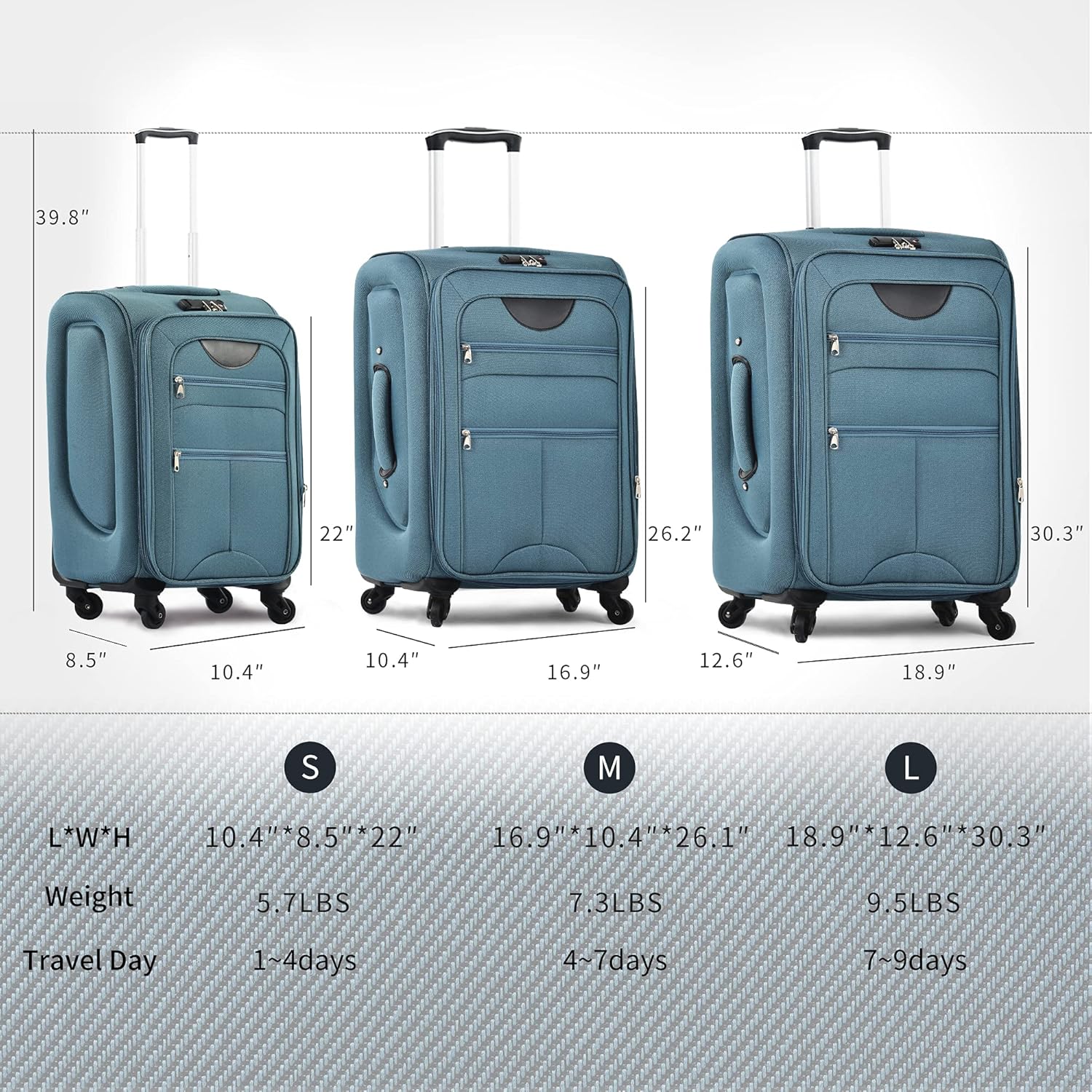
Image: A visual representation of the three luggage sizes (Small, Medium, Large) with their respective dimensions, weights, and recommended travel days.
Warranty and Support
Merax products are manufactured with quality and durability in mind. For specific warranty information, please refer to the warranty card included with your purchase or visit the official Merax website.
If you encounter any issues or have questions regarding your Merax Softside Luggage Set, please contact Merax Customer Support through the retailer where you purchased the product or via the contact information provided on the official Merax website.
For more information, visit the Merax Store on Amazon.