
Introduction
The WGGE T1-Pro Bluetooth 5.0+EDR Wireless Earbuds offer a premium audio experience with true wireless stereo (TWS) sound and deep bass. Designed for comfort and durability, these sweat-proof earbuds are ideal for various activities, including sports and exercise. They feature a built-in microphone for hands-free calls and offer stable connectivity with a wide range of Bluetooth-enabled devices.

Image: WGGE T1-Pro Earbuds in their charging case, illustrating the charging process with a lightning effect.
What's in the Box
Upon unboxing your WGGE T1-Pro Earbuds, please ensure all components are present:
- WGGE T1-Pro Wireless Earbuds (Left and Right)
- 2600mAh Rechargeable Charging Case
- Micro USB Charging Cable
- User Manual
- Additional Ear Tips (S/M/L sizes for optimal fit)

Image: All components included in the WGGE T1-Pro Earbuds package, laid out for clear identification.
Setup
Charging the Earbuds and Case
The charging case features a built-in 2600mAh rechargeable battery. Ensure the case is charged before first use. The earbuds themselves have a 50mAh battery capacity each.
- Place the earbuds into the charging case. They will automatically begin charging.
- Connect the Micro USB charging cable to the charging port on the case and to a compatible USB power source.
- A full charge of the earbuds provides 4-5 hours of playback. The portable charger box can provide up to 60 hours of total playback time.
- Standby time is approximately 100 hours for a single earbud and 60 hours for both earbuds.
Pairing with Your Device
The WGGE T1-Pro earbuds support auto-pairing for convenience.
- Step 1: Remove both earbuds from the charging case. They will automatically power on. If not, press the control button on each earbud to turn them on.
- Step 2: On your smartphone, tablet, or other Bluetooth-enabled device, navigate to the Bluetooth settings.
- Step 3: Search for available devices and select "T1-R" (or similar, as indicated by the device). The earbuds will connect automatically.
- Once paired, the earbuds will automatically connect to the last paired device when removed from the case.

Image: Visual guide for the "Super Easy Pair" process, showing earbuds being removed from the case and the Bluetooth pairing screen on a phone.
Operating Instructions
General Use
- The earbuds can be used individually or in pairs, offering full Bluetooth functionality for each earbud.
- The Bluetooth transmission distance is approximately 33 feet (10 meters).
- Equipped with Bluetooth 5.0+EDR technology, these earbuds provide true wireless stability, reducing call and voice dropouts for clearer communication.
Controls
The earbuds feature a control button for media and call management. Specific functions (e.g., single press for play/pause, double press for next track) are typically detailed in the included user manual. The control type is Media Control, and the control method is Remote.
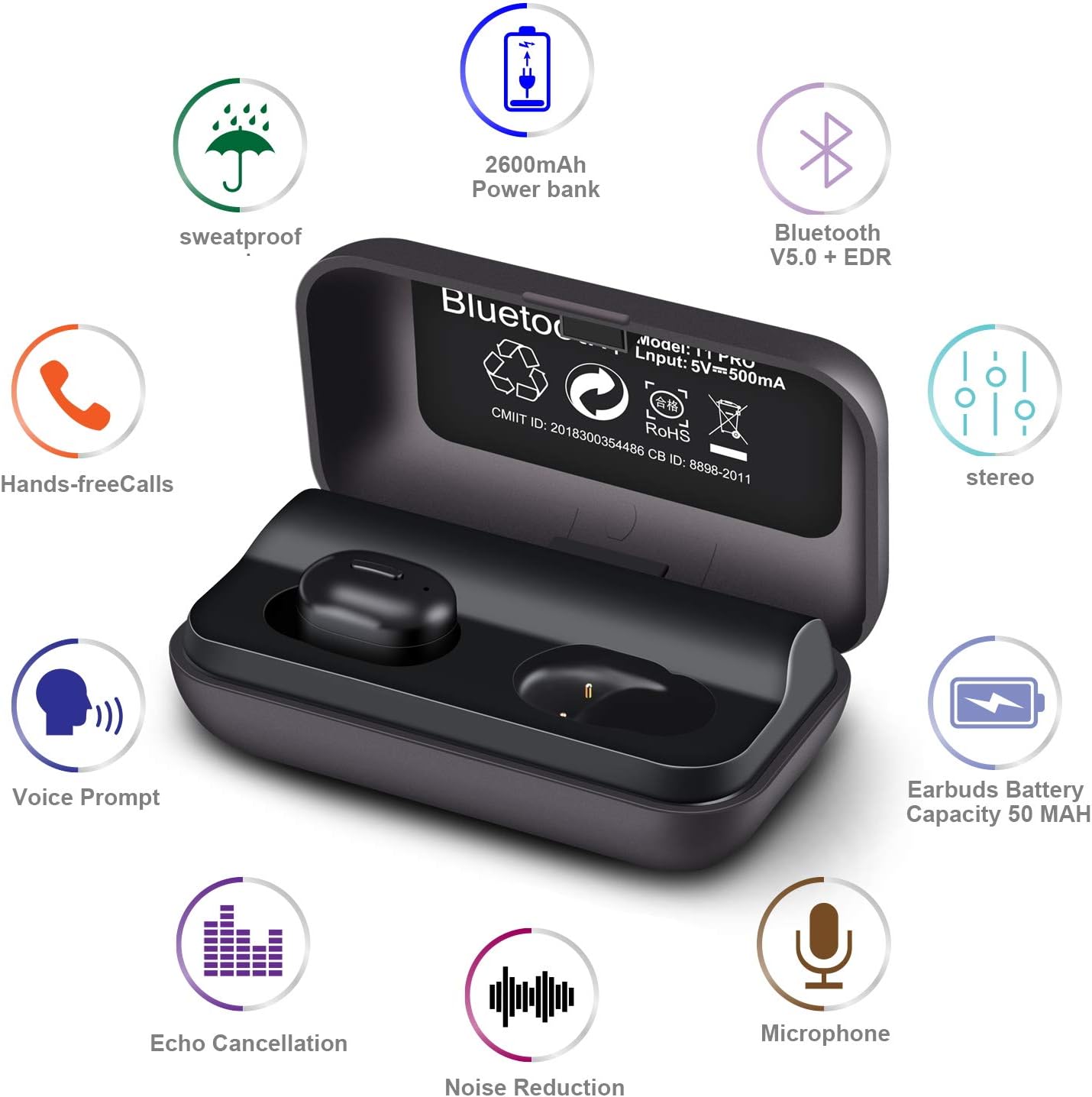
Image: An infographic detailing various features such as sweatproof design, battery capacity, Bluetooth version, and audio enhancements.
Maintenance
To ensure the longevity and optimal performance of your WGGE T1-Pro Earbuds, follow these maintenance guidelines:
- Cleaning: Regularly wipe the earbuds and charging case with a soft, dry cloth. Avoid using harsh chemicals or abrasive materials.
- Storage: When not in use, store the earbuds in their charging case to protect them from dust and damage.
- Water Resistance: The earbuds are IPX5 sweat-proof, meaning they are resistant to sweat and light splashes. Do not submerge them in water or expose them to heavy rain.
- Battery Care: For best battery life, avoid fully discharging the earbuds or charging case frequently. Charge them regularly, even if not in constant use.

Image: A woman exercising in the rain with the earbuds, emphasizing their sweat-resistant design and suitability for active lifestyles.
Troubleshooting
If you encounter any issues with your WGGE T1-Pro Earbuds, try the following common troubleshooting steps:
- No Sound: Ensure earbuds are charged and properly paired. Check device volume and earbud volume.
- Pairing Issues: Make sure Bluetooth is enabled on your device. Turn off and on the earbuds. Forget the device in your phone's Bluetooth settings and try pairing again. Ensure earbuds are close to the device.
- One Earbud Not Working: Place both earbuds back into the charging case, then remove them simultaneously to re-sync.
- Poor Sound Quality: Check for debris in the earbud tips. Try different sized ear tips for a better seal. Ensure you are within the Bluetooth range.
- Charging Problems: Verify the charging cable and power source are working. Clean the charging contacts on both the earbuds and the case.
For persistent issues, please refer to the full user manual included in the product packaging or contact WGGE customer support.
Specifications
| Feature | Detail |
|---|---|
| Model Name | WG-024 |
| Connectivity Technology | Wireless (Bluetooth 5.0+EDR) |
| Bluetooth Range | 33 Feet (10 Meters) |
| Charging Case Battery | 2600mAh |
| Earbud Battery Life (Single Charge) | 4-5 Hours |
| Total Playback Time (with Case) | Up to 60 Hours |
| Water Resistance Level | IPX5 Sweat-proof |
| Material | Silicone |
| Dimensions | 3 x 1.6 x 1 inches |
| Item Weight | 3 Ounces |
| Frequency Range | 20 Hz - 20,000 Hz |
| Manufacturer | W&G GLOBAL ELECTRONICS INC |
| UPC | 650327851580 |
Warranty and Support
WGGE is committed to providing high-quality products. Your WGGE T1-Pro Earbuds come with a return policy that typically allows for refunds or replacements within 30 days of purchase. For specific warranty details and support, please refer to the documentation included with your product or visit the official WGGE store on Amazon:
Visit the WGGE Store on Amazon
For any technical assistance or inquiries, please contact W&G GLOBAL ELECTRONICS INC directly through their seller page on Amazon.