
1. Introduction
This manual provides comprehensive instructions for the installation, operation, and maintenance of your XTC Power Products Maverick Plug & Play 4 Switch Power Control System (PCS-44-MAV-NS). This system is designed to simplify the addition of accessories to your Can Am Maverick by providing a centralized and protected power distribution solution.
Please read this manual thoroughly before installation and use to ensure proper function and safety.
2. Safety Information
- Always disconnect the vehicle's battery before performing any electrical work to prevent electrical shock or damage.
- Ensure all connections are secure and properly insulated to prevent short circuits.
- Do not exceed the maximum current rating of 20 Amps for the system.
- Consult a qualified technician if you are unsure about any part of the installation process.
- Wear appropriate personal protective equipment (PPE) during installation.
- This product is designed for 12V DC automotive applications only.
3. Package Contents
Verify that all components are present before beginning installation:
- XTC Power Control System Module
- Main Power Harness with Fuse Holder
- 4-Way Switch Harness (for connecting up to four switches)
- Battery Terminal Connectors
- Zip Ties for cable management
- Installation Instructions (this manual)
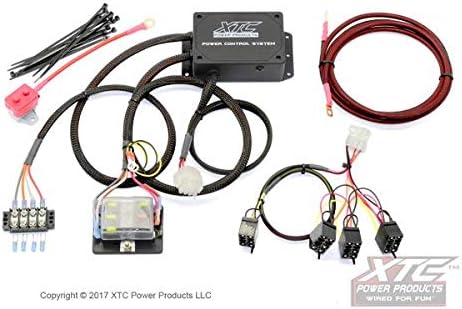
Figure 1: Complete XTC Power Control System kit including the main module, wiring harnesses, battery terminals, and zip ties.
4. Setup and Installation
Follow these steps carefully to install the XTC Power Control System:
- Disconnect Battery: Before starting, disconnect the negative terminal of your vehicle's battery to prevent electrical hazards.
- Mount the Control Module: Select a secure, dry location for the main XTC Power Control System module. Use appropriate fasteners (not included) to mount it firmly. Ensure it is away from excessive heat or moving parts.
- Connect Main Power Harness:
- Connect the main power harness (red wire with fuse holder) to the positive terminal of your vehicle's battery.
- Connect the ground wire (black) from the main harness to a suitable chassis ground point.
- Route the main power harness to the control module, ensuring it is protected from abrasion and heat.
- Connect Switch Harness:
- Locate the 4-way switch harness. This harness connects your accessory switches to the control module.
- Plug the main connector of the 4-way switch harness into the corresponding port on the XTC Power Control System module.
- Connect your individual accessory switches (not included) to the four available connectors on the switch harness. Each connector provides power and ground for one switch.

Figure 2: The 4-way switch harness, designed to connect up to four individual accessory switches to the main control module.
- Connect Accessories: Connect your accessories to the output terminals provided by the XTC Power Control System module. Refer to the module's labeling for specific output channels. Ensure each accessory's current draw does not exceed the system's capacity.
- Secure Wiring: Use the provided zip ties to neatly secure all wiring, keeping it away from hot engine components, sharp edges, and moving parts.
- Reconnect Battery: Once all connections are secure and verified, reconnect the negative terminal of your vehicle's battery.
- Test System: Turn on your vehicle and test each connected accessory to ensure proper operation.
5. Operating Instructions
The XTC Power Control System operates by providing fused and switched power to your accessories. Once installed, operation is straightforward:
- Powering On/Off: Each accessory connected to the system is controlled by its dedicated switch. Simply toggle the switch to turn the connected accessory on or off.
- Indicator Lights: If your switches include indicator lights, they will illuminate when the accessory is active, providing visual confirmation of operation.
- Fuse Protection: The system incorporates fuse protection for each circuit. In the event of an overcurrent, the corresponding fuse will blow, protecting your accessory and the vehicle's electrical system.
6. Maintenance
The XTC Power Control System is designed for minimal maintenance. However, periodic checks are recommended:
- Inspect Wiring: Periodically check all wiring for signs of wear, fraying, or damage. Ensure all connections remain tight and secure.
- Check Fuses: If an accessory stops working, check the corresponding fuse in the system's fuse holder. Replace blown fuses only with fuses of the correct amperage rating (20 Amps maximum per circuit, refer to specific accessory requirements).
- Clean Module: Keep the control module clean and free of dirt, dust, and moisture. The IP54 rating provides protection against dust and splashing water, but it is not submersible.
7. Troubleshooting
| Problem | Possible Cause | Solution |
|---|---|---|
| Accessory does not turn on. | Blown fuse. | Check and replace the fuse for that circuit. Ensure the replacement fuse matches the original amperage rating. |
| Accessory does not turn on. | Loose wiring connection. | Inspect all connections, especially at the battery, control module, and accessory. Tighten as necessary. |
| Accessory does not turn on. | Faulty switch or accessory. | Test the switch and accessory independently to confirm they are functioning correctly. |
| System not receiving power. | Main fuse blown or battery disconnected. | Check the main fuse near the battery. Ensure the battery is properly connected and charged. |
If troubleshooting steps do not resolve the issue, contact XTC Power Products customer support for assistance.
8. Specifications
- Model: PCS-44-MAV-NS
- Operation Mode: Plug & Play
- Current Rating: 20 Amps (per circuit, maximum)
- Connector Type: Screw terminals for outputs, proprietary for harnesses
- Circuit Type: 4-way (supports up to 4 accessories)
- International Protection Rating: IP54 (Dust protected, splash resistant)
- Number of Positions: 4 (for switches)
- Control Method: External switches (not included)
- Product Dimensions (L x W x H): 4.3 x 8.8 x 11.3 inches
- Item Weight: 3.39 pounds
- Manufacturer: XTC Power Products
9. Warranty and Support
For warranty information or technical support, please contact XTC Power Products directly. Keep your purchase receipt as proof of purchase.
Contact information can typically be found on the manufacturer's official website or product packaging.