
1. Product Overview
The TESSAN European Travel Plug Adapter is designed to allow US electrical devices to be used in countries with Type C outlets. It features two standard US AC outlets and two USB ports, enabling simultaneous charging of multiple devices.

Image 1.1: Front view of two TESSAN Type C travel adapters, highlighting the US outlets and USB ports, along with a detailed view of the Type C plug.
Key Features:
- Type C Compatibility: Works in many European countries including France, Germany, Greece, Italy, Spain, Hungary, Portugal, Poland, Netherlands, Jordan, Israel, Turkey, Iceland, Austria, and Finland. Note: Not compatible with UK, Ireland, or Scotland (Type G required).
- Multiple Charging Ports: Equipped with 2 standard US AC outlets and 2 USB ports (2.4A max total).
- High Power Capacity: Supports up to 2500 Watts (max 250 Volt, 10 Ampere).
- Integrated Phone Holder: Convenient slot on top for holding a smartphone while charging.
- Compact and Portable: Small size and lightweight design for easy travel.

Image 1.2: Visual representation of countries where the Type C adapter is compatible, along with a list of supported regions.
2. Setup
Before using your TESSAN European Travel Plug Adapter, please read the following instructions carefully to ensure safe and proper operation.
Important Voltage Information:
This adapter is NOT a voltage converter.
It will not convert voltage from 110V to 220V or vice versa. It only adapts the plug shape. Ensure your electronic devices are dual voltage compatible (100-250V) before plugging them into the adapter. Using a 110V-only device in a 220V outlet via this adapter will damage your device and potentially create a safety hazard.

Image 2.1: Illustration emphasizing that the adapter supports 100-250V but is not a voltage converter, showing examples of devices that may require a separate voltage converter.
Initial Use:
- Verify the voltage requirements of your device. Look for labels like "INPUT: 100-240V, 50/60Hz" on your device or its power adapter.
- Locate a suitable Type C wall outlet in your destination country.
- Plug the TESSAN adapter firmly into the wall outlet. The indicator light on the adapter will illuminate, confirming power is on.

Image 2.2: Demonstrates the compact and lightweight design of the adapter, showing its dimensions and how it fits into a European wall socket.
3. Operating Instructions
Once the adapter is securely plugged into the wall outlet, you can connect your devices.
Connecting Devices:
- For AC Powered Devices: Plug your device's US plug directly into one of the two AC outlets on the front of the TESSAN adapter.
- For USB Powered Devices: Connect your USB charging cable to one of the two USB-A ports on the bottom of the adapter, then connect the other end to your device (e.g., cell phone, tablet, earphone, smartwatch, power bank).
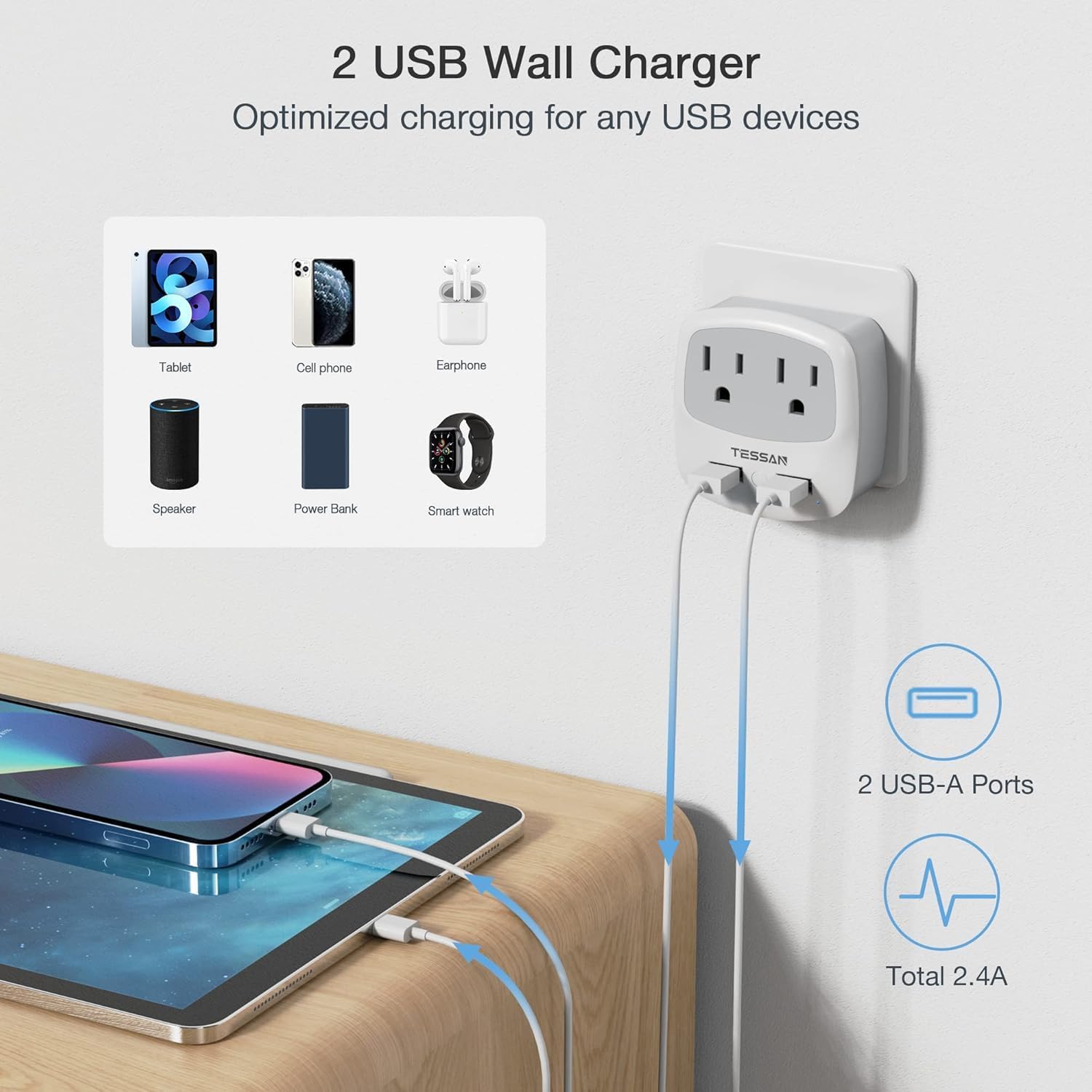
Image 3.1: Illustrates the use of the two USB ports for charging various portable electronic devices simultaneously.
Using the Phone Holder:
The integrated phone holder on the top of the adapter allows you to conveniently rest your smartphone while it is charging via the USB ports or an AC adapter.

Image 3.2: Demonstrates the phone holder feature, showing a smartphone securely placed on top of the adapter while charging.

Image 3.3: An example of the adapter in use, charging multiple devices in a typical travel setting.
4. Maintenance
To ensure the longevity and safe operation of your TESSAN adapter, follow these maintenance guidelines:
- Cleaning: Disconnect the adapter from the wall outlet before cleaning. Use a dry, soft cloth to wipe the surface. Do not use liquid cleaners or abrasive materials.
- Storage: When not in use, store the adapter in a cool, dry place away from direct sunlight and moisture.
- Inspection: Periodically inspect the adapter for any signs of damage, such as cracks in the casing or bent pins. Do not use if damaged.
Safety Precautions:
- Do not exceed the maximum load capacity of 2500W (10A).
- This adapter is for indoor use only.
- Keep out of reach of children.
- Do not disassemble or modify the adapter.
- Avoid exposing the adapter to water or extreme temperatures.
5. Troubleshooting
If you encounter issues with your TESSAN adapter, refer to the following common problems and solutions:
- Adapter not powering on (LED not lit):
- Ensure the adapter is fully and securely plugged into the wall outlet.
- Check if the wall outlet is functional by testing it with another device.
- Verify that the destination country uses Type C outlets.
- Device not charging:
- Confirm your device is dual voltage compatible (100-250V). If it's 110V only, you need a voltage converter, not just this adapter.
- Check if your device's charging cable is properly connected to the adapter and the device.
- Test the device and cable with a different power source to rule out issues with the device or cable.
- Ensure the total power draw of all connected devices does not exceed 2500W (10A).
- Loose fit in wall outlet:
- Some outlets may have slight variations. Ensure the adapter is pushed in firmly. If the fit is excessively loose, it may indicate a worn outlet or an incompatible outlet type.
6. Specifications
| Feature | Detail |
|---|---|
| Model Number | TS-WM02-EU |
| Input Voltage | 100-250V AC, 50/60Hz |
| Max Current | 10A |
| Max Power | 2500W |
| USB Output | 5V / 2.4A (Total) |
| Plug Format | Type C (EU) |
| Dimensions | 4.21 x 3.35 x 3.15 inches (Package) |
| Item Weight | 7.4 ounces |
| Color | Grey-Type C-2 Pack |
7. Warranty and Support
TESSAN products are designed for reliability and performance. For specific warranty details, please refer to the product packaging or the official TESSAN website. In general, products purchased through Amazon are subject to Amazon's return and refund policies.
Customer Support:
If you have any questions, concerns, or require technical assistance, please contact TESSAN customer support through the retailer's platform or visit the official TESSAN website for contact information.
For online support, you may visit the TESSAN Store on Amazon.


