
Vineen 214000C
Zopec EXPLORE 4000 CPAP Battery Backup Power Supply
Model: 214000C
Introduction
The Zopec EXPLORE 4000 is a portable battery backup power supply designed to provide uninterrupted power for CPAP machines and other essential electronic devices. It features a 110V AC outlet, eliminating the need for complex adapters or converters for most CPAP machines. This manual provides essential information for the safe and effective use of your Zopec EXPLORE 4000.

Image: Zopec EXPLORE 4000 CPAP Battery Backup Power Supply, showcasing its compact design and available ports.
Safety Information
Please read and understand all safety instructions before using the Zopec EXPLORE 4000. Failure to follow these instructions may result in electric shock, fire, or serious injury.
- Do not expose the device to water, moisture, or extreme temperatures.
- Do not disassemble, repair, or modify the device. Contact qualified service personnel for assistance.
- Keep the device away from flammable materials and direct sunlight.
- Ensure proper ventilation during use and charging to prevent overheating.
- Use only the provided charging accessories or approved alternatives.
- This device contains a lithium-ion battery. Handle with care and dispose of responsibly according to local regulations.
Package Contents
Verify that all items are present in your package:
- Zopec EXPLORE 4000 Battery Backup Power Supply
- Universal AC Power Adapter (for charging)
- User Manual
- Carrying Pouch (may vary by package)
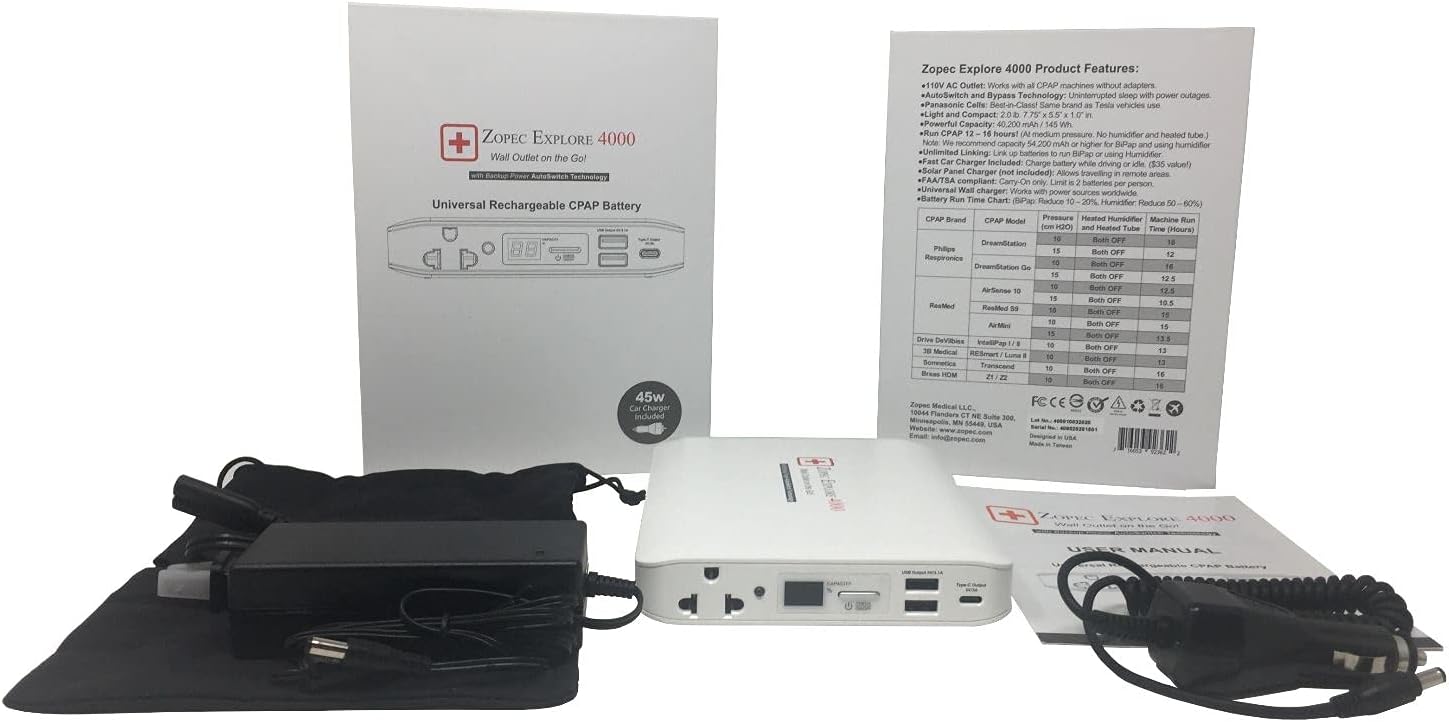
Image: The Zopec EXPLORE 4000 unit displayed with its universal AC power adapter, car charger, and a soft carrying pouch.
Product Overview
Familiarize yourself with the key components of your Zopec EXPLORE 4000:

Image: A detailed view of the Zopec EXPLORE 4000's top panel, highlighting the 110V AC outlet, USB-A ports, USB-C port, and the digital battery capacity indicator with an On/Off button.
- 110V AC Outlet: Standard wall outlet for CPAP machines and other AC-powered devices.
- USB Output (5V/3.1A): Two USB-A ports for charging smartphones, tablets, and other USB-powered devices.
- Type-C Output (5V/3A): USB-C port for compatible devices.
- Digital Capacity Display: Shows the remaining battery percentage.
- Check/On/Off Button: Press to check battery capacity, press and hold to turn the unit on or off.
- DC Input Port: For charging the battery using the AC adapter, car charger, or solar charger.
Setup
Charging the Zopec EXPLORE 4000
Before initial use, fully charge the Zopec EXPLORE 4000. Charging options include:
- AC Wall Charger (Included): Connect the universal AC power adapter to the DC Input Port on the battery and plug it into a standard wall outlet (100-240V, 50-60Hz). The digital display will show charging progress.
- Car Charger (Sold Separately): For charging on the go, use the Zopec car charger (12V DC-DC) by connecting it to your vehicle's cigarette lighter socket and the battery's DC Input Port.
- Solar Panel Charger (Sold Separately): For off-grid charging, connect a compatible Zopec solar panel charger to the DC Input Port.
Image: Various charging accessories for the Zopec EXPLORE 4000, including the included car charger and optional solar chargers.
Operating Instructions
Powering On/Off and Checking Capacity
- To check the battery capacity, press the Check/On/Off button briefly. The digital display will illuminate and show the percentage.
- To turn the unit on, press and hold the Check/On/Off button for approximately 3 seconds until the display lights up.
- To turn the unit off, press and hold the Check/On/Off button for approximately 3 seconds until the display turns off.
Using with CPAP Machines
The Zopec EXPLORE 4000 is designed to work with all CPAP/BiPAP machines directly, similar to a standard wall outlet. No special adapters or converters are required for most machines.
- Ensure the Zopec EXPLORE 4000 is sufficiently charged.
- Turn on the Zopec EXPLORE 4000 by pressing and holding the Check/On/Off button.
- Plug your CPAP machine's AC power cord directly into the 110V AC Outlet on the Zopec EXPLORE 4000.
- Operate your CPAP machine as usual. The Zopec EXPLORE 4000 features automatic switch technology for seamless power backup during outages.

Image: The Zopec EXPLORE 4000 shown powering multiple CPAP machines, illustrating its universal compatibility and ease of use.
Run Time Considerations
The battery run time varies significantly based on CPAP machine settings, particularly the use of heated humidifiers and heated tubes. To maximize run time, it is recommended to disable these features if possible.
- Without Heated Humidifier and Heated Tube: Expect approximately 1.5 - 2 nights or 12 - 16 hours of operation.
- With Heated Humidifier and/or Heated Tube: Battery run time can be reduced by 50% - 80%.
| CPAP Brand | CPAP Model | Pressure (cm H2O) | Heated Humidifier | Heated Tube | Explore 4000 (Hours) |
|---|---|---|---|---|---|
| Philips Respironics | DreamStation 1 and 2 | 10 | OFF | OFF | 16 |
| 15 | OFF | OFF | 12 | ||
| DreamStation Go | 10 | OFF | OFF | 16 | |
| 15 | OFF | OFF | 12.5 | ||
| ResMed | AirSense 10 and 11 | 10 | OFF | OFF | 12.5 |
| 15 | OFF | OFF | 10.5 | ||
| AirMini | 10 | OFF | OFF | 15 | |
| Drive DeVilbiss | IntelliPap I / II | 10 | OFF | OFF | 13 |
| Apex Medical | XT and iCH II | 10 | OFF | OFF | 10 |
| Breas HDM | Z1 / Z2 | 10 | OFF | OFF | 16 |
| 3B Medical | RESmart / Luna | 10 | OFF | OFF | 13 |
| Somnetics | Transcend | 10 | OFF | OFF | 16 |
Image: A table detailing approximate run times for various CPAP machine models when used with the Zopec Explore 4000, with humidifier and heated tube functions off.
Using with Other Devices
The Zopec EXPLORE 4000 can also power or charge a variety of other electronic devices:
- USB Devices: Use the USB-A or USB-C ports to charge smartphones, tablets, and other USB-powered gadgets.
- AC Devices: Plug laptops, lights, small fans, radios, and other AC-powered electronics (within the power limit) into the 110V AC outlet.
Image: The Zopec EXPLORE 4000 demonstrating its versatility by powering a range of electronic devices, including CPAP machines, laptops, and mobile devices.
Maintenance
Proper maintenance ensures the longevity and optimal performance of your Zopec EXPLORE 4000.
- Cleaning: Wipe the exterior with a soft, dry cloth. Do not use abrasive cleaners or immerse the device in water.
- Storage: Store the battery in a cool, dry place, away from direct sunlight and extreme temperatures. For long-term storage, charge the battery to approximately 50-70% every 3-6 months to maintain battery health.
- Battery Health: Avoid fully discharging the battery frequently, as this can reduce its overall lifespan.
Troubleshooting
If you encounter issues with your Zopec EXPLORE 4000, refer to the following common problems and solutions:
- Device not turning on: Ensure the battery is charged. Press and hold the On/Off button for 3 seconds.
- CPAP machine not receiving power: Verify the Zopec EXPLORE 4000 is turned on and has sufficient charge. Check that the CPAP machine's power cord is securely plugged into the AC outlet.
- Slow charging: Ensure you are using the original AC power adapter or a compatible high-quality charger. Check the power source for stability.
- Short run time: Confirm that heated humidifier and heated tube functions on your CPAP machine are turned off, as these significantly reduce battery life. Refer to the run time chart for expected durations.
- Overheating: Discontinue use immediately. Ensure the device is in a well-ventilated area and not covered. Allow it to cool down before resuming use. If overheating persists, contact customer support.
Specifications
| Feature | Specification |
|---|---|
| Model Number | 214000C |
| Product Dimensions | 7.75 x 5.5 x 1 inches |
| Item Weight | 2 pounds |
| Battery Cell Composition | Lithium Ion |
| Voltage | 12 Volts |
| Capacity | 40,000 mAh |
| AC Output | 110V AC |
| USB Output | 5V/3.1A |
| Type-C Output | 5V/3A |
| FAA Compliant | Yes, for Air Travel |
Warranty and Support
For warranty information, technical support, or service inquiries, please refer to the contact information provided with your product packaging or visit the manufacturer's official website.
Manufacturer: Zopec EXPLORE
For additional support, you may contact the seller directly through the platform where the product was purchased.
Ask a question about this manual
Ask about setup, troubleshooting, compatibility, parts, safety, or missing instructions. Manuals+ will review the question and use this page’s manual context to help answer it.