
Amemo B083P1H7VM
Amemo Fingertip Pulse Oximeter User Manual
Model: B083P1H7VM
1. Introduction
This manual provides instructions for the safe and proper operation of the Amemo Fingertip Pulse Oximeter. This device is designed to measure pulse oxygen saturation (SpO2) and pulse rate through a user's finger. It is suitable for use in the home, medical institutions, and community health centers.

Image 1.1: The Amemo Fingertip Pulse Oximeter, shown with its carrying case, silicone cover, and AAA batteries.
2. Important Safety Information
- Consult your physician before using this device for medical diagnosis.
- Do not use the oximeter in an MRI or CT environment.
- Keep the device away from children.
- Avoid using the oximeter on the same arm as a blood pressure cuff or arterial catheter.
- Nail polish or artificial nails may affect the accuracy of readings.
- Ensure the finger is clean and dry before measurement.
3. Product Components and Display
Familiarize yourself with the key components and display indicators of your Amemo Pulse Oximeter.
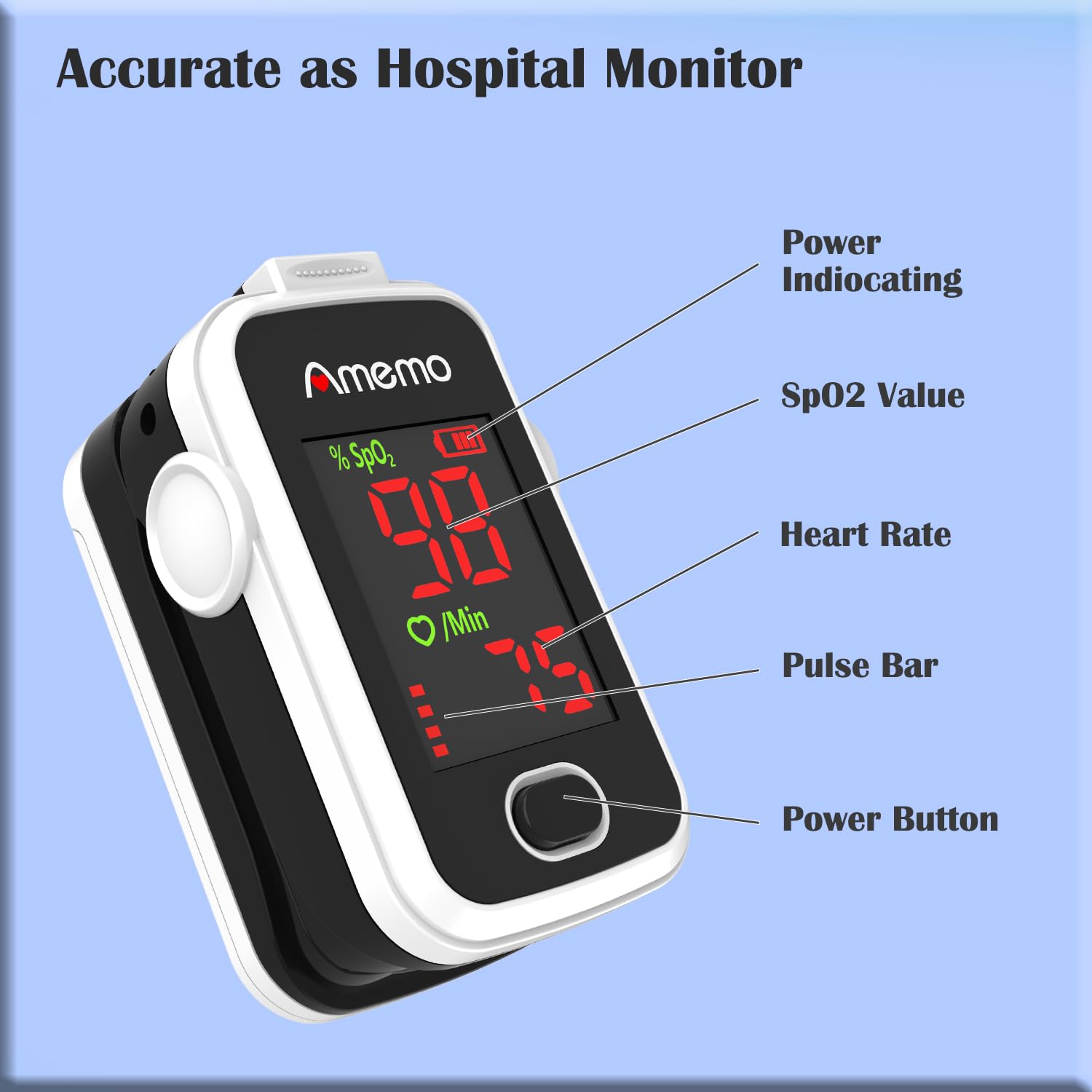
Image 3.1: The Amemo Pulse Oximeter display, indicating the Power Button, Power Indicator, SpO2 Value, Heart Rate, and Pulse Bar.
- Power Button: Used to turn the device on and off, and to change display modes.
- SpO2 Value: Displays the blood oxygen saturation level as a percentage.
- Heart Rate: Shows the pulse rate in beats per minute (BPM).
- Pulse Bar: A graphical representation of the pulse strength.
- Power Indicating: Battery level indicator.

Image 3.2: The Amemo Pulse Oximeter featuring a dual-color high brightness LED screen for clear readings.
4. Setup and Battery Installation
Before first use, install the provided AAA batteries.
- Open the battery compartment cover on the back of the device.
- Insert two AAA batteries, ensuring the polarity (+ and -) matches the diagram inside the compartment.
- Close the battery compartment cover securely.

Image 4.1: Illustration showing the correct orientation for installing two AAA batteries into the Amemo Pulse Oximeter.
The package includes a carrying case, silicone cover, and lanyard for convenience and protection.

Image 4.2: The Amemo Pulse Oximeter with its carrying case, silicone cover, lanyard, and batteries, alongside its approximate dimensions (2.2 inches length, 1.25 inches width, 1.1 inches height).
5. Operating Instructions
- Insert one finger into the rubber opening of the oximeter with the nail surface facing upwards.
- Press the power button on the front panel to turn on the device.
- Keep your hand still during the measurement. Movement can affect accuracy.
- Read the SpO2 and pulse rate values from the display.
- The device will automatically power off after approximately 8 seconds if no finger is detected.
Important Measurement Tips:
- Ensure fingernails are clean and free of polish.
- Avoid bright light directly on the sensor.
- Do not use on fingers that are too cold or have poor circulation.
6. Maintenance and Storage
- Clean the surface of the oximeter with a soft cloth dampened with medical alcohol (75% ethanol).
- Do not immerse the device in water or other cleaning solutions.
- Remove batteries if the device will not be used for an extended period to prevent leakage.
- Store the oximeter in a cool, dry place, away from direct sunlight and extreme temperatures.
7. Troubleshooting Guide
| Problem | Possible Cause | Solution |
|---|---|---|
| No display after power on | Batteries are dead or incorrectly installed. | Replace batteries or re-install them correctly, observing polarity. |
| Display is unstable or inaccurate | Finger not properly inserted, movement during measurement, nail polish, or cold finger. | Re-insert finger correctly, remain still, remove nail polish, warm finger if necessary. |
| "Finger Out" message | Finger not detected or removed during measurement. | Ensure finger is fully inserted into the device. |
8. Product Specifications
| Feature | Detail |
|---|---|
| Brand | Amemo |
| Model | Fingertip Pulse Oximeter (ASIN: B083P1H7VM) |
| Measuring Range (SpO2) | 70% - 100% |
| Display Type | OLED (Dual-Color High Brightness LED Screen) |
| Power Source | 2 x AAA Batteries (included) |
| Battery Life | Approximately 24 months (under typical usage) |
| Automatic Shut-off | Yes, after 8 seconds of inactivity |
| Dimensions | 3.4 x 2.6 x 2.3 inches (Package); Device approx. 2.2 x 1.25 x 1.1 inches |
| Weight | 3.21 ounces (Package) |
| Manufacturer | SHENZHEN AEON TECHNOLOGY CO.,LTD |
9. Warranty and Support
Specific warranty information is not provided in the product details. For warranty claims or technical support, please contact the manufacturer, SHENZHEN AEON TECHNOLOGY CO.,LTD, or the seller, TIANYIZHIXING, through your purchase platform.
Please refer to your purchase documentation for detailed warranty terms and conditions.
Ask a question about this manual
Ask about setup, troubleshooting, compatibility, parts, safety, or missing instructions. Manuals+ will review the question and use this page’s manual context to help answer it.